
Interactive Markdown Editor for Google Colab Notebooks

Project description
Colab Markdown Editor




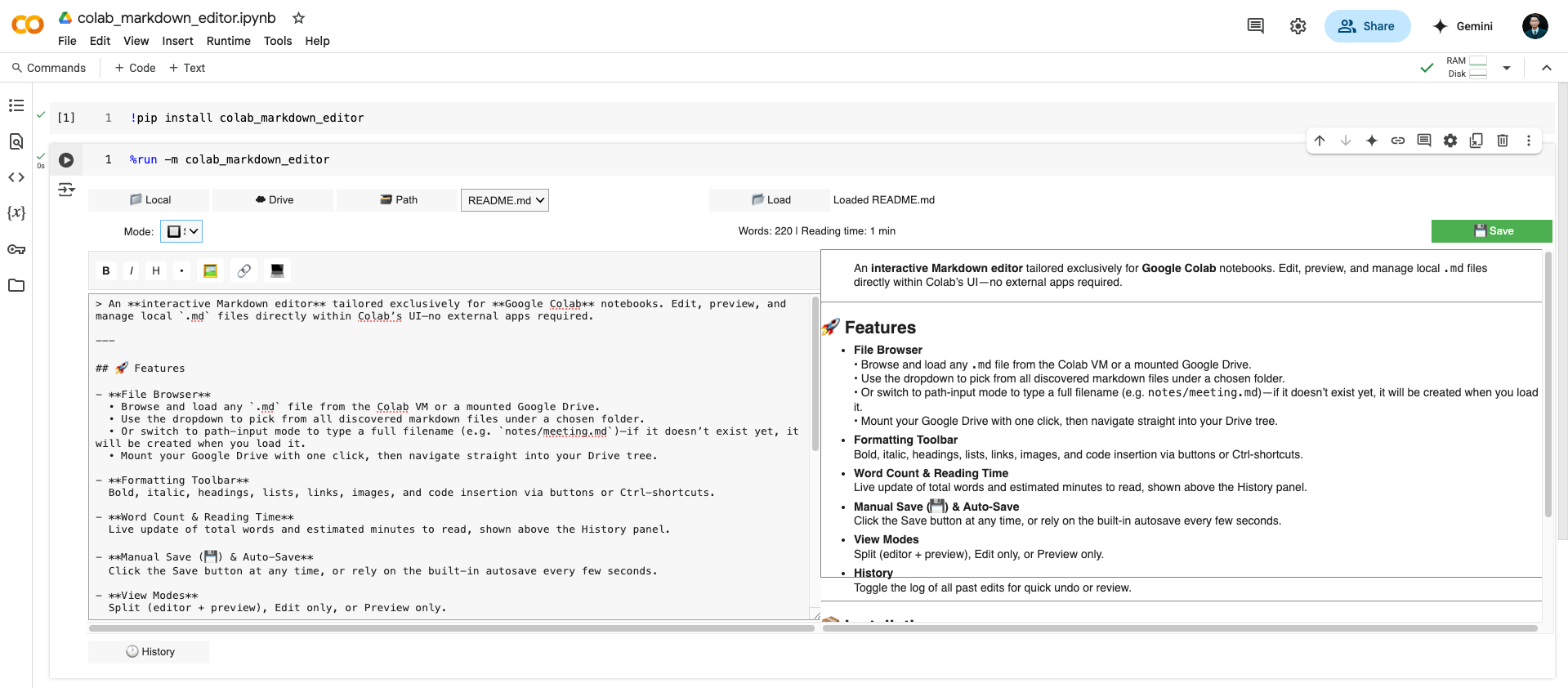
An interactive Markdown editor tailored exclusively for Google Colab notebooks. Edit, preview, and manage local
.mdfiles directly within Colab’s UI—no external apps required.
🚀 Features
-
File Browser
• Browse and load any.mdfile from the Colab VM or a mounted Google Drive.
• Use the dropdown to pick from all discovered markdown files under a chosen folder.
• Or switch to path-input mode to type a full filename (e.g.notes/meeting.md)—if it doesn’t exist yet, it will be created when you load it.
• Mount your Google Drive with one click, then navigate straight into your Drive tree. -
Formatting Toolbar
Bold, italic, headings, lists, links, images, and code insertion via buttons or Ctrl-shortcuts. -
Word Count & Reading Time
Live update of total words and estimated minutes to read, shown above the History panel. -
Manual Save (💾) & Auto-Save
Click the Save button at any time, or rely on the built-in autosave every few seconds. -
View Modes
Split (editor + preview), Edit only, or Preview only. -
History
Toggle the log of all past edits for quick undo or review.
📦 Installation
pip install colab_markdown_editor
🎯 Usage in Google Colab
- Open a Colab notebook.
- In a code cell, run:
%run -m colab_markdown_editor


Download files
Download the file for your platform. If you're not sure which to choose, learn more about installing packages.
Source Distribution
Built Distribution
Filter files by name, interpreter, ABI, and platform.
If you're not sure about the file name format, learn more about wheel file names.
Copy a direct link to the current filters
File details
Details for the file colab_markdown_editor-1.0.3.tar.gz.
File metadata
- Download URL: colab_markdown_editor-1.0.3.tar.gz
- Upload date:
- Size: 9.8 kB
- Tags: Source
- Uploaded using Trusted Publishing? No
- Uploaded via: twine/6.1.0 CPython/3.10.0
File hashes
| Algorithm | Hash digest | |
|---|---|---|
| SHA256 |
beb5d05ccc66e2d77ce5a5d507ed55837d2359f576b112f3b47cf68594ffa41a
|
|
| MD5 |
4006e37fbdd00d0734d80711dc54dec7
|
|
| BLAKE2b-256 |
509972fcb8c7716d98fe226215d4b2d27d6afa60e957b5bacc205a4df2482fbb
|
File details
Details for the file colab_markdown_editor-1.0.3-py3-none-any.whl.
File metadata
- Download URL: colab_markdown_editor-1.0.3-py3-none-any.whl
- Upload date:
- Size: 10.9 kB
- Tags: Python 3
- Uploaded using Trusted Publishing? No
- Uploaded via: twine/6.1.0 CPython/3.10.0
File hashes
| Algorithm | Hash digest | |
|---|---|---|
| SHA256 |
8d010946ddb73452189582011d0874a4a2336773a475e7e259ca6c5ca661427b
|
|
| MD5 |
ce08ee5f7c14100be0b68a2b62b9e3f8
|
|
| BLAKE2b-256 |
350ef43329516f8ac522831ce781f3ed824943ced500c2516dc6af0afa5ac926
|






