

Colcon Dashboard
See your colcon build.
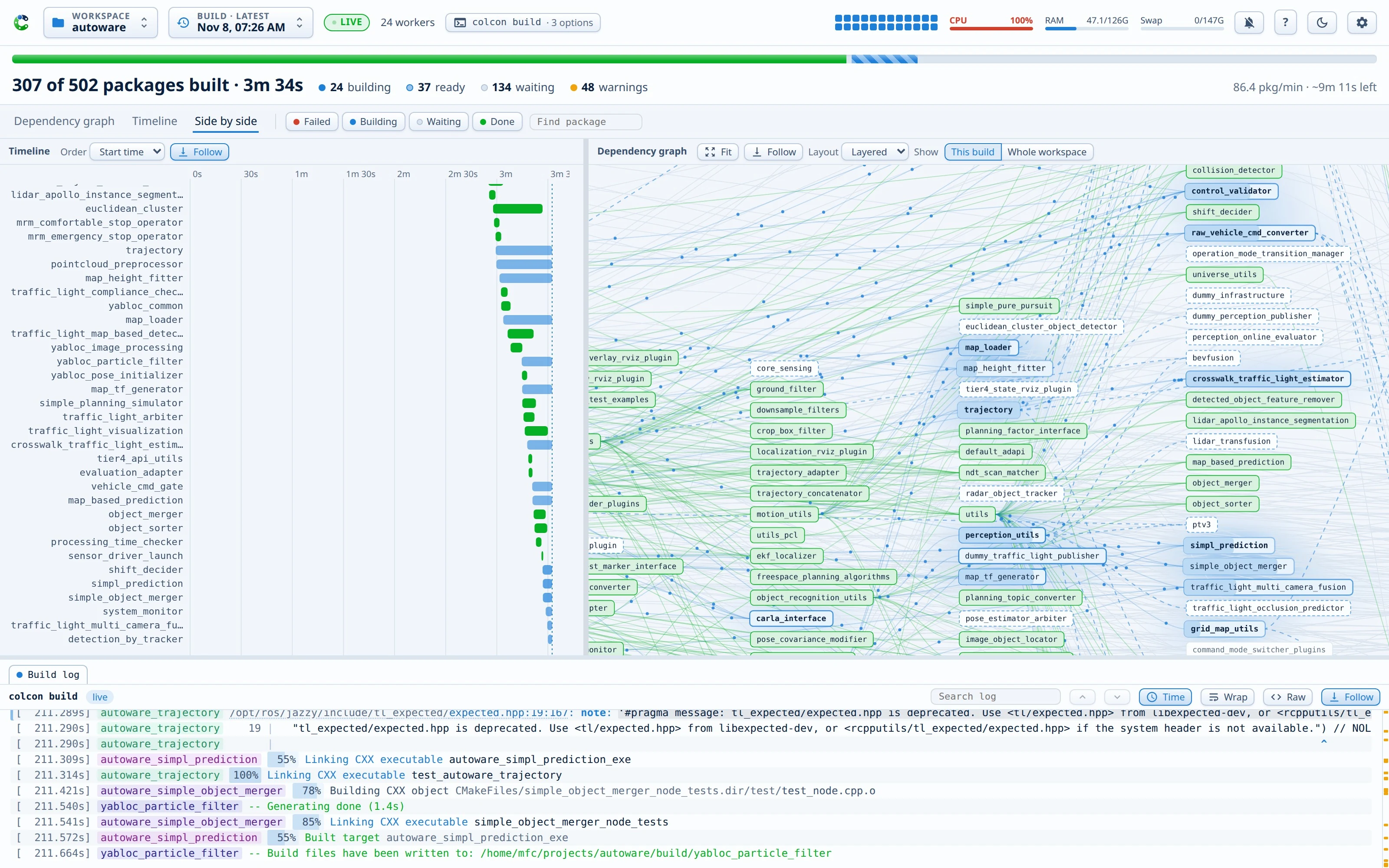
A live dashboard for colcon build: the dependency graph, a timeline, one log per package, and the load on your machine.
Documentation · Install · Quick start · PyPI
Why
A long colcon build prints a wall of text. You cannot see what builds now, what waits, which package is slow, or where the first error is. Colcon Dashboard shows all of it on one page, while the build runs.
- Nothing changes in how you build. The dashboard reads the logs that colcon already writes into
log/. Every build shows up: from any terminal, with any options. - No dependencies. The server is plain Python 3.8 or newer, with only the standard library.
- One address for every workspace. One server on
localhost:8642serves all your workspaces, from a small package set to a 500-package Autoware build.
What you get
- Dependency graph: every package, placed by its dependency depth. Packages turn blue while they build and green when they are done. Hover a package to see its whole dependency chain.
- Timeline: a Gantt chart of every package. Sort it by duration to find the packages that slow the build.
- Log panes: one tab per package, so parallel output never mixes. Errors and warnings stand out, install lines fold, and search stays fast also in a 10 MB log.
- Failures: the log of a failed package opens by itself, and a Failures tab collects every error. One click asks Claude to find the cause.
- History: every build and test run, with its outcome and its time against the previous run.
- System meters: a per-core heatmap and the CPU, RAM, and swap meters, because a big build can run out of memory.
- Desktop app: install the page as an app with its own window, get desktop notifications, and use the optional tray icon.
Install
On Ubuntu, install the apt package. It upgrades with your system updates:
sudo add-apt-repository ppa:xmfcx/colcon-dashboard
sudo apt install python3-colcon-dashboard
colcon-dashboard --start-service
On any Linux distribution, use pipx:
pipx install colcon-dashboard
colcon-dashboard --install-service
The service starts the server at every login. Open http://localhost:8642/, pick your workspace, and run colcon build as usual.
The documentation has the full tour, the desktop app, the configuration, and the command line.
Security
The server binds to 127.0.0.1 by default. It trusts every caller, so expose its port only to a network that you trust. To watch a build on another machine, use an SSH tunnel.
License
Apache 2.0
Metadata
Release files for colcon-dashboard 0.12.0
For a detailed explanation of source distributions (sdists) and built distributions (wheels), please see the package formats documentation.
Source distribution (sdist)
| File | Size | Uploaded | Provenance | Actions |
|---|---|---|---|---|
| colcon_dashboard-0.12.0.tar.gz | 319.3 kB | With provenance | Details for colcon_dashboard-0.12.0.tar.gz |
Built distribution (wheel)
| File | Interpreter | ABI | Platform | Actions Reset |
|---|---|---|---|---|
| colcon_dashboard-0.12.0-py3-none-any.whl | Python 3 | none | any | Details for colcon_dashboard-0.12.0-py3-none-any.whl |
Total release size: 630.6 kB
Release files / colcon_dashboard-0.12.0.tar.gz
| Download URL | colcon_dashboard-0.12.0.tar.gz |
|---|---|
| Size | 319.3 kB |
| Tags | Source |
|
SHA-256 checksum How to use checksums |
f981c3673d274be6bdc7f389a7f44bf9a9e2a54fcfed90337bb3f12143a71d3e
|
|
BLAKE2b-256 checksum How to use checksums |
a4c9ecc9cccff4752a124ddaaf82165afa64cb253f3e1a41d01faac3f652c765
|
| Upload date | |
|
Uploaded using Trusted Publishing? What is trusted publishing? |
Yes |
| Uploaded via |
twine/7.0.0 CPython/3.13.16
|
Provenance
Provenance describes where a file came from. On PyPI, provenance is shared via attestations, which provide a verifiable record of the build or publishing details. View details, limitations and caveats.


PyPI Publish Attestation
PyPI verified that this artifact, at this checksum, originated from the publisher listed below.
Signed by GitHub Actions, verified by PyPI on Nov 17, 2026.
Transparency logRelease files / colcon_dashboard-0.12.0-py3-none-any.whl
| Download URL | colcon_dashboard-0.12.0-py3-none-any.whl |
|---|---|
| Size | 311.3 kB |
| Tags | Python 3 |
|
SHA-256 checksum How to use checksums |
b3234c00021450a19305f574faf9abda7c04e48405166373350400d11a9ca97b
|
|
BLAKE2b-256 checksum How to use checksums |
e49c30b4c7e949a48603496ca9368638c38d6a0e49a43632220099815e5381fc
|
| Upload date | |
|
Uploaded using Trusted Publishing? What is trusted publishing? |
Yes |
| Uploaded via |
twine/7.0.0 CPython/3.13.16
|
Provenance
Provenance describes where a file came from. On PyPI, provenance is shared via attestations, which provide a verifiable record of the build or publishing details. View details, limitations and caveats.
PyPI Publish Attestation
PyPI verified that this artifact, at this checksum, originated from the publisher listed below.
Signed by GitHub Actions, verified by PyPI on Nov 17, 2026.
Transparency logSecurity for colcon-dashboard 0.12.0
Provenance
Provenance describes where a file came from. On PyPI, provenance is shared via attestations, which provide a verifiable record of the build or publishing details. View details, limitations and caveats.
Full provenance
Both files in this release have been uploaded with provenance metadata.
Attestation for colcon_dashboard-0.12.0.tar.gz
PyPI Publish Attestation
PyPI verified that this artifact, at this checksum, originated from the publisher listed below.
Signed by GitHub Actions, verified by PyPI on Nov 17, 2026.
Transparency logA note on package security
PyPI is a repository for distributing packages, not a service for auditing them. While third-party security researchers and our staff do their best to detect and remove malicious packages, PyPI cannot guarantee the quality, security or suitability of any given package.
To learn more about protecting yourself from malicious actors, visit our package security documentation.














