
Coldsweat
Coldsweat is a self-hosted Python 3 web RSS aggregator and reader compatible with the Fever API. This means that you can connect Coldsweat to a variety of clients like Reeder for iOS or Mac OS X ReadKit app and use it to sync them together.
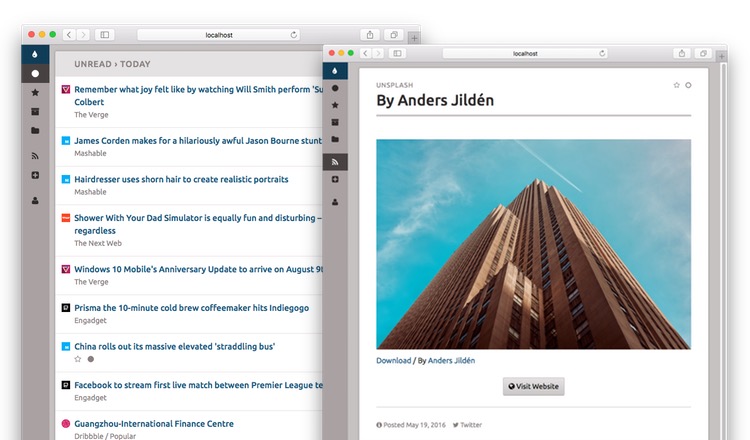
Features
- Web interface to read and add feeds
- Compatible with existing Fever desktop and mobile clients
- Multi-user support
- Basic support for grouping of similar items
Installation and quick setup
Let's see how you can take a peek at what Coldsweat offers running it on your machine.
Note: you can install Coldsweat in the main Python environment of your machine or in a virtual environment, which is the recommended approach, since its dependencies may clash with packages you have already installed. Learn more about virtual environments here.
Install
Coldsweat is Flask application distributed as a Python wheel, hence you can install it from PyPI using the, hopefully familiar, pip utility:
$ pip install coldsweat
The install procedure will also create a coldsweat command, available in your terminal.
Create a user
Once installed, create a new user specifing email and password with the setup command:
$ coldsweat setup john@example.com -p somepassword
If you prefer you can enter the password interactively:
$ coldsweat setup john@example.com
Enter password for user john@example.com: ************
Enter password (again): ************
Setup completed for john@example.com
Email and password will be needed to access the web UI and use the Fever API sync with your favourite RSS client.
Import your feeds
Like other RSS software Coldsweat uses the OPML format to import multiple feeds with a single operation:
$ coldsweat import /path/to/subscriptions.opml alice@example.com -f
The -f option tells Coldsweat to fetch the feeds right after the import step.
Fetch feeds
To update all the feeds run the fetch command:
$ coldsweat fetch
You should use cron or similar utilities to schedule feed fetches periodically.
Run the web UI
Then you can run the Flask development web server and access the web UI:
$ coldsweat run
* Serving Flask app 'coldsweat'
* Debug mode: off
* Running on http://127.0.0.1:5000
...
See Setup and Deploy pages for additional information.
Upgrading from a previous version
Upgrade to the latest Coldsweat version with:
$ pip install -U coldsweat
Note: there's no upgrade path from previous 0.9.x releases. Your best bet if to export OPML subscriptions and import them in the new 0.10 release.
Contributing
See Contributing page.
0.10 technical underpinnings
- Runs on Python 3.9 and up
- Completely rebuilt using Flask web framework
- Supports SQLite, PostgreSQL, and MySQL databases
- HTTP-friendly fetcher
- Tested with latest versions of Chrome, Safari, and Firefox
Motivation
I'm fed up of online services that are here today and gone tomorrow. Years ago, after the Google Reader shutdown it was clear to me that the less we rely on external services the more the data we care about are preserved. With this in mind I'm writing Coldsweat. It is my personal take at consuming feeds today.
Coldsweat started in July 2013 as a fork of Bottle Fever by Rui Carmo. After several years of pause I've restarted to develop Coldsweat using Python 3 and the latest crop of web technologies.
1 maintainer

Metadata
1 maintainer
Release files for coldsweat 0.10.2
For a detailed explanation of source distributions (sdists) and built distributions (wheels), please see the package formats documentation.
Source distribution (sdist)
| File | Size | Uploaded | |
|---|---|---|---|
| coldsweat-0.10.2.tar.gz | 1.5 MB | Details |
Built distribution (wheel)
| File | Interpreter | ABI | Platform | Reset |
|---|---|---|---|---|
| coldsweat-0.10.2-py3-none-any.whl | Python 3 | none | any | Details |
Total release size: 2.2 MB
Release files / coldsweat-0.10.2.tar.gz
| Download URL | coldsweat-0.10.2.tar.gz |
|---|---|
| Size | 1.5 MB |
| Tags | Source |
|
SHA-256 checksum How to use checksums |
24d431b1968551616a99de369e114bc5732346e274cfe04313d86dc8ec5f157f
|
|
BLAKE2b-256 checksum How to use checksums |
7ff03d452df4f75eb6a8c9a3add556c95c96bbafbff9f0e385e7bea3a2a31156
|
| Upload date | |
|
Uploaded using Trusted Publishing? What is trusted publishing? |
No |
| Uploaded via |
twine/4.0.2 CPython/3.9.17
|
Release files / coldsweat-0.10.2-py3-none-any.whl
| Download URL | coldsweat-0.10.2-py3-none-any.whl |
|---|---|
| Size | 677.3 kB |
| Tags | Python 3 |
|
SHA-256 checksum How to use checksums |
84daafb478f11bdfc5e2f94ebb94f85817a3a02cb7e9da9a16858f3518667f31
|
|
BLAKE2b-256 checksum How to use checksums |
5627cf5b65f011eb8a1758ac7518507abc6689c4348cb3e37503e0faea7d6fb8
|
| Upload date | |
|
Uploaded using Trusted Publishing? What is trusted publishing? |
No |
| Uploaded via |
twine/4.0.2 CPython/3.9.17
|














