


Collagraph 📓
Reactive user interfaces.
The word Collagraphy is derived from the Greek word koll or kolla, meaning glue, and graph, meaning the activity of drawing.
Inspired by Vue and React. Check out the documentation to get started.
Features
Write your Python interfaces in a declarative manner as single-file components with Vue-like syntax (.cgx files), but with Python!
- Fine-grained reactivity (made possible by leveraging observ)
- Class components with local state and life-cycle methods/hooks
- Single-file components with Vue-like template syntax (
.cgxfiles) - Renderers for PySide6 and Pygfx, with support for custom renderers
Here is an example that shows a counter, made with a component with Vue-like syntax:
Contents of counter.cgx:
<widget>
  <label>Count: {{ count }}</label>
  <button @clicked="bump">bump</button>
</widget>

<script>
import collagraph as cg


class Counter(cg.Component):
    def init(self):
        self.state["count"] = 0

    def bump(self):
        self.state["count"] += 1
</script>
Contents of app.py:
from PySide6 import QtWidgets
import collagraph as cg

# After importing collagraph, it's possible to import
# components directly from .cgx files
from counter import Counter

# Create a Collagraph instance with a PySide renderer
# and register with the Qt event loop
gui = cg.Collagraph(renderer=cg.PySideRenderer())
# Render the component into a container
# (in this case the app but can be another widget)
app = QtWidgets.QApplication()
gui.render(Counter, app)
app.exec()
Which looks something like this:
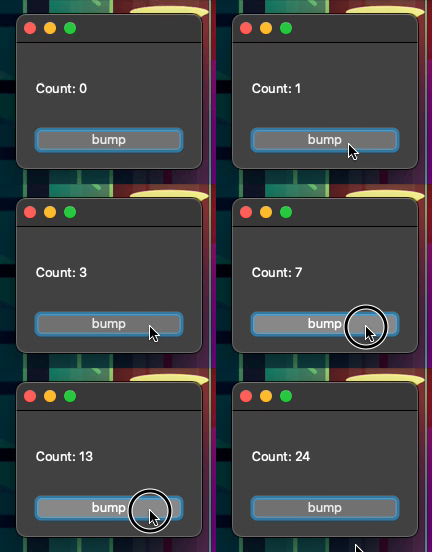
Instead of using a python file as an entry point to run components, you can run them directly using the collagraph CLI:
uv run collagraph examples/pyside/counter.cgx
To inspect the Python code that is compiled for a component, use the --show-code flag:
uv run collagraph --show-code examples/pyside/counter.cgx
For more examples, please take a look at the examples folder. For guides and API reference, visit the documentation.
Currently there are two renderers:
- PysideRenderer: for rendering PySide6 applications
- PygfxRenderer: for rendering 3D graphic scenes with Pygfx
It is possible to create a custom Renderer using the Renderer interface, to render to other UI frameworks, for instance wxPython.
Development
To try out Collagraph or start development, run:
# Basic dev setup (no pygfx or pyside)
uv sync
# Full dev setup
uv sync --all-groups
# Run example:
uv run python examples/pyside/layout-example.py
# Run test suite:
uv run pytest
# Install git pre-commit hooks to make sure tests/linting passes before committing
uv run prek install
Editor Integration
Syntax highlighting, linting and formatting for single-file components (.cgx) is supported for Zed, VSCode and Sublime Text:
- Collagraph-lsp plugin for Zed
- Collagraph-lsp plugin for Sublime Text
- Collagraph-lsp plugin for VSCode
These plugins use collagraph-lsp for editor integration and ruff-cgx for formatting and linting capabilities.
2 maintainers


Metadata
2 maintainers
Release files for collagraph 0.10.1
For a detailed explanation of source distributions (sdists) and built distributions (wheels), please see the package formats documentation.
Source distribution (sdist)
| File | Size | Uploaded | Provenance | Actions |
|---|---|---|---|---|
| collagraph-0.10.1.tar.gz | 194.0 kB | With provenance | Details for collagraph-0.10.1.tar.gz |
Built distribution (wheel)
| File | Interpreter | ABI | Platform | Actions Reset |
|---|---|---|---|---|
| collagraph-0.10.1-py3-none-any.whl | Python 3 | none | any | Details for collagraph-0.10.1-py3-none-any.whl |
Total release size: 274.2 kB
Release files / collagraph-0.10.1.tar.gz
| Download URL | collagraph-0.10.1.tar.gz |
|---|---|
| Size | 194.0 kB |
| Tags | Source |
|
SHA-256 checksum How to use checksums |
e1d2b09175af55a564ec40bfa7114e619f6e6b48d49d85210d066d9d783a6a14
|
|
BLAKE2b-256 checksum How to use checksums |
527bc40de1458ab65ffa4f99489426f4a18d2dd789c9503d9d6ed5cf8f4291ad
|
| Upload date | |
|
Uploaded using Trusted Publishing? What is trusted publishing? |
Yes |
| Uploaded via |
twine/7.0.0 CPython/3.13.14
|
Provenance
Provenance describes where a file came from. On PyPI, provenance is shared via attestations, which provide a verifiable record of the build or publishing details. View details, limitations and caveats.


PyPI Publish Attestation
PyPI verified that this artifact, at this checksum, originated from the publisher listed below.
Signed by GitHub Actions, verified by PyPI on Oct 20, 2026.
Transparency logRelease files / collagraph-0.10.1-py3-none-any.whl
| Download URL | collagraph-0.10.1-py3-none-any.whl |
|---|---|
| Size | 80.2 kB |
| Tags | Python 3 |
|
SHA-256 checksum How to use checksums |
a7b9ee8b3bcb4e269c7e9a8f7fa62610aa889ac7f2b597053a53cd65f75be2c4
|
|
BLAKE2b-256 checksum How to use checksums |
9c1a704aca09cd45e6e740fbd002266a5a7392954d2fec9fa68f09ef26aa410b
|
| Upload date | |
|
Uploaded using Trusted Publishing? What is trusted publishing? |
Yes |
| Uploaded via |
twine/7.0.0 CPython/3.13.14
|
Provenance
Provenance describes where a file came from. On PyPI, provenance is shared via attestations, which provide a verifiable record of the build or publishing details. View details, limitations and caveats.
PyPI Publish Attestation
PyPI verified that this artifact, at this checksum, originated from the publisher listed below.
Signed by GitHub Actions, verified by PyPI on Oct 20, 2026.
Transparency logSecurity for collagraph 0.10.1
Provenance
Provenance describes where a file came from. On PyPI, provenance is shared via attestations, which provide a verifiable record of the build or publishing details. View details, limitations and caveats.
Full provenance
Both files in this release have been uploaded with provenance metadata.
Attestation for collagraph-0.10.1.tar.gz
PyPI Publish Attestation
PyPI verified that this artifact, at this checksum, originated from the publisher listed below.
Signed by GitHub Actions, verified by PyPI on Oct 20, 2026.
Transparency logA note on package security
PyPI is a repository for distributing packages, not a service for auditing them. While third-party security researchers and our staff do their best to detect and remove malicious packages, PyPI cannot guarantee the quality, security or suitability of any given package.
To learn more about protecting yourself from malicious actors, visit our package security documentation.














