
collective.volto.aemet





An integration for the AEMET service with Plone.
Features
-
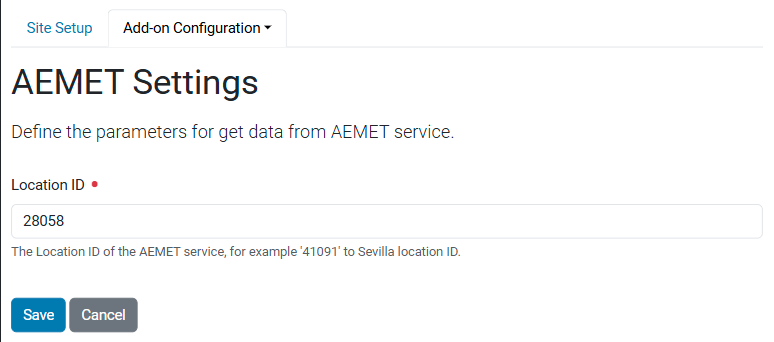
Control panel in Plone registry to manage
AEMET Settings. -
RestApi endpoint that exposes the
AEMET SettingsforVoltointegration. -
RestApi endpoint that exposes the current weather forecast for the Location ID defined on the
AEMET Settingscontrol panel.
Screenshot
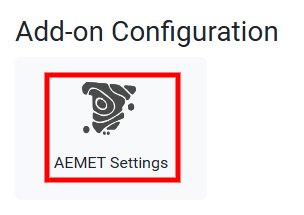
Add-on Configuration Access
AEMET Settings control panel
Volto integration
To use this product in Volto, you needs to include the following add-on
in your project: volto-aemet.
Translations
This product support the following languages:
-
Basque
-
Catalan
-
English
-
Galician
-
Spanish
Compatibility
- Tested with
Python3.12 and {term}Plone6.1.5.
Install it
To install in your project, the collective.volto.aemet add-on with pip command:
pip install collective.volto.aemet
And to create the Plone site:
make create-site
Custom REST services
Plone can expose specific endpoints for Volto. These services encapsulate
the logic for communicating with AEMET and provide a standardised format
for the front end.
AEMET settings route
Anonymous users can't access registry resources by default with plone.restapi (there is a special permission).
To avoid enabling registry access to everyone, this package exposes a dedicated RestApi route with
AEMET Settings (@aemet-settings):
Get the information from the AEMET Settings via curl command:
curl -X GET http://localhost:8080/Plone/@controlpanels/aemet-settings \
  -H "Accept: application/json" \
  --user admin:admin
This route returns a JSON object containing the AEMET Settings and weather forecast data via curl command:
{
  "@id": "http://localhost:8080/Plone/@controlpanels/aemet-settings",
  "data": {
    "location_id": "41091"
  },
  "group": "Add-on Configuration",
  "schema": {
    "fieldsets": [
      {
        "behavior": "plone",
        "fields": [
          "location_id"
        ],
        "id": "default",
        "title": "Default"
      }
    ],
    "properties": {
      "location_id": {
        "description": "The Location ID of the AEMET service, for example '41091' to Sevilla location ID.",
        "factory": "Text line (String)",
        "title": "Location ID",
        "type": "string"
      }
    },
    "required": [
      "location_id"
    ],
    "type": "object"
  },
  "title": "AEMET Settings"
}
Below is a PATCH operation to set up the location_id field value of the
AEMET Settings:
curl -i -X PATCH http://localhost:8080/Plone/@controlpanels/aemet-settings \
  -H "Accept: application/json" \
  -H "Content-Type: application/json" \
  --data '{"location_id": "28058"}' \
  --user admin:admin
This route returns a HTTP response:
HTTP/1.1 204 No Content
Connection: close
Date: Fri, 17 Jul 2026 12:52:40 GMT
Server: waitress
Via: waitress
X-Powered-By: Zope (www.zope.dev), Python (www.python.org)
That means you updates the values in the AEMET Settings control panel fields correctly.
NOTE: You can validate the update operation, going to Site setup > Add-on Settings > AEMET Settings.
AEMET weather forecast route
This route is uses to fetch the current weather forecast for location defined on the AEMET Settings control panel:
curl -X GET http://localhost:8080/Plone/++api++/@aemet-weather-forecast
This route returns a JSON object containing the AEMET weather forecast data:
{
  "forecast": [
    {
      "currentHour": 14,
      "date": "2026-07-17",
      "name": "Madrid",
      "province": "Madrid",
      "skyState": "Despejado",
      "skyStateValue": "11",
      "tempMax": "34",
      "tempMin": "20",
      "timePeriod": "12-18"
    }
  ]
}
This can be implements in a Volto integration for example, the WeatherForecast component available into the volto-aemet add-on.
Contribute
Prerequisites ✅
- An operating system that runs all the requirements mentioned.
- uv
- Make
- Git
- Docker (optional)
Installation 🔧
-
Clone this repository, then change your working directory.
git clone git@github.com:collective/collective.volto.aemet.git
cd collective.volto.aemet
-
Install this code base.
make install
Add features using plonecli or bobtemplates.plone
This package provides markers as strings (<!-- extra stuff goes here -->) that are compatible with plonecli and bobtemplates.plone.
These markers act as hooks to add all kinds of subtemplates, including behaviors, control panels, upgrade steps, or other subtemplates from plonecli.
To run plonecli with configuration to target this package, run the following command.
make add <template_name>
For example, you can add a content type to your package with the following command.
make add content_type
You can add a behavior with the following command.
make add behavior
See also:
You can check the list of available subtemplates in the bobtemplates.plone README.md file.
See also the documentation of Mockup and Patternslib for how to build the UI toolkit for Classic UI.
Credits
Developed with the support of:
-
Agencia Estatal de Meteorología - AEMET. Gobierno de España.
-
Instituto Municipal de Deportes - IMD, Seville City Council, Spain.


Acknowledgements 🙏
Generated using Cookieplone (0.9.10) and cookieplone-templates (eb40854) on 2025-11-06 19:48:38.313942. A special thanks to all contributors and supporters!
Authors
This product was developed by Leonardo J. Caballero G..

Contributors
You can see a list of contributors in the CONTRIBUTORS.md file.
License
The project is licensed under GPLv2.
1 maintainer

Download files
Download the file for your platform. If you're not sure which to choose, learn more about installing packages.
Source Distribution
Built Distribution
Filter files by name, interpreter, ABI, and platform.
If you're not sure about the file name format, learn more about wheel file names.
Copy a direct link to the current filters
File details
Details for the file collective_volto_aemet-1.0.0.tar.gz.
File metadata
- Download URL: collective_volto_aemet-1.0.0.tar.gz
- Upload date:
- Size: 268.4 kB
- Tags: Source
- Uploaded using Trusted Publishing? No
- Uploaded via: twine/7.0.0 CPython/3.10.18
File hashes
| Algorithm | Hash digest | |
|---|---|---|
| SHA256 |
cd4efc2e2df102e3bb7d2672feced05fb57ba4c7cc9dba1f20d78e9f0290c4f3
|
|
| MD5 |
7b7c242035d2d33a4f30a8e09e115fce
|
|
| BLAKE2b-256 |
6569b34437483edbe7a4fd8093418c5d2ba7222e14733c42c2561c8030048cbf
|
File details
Details for the file collective_volto_aemet-1.0.0-py3-none-any.whl.
File metadata
- Download URL: collective_volto_aemet-1.0.0-py3-none-any.whl
- Upload date:
- Size: 54.8 kB
- Tags: Python 3
- Uploaded using Trusted Publishing? No
- Uploaded via: twine/7.0.0 CPython/3.10.18
File hashes
| Algorithm | Hash digest | |
|---|---|---|
| SHA256 |
fe0883eceb5224cda93932ccf8467bbfae03c1b034e8fd32ea8d923a4bdc2a46
|
|
| MD5 |
9f16adc4ab5829d3cde19c68c4e43c0b
|
|
| BLAKE2b-256 |
c16acdc814f18177ccfcd8c10afe06d8bc19fe38fec8b1eb959852f5c688e299
|







