
ColorIt
A simple library to add color to your output.
Have you ever wanted to print Colors to the console? I certainly have. There comes a time when you realize it is a necessity. That's why I created ColorIt. ColorIt is a super simple way to print color to the console.
How it works
Interally, the library creates custom ANSI sequences with RGB values. This means there are 16 million colors that can be used with colorit!
Installation
To install colorit. Run pip install color-it on Windows, or pip3 install color-it on macOS and Linux, from there it can be imported with import colorit
How to use it
To use ColorIt:
from colorit import *

# Use this to ensure that ColorIt will be usable by certain command line interfaces
init_colorit()

# Foreground
print(color("This text is red", Colors.red))
print(color("This text is orange", Colors.orange))
print(color("This text is yellow", Colors.yellow))
print(color("This text is green", Colors.green))
print(color("This text is blue", Colors.blue))
print(color("This text is purple", Colors.purple))
print(color("This text is white", Colors.white))

# Background
print(background("This text has a background that is red", Colors.red))
print(background("This text has a background that is orange", Colors.orange))
print(background("This text has a background that is yellow", Colors.yellow))
print(background("This text has a background that is green", Colors.green))
print(background("This text has a background that is blue", Colors.blue))
print(background("This text has a background that is purple", Colors.purple))
print(background("This text has a background that is white", Colors.white))

# Custom
print(color("This color has a custom grey text color", (150, 150, 150)))
print(background("This color has a custom grey background", (150, 150, 150)))

# Combination
print(
    background(
        color("This text is blue with a white background", Colors.blue), Colors.white
    )
)

# If you are using Windows Command Line, this is so that it doesn't close immediately
input()
As output you get:
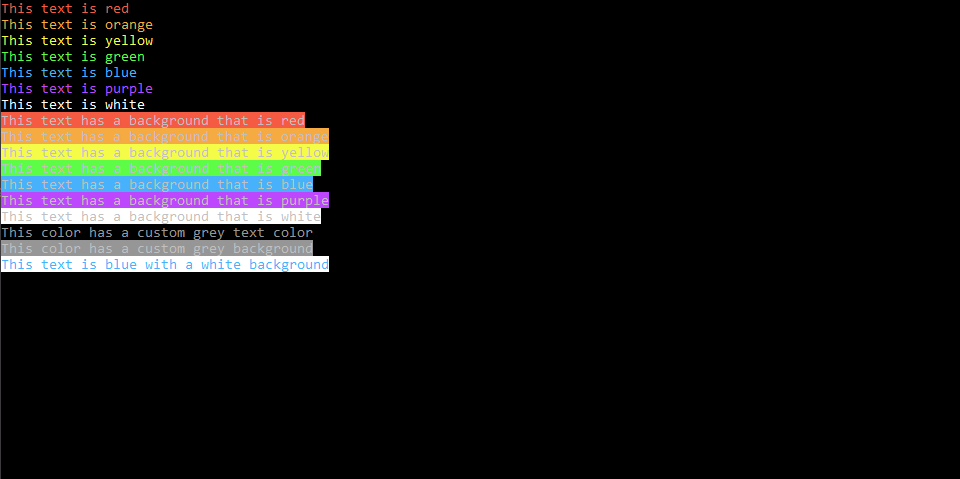
If you would like to try this for yoyr self, you can download demo.py and try it out.
And that's it. That's really all there is to it.
Additional Note: init_colorit() clears the console, so put this somewhere in your code before printing output.
Release Log
- Released the first version of ColorIt (v1.0.0)
- Added a license
Support me on patreon!
Here is the link to my patreon page: https://www.patreon.com/supermazingcoder :D
1 maintainer

Metadata
1 maintainer
Release files for color-it 2.1.3
For a detailed explanation of source distributions (sdists) and built distributions (wheels), please see the package formats documentation.
Source distribution (sdist)
| File | Size | Uploaded | Provenance | |
|---|---|---|---|---|
| color-it-2.1.3.tar.gz | 2.9 kB | Without provenance | Details |
Built distribution (wheel)
| File | Interpreter | ABI | Platform | Reset |
|---|---|---|---|---|
| color_it-2.1.3-py3-none-any.whl | Python 3 | none | any | Details |
Total release size: 7.3 kB
Release files / color-it-2.1.3.tar.gz
| Download URL | color-it-2.1.3.tar.gz |
|---|---|
| Size | 2.9 kB |
| Tags | Source |
|
SHA-256 checksum How to use checksums |
d8882216367532bcf55af2d230619a5531abdfb9d378bff2f2dc85a8a0bbd6f6
|
|
BLAKE2b-256 checksum How to use checksums |
456ee902c68567ef7e641cd10192c6292e339df60099882bb363a21492897eaa
|
| Upload date | |
|
Uploaded using Trusted Publishing? What is trusted publishing? |
No |
| Uploaded via |
twine/3.2.0 pkginfo/1.5.0.1 requests/2.24.0 setuptools/41.2.0 requests-toolbelt/0.9.1 tqdm/4.48.2 CPython/3.7.7
|
Release files / color_it-2.1.3-py3-none-any.whl
| Download URL | color_it-2.1.3-py3-none-any.whl |
|---|---|
| Size | 4.4 kB |
| Tags | Python 3 |
|
SHA-256 checksum How to use checksums |
f7112efade7249e2828fb28daa400964014cac7d66b528e80c1bceffcb6da4e4
|
|
BLAKE2b-256 checksum How to use checksums |
2ade5b8ab29fe4c172402a5fed5cb7a05f810a99b2f21000d64c6aebf768cd39
|
| Upload date | |
|
Uploaded using Trusted Publishing? What is trusted publishing? |
No |
| Uploaded via |
twine/3.2.0 pkginfo/1.5.0.1 requests/2.24.0 setuptools/41.2.0 requests-toolbelt/0.9.1 tqdm/4.48.2 CPython/3.7.7
|
Security for color-it 2.1.3
Provenance
Provenance describes where a file came from. On PyPI, provenance is shared via attestations, which provide a verifiable record of the build or publishing details. View details, limitations and caveats.
No provenance found
None of the files in this release were uploaded with provenance metadata.
A note on package security
PyPI is a repository for distributing packages, not a service for auditing them. While third-party security researchers and our staff do their best to detect and remove malicious packages, PyPI cannot guarantee the quality, security or suitability of any given package.
To learn more about protecting yourself from malicious actors, visit our package security documentation.














