
Color Notify


A desktop notification tool that detects color codes in your clipboard and displays beautiful growl-style notifications with the detected color as background. Now includes an integrated Color Picker dialog for manual color selection!
✨ Features
Clipboard Monitoring
- 🎨 Auto-detect color codes - Supports HEX (#FF0000, #F00) and RGB (rgb(255, 0, 0))
- 🔔 Growl-style notifications - Frameless, borderless, with smooth fade animations
- 📍 Flexible positioning - 9 positions: left/center/right × up/center/down
- 👁️ Adjustable transparency - Opacity from 0.0 to 1.0
- ⏱️ Configurable timeout - Auto-hide after specified time or keep visible (0 = no auto-hide)
Color Picker Dialog
- 🎨 Interactive color picker - Qt color dialog integration
- 📍 Smart positioning - Color dialog opens next to picker (configurable: left/right/top/bottom)
- 🎯 Smart focus management - Focus returns to previous window on Escape
- ⚙️ Auto-hide option - Optionally close picker after color selection
- ⌨️ Global shortcut - Ctrl+Alt+Shift+C to open from anywhere
- 💾 Auto-copy to clipboard - Selected colors automatically copied
- 🔍 Hex input support - Manually enter hex color codes
- ⌨️ Keyboard shortcuts - Quick access with hotkeys
- 📺 Always on top - Toggle with keyboard shortcuts
- 🔄 Live clipboard detection - Auto-updates from clipboard
System Integration
- ⚙️ INI configuration - All settings in
.color-notify.iniorcolor-notify.ini - 🖥️ System tray integration - Background monitoring with tray menu
- 🔝 Always on Top - Optional AOT mode
- 🌈 Smart text color - Auto black/white text based on luminance
- ⏸️ Pause/Resume - Toggle monitoring from tray menu
- 🖱️ Click to dismiss - Click notification to close it
📦 Installation
pip install color-notify
Requirements
- Python 3.6+
- PyQt5
- pynput (for global hotkey support)
Note: The global hotkey
Ctrl+Alt+Shift+Crequirespynput. If not installed, you can still use the tray menu to access the color picker.
🚀 Usage
Run the application
color-notify
Or run as Python module:
python -m color_notify
The application will start in the background with a system tray icon.
Clipboard Monitoring Mode
-
Copy a color code to your clipboard:
#FF5733#F00rgb(255, 87, 51)rgb(100, 200, 150)
-
A notification will appear with the color as background!
Color Picker Mode
-
Right-click the tray icon and select "🎨 Color Picker"
OR
Press global shortcut:
Ctrl+Alt+Shift+C(from anywhere!) -
Use the color picker dialog to:
- Click "Choose Color" to open Qt color dialog
- Type hex code in input field and press Enter
- Selected color automatically copied to clipboard
Color Picker Keyboard Shortcuts
Ctrl+Alt+Shift+C- Open color picker (global shortcut)QorEscape- Close color pickerA- Enable always on topShift + A- Disable always on topEnter- Set color from hex input
⚙️ Configuration
Color Notify looks for configuration in:
~/.color-notify.ini(user home directory) - Recommendedcolor-notify.ini(current directory) - Fallback
Create or edit the configuration file:
[notification]
# Position: left_up, left_center, left_down,
#           center_up, center_center, center_down,
#           right_up, right_center, right_down
position = right_center

# Transparency (0.0 - 1.0)
opacity = 0.95

# Keep notification always on top
always_on_top = True

# Auto-hide timeout in milliseconds
# 0 = no auto-hide (stays until clicked)
timeout = 3000

# Margin from screen edge in pixels
margin = 20

# Enable notification sound (not implemented yet)
sound_enabled = False

[color_picker]
# Position of Qt Color Dialog relative to Color Picker
# Options: left, right, top, bottom
color_dialog_position = right

# Auto-hide Color Picker after selecting a color
# True = Closes picker and returns to previous window
# False = Keeps picker open for multiple picks (default)
auto_hide_after_pick = False

[detection]
# Detect HEX format (#FF0000, #F00)
detect_hex = True

# Detect RGB format (rgb(255, 0, 0))
detect_rgb = True

# Detect HSL format (not implemented yet)
detect_hsl = False

# Clipboard polling interval in milliseconds
# Lower = more responsive but may cause clipboard conflicts on Windows
# Recommended: 1000-2000ms for Windows, 500-1000ms for Linux/macOS
poll_interval = 1000
Note for Windows Users: If you see clipboard warning messages, increase
poll_intervalto 1500-2000ms in the config file. This prevents conflicts with other clipboard applications.
Quick Config Access
Right-click the tray icon and select "Open Config File" to edit settings.
🎯 System Tray Menu
- 🎨 Color Picker (Ctrl+Alt+Shift+C) - Open color picker dialog
- 🧪 Test Notification - Display a random color notification
- ⏸️ Pause/Resume Monitoring - Toggle clipboard monitoring
- 🔄 Reload Config - Reload configuration without restart
- ⚙️ Open Config File - Open config file in default editor
- ℹ️ About - Show application information
- ❌ Exit - Close the application
📸 What You'll See
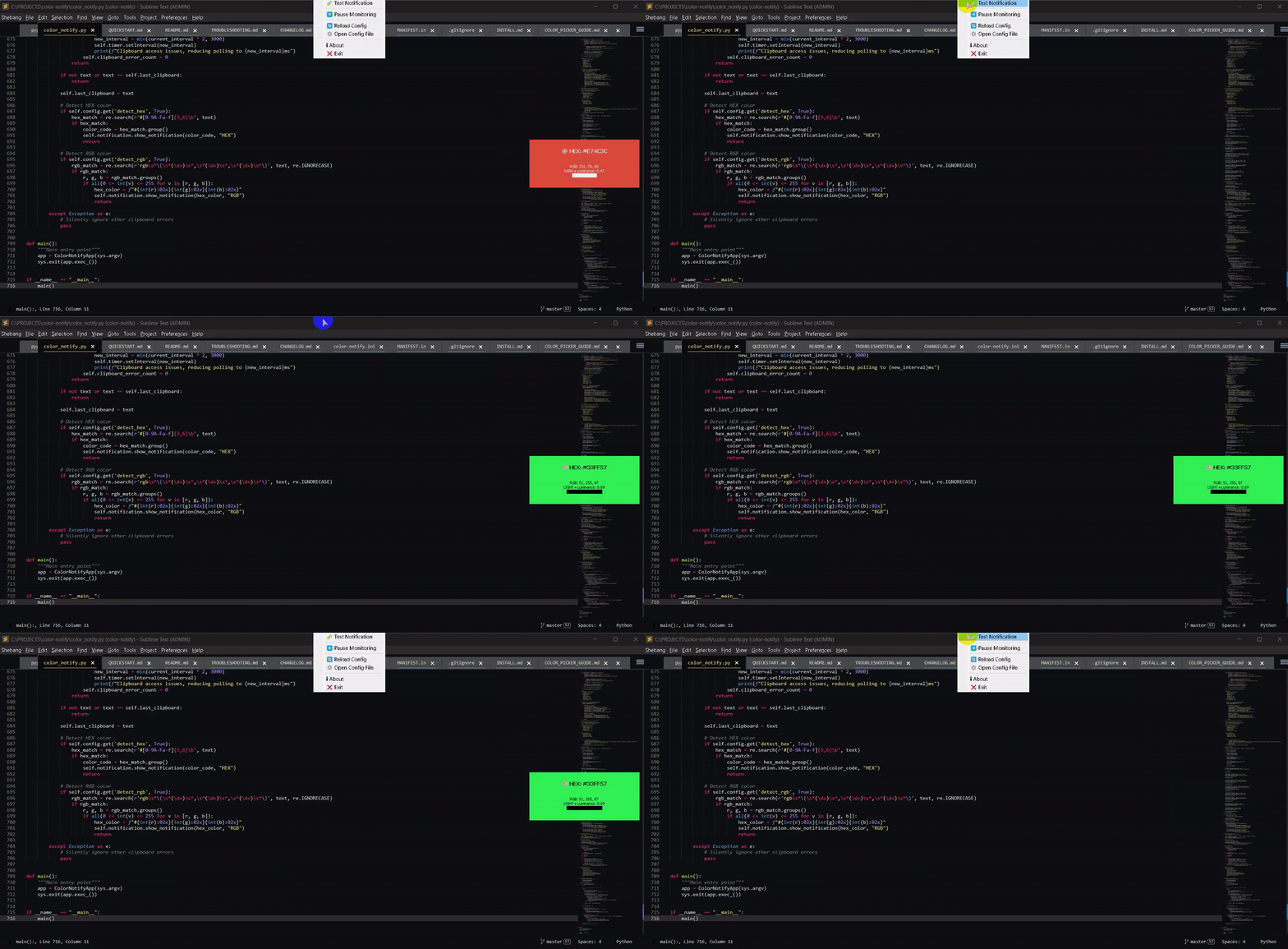
Notifications Display:
- Title: Color type and code (HEX/RGB)
- Body:
- RGB values
- Brightness classification (LIGHT/DARK)
- Luminance value and visual bar
- Background: The detected color
- Text: Auto-adjusted (black/white) for readability
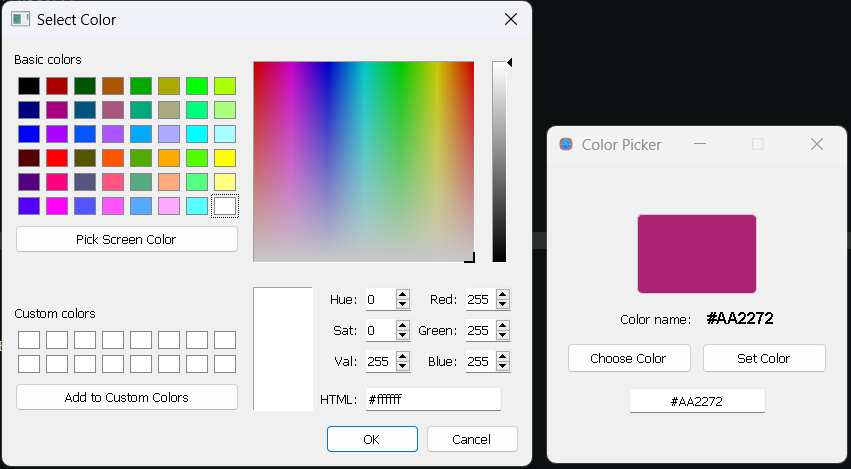
Color Picker Shows:
- Color Preview - Large preview box with current color
- Color Name - Hex code display
- Choose Color Button - Opens Qt color dialog
- Set Color Button - Apply hex from input field
- Hex Input - Manual hex code entry
Color Notify - Complete Features Overview
🎯 Two Operating Modes
1. Passive Mode - Clipboard Monitoring
Automatically detects and displays colors from clipboard.
How it works:
- Monitors clipboard continuously
- Detects color codes automatically
- Shows growl-style notification
- No user interaction needed
Supported formats:
- HEX:
#FF0000,#F00 - RGB:
rgb(255, 0, 0)
2. Active Mode - Color Picker
Interactive dialog for manual color selection.
How it works:
- Open from system tray
- Pick colors interactively
- Auto-copy to clipboard
- Full dialog interface
Features:
- Qt color dialog integration
- Manual hex input
- Live clipboard detection
- Always on top option
📋 Complete Feature List
Clipboard Monitoring Features
| Feature | Description | Config |
|---|---|---|
| HEX Detection | Detects #RRGGBB and #RGB | detect_hex = True |
| RGB Detection | Detects rgb(r, g, b) | detect_rgb = True |
| Auto Notification | Shows notification on detect | Automatic |
| Smart Text Color | Black/white based on luminance | Automatic |
| Luminance Display | Shows brightness info | Automatic |
| RGB Values | Displays RGB breakdown | Automatic |
| Visual Bar | Luminance visualization | Automatic |
Notification Features
| Feature | Description | Config |
|---|---|---|
| Positioning | 9 screen positions | position = right_center |
| Transparency | Adjustable opacity | opacity = 0.95 |
| Timeout | Auto-hide duration | timeout = 3000 |
| Always on Top | Keep above windows | always_on_top = True |
| Click to Dismiss | Close on click | Built-in |
| Fade Animation | Smooth in/out | Built-in |
| Frameless | No window border | Built-in |
| No Taskbar | System tray only | Built-in |
Color Picker Features
| Feature | Description | Shortcut |
|---|---|---|
| Qt Color Dialog | Full color picker | - |
| Hex Input | Manual entry | Enter |
| Color Preview | Large preview box | - |
| Color Name | Hex display | - |
| Auto Copy | To clipboard | Automatic |
| Clipboard Detect | Auto update | Every 1s |
| Always on Top | Toggle mode | A / Shift+A |
| Close | Exit dialog | Q / Escape |
| Multi-Monitor | Screen detection | Automatic |
| Auto Center | Window positioning | Automatic |
System Tray Features
| Feature | Description |
|---|---|
| Tray Icon | Minimized operation |
| Color Picker Menu | Open picker dialog |
| Test Notification | Sample display |
| Pause/Resume | Toggle monitoring |
| Reload Config | Hot reload settings |
| Open Config | Edit INI file |
| About | Version info |
| Exit | Close application |
Configuration Features
| Feature | Description | Default |
|---|---|---|
| Position | 9 positions available | right_center |
| Opacity | 0.0 to 1.0 | 0.95 |
| Timeout | 0 to ∞ ms | 3000 |
| Margin | Screen edge margin | 20 px |
| Poll Interval | Clipboard check rate | 1000 ms |
| AOT | Always on top | True |
| HEX Detect | Enable hex detection | True |
| RGB Detect | Enable RGB detection | True |
Error Handling Features
| Feature | Description |
|---|---|
| Clipboard Errors | Silent retry on access error |
| Auto Interval Adjust | Increase on persistent errors |
| Error Counter | Track clipboard issues |
| Validation | RGB range checking (0-255) |
| Graceful Degradation | Continue on errors |
🎨 Color Format Support
Currently Supported
HEX Formats
- 6-digit:
#FF5733(red, green, blue) - 3-digit:
#F00(expands to#FF0000) - Case insensitive:
#ff5733=#FF5733
RGB Formats
- Standard:
rgb(255, 87, 51) - Spaces:
rgb( 255 , 87 , 51 ) - Case insensitive:
RGB(255,87,51) - Validated: 0-255 range checking
Planned Support
- HSL:
hsl(9, 100%, 60%) - HSLA:
hsla(9, 100%, 60%, 1.0) - RGBA:
rgba(255, 87, 51, 1.0) - Named colors:
red,blue, etc. - CSS color keywords
🎯 Position Options
All 9 screen positions available:
left_up      center_up      right_up
left_center  center_center  right_center
left_down    center_down    right_down
Each respects margin setting for distance from screen edge.
⏱️ Timeout Behavior
| Value | Behavior |
|---|---|
0 |
No auto-hide (click to dismiss) |
1000 |
1 second |
3000 |
3 seconds (default) |
5000 |
5 seconds |
| Any positive | Custom milliseconds |
🎨 Smart Features
Luminance-Based Text Color
- Light colors (luminance > 0.5): Black text
- Dark colors (luminance ≤ 0.5): White text
- Ensures readability on any background
Luminance Calculation
luminance = (0.299 × R + 0.587 × G + 0.114 × B) / 255
Visual Luminance Bar
- 20-character bar:
████████████████████ - Length based on luminance value
- Quick visual brightness indicator
🔄 Workflow Integration
Design Workflow
Design Tool → Copy Color → Notification → Verify
     ↓
Color Picker → Choose → Auto Copy → Paste
Development Workflow
Code → Copy Color → Notification → Check
    ↓
Color Picker → Test → Copy → Implement
Testing Workflow
Spec → Color Picker → Choose → Compare → Verify
         ↓
  Notification confirms copied colors
🚀 Performance
Resource Usage
- Memory: ~50-100 MB
- CPU: <1% idle, <5% active
- Startup: <2 seconds
Optimization
- Efficient clipboard polling
- Error-based interval adjustment
- Minimal background operations
- No unnecessary rendering
🔒 Security & Privacy
What We Access
- ✅ System clipboard (text only)
- ✅ System tray
- ✅ Config file (local)
What We Don't
- ❌ No network access
- ❌ No file scanning
- ❌ No data collection
- ❌ No telemetry
Data Storage
- Config file only (
~/.color-notify.ini) - No color history saved
- No tracking or analytics
- Fully local operation
🎯 Use Case Matrix
| Use Case | Clipboard Mode | Color Picker | Both |
|---|---|---|---|
| Verify copied colors | ✅ | ❌ | ✅ |
| Pick new colors | ❌ | ✅ | ✅ |
| Build palette | ❌ | ✅ | ✅ |
| Test hex codes | ✅ | ✅ | ✅ |
| Monitor workflow | ✅ | ❌ | ✅ |
| Active selection | ❌ | ✅ | ✅ |
| Background checking | ✅ | ❌ | ✅ |
💡 Best Practices
For Designers
- Keep Color Picker open while designing
- Use Always on Top (
Akey) - Enable notifications for verification
- Set timeout to
5000for longer viewing
For Developers
- Use notifications to verify copied colors
- Quick color picker for testing
- Set poll interval to
1000for responsiveness - Position notifications away from editor
For QA/Testing
- Use both modes for comprehensive checks
- Color Picker for spec comparison
- Notifications for automated checks
- Save screenshots with notifications
🔮 Future Enhancements
Planned Features
- HSL/HSV format support
- Color history log
- Palette management
- Gradient picker
- Color harmonies
- Contrast checker
- Export to formats (CSS, JSON, etc.)
- Multiple color detection in single clipboard
- Notification templates
- Sound notifications
- Statistics tracking
Community Requests
Submit feature requests on GitHub Issues
📊 Feature Comparison
vs Manual Copy-Paste
| Color Notify | Manual | |
|---|---|---|
| Speed | Instant | Slow |
| Verification | Visual | Mental |
| History | Session | None |
| Errors | Validated | Possible |
vs Browser Extensions
| Color Notify | Extensions | |
|---|---|---|
| System-wide | ✅ | ❌ |
| No browser | ✅ | ❌ |
| Privacy | ✅ | ⚠️ |
| Lightweight | ✅ | ⚠️ |
vs Color Picker Apps
| Color Notify | Other Apps | |
|---|---|---|
| Notifications | ✅ | ❌ |
| Auto-detect | ✅ | ❌ |
| Lightweight | ✅ | ⚠️ |
| Free | ✅ | ⚠️ |
🔧 Examples
HEX Colors
#FF0000  → Red
#00FF00  → Green
#0000FF  → Blue
#FFFF00  → Yellow
#FF00FF  → Magenta
#00FFFF  → Cyan
#F0A500  → Orange
#9B59B6  → Purple
RGB Colors
rgb(255, 0, 0)      → Red
rgb(0, 255, 0)      → Green
rgb(100, 150, 200)  → Light Blue
rgb(255, 87, 51)    → Coral
Short HEX
#F00  → Red (#FF0000)
#0F0  → Green (#00FF00)
#00F  → Blue (#0000FF)
💡 Use Cases
For Designers
- Quick color reference from design files
- Pick colors interactively with color picker
- Verify colors from screenshots
- Check accessibility (luminance display)
- Build color palettes
For Developers
- Monitor colors from code
- Verify hex/rgb conversions
- Quick color validation
- Copy colors to clipboard instantly
- Test color combinations
For QA/Testing
- Verify UI colors match specs
- Document color usage
- Cross-reference design systems
- Quick color comparisons
🛠️ Development
Requirements
- Python 3.6+
- PyQt5
Troubleshooting
Clipboard warnings on Windows?
- Increase
poll_intervalto 1500-2000ms in config - See TROUBLESHOOTING.md for details
Color Picker not showing?
- Check system tray menu is accessible
- Try running from command line to see errors
For more help, check:
- TROUBLESHOOTING.md - Detailed troubleshooting guide
- INSTALL.md - Installation help
- QUICKSTART.md - Quick start guide
Local Development
# Clone repository
git clone https://github.com/cumulus13/color-notify.git
cd color-notify

# Install in development mode
pip install -e .

# Run
python -m color_notify
🎨 Two Modes of Operation
1. Passive Mode (Default)
- Monitors clipboard automatically
- Shows notifications when colors detected
- Runs in background
2. Active Mode (Color Picker)
- Manual color selection
- Interactive color dialog
- Instant clipboard copy
- Always accessible from tray menu
Both modes work together seamlessly!
📝 License
MIT License - see LICENSE file for details
👤 Author


🔗 Links
- GitHub: https://github.com/cumulus13/color-notify
- PyPI: https://pypi.org/project/color-notify/
- Issues: https://github.com/cumulus13/color-notify/issues
🤝 Contributing
Contributions, issues, and feature requests are welcome!
Feel free to check the issues page.
⭐ Show Your Support
Give a ⭐️ if this project helped you!
📊 Changelog
Version 1.0.1
- ✨ Added Color Picker Dialog
- 🎨 Interactive color selection
- ⌨️ Keyboard shortcuts for color picker
- 🔄 Live clipboard detection in picker
- 🐛 Fixed clipboard access warnings on Windows
- 📈 Improved error handling
- 📝 Better documentation
Version 1.0.0
- 🎉 Initial release
- 🎨 HEX and RGB color detection
- 🔔 Growl-style notifications
- 🖥️ System tray integration
- ⚙️ Configurable positioning and timeout
- ⏸️ Pause/Resume monitoring
- 🖱️ Click to dismiss notifications
Enjoy Color Notify! 🎨✨
1 maintainer

Metadata
1 maintainer
Release files for color-notify 1.0.10
For a detailed explanation of source distributions (sdists) and built distributions (wheels), please see the package formats documentation.
Source distribution (sdist)
| File | Size | Uploaded | |
|---|---|---|---|
| color_notify-1.0.10.tar.gz | 162.0 kB | Details |
Built distribution (wheel)
| File | Interpreter | ABI | Platform | Reset |
|---|---|---|---|---|
| color_notify-1.0.10-py3-none-any.whl | Python 3 | none | any | Details |
Total release size: 180.4 kB
Release files / color_notify-1.0.10.tar.gz
| Download URL | color_notify-1.0.10.tar.gz |
|---|---|
| Size | 162.0 kB |
| Tags | Source |
|
SHA-256 checksum How to use checksums |
3001b642e46fdfb59fc4a901620fbeaf976f94f22eef09446e36896ec717e946
|
|
BLAKE2b-256 checksum How to use checksums |
428266b71f0bc723aab4b443097e79a8440fbfd31246aa4f5c7bfe25f7195a67
|
| Upload date | |
|
Uploaded using Trusted Publishing? What is trusted publishing? |
No |
| Uploaded via |
twine/4.0.2 CPython/3.11.4
|
Release files / color_notify-1.0.10-py3-none-any.whl
| Download URL | color_notify-1.0.10-py3-none-any.whl |
|---|---|
| Size | 18.4 kB |
| Tags | Python 3 |
|
SHA-256 checksum How to use checksums |
b8cd5de242329104f96eeea7339ae69f55975278acabded223bbe0c76c29da0d
|
|
BLAKE2b-256 checksum How to use checksums |
931cfddf912feaf814324fa8c2e07f8a799b5ee082414108ff26e14693f35965
|
| Upload date | |
|
Uploaded using Trusted Publishing? What is trusted publishing? |
No |
| Uploaded via |
twine/4.0.2 CPython/3.11.4
|














