
A simple styling package for making console programmes great again.

Project description
Colorain v0.0.46
Ever wondered how some people make those console programmes print in pretty colours? Well, the answer is simple: there are ANSI colour codes with which you have to tag up the text. The problem is, these codes are pretty cumbersome to remember and are not built into Python either. And so typically people write bland, all-whites console programmes. Colorain is a package that makes printing coloured text to the console a piece of cake. Using a simple markup designed just for styling text on the terminal, Colorain allows you to quickly add styles to any Python console project you might have. There's a few other packages that help you to print styled text with Python, but none with the ease of use as Colorain (well, at least to me :p).
Installation
pip install colorain
Usage
Using a very simple markup that kinda looks like HTML, you can easily modify the colour of different parts of some text. The general syntax is as follows: <f=C>Text</> colours the foreground with colour C, i.e. the text, <b=C>Text</> colours the background with colour C, and <f=C1;b=C2>Text</> or <b=C2;f=C1> colours the foreground with C1 and the background with C2.
A Hello World Example
from colorain import *
# parses the colour tags and colour-codes the text as needed
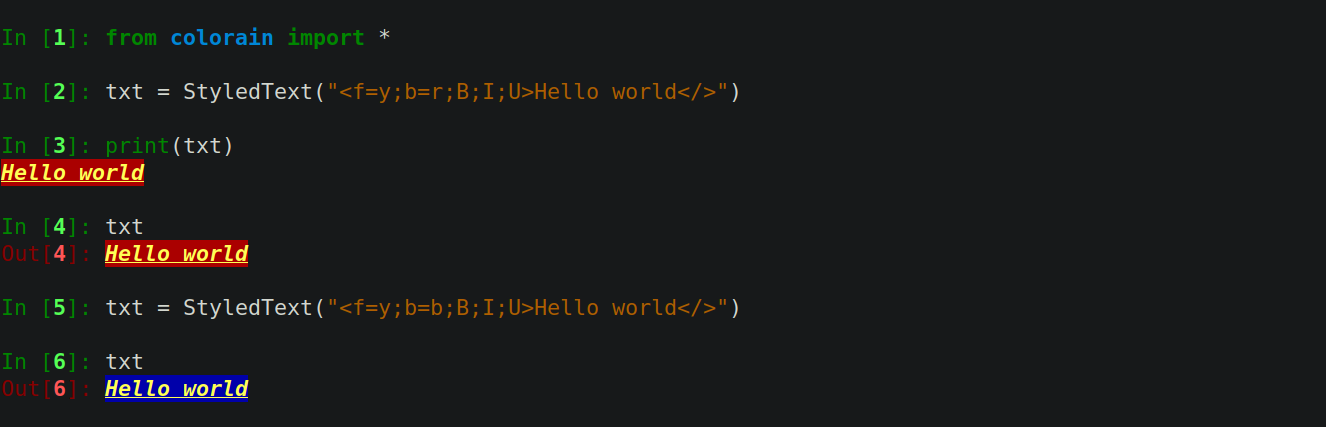
txt = StyledText("<f=y;b=r;B;I;U>Hello world</>")
print(txt)
Getting Help
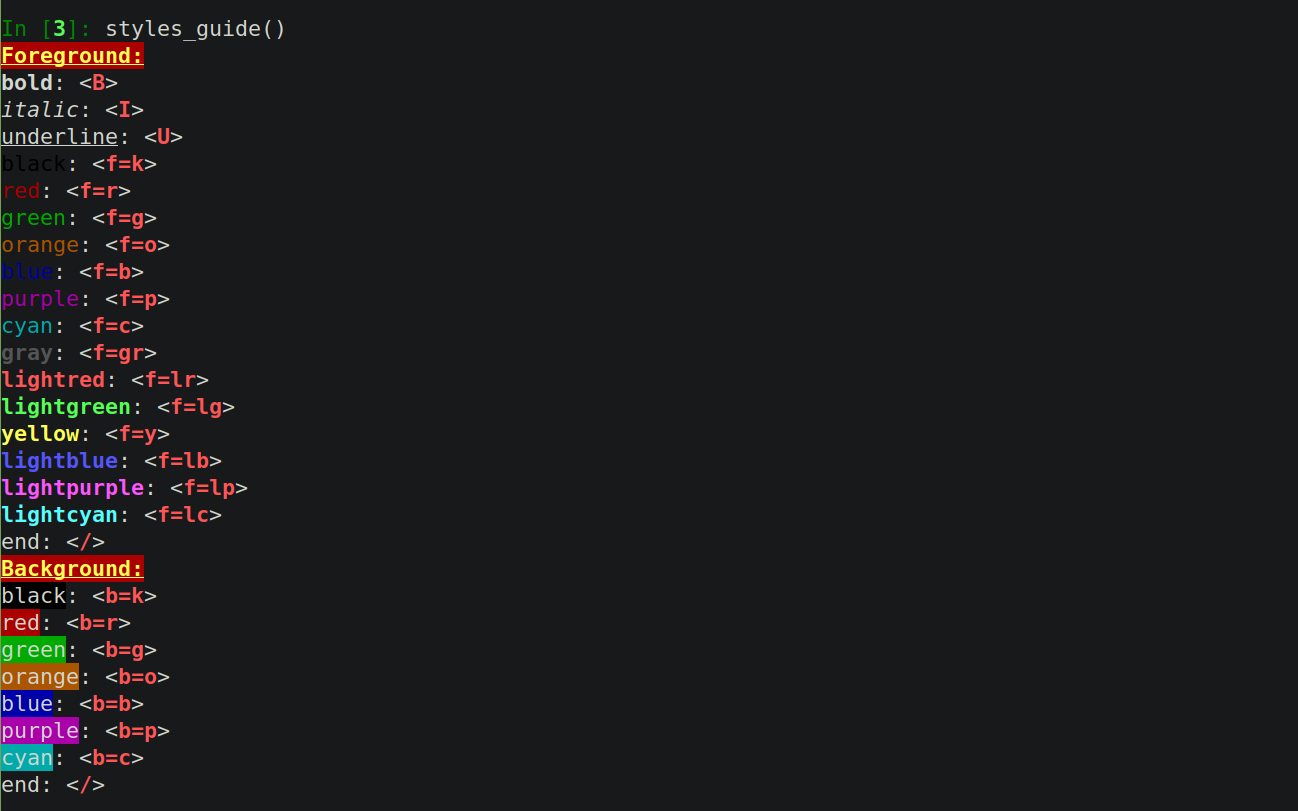
You can use the styles_guide() helper function to view all the available styles and the tags for them.
styles_guide()
The Syntax
The core class in colorain is the StyledText class. The constructor takes a string marked up with the colorain markup and parses that to generate styled strings. The markup is fairly similar in spirit to HTML, and so is pretty simple to remember. For styling some part of a text, tag up the beginning and end of that part by the start tag/token and the end tag/token. The end tag is always the same: </>. The start tag specifies styling properties, called props. In the above code, f=y tells colorain to colour the foreground, i.e., the text itself, with 'y' i.e. yellow. Similarly, b=r tells colorain to paint the background with red. The following props, B, I, and U, tell colorain to make the text bold, italic, and underlined. You don't have to specify the props in any specific order. The start tag must contain at least one styling prop. If you're using more than one prop, make sure you separate them with semicolons.
In case you want several differently styled texts at a stretch, you don't strictly have to put an end tag after each; you can just place the end tag at the end of all of them. However, do note the slight inconsistency that arises from this. This is due to the nature of the ANSI codes, and so it's recommended that you close each tag separately. (I might add some more error checking to the library to detect if all tags have been closed. At present, it only checks if there's at least one end tag, if there is(are) start tag(s).)
title1 = StyledText("<f=r>c <f=o>o <f=y>l <f=g>o <f=b>r <f=gr>a <f=lr>i <f=c>n  </>")
print(title1)


title2 = StyledText("<f=r>c</> <f=o>o</> <f=y>l</> <f=g>o</> <f=b>r</> <f=gr>a</> <f=lr>i</> <f=c>n</>")
print(title2)

Useful Features
parse_color() and raw_text(): Any StyledText object has a couple of methods you might find useful. StyledText.parse_color() gives you the parsed output string, i.e., ANSI colour-coded string. This is the string you might directly print using the print() function, and the output will be coloured as required. This is useful, for example, if you want to copy the ANSI coded string. You could send that to any friend of yours who hasn't installed colorain and they could copy the string to directly print the styled text.
In case you want to strip the text of all styles, the StyledText.raw_text() method is what you're looking for. (By the way, in the following snippet I'm using a third-party module called clipboard. You should check that out if you haven't already - really great for automating certain tasks!)
import clipboard
print(title1.parse_color())
clipboard.copy(title1.parse_color()) # copies the ANSI coded string to your clipboard
print(title1.raw_text())
clipboard.copy(title1.raw_text()) # copies an unstyled version of the string to your clipboard

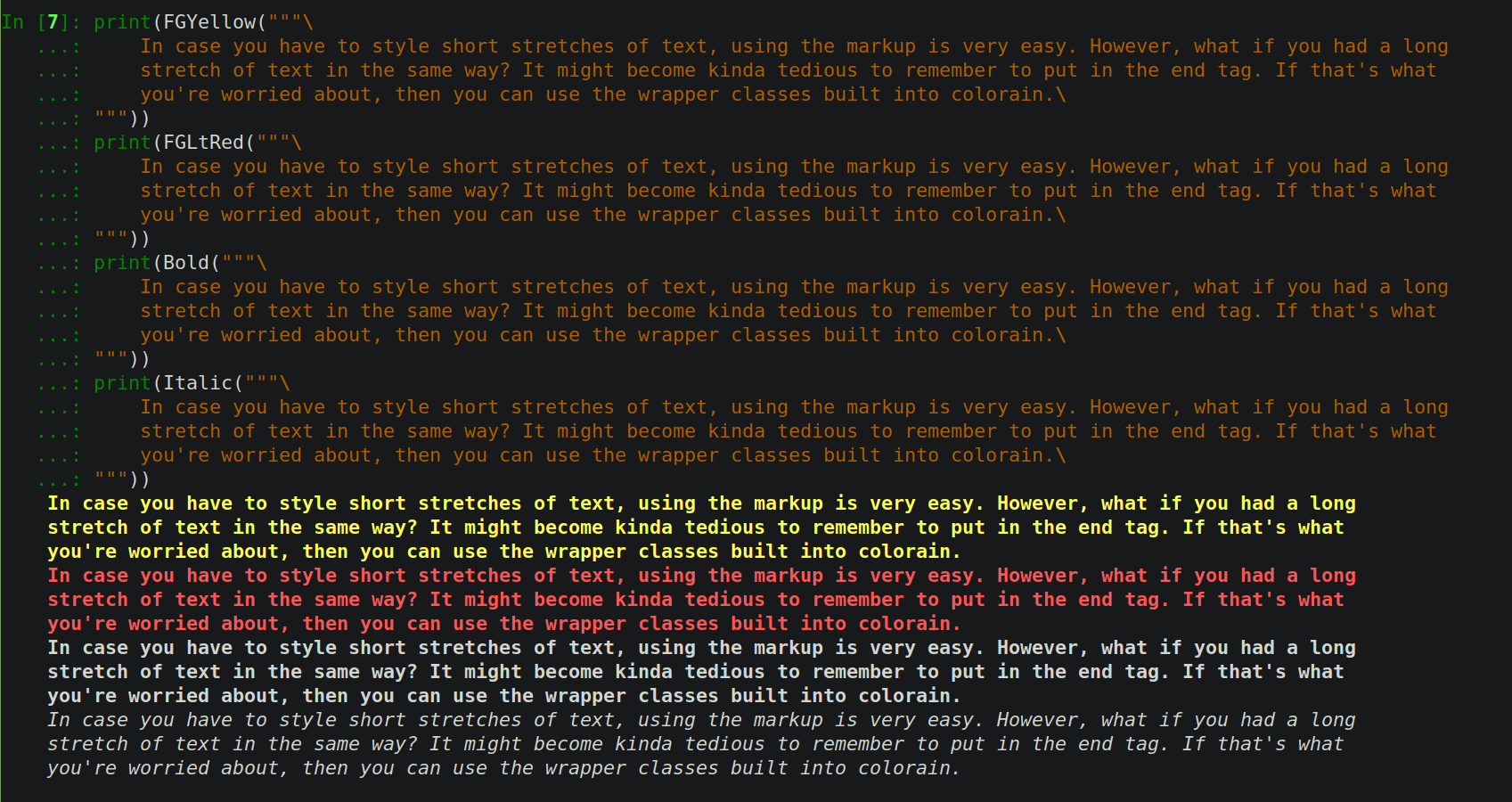
Wrapper Classes: In case you have to style short stretches of text, using the markup is very easy. However, what if you had a long stretch of text styled the same way? It might become kinda tedious to remember to put in the end tag. If that's what you're worried about, then you can use the wrapper classes built into colorain, all of which inherit from StyledText.
print(FGYellow("""\
    In case you have to style short stretches of text, using the markup is very easy. However, what if you had a long
    stretch of text in the same way? It might become kinda tedious to remember to put in the end tag. If that's what
    you're worried about, then you can use the wrapper classes built into colorain.\
"""))
print(FGLtRed("""\
    In case you have to style short stretches of text, using the markup is very easy. However, what if you had a long
    stretch of text in the same way? It might become kinda tedious to remember to put in the end tag. If that's what
    you're worried about, then you can use the wrapper classes built into colorain.\
"""))
print(Bold("""\
    In case you have to style short stretches of text, using the markup is very easy. However, what if you had a long
    stretch of text in the same way? It might become kinda tedious to remember to put in the end tag. If that's what
    you're worried about, then you can use the wrapper classes built into colorain.\
"""))
print(Italic("""\
    In case you have to style short stretches of text, using the markup is very easy. However, what if you had a long
    stretch of text in the same way? It might become kinda tedious to remember to put in the end tag. If that's what
    you're worried about, then you can use the wrapper classes built into colorain.\
"""))
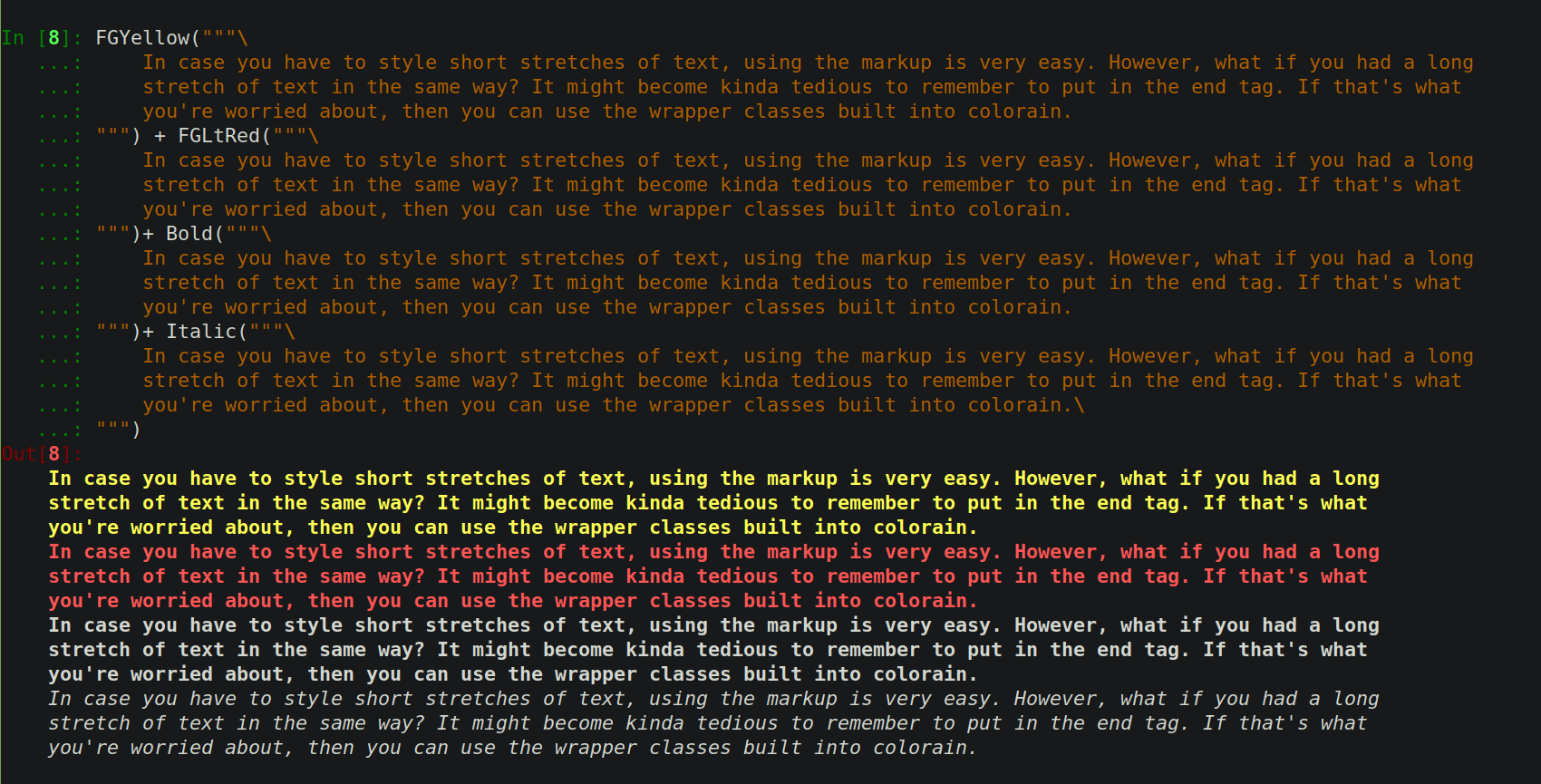
Adding together styled strings: colorain overloads the "+" operator for StyledText objects so that you can manipulate StyledText objects as you manipulate regular strings.
print(FGYellow("""\
    In case you have to style short stretches of text, using the markup is very easy. However, what if you had a long
    stretch of text in the same way? It might become kinda tedious to remember to put in the end tag. If that's what
    you're worried about, then you can use the wrapper classes built into colorain.
""") + FGLtRed("""\
    In case you have to style short stretches of text, using the markup is very easy. However, what if you had a long
    stretch of text in the same way? It might become kinda tedious to remember to put in the end tag. If that's what
    you're worried about, then you can use the wrapper classes built into colorain.
""")+ Bold("""\
    In case you have to style short stretches of text, using the markup is very easy. However, what if you had a long
    stretch of text in the same way? It might become kinda tedious to remember to put in the end tag. If that's what
    you're worried about, then you can use the wrapper classes built into colorain.
""")+ Italic("""\
    In case you have to style short stretches of text, using the markup is very easy. However, what if you had a long
    stretch of text in the same way? It might become kinda tedious to remember to put in the end tag. If that's what
    you're worried about, then you can use the wrapper classes built into colorain.\
"""))
Errors
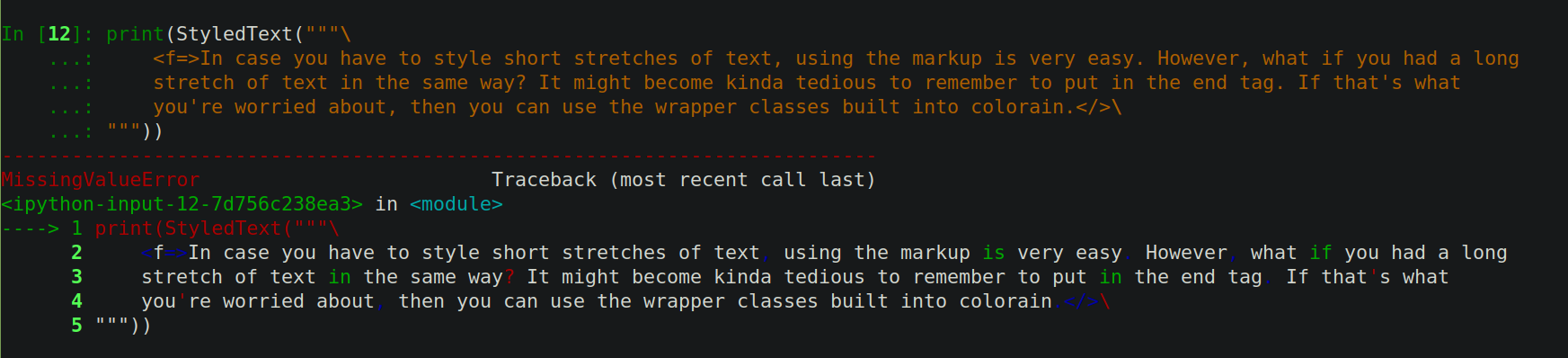
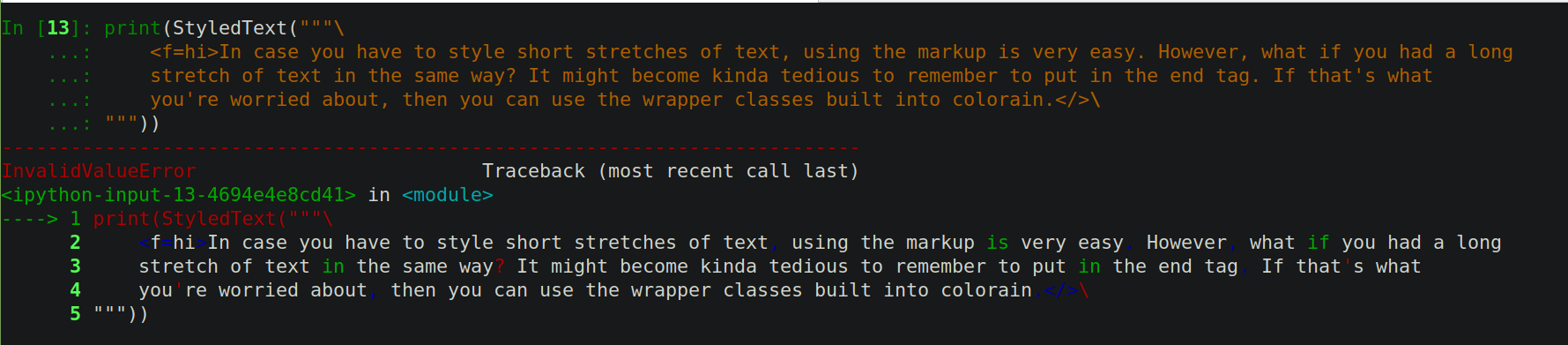
If you mess something up in the markup, there's some (slightly) informative errors that might help you with debugging.
print(StyledText("""\
    <f=>In case you have to style short stretches of text, using the markup is very easy. However, what if you had a long
    stretch of text in the same way? It might become kinda tedious to remember to put in the end tag. If that's what
    you're worried about, then you can use the wrapper classes built into colorain.</>\
"""))


Lastly, the entire thing is a work in progress by an amateur coder. Please let me know if you find any errors or have any suggestions! Thank you!
Release history Release notifications | RSS feed


Download files
Download the file for your platform. If you're not sure which to choose, learn more about installing packages.
Source Distribution
Built Distribution
Filter files by name, interpreter, ABI, and platform.
If you're not sure about the file name format, learn more about wheel file names.
Copy a direct link to the current filters
File details
Details for the file colorain-0.0.46.tar.gz.
File metadata
- Download URL: colorain-0.0.46.tar.gz
- Upload date:
- Size: 11.6 kB
- Tags: Source
- Uploaded using Trusted Publishing? No
- Uploaded via: twine/3.4.2 importlib_metadata/3.10.0 pkginfo/1.7.0 requests/2.25.1 requests-toolbelt/0.9.1 tqdm/4.61.2 CPython/3.8.8
File hashes
| Algorithm | Hash digest | |
|---|---|---|
| SHA256 |
75c4b8eb240c7f5c83c32838659301de7d111c025a86f3db00f22f7e29126ca1
|
|
| MD5 |
48f885288c8638bcf5b6288df7c12e14
|
|
| BLAKE2b-256 |
818708e67b66b44a3e4ef6481346b6e638fca9d4a03d46a2ae12b7bde44d56a8
|
File details
Details for the file colorain-0.0.46-py3-none-any.whl.
File metadata
- Download URL: colorain-0.0.46-py3-none-any.whl
- Upload date:
- Size: 10.7 kB
- Tags: Python 3
- Uploaded using Trusted Publishing? No
- Uploaded via: twine/3.4.2 importlib_metadata/3.10.0 pkginfo/1.7.0 requests/2.25.1 requests-toolbelt/0.9.1 tqdm/4.61.2 CPython/3.8.8
File hashes
| Algorithm | Hash digest | |
|---|---|---|
| SHA256 |
127cd03c3f2e3c7a84e2ed19327f648567944f3b4624b502f686cf5ce2976a9c
|
|
| MD5 |
ebc353f2d9d2250cd2efee9cbb70e24b
|
|
| BLAKE2b-256 |
325a57ab82a3ad685b69c487df8c929df8d436b0a071ec3538ac96b5036f8b3c
|






