
colorbar
Add a colorbar to an image in milliseconds (faster than plt.imshow+plt.colorbar) 💨
colorbar achieves its speed by avoiding matplotlib and instead using numpy, pillow, cmap and pycairo!
🛠️ Install via: pip install colorbar (+ if pycairo causes trouble try conda install anaconda::pycairo)
Usage 💡
import numpy as np
from colorbar import CBar

shape = (400, 800)
im = np.linspace(0, 1, shape[0] * shape[1]).reshape(*shape)  # dummy image
cbar = CBar(cmap='gray',    # see https://cmap-docs.readthedocs.io/en/latest/catalog/
            vmin=im.min(),  # pixels <= vmin become first color of cmap
            vmax=im.max())  # pixels >= vmax become last color of cmap
im_cbar = cbar.draw(im)  # draw colorbar!
im_cbar.show()
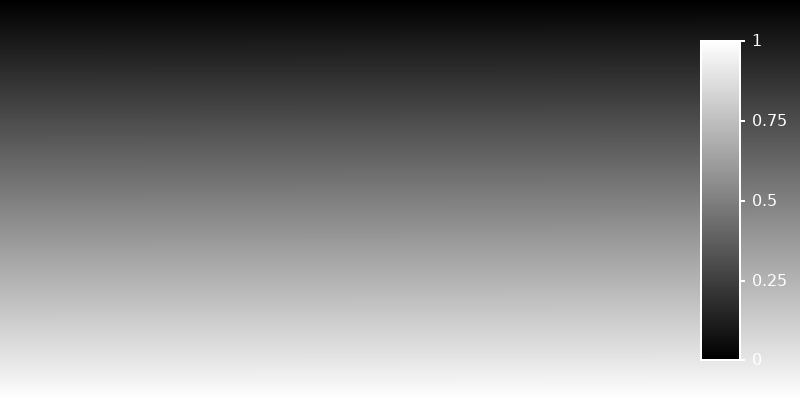
draw() returns a PIL.Image that is shown via show() and saved via save()
im_cbar.save('cbar.png')
Use cbar.save() instead of im=cbar.draw()+im.save() to save the image as a vector graphic
...
cbar.save('cbar.pdf', im)  # .pdf, .svg, .ps or .eps
To customize the colorbar, draw() and save() take the arguments:
vertical: If True, colorbar is vertical. Default:Truepad: Added pixel rows on the colorbar-side of the image. Default:0pad_color: Color-string of added pixels. Default:'k'(=black)x: Position of the colorbar center relative to image in width-direction. Default:.9y: Position of the colorbar center relative to image in length-direction. Default:.5width: Size of the colorbar relative to image. Default:.05length: Size of the colorbar relative to image. Default:.8label: Label above the colorbar. Default:Noneticks: List (e.g.[0, 1]) or dict (e.g.{0: 'low', 1: 'high'}) of ticks. Default:Nonefontsize: Fontsize of labels and ticks. Default:20linecolor: Color of the lines and the font used to write labels and ticks. Default:w(=white)linewidth: Width of ticklines and outlines. Default:2tick_len: Length of ticklines. Default:2
Finally, if you want draw() to return a numpy array use asarray=True
im_cbar = cbar.draw(im, asarray=True)
to e.g. plot it with matplotlib via plt.imshow(im_cbar).
1 maintainer

Release files for colorbar 0.2.0
For a detailed explanation of source distributions (sdists) and built distributions (wheels), please see the package formats documentation.
Source distribution (sdist)
| File | Size | Uploaded | |
|---|---|---|---|
| colorbar-0.2.0.tar.gz | 389.1 kB | Details |
Built distribution (wheel)
| File | Interpreter | ABI | Platform | Reset |
|---|---|---|---|---|
| colorbar-0.2.0-py3-none-any.whl | Python 3 | none | any | Details |
Total release size: 776.9 kB
Release files / colorbar-0.2.0.tar.gz
| Download URL | colorbar-0.2.0.tar.gz |
|---|---|
| Size | 389.1 kB |
| Tags | Source |
|
SHA-256 checksum How to use checksums |
6ab34e6318828adb4e70c6dc9cfdfff5f2464a15bccc9d4fa8615ab667483d4e
|
|
BLAKE2b-256 checksum How to use checksums |
1ab8f8fab109d2e2dfaa475a62d5c4b6220c2098eef3d461991d8bd5bc718c87
|
| Upload date | |
|
Uploaded using Trusted Publishing? What is trusted publishing? |
No |
| Uploaded via |
poetry/1.8.4 CPython/3.11.9 Linux/5.15.0-56-generic
|
Release files / colorbar-0.2.0-py3-none-any.whl
| Download URL | colorbar-0.2.0-py3-none-any.whl |
|---|---|
| Size | 387.8 kB |
| Tags | Python 3 |
|
SHA-256 checksum How to use checksums |
b81f49005410a1cfd5785b39935497ccdfa420e9dd7312c608bdd592d5cb4106
|
|
BLAKE2b-256 checksum How to use checksums |
c8abc7d7cf15ac34bee222d26ca7a5c08fc91fa9a460f7a67af929e6a3e5b02a
|
| Upload date | |
|
Uploaded using Trusted Publishing? What is trusted publishing? |
No |
| Uploaded via |
poetry/1.8.4 CPython/3.11.9 Linux/5.15.0-56-generic
|














