
colorcc
Connected components of every colour at once, on the GPU.
Exact region labels for RGB images in PyTorch, on NVIDIA and Apple GPUs.


How it works, with live figures: read the post on the Fablnx engineering blog →
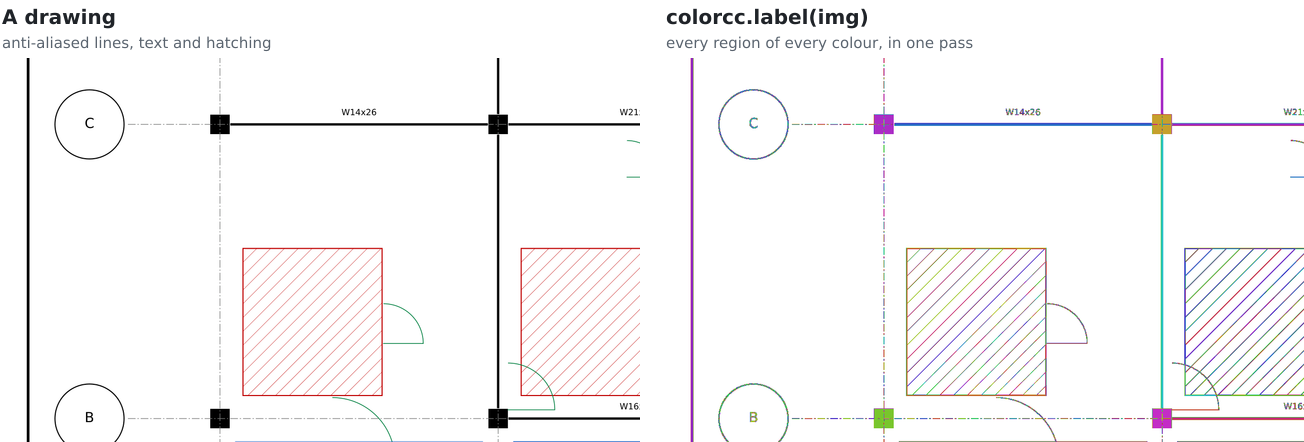
New here? Every colour at once builds this labeller from scratch: union-find, warps, atomics, why the white paper of a drawing is the hardest region of all, and how it compares with NVIDIA's libraries. Every figure is live, and no GPU background is needed.
Why
Most connected-component labellers (OpenCV, SciPy, cuCIM's binary mode) see black and white. Real images, and construction drawings in particular, are made of many exact colours, with anti-aliased edges in between. colorcc gives every exact colour its own regions, in one pass over the image, with no loop over colours:
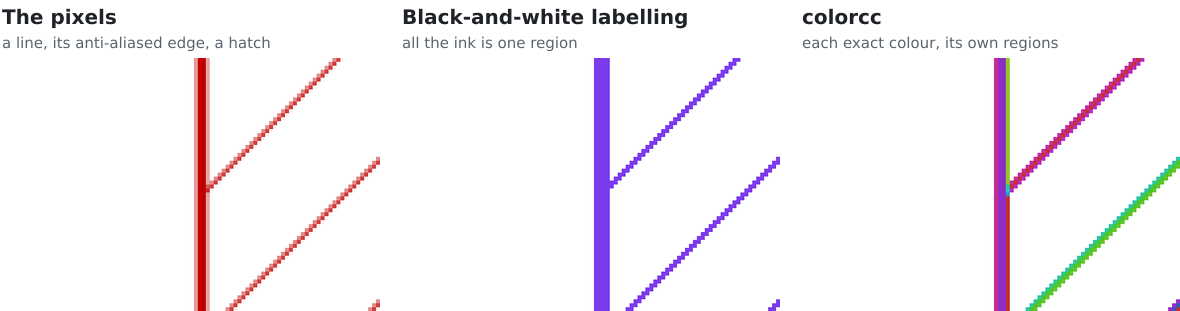
Two pixels belong to the same region when they touch (4 or 8 neighbours) and have exactly the same RGB value.
Labels run 1..n in raster order of each region's first pixel, so the output is identical, value for value, to
cc3d.connected_components on the packed colours. One colour, such as white paper, can be ignored: it gets
label 0 and joins nothing.
Install
Install PyTorch first, then:
pip install "colorcc[cuda12]"    # NVIDIA, PyTorch built for CUDA 12
pip install "colorcc[cuda13]"    # NVIDIA, PyTorch built for CUDA 13
pip install colorcc              # Apple silicon
Nothing is compiled at install time and no CUDA toolkit is needed: the wheel is pure Python. The kernels are compiled at the first call for the GPU you have, by NVRTC through CuPy on NVIDIA GPUs and by Metal through PyTorch on Apple GPUs (PyTorch 2.6 or later). CuPy caches the result, so only the first call in a fresh environment pays for it. Python 3.10 or later.
Quickstart
import numpy as np, torch, colorcc
from PIL import Image

rgb = np.array(Image.open("drawing.png").convert("RGB"))
img = torch.from_numpy(rgb).to("cuda")                          # or "mps"
labels, n = colorcc.label(img, conn=8, ignore=(255, 255, 255))  # labels: [H, W] int32, 1..n; paper 0
examples/label_png.py does this and saves the regions as a colour-coded PNG
(pip install pillow):
python examples/label_png.py drawing.png labels.png
Benchmarks
On an NVIDIA A100, with the picture already on the GPU, the full 806-megapixel drawing takes 49 ms (89 ms on an RTX 3070):
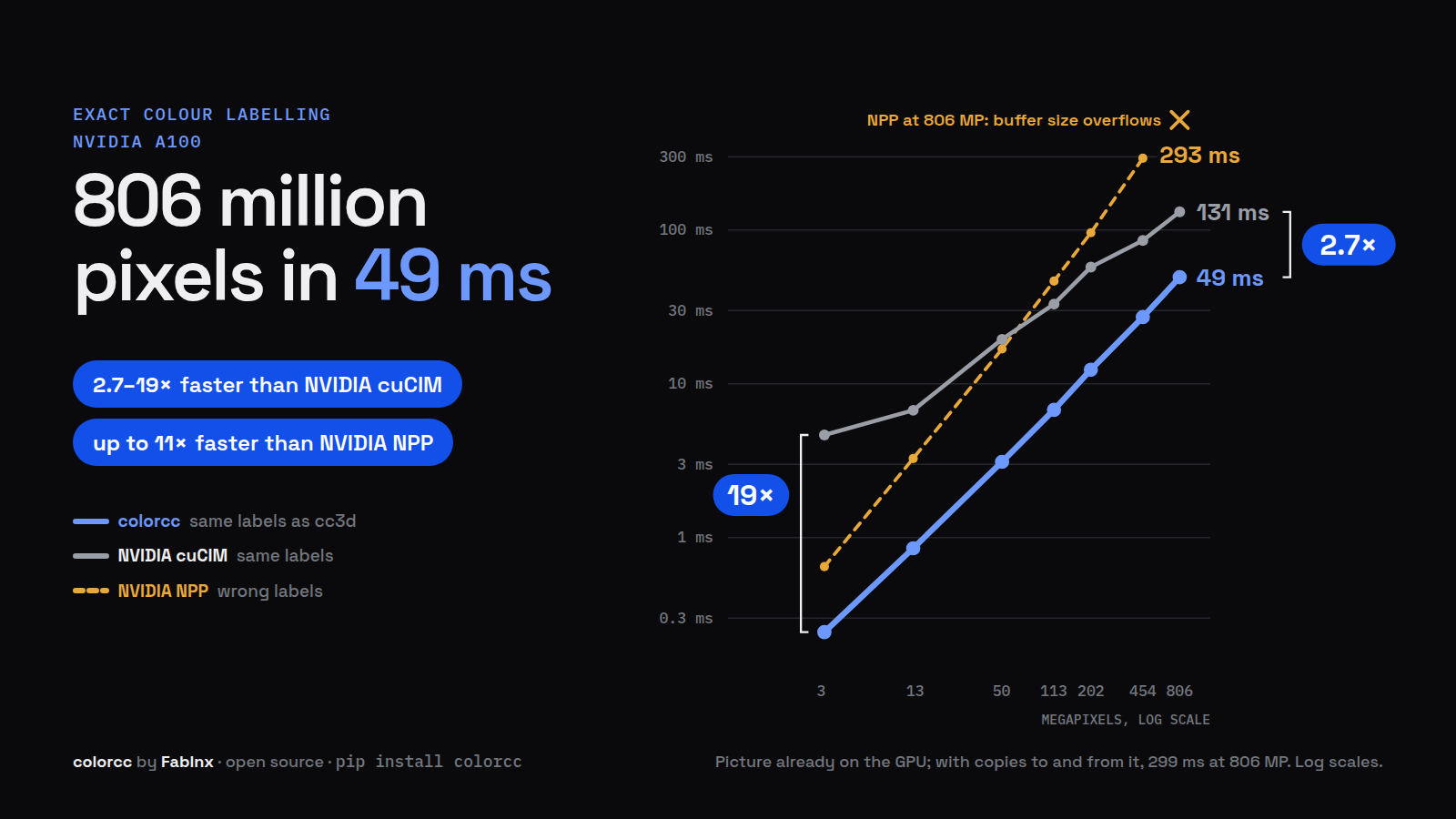
Interactive, with an RTX 3070 and the Apple M5 Pro against cc3d: Fig. 1 of the post.
| 3 MP render | 454 MP (600 dpi) | 806 MP sheet | |
|---|---|---|---|
| colorcc | 0.24 ms | 27.2 ms | 49.4 ms |
NVIDIA cuCIM label() |
4.65 ms (19x slower) | 85.6 ms (3.1x slower) | 131 ms (2.7x slower) |
NVIDIA NPP LabelMarkersUF |
0.65 ms (2.7x slower), wrong labels | 293 ms (11x slower), wrong labels | buffer-size query overflows |
On the RTX 3070: cuCIM 1.7x to 5.4x slower, NPP 2.5x to 24x slower.
The same sheet takes 151 ms on an Apple M5 Pro, 17x faster than cc3d on one CPU core. cuCIM gives the same regions in the same memory; NPP needs twice the memory and splits regions at every size it ran.
Every number, at every size, with the machines, versions and method:
results/README.md. The same data as live charts, with what each idea is worth: chapter 9 of the post.
How it works
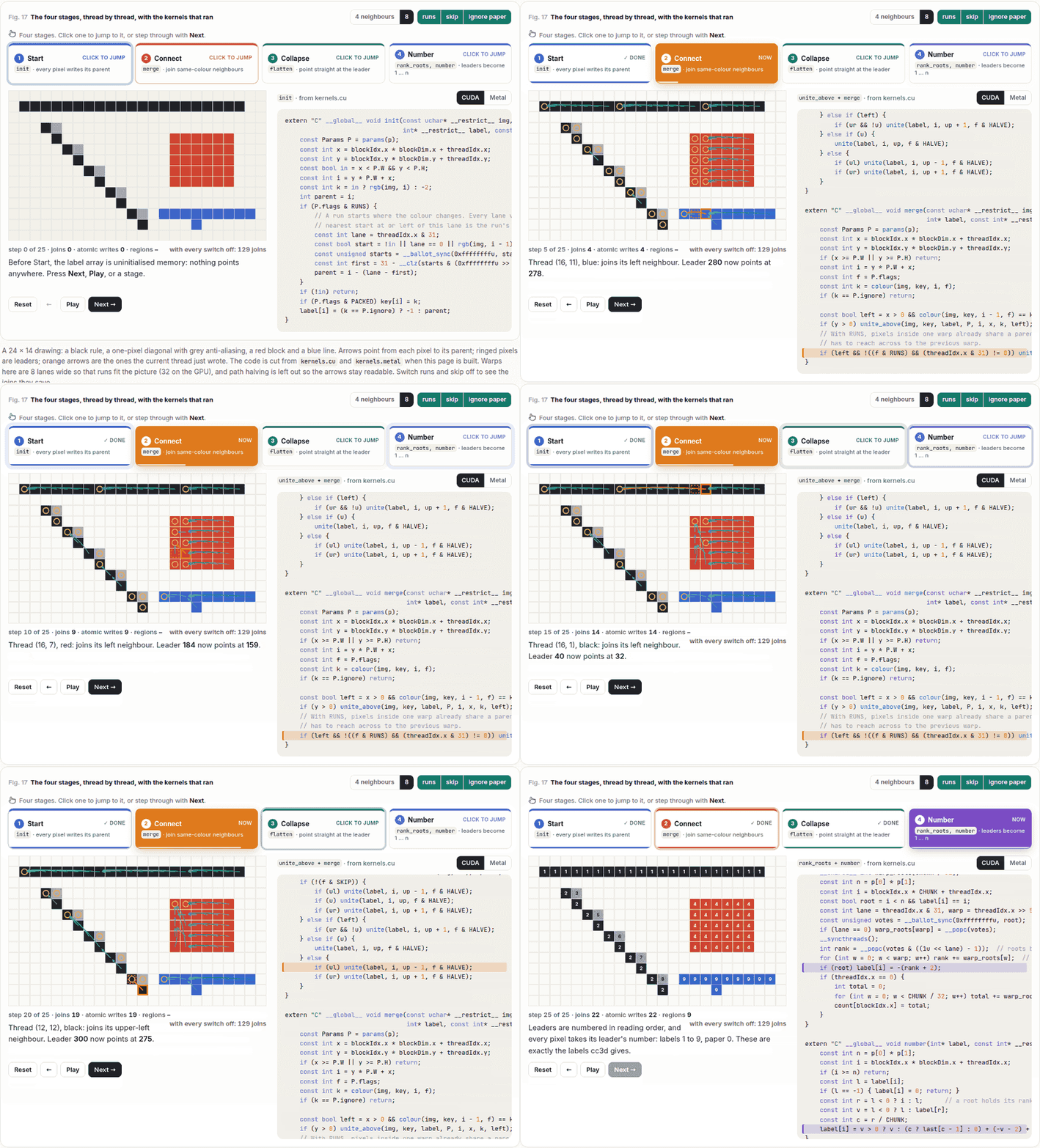
Four stages, the same CUDA (colorcc/cuda/kernels.cu) and Metal
(colorcc/metal/kernels.metal) code line for line, launched by one Python function
(_stages in colorcc/__init__.py) on either GPU:
- Start (
init): each pixel points at a parent. A warp vote finds runs of one colour among its 32 pixels, and each pixel points at the first pixel of its run. - Connect (
merge): union-find. Each pixel joins its tree to the trees of its same-colour neighbours with an atomic minimum, the row above first, then the left neighbour. Joins another thread already makes are skipped, and path halving keeps the trees shallow. - Collapse (
flatten): each pixel points straight at its leader. - Number (
rank_roots,number): each leader gets its rank in a 256-pixel chunk; after a prefix sum, each pixel takes its leader's number 1..n.
The animation is Fig. 17 of the post, where you can step through it yourself, switch each idea on and off, and see what each one is worth.
API
colorcc.label(img, conn=8, ignore=None, flags=colorcc.DEFAULT, stages=4) -> (labels, n)
| Argument | |
|---|---|
img |
[H, W, 3] uint8 tensor on a CUDA or MPS device |
conn |
4 or 8 neighbours |
ignore |
an (r, g, b) colour that gets label 0 and joins nothing, or None |
flags |
which optimisations to switch on; see below |
stages |
stop early, for timing: 1 init, 2 merge, 3 flatten (labels then hold root pixel indices, -1 for ignored pixels), 4 numbered labels |
Returns labels, an [H, W] int32 tensor on the same device, and n, the
number of components as a Python int (0 when stages is below 4). Bad input
raises ValueError; an empty image returns an empty label tensor and 0.
Flags (combine with |):
| Flag | |
|---|---|
RUNS |
init: a warp ballot finds horizontal runs of one colour, so most left joins disappear |
SKIP |
merge: skip joins another thread already makes |
PACKED |
init stores each colour as one int; merge reads one word instead of three bytes |
HALVE |
merge: path halving keeps the trees shallow |
DEFAULT |
RUNS | SKIP | HALVE |
ALL |
all four |
PACKED is off by default. Added to the default switches it was slower in all
40 measurements (14 on the M5 Pro, 12 on the RTX 3070, 14 on the A100), by up to 38%,
and it doubles the memory. On its own, without the other switches, it was
faster in only 15 of 40. The flags exist so each idea can be
measured on its own; every combination gives the same labels.
colorcc.reference has CPU versions (cc3d, and one OpenCV call per colour)
used as ground truth in the tests and as baselines in the benchmarks.
Limits
- Images up to 2^31 pixels (labels are 32-bit pixel indices).
- 3-channel
uint8input only. - Tested only on the three GPUs above.
Correctness
tests/test_colorcc.py compares every flag combination, 4 and 8 neighbours, with and
without an ignored colour, against cc3d: the same labels, value for value, on ten test images (noise,
checkerboards, one-pixel diagonals, a spiral, single rows and columns and others), plus a test that labels a large
image many times to catch races. All 285 tests pass on an RTX 3070 against the released wheel (results/rtx3070/tests.txt) and on an Apple M5 Pro against colorcc 0.1.1 installed from PyPI (results/m5/tests.txt). In every benchmark the labels were also identical to cc3d at every size.
Development
git clone https://github.com/Acero-AI/colorcc && cd colorcc
pip install -e ".[cuda12,test]"   # or cuda13; nothing extra on a Mac
pytest tests                      # CUDA if present, else the Apple GPU; with neither, only the input checks run
The benchmarks (pip install -e ".[cuda12,bench]"):
python bench/synth_sheet.py sheet.pdf
python bench/bench.py sheet.pdf --out sheet.json                  # every flag, and cc3d, 50-800 dpi
python bench/nvidia.py cache/sheet.pdf.*.npy --out nvidia.json    # vs NPP and cuCIM (whichever are installed)
python bench/e2e.py cache/sheet.pdf.*.npy --out e2e.json          # with copies to and from the GPU
python bench/tables.py                                            # the tables in results/README.md
bench.py caches each render as .npy in --cache (default cache/); an 800 dpi render is 2.4 GB.
bench/profile.py times each stage and each library's kernels at one size (it compiles its kernel variants with a
CUDA toolkit), and bench/check_labels.py checks a label file against its image on the CPU with SciPy.
Issues and pull requests are welcome. Releases are listed in CHANGELOG.md.
Citing
If colorcc helps your work, please cite it: GitHub's Cite this repository button (from
CITATION.cff) gives BibTeX and APA.
Licence
MIT. See LICENSE.
Gokul Adethya, Fablnx. How it works, with live figures: the Fablnx engineering blog.
1 maintainer

Metadata
1 maintainer
Release files for colorcc 0.1.2
For a detailed explanation of source distributions (sdists) and built distributions (wheels), please see the package formats documentation.
Source distribution (sdist)
| File | Size | Uploaded | Provenance | |
|---|---|---|---|---|
| colorcc-0.1.2.tar.gz | 20.2 kB | With provenance | Details |
Built distribution (wheel)
| File | Interpreter | ABI | Platform | Reset |
|---|---|---|---|---|
| colorcc-0.1.2-py3-none-any.whl | Python 3 | none | any | Details |
Total release size: 36.4 kB
Release files / colorcc-0.1.2.tar.gz
| Download URL | colorcc-0.1.2.tar.gz |
|---|---|
| Size | 20.2 kB |
| Tags | Source |
|
SHA-256 checksum How to use checksums |
3e890c5a3f6849abd8adac4a9ea3203fea75989784cdb606ead48a050b3477d5
|
|
BLAKE2b-256 checksum How to use checksums |
39cad8b75f53dc4c57e028219d2b4f7fc10457c2b90a6076ef179c41ad9089b9
|
| Upload date | |
|
Uploaded using Trusted Publishing? What is trusted publishing? |
Yes |
| Uploaded via |
twine/7.0.0 CPython/3.13.16
|
Provenance
Provenance describes where a file came from. On PyPI, provenance is shared via attestations, which provide a verifiable record of the build or publishing details. View details, limitations and caveats.


PyPI Publish Attestation
PyPI verified that this artifact, at this checksum, originated from the publisher listed below.
Signed by GitHub Actions, verified by PyPI on Oct 21, 2026.
Transparency logRelease files / colorcc-0.1.2-py3-none-any.whl
| Download URL | colorcc-0.1.2-py3-none-any.whl |
|---|---|
| Size | 16.2 kB |
| Tags | Python 3 |
|
SHA-256 checksum How to use checksums |
c7350383bb81a1296c51d64992a8451954fbb3c72eab57e551aeb967f5cb9670
|
|
BLAKE2b-256 checksum How to use checksums |
11ef2357f9c75e8a47a2c54e602bad3da721ccfc4237a08cab52b16831e470a7
|
| Upload date | |
|
Uploaded using Trusted Publishing? What is trusted publishing? |
Yes |
| Uploaded via |
twine/7.0.0 CPython/3.13.16
|
Provenance
Provenance describes where a file came from. On PyPI, provenance is shared via attestations, which provide a verifiable record of the build or publishing details. View details, limitations and caveats.
PyPI Publish Attestation
PyPI verified that this artifact, at this checksum, originated from the publisher listed below.
Signed by GitHub Actions, verified by PyPI on Oct 21, 2026.
Transparency logSecurity for colorcc 0.1.2
Provenance
Provenance describes where a file came from. On PyPI, provenance is shared via attestations, which provide a verifiable record of the build or publishing details. View details, limitations and caveats.
Full provenance
All 2 files in this release have been uploaded with provenance metadata.
Attestation for colorcc-0.1.2.tar.gz
PyPI Publish Attestation
PyPI verified that this artifact, at this checksum, originated from the publisher listed below.
Signed by GitHub Actions, verified by PyPI on Oct 21, 2026.
Transparency logA note on package security
PyPI is a repository for distributing packages, not a service for auditing them. While third-party security researchers and our staff do their best to detect and remove malicious packages, PyPI cannot guarantee the quality, security or suitability of any given package.














