
ColorController is a Pythonic interface for managing colors using either english-language names or one of several standard color values.

Project description
ColorController.py
Table of Contents
- Encode color data in various formats.
- 1.1: Create a ColorController object using a familiar, english-language color name, and print out its properties.
- 1.2: Show a color
- 1.3: Create a ColorController object using a hex code.
- 1.4: Create a ColorController object using an RGB triplet
- 1.5: Create a ColorController object using an HSV triplet, and print out its properties.
- Modify a color using simple, convenient methods.
- Invert a color
- Access a rich set of color values and color names
Welcome to the ColorController Python library!
My name is Tal Zaken, and I wrote this library for use in a natural language processing project that aims to take in free-form text, and spit out color data which somehow relates to the text's content.
Enough about that. Here are some things that you can do with ColorController:
1. Encode color data in various formats.
Example 1.1: Create a ColorController object using a familiar, english-language color name, and print out its properties.
You can set a color using a very large library of color names. See the colornames.txt document contained herein, with enormous thanks to Martin Krzywinski.
The following code:
from ColorController.ColorController import ColorController

color = ColorController(name='hazel')

print(f"Name: {color.name}",
      f"Hex Code: {color.hex_code}",
      f"RGB: {color.rgb}",
      f"HSV: {color.hsv}",
      sep='\n')
outputs:
Name: hazel
Hex Code: ['#8E7618']
RGB: [(142, 118, 24)]
HSV: [(0.133, 0.831, 142)]
Further, you can change all the ColorController's properties by changing any one of them.
By example:
color.name = 'blue'

print(f"Name: {color.name}",
      f"Hex Code: {color.hex_code}",
      f"RGB: {color.rgb}",
      f"HSV: {color.hsv}",
      sep='\n')
You will see that all properties have updated:
Name: blue
Hex Code: ['#00008B', '#0000CD', '#0000EE', '#0000FF', '#0018A8', '#0087BD', '#0093AF', '#0247FE', '#0343DF', '#1F75FE', '#2242C7', '#333399']
RGB: [(0, 0, 139), (0, 0, 205), (0, 0, 238), (0, 0, 255), (0, 24, 168), (0, 135, 189), (0, 147, 175), (2, 71, 254), (3, 67, 223), (31, 117, 254), (34, 66, 199), (51, 51, 153)]
HSV: [(0.667, 1.0, 139), (0.667, 1.0, 205), (0.667, 1.0, 238), (0.667, 1.0, 255), (0.643, 1.0, 168), (0.548, 1.0, 189), (0.527, 1.0, 175), (0.621, 0.992, 254), (0.618, 0.987, 223), (0.602, 0.878, 254), (0.634, 0.829, 199), (0.667, 0.667, 153)]
Notably, the colornames.txt file has numerous entries that all share the name "blue." This is true of many colors. Because color is thought to be a culturally relative phenomenon, I have chosen to return all hex codes that match a given name. You will notice a similar phenomenon occurs for color names when you set a color using hex code, RGB, or HSV. This is because there are sometimes many names that all describe the same color.
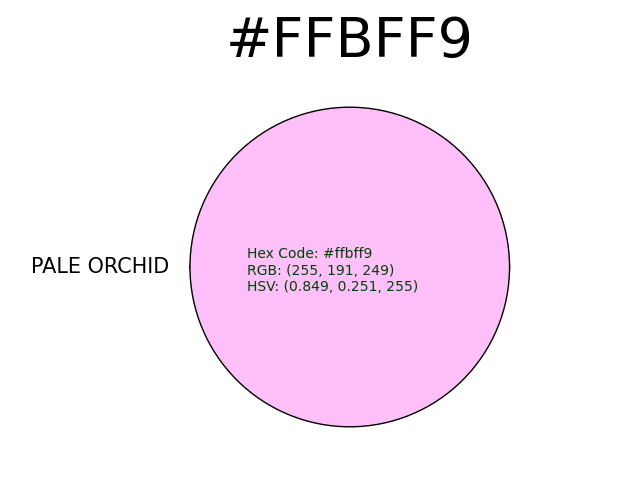
Example 1.2: Show a color.
We've had a lot of talk about colors so far, but we haven't even seen any colors yet! Let's solve that now, and do away with these lengthy print statements:
color.hex_code ='#ffbff9'

color.show_color()
Shows:
That said, the ColorController object is biased toward whatever you, the user, set it to be. If you explicitly set a name, then that will be the singular name of your object. Similarly, if you explicitly set a hex code, then that will be the value of your hex code. If you leave a leading # off of your hex code, then everything will still work, but that will be the hex code value. For example...
Example 1.3: Create a ColorController object using a hex code.
color = ColorController(hex_code='#990000')

color.show_color()
Shows:
![['crimson_red', 'stizza', 'ou_crimson_red', 'usc_cardinal']](https://pypi-camo.freetls.fastly.net/186b126ed3aff6a577eaac0088cae6c7d19f426c/68747470733a2f2f6769746875622e636f6d2f74616c2d7a2f54657874546f436f6c6f722f626c6f622f6d61696e2f436f6c6f72436f6e74726f6c6c65722f726561646d65706963732f6372696d736f6e5f7265642e504e473f7261773d74727565)
While:
color.hex_code = '990000'

color.show_color()
Shows very similar results:
![['crimson_red', 'stizza', 'ou_crimson_red', 'usc_cardinal']](https://pypi-camo.freetls.fastly.net/e204a35bfb189f0fd9a6013e7177ca6a4a414cef/68747470733a2f2f6769746875622e636f6d2f74616c2d7a2f54657874546f436f6c6f722f626c6f622f6d61696e2f436f6c6f72436f6e74726f6c6c65722f726561646d65706963732f6372696d736f6e5f726564322e504e473f7261773d74727565)
Example 1.4: Create a ColorController object using an RGB triplet.
You can also pass a 3-tuple whose values are each contained in range(0,256) to the rgb property. For example:
color = ColorController(rgb=(10, 255, 230))

color.show_color()
Shows:
![[bright_aqua]](https://pypi-camo.freetls.fastly.net/a1dd6c2b70b4e169e661148c7f06bb27eb450a56/68747470733a2f2f6769746875622e636f6d2f74616c2d7a2f54657874546f436f6c6f722f626c6f622f6d61696e2f436f6c6f72436f6e74726f6c6c65722f726561646d65706963732f6272696768745f617175612e504e473f7261773d74727565)
Example 1.5: Create a ColorController object using an HSV triplet, and print out its properties.
Lastly, you can also pass a 3-tuple whose first two values are a floating point number between 0 and 1 inclusive, and whose third value falls in range(0, 256):
color = ColorController(hsv=(0.25, 1, 255))

color.show_color()
Shows:
![[chartreuse]](https://pypi-camo.freetls.fastly.net/5c31bbed92f64d08f2290046288916395f08a8ed/68747470733a2f2f6769746875622e636f6d2f74616c2d7a2f54657874546f436f6c6f722f626c6f622f6d61696e2f436f6c6f72436f6e74726f6c6c65722f726561646d65706963732f636861727472657573652e504e473f7261773d74727565)
NOTE: While this is the HSV value format that comes included with the colorsys python standard library, it doesn't seem to be a very common format elsewhere. To match formats used in other locations, see the following functions:
def colorsys_hsv_to_hsv360(colorsys_hsv=tuple):
    """Takes an HSV triplet as provided by colorsys, and converts it to match the
    notation used in colornames.txt"""

def hsv360_to_hsvdistance(hsv360=tuple):
    """Takes an HSV triplet as provided by colorsys_hsv_to_hsv360(), and converts it to match the
    notation used in the function for calculating distance between colors."""
2. Modify a color using simple, convenient methods.
Example 2.1: Darken a color.
You can darken a color using the darken_color() method. For example:
from ColorController.ColorController import ColorController

color = ColorController(name='forest')

color.show_color()

color.darken_color()

color.show_color()
Will show the following in series:
![[forest]](https://pypi-camo.freetls.fastly.net/9f439fb6488e234959e9bbb5fc91c14cedb518a7/68747470733a2f2f6769746875622e636f6d2f74616c2d7a2f54657874546f436f6c6f722f626c6f622f6d61696e2f436f6c6f72436f6e74726f6c6c65722f726561646d65706963732f666f726573742e504e473f7261773d74727565)
![[hunter_green]](https://pypi-camo.freetls.fastly.net/70df54b19bb6500a501d2ec97a8cd54057974874/68747470733a2f2f6769746875622e636f6d2f74616c2d7a2f54657874546f436f6c6f722f626c6f622f6d61696e2f436f6c6f72436f6e74726f6c6c65722f726561646d65706963732f68756e7465725f677265656e2e504e473f7261773d74727565)
You can also pass in a darkening_value between zero and one, to set the percent darker you'd like to go. For instance:
color = ColorController(name='cocoa')

color.show_color()

color.darken_color(.3)

color.show_color()
Shows the following in series:
![[cocoa]](https://pypi-camo.freetls.fastly.net/7fd5f4f81f0e83eefd7140b2a4133e15fe43d7c7/68747470733a2f2f6769746875622e636f6d2f74616c2d7a2f54657874546f436f6c6f722f626c6f622f6d61696e2f436f6c6f72436f6e74726f6c6c65722f726561646d65706963732f636f636f612e504e473f7261773d74727565)
![[nutmeg]](https://pypi-camo.freetls.fastly.net/93be426eebc8f9c96b37b71764f04aa2f58148c4/68747470733a2f2f6769746875622e636f6d2f74616c2d7a2f54657874546f436f6c6f722f626c6f622f6d61696e2f436f6c6f72436f6e74726f6c6c65722f726561646d65706963732f6e75746d65672e504e473f7261773d74727565)
In the above example, note that our color object was first initiated by the name property,
meaning that there are lists of associated hex, rgb, and hsv values stored in their respective properties.
When we lighten the color, we have to select one index from these lists to operate on.
The default behavior is to operate on the first index. See the unlist() function in helpers.py.
Example 2.2: Lighten a color.
You can also pass in a lightening_value between zero and one, to set the percent lighter you'd like to go. For instance:
color = ColorController(hex_code='#6c3461')

color.show_color()

color.lighten_color(.5)

color.show_color()
Shows the following in series:
![[grape]](https://pypi-camo.freetls.fastly.net/a09fbd036fa0fcca94e6cd744f878d38db1eb68f/68747470733a2f2f6769746875622e636f6d2f74616c2d7a2f54657874546f436f6c6f722f626c6f622f6d61696e2f436f6c6f72436f6e74726f6c6c65722f726561646d65706963732f67726170652e504e473f7261773d74727565)
![[grayish_fuchsia]](https://pypi-camo.freetls.fastly.net/ee48cdc0403655eab737ebb85f0052953633b074/68747470733a2f2f6769746875622e636f6d2f74616c2d7a2f54657874546f436f6c6f722f626c6f622f6d61696e2f436f6c6f72436f6e74726f6c6c65722f726561646d65706963732f677261796973685f667563687369612e504e473f7261773d74727565)
Example 2.3: Brighten a color.
3. Invert a color.
Example:
from ColorController.conversions import invert_rgb
from ColorController.ColorController import ColorController


color = ColorController(hex_code='#9ffeb0')
color.show_color()

r, g, b = color.rgb
color.rgb = invert_rgb(r, g, b)
color.show_color()
Shows the following in series:
![[mint]](https://pypi-camo.freetls.fastly.net/9352276ed9eea7c45e61942393b50f94c0f9dac3/68747470733a2f2f6769746875622e636f6d2f74616c2d7a2f54657874546f436f6c6f722f626c6f622f6d61696e2f436f6c6f72436f6e74726f6c6c65722f726561646d65706963732f6d696e742e504e473f7261773d74727565)
![[deep_orchid]](https://pypi-camo.freetls.fastly.net/d5f8dc3599ec6af0efcba159c52e96f45c59d53c/68747470733a2f2f6769746875622e636f6d2f74616c2d7a2f54657874546f436f6c6f722f626c6f622f6d61696e2f436f6c6f72436f6e74726f6c6c65722f726561646d65706963732f646565705f6f72636869642e504e473f7261773d74727565)
4. Access a rich set of color values and color names (prepared by Martin Krzywinski), conveniently stored in a Pandas DataFrame.
Example:
from ColorController.ColorController import colors_df

print(colors_df.iloc[5000])
Outputs:
IDX                                                                  5000
NAME                                                    light_apple_green
rgb                                                                   rgb
R                                                                     220
G                                                                     231
B                                                                     139
hex                                                                   hex
HEX                                                               #DCE78B
hsv                                                                   hsv
h                                                                      67
s                                                                      40
v                                                                      91
xyz                                                                   xyz
X                                                                    0.63
Y                                                                    0.74
Z                                                                    0.35
lab                                                                   lab
L                                                                      89
A                                                                     -17
B                                                                      44
lch                                                                   lch
L                                                                      89
C                                                                      47
H                                                                     112
cmyk                                                                 cmyk
C                                                                       4
M                                                                       0
Y                                                                      36
K                                                                       9
NEIGHBOUR_STR           PMS586[775][226,229,132](3.6):hypnotic[4592][2...
NUM_NEIGHBOURS_MAXDE                                                    4
WORD_TAGS               [light, PMS586, hypnotic, jonquil, green, lime...
Name: 5000, dtype: object
Known Bugs:
- I don't know of any right now, but I'm sure they exist!
Ideas
- tint and shade methods instead of or in addition to lighten/darken?
- more unit tests
- module to mix colors
- this will require converting to LAB or another subtractive space, so more getter/setter methods
Resources:
- What is color?: https://www.crayola.com/for-educators/resources-landing/articles/color-what-is-color.aspx
- unofficial crayola colors: https://www.w3schools.com/colors/colors_crayola.asp
- color names database: http://mkweb.bcgsc.ca/colornames/
- interactive color code tool: https://www.hexcolortool.com/#3cec71
- NLTK Information extraction chapter: http://www.nltk.org/book/ch07.html
- colorsys source code: https://github.com/python/cpython/blob/3.9/Lib/colorsys.py
- webcolors source code: https://github.com/ubernostrum/webcolors/blob/trunk/src/webcolors.py
- Note: while I'm not using webcolors in this program, I'm looking at their hex conversion algorithms to better understand the concept and see how it gets implemented.
- explanation of calculating distance in hsv space: https://stackoverflow.com/questions/35113979/calculate-distance-between-colors-in-hsv-space
- Making colors lighter or darker: https://www.color-hex.com/blog/making-colors-lighter-or-darker-4
Release history Release notifications | RSS feed


Download files
Download the file for your platform. If you're not sure which to choose, learn more about installing packages.
Source Distribution
Built Distribution
Filter files by name, interpreter, ABI, and platform.
If you're not sure about the file name format, learn more about wheel file names.
Copy a direct link to the current filters
File details
Details for the file colorcontroller-0.1.5.tar.gz.
File metadata
- Download URL: colorcontroller-0.1.5.tar.gz
- Upload date:
- Size: 1.5 MB
- Tags: Source
- Uploaded using Trusted Publishing? No
- Uploaded via: poetry/1.1.12 CPython/3.9.4 Windows/10
File hashes
| Algorithm | Hash digest | |
|---|---|---|
| SHA256 |
b970ce389cd474880329759489448872c78edbeeaf4fa58a61c24024367710d3
|
|
| MD5 |
04d4e7bc8aa7c3f3a4fc60e73e4640f2
|
|
| BLAKE2b-256 |
36348ebe8fb0b79d3d88cb5523a4244d6886039d8eda65de19b98bd7c5241f7e
|
File details
Details for the file colorcontroller-0.1.5-py3-none-any.whl.
File metadata
- Download URL: colorcontroller-0.1.5-py3-none-any.whl
- Upload date:
- Size: 1.5 MB
- Tags: Python 3
- Uploaded using Trusted Publishing? No
- Uploaded via: poetry/1.1.12 CPython/3.9.4 Windows/10
File hashes
| Algorithm | Hash digest | |
|---|---|---|
| SHA256 |
56c70090462183bdddf2d35d0c6963a72344118ddcb6aacab31ca57d36ba28f5
|
|
| MD5 |
0b5a37fa3cd6b871dd2aa1585c53b4c4
|
|
| BLAKE2b-256 |
a5d1a1b5b4c5d6fbdcd349ce9a29e3b3439bcad3d2d959a600e66125cfa116e5
|






