
colordemo
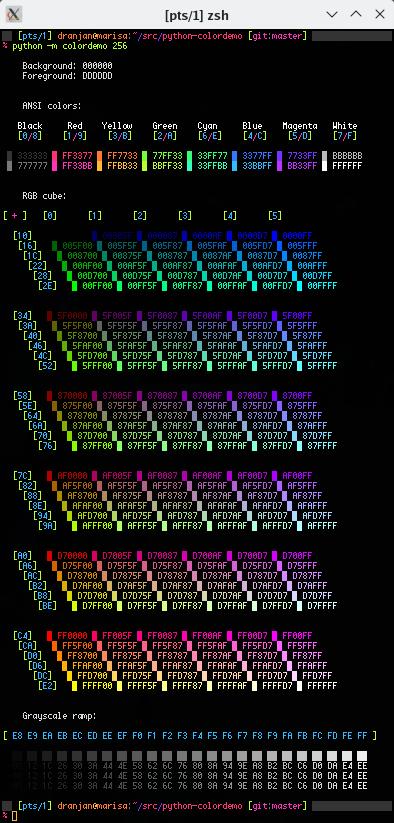
colordemo is a Python package implementing RGB queries on xterm-like
terminals. It includes a demo script for presenting terminal color
schemes, complete with RGB hex codes.
Quick start
There are many ways to run the demo script, and we will briefly describe
them here. Note that with any of the methods below, the colordemo
tool can accept command-line options. To see which options are available,
use --help with any of the methods, e.g.,
pipx run colordemo --help
Using pipx
With only an active internet connection and the pipx Python utility,
the script can be run directly without installation:
pipx run colordemo
Alternatively, it can also be installed explicitly and run that way:
pipx install colordemo
colordemo
Using pip
The package can also be installed and run as a normal Python package
using pip (preferably in a virtualenv environment):
pip install colordemo
colordemo

# Equivalent
python -m colordemo
From the source tree
Finally, the script can be run easily from the source tree directly. This package has no dependencies besides Python, so no actions are needed besides cloning the repository.
git clone 'git@github.com:dranjan/python-colordemo.git'
cd python-colordemo
python -m colordemo
Overview of functionality
colordemo allows you to programmatically determine the RGB values of
some terminals' ANSI colors (or more colors, if the terminal has them).
The functions must be run from the terminal whose colors you want to
determine, and with caveats if within a screen or tmux session (see
below for more on this). Not all terminal types are supported (see the
next section).
Terminal support
The fundamental requirement for a terminal to be supported by colordemo
is for it to support the xterm-like OSC ("Operating System Command") control
sequences, listed under "Operating System Commands" here:
https://invisible-island.net/xterm/ctlseqs/ctlseqs.html#h3-Operating-System-Commands
(Sometimes this support can be ascertained from the documentation of the terminal, but often you just need to try it.)
We call these terminals "xterm-like". If a terminal emulator doesn't
support those sequences, then it won't be supported here.
There may be other ways to obtain RGB values for these terminals, such
as parsing configuration files or perhaps parsing the output of
xrdb --query, but we have no plans to implement any of these.
The only way to add support for a currently unsupported terminal is to
patch the terminal with support for the OSC sequences.
There are too many terminals for us to test all of them, so the lists below are not exhaustive. If a terminal isn't mentioned in one of the following subsections, attempt at your own risk!
Fully supported terminals
- xterm
- urxvt
- VTE-based terminals, including:
- vte
- Terminal (XFCE)
- gnome-terminal
- terminator
- tilda
- (etc.)
- kitty
- alacritty
- wezterm
- ttyd
- (etc.)
Unsupported terminals
- Konsole-based terminals, which are buggy:
- Konsole
- yakuake
- (etc.)
- terminology
- st (unpatched)
- Linux basic TTY (text mode without X)
- (etc.)
Some terminals (like terminology) don't seem to allow their colors to be queried dynamically, so all RGB queries will fail, but the failure can be detected. The demo script will therefore be able to output a color table, but without RGB values.
Other terminals (like Konsole) seem to support the query codes but are extremely buggy, returning incorrect values and even segfaulting sometimes.
In other cases (like the basic TTY), colordemo will garble
the TTY and make it unreadable. (Try tput reset<ENTER> to restore it
to something usable.)
Note regarding screen and tmux
It generally doesn't make sense to query a terminal from inside a screen
or tmux session, since a single screen or tmux session can be attached
to multiple terminals. However, in the special case of being attached
to a single terminal, it is possible because tmux and screen provide
(different) methods to pass control sequences through to the attached
terminal. Of course, it makes no sense to try this if there are
multiple terminals attached, and you should expect crazy results if you
do. Thus, forwarding queries through screen or tmux is currently an
opt-in feature (see the screen_forward optional argument in
TerminalQueryContext.__init__ or the
--screen-forward/--tmux-forward command-line options).
This will fail inside a nested screen or tmux session.
(Not using the optional screen/tmux control-passthrough support, it's interesting to observe that screen and tmux emulate a 256-color terminal independently of the terminal(s) to which they are attached, which is very apparent if you run the script with 256-color output on a screen session attached to a terminal with 8- or 16-color terminfo (or with TERM set to such).)
Python API
For greater flexbility, the functionality of this package can also be accessed through its Python API. For example, this could be useful to create new color scheme demo scripts.
The primary interface is the context manager,
colordemo.TerminalQueryContext. The color queries must be performed
inside the context manager's context.
import colordemo

with colordemo.TerminalQueryContext() as tq:
    # Simplest method: get everything at once.
    # This provides a list of RGBAColor instances.
    colors = tq.get_all_indexed_colors()

    # Alternatively, you can query individual colors.
    n = tq.get_num_colors()
    colors = [tq.get_indexed_color(k) for k in range(n)]

    # The foreground and background colors need to
    # be queried separately:
    fg = tq.get_fg()
    bg = tq.get_bg()

# Color values are represented as instances of `RGBAColor`, which is
# a specialization of `namedtuple`.
(r, g, b, a) = fg

# Equivalent:
r, g, b, a = fg.r, fg.g, fg.b, fg.a

# Color components are floating-point numbers in the range [0, 1].
# To convert these to two-digit hex codes:
r_hex = '%02x' % (int(r * 0xffff) // 256)  # etc.
Credits
- dranjan: main implementation
- oblique: improved tmux support
- Xyne: much useful discussion and review
1 maintainer

Metadata
1 maintainer
Release files for colordemo 0.3.0
For a detailed explanation of source distributions (sdists) and built distributions (wheels), please see the package formats documentation.
Source distribution (sdist)
| File | Size | Uploaded | Provenance | |
|---|---|---|---|---|
| colordemo-0.3.0.tar.gz | 38.7 kB | Without provenance | Details |
Built distribution (wheel)
| File | Interpreter | ABI | Platform | Reset |
|---|---|---|---|---|
| colordemo-0.3.0-py3-none-any.whl | Python 3 | none | any | Details |
Total release size: 79.3 kB
Release files / colordemo-0.3.0.tar.gz
| Download URL | colordemo-0.3.0.tar.gz |
|---|---|
| Size | 38.7 kB |
| Tags | Source |
|
SHA-256 checksum How to use checksums |
5523a2c5f94f9a23eb7b335ee2e848a029e801c8b56b23ec7b66b0a67e5a9e42
|
|
BLAKE2b-256 checksum How to use checksums |
2ac0598d4b402c5163a5db54b97081b7168dc8b1f60890ce62efe4aab57eaae2
|
| Upload date | |
|
Uploaded using Trusted Publishing? What is trusted publishing? |
No |
| Uploaded via |
pdm/2.7.4 CPython/3.11.3
|
Release files / colordemo-0.3.0-py3-none-any.whl
| Download URL | colordemo-0.3.0-py3-none-any.whl |
|---|---|
| Size | 40.6 kB |
| Tags | Python 3 |
|
SHA-256 checksum How to use checksums |
f94e854fb46a7d0f8c45b11dbfbfb6a19c7d656eea97f28a7be6ee05b2321bc2
|
|
BLAKE2b-256 checksum How to use checksums |
b69c5f6a1080820f0da668bc292fc9b059ed1854b8b0e66f4ef3ccb93fa53706
|
| Upload date | |
|
Uploaded using Trusted Publishing? What is trusted publishing? |
No |
| Uploaded via |
pdm/2.7.4 CPython/3.11.3
|
Security for colordemo 0.3.0
Provenance
Provenance describes where a file came from. On PyPI, provenance is shared via attestations, which provide a verifiable record of the build or publishing details. View details, limitations and caveats.
No provenance found
None of the files in this release were uploaded with provenance metadata.
A note on package security
PyPI is a repository for distributing packages, not a service for auditing them. While third-party security researchers and our staff do their best to detect and remove malicious packages, PyPI cannot guarantee the quality, security or suitability of any given package.
To learn more about protecting yourself from malicious actors, visit our package security documentation.














