
Colorize Different.

Project description
coloredstrings






Do more. Type less. Colorize different.
coloredstrings is a small utility for expressive terminal colors and text styles. It exposes a fluent, chainable API for styling strings - similar to the yachalk package, and can act as a drop-in replacement.
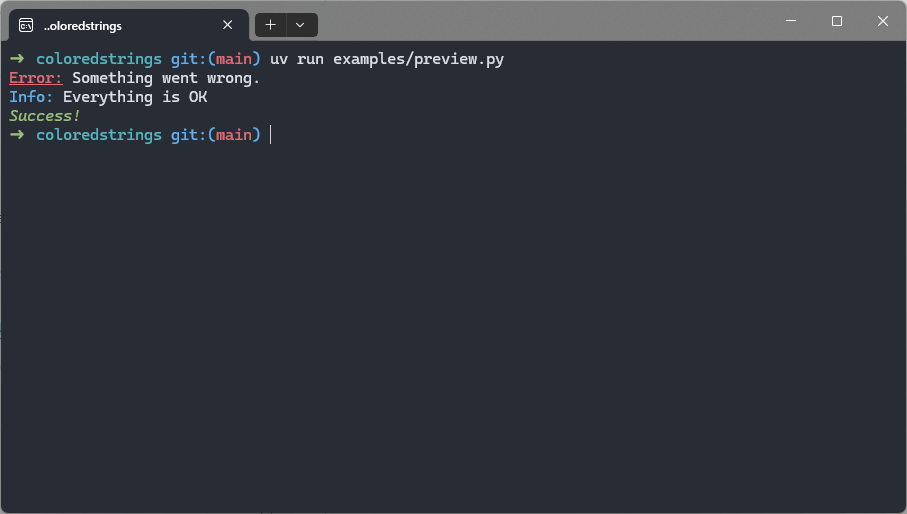
Example:
from coloredstrings import style

print(style.bold.underline.red("Error:"), "Something went wrong.")
print(style.blue.bold("Info:"), "Everything is OK")
print(style.italic.green("Success!"))
Features🔥
- No dependencies
- Composing styles in a chainable way
- Nested colors and no nested styling bug
NO_COLOR&FORCE_COLORsupport- Support for 16-color, 256-color, and 24-bit (truecolor / RGB / hex) modes
- Auto-detection of terminal color capabilities
- Automatically fall back to the nearest supported color if the requested color isn't supported
- Friendly auto-complete API
- Optional ability to call style methods on strings directly (with some black magic help)
Installation
Stable release from PyPI:
pip install coloredstrings
Latest development version:
pip install git+https://github.com/samedit66/coloredstrings.git
"Patched" version
Experimental feature that patches str so you can call style methods on literals (e.g. "text".red). Not enabled by default; CPython-only.
pip install "coloredstrings[patched]"
Quick start
Run the bundled demo:
python -m coloredstrings
Examples using the style object:
from coloredstrings import style

print(style.bold.underline.red("Error:"), "Something went wrong.")
print(style.blue.bold("Info:"), "Everything is OK")
print(style.italic.green("Success!"))

# style(...) accepts multiple arguments and a `sep` argument like `print`:
print(style.green("That's", "great!"))
print(style.blue(1, 3.14, True, sep=", "))

# Nesting and combining styles:
print(style.red(f"Hello {style.underline.on.blue('world')}!"))
print(
    style.green(
        "I am a green line " +
        style.blue.underline.bold("with a blue substring") +
        " that becomes green again!"
    )
)

# 24-bit RGB / hex and 256-color:
print(style.rgb(123, 45, 200)("custom"))
print(style.hex("#aabbcc")("hex is also supported"))
print(style.color256(37)("256-color example"))

# Define theme helpers:
error = style.bold.red
warning = style.hex("#FFA500")

print(error("Error!"))
print(warning("Warning!"))
Usage
All you need to use (mostly) is the global style object - an instance of the StyleBuilder class. It provides a chainable API that looks like this:
style.red.on.blue("Hello", "world!")
Put simply: you name the style pieces dot after dot and StyleBuilder handles the rest. The final pair of parentheses is a call that styles the given strings (or any sequence of values). Arguments are converted to strings and joined using an optional sep argument (which defaults to a single space):
style.<style1>.[<style2>...](v1, [v2...], sep=' ')
style object
style is an immutable builder object used to construct composite styles and themes.
Because style is immutable, creating a new style from an existing one doesn't modify the original. This avoids accidental cross-contamination of styles presented in yachalk:
from yachalk import chalk
from coloredstrings import style

# With yachalk
s1 = chalk.italic
s2 = s1.red

print(s1("Chalk, am I red?"))
print(s2("Yes, you are!"))

print("-" * 8)

# With coloredstrings
s3 = style.italic
s4 = s3.red

print(s3("Style, am I still red?"))
print(s4("Sure not, but I am!"))
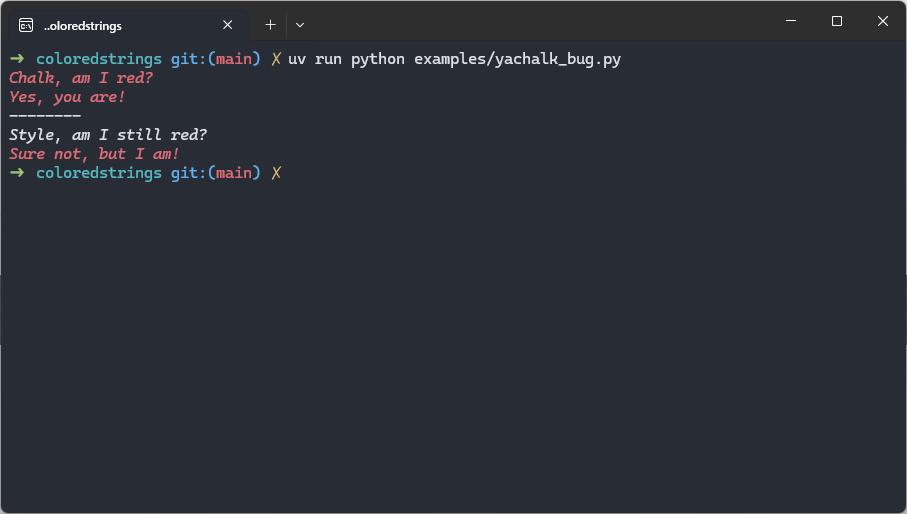
In this example, s1/s2 and s3/s4 behave different: s1/s2 are actually the same style, while s3/s4 are truly independent styles.
Chaining and gotchas
coloredstrings - like yachalk and several other libraries - is built around chaining styles. Unlike some libraries, it does not provide separate background helpers such as bg_blue. Instead, use the on helper to mark that the next color in the chain should be a background color. This gives you explicit control over whether the color you add applies to the foreground or the background.
Example:
from coloredstrings import style

# Red text on a blue background
print(style.red.on.blue("Hey!"))

# Don't write code like this - it's hard to read!
# It's equivalent to `style.white.on.black(...)` but much less clear
print(style.white.on.on.black("Do not write code like that."))

# Green background with default foreground
print(style.on.green("Text on a green background"))
A few important gotchas:
-
If you chain multiple foreground colors, only the last foreground color takes effect:
print(style.red.green.blue("Blue text")) # result: blue foreground
-
onaffects only the next color in the chain. For example:print(style.on.magenta.cyan("Cyan text on magenta background"))
Here
magentabecomes the background (because ofon) andcyanis the foreground. -
Repeated calls to
onwithout an intervening color are redundant and hurt readability; prefer the simpler, clearer form.
Supported color modes
coloredstrings tries its best to detect terminal color capabilities automatically (see coloredstrings.color_support.detect_color_support()), but detection can occasionally miss. You can explicitly set the color mode using the pseudo-style method color_mode(mode).
mode is a member of the coloredstrings.ColorMode enum with these values:
ColorMode.NO_COLORS- disable styling; no escape sequences are emittedColorMode.ANSI_16- 16 basic ANSI colorsColorMode.EXTENDED_256- 256 color modeColorMode.TRUE_COLOR- 24-bit RGB / truecolor support
Example:
from coloredstrings import style, ColorMode

# Force no colors
just_text = style.color_mode(ColorMode.NO_COLORS)
print(just_text.red("It isn't red"))

# Force truecolor
rgb_default = style.color_mode(ColorMode.TRUE_COLOR)
print(rgb_default.hex("#ca7e8d")("Hi!"))
FORCE_COLOR and NO_COLOR
coloredstrings respects common environment conventions:
-
NO_COLOR: if this environment variable is present (with any value), coloredstrings will avoid emitting color escape sequences. This is the community-standard way for users to opt out of colored output. -
FORCE_COLOR: if set, this variable can be used to force color output even when detection would otherwise disable it (for example, when output is being piped). Following values are supported:FORCE_COLOR<=0- same asColorMode.NO_COLORorNO_COLORenvironment variableFORCE_COLOR=1- same asColorMode.ANSI_16FORCE_COLOR=2- same asColorMode.EXTENDED_256FORCE_COLOR>=3- same asColorMode.TRUE_COLOR
You can still programmatically override detection by calling style.color_mode(...) as shown above.
Fallback behavior
Many terminals do not support full truecolor (ColorMode.TRUE_COLOR). When a requested color cannot be represented in the current color mode, coloredstrings automatically maps the requested color into the best available color space and emits the closest supported color. In short: you will still get colored output, though the result may be an approximation of the original color.
Styles
Attributes
bold- Make the text bold (increases weight). Widely supported.dim(aliases:faint,dark) - Render the text with lower intensity / brightness. Support varies.italic- Render text in italic. Support varies across terminals.underline- Draw a horizontal line below the text. Support varies.double_underline- Draw a double underline under the text. Not widely supported.overline- Draw a horizontal line above the text. Not widely supported.inverse(alias:reverse) - Swap foreground and background colors (invert colors).hidden(alias:concealed) - Do not display the text (it is still present in the output stream).strike(alias:strikethrough) - Draw a horizontal line through the center of the text. Support varies.blink(alias:slow_blink) - Make the text blink. Often unsupported in modern terminals; avoid depending on it.rapid_blink- Faster blink. Often unsupported in modern terminals; avoid depending on it.framed- Draw a frame around the text. Rarely supported.encircle(alias:circle) - Draw a circle/encircle the text. Rarely supported.
Note on attributes: Most attributes stack (they combine instead of overriding). Terminal support for many of these attributes is spotty - prefer basic attributes (
bold,underline,inverse) for portability.
Colors (both foreground and background)
blackredgreenyellowbluemagentacyanwhitebright_black(aliases:gray,grey)bright_redbright_greenbright_yellowbright_bluebright_magentabright_cyanbright_whitecolor256(index)- 256 colorrgb(r, g, b),hex(color_code)- 24-bit RGB color
Experimental patching of str
[!WARNING] Patching builtins is controversial and can feel un-Pythonic. This feature is intentionally opt-in and scoped; it is not enabled by default.
pip install "coloredstrings[patched]"
This package offers an optional, experimental feature that temporarily adds style methods to Python's built-in str type so you can write colorized literals like "error:".red.
The patching feature is provided as a context manager and as a decorator. Both variants temporarily add style methods to str for the duration of the context or the decorated function. Methods are removed when the context exits or after the decorated function returns.
Example using the context manager:
from coloredstrings.patch import colored_strings

with colored_strings():
    # style methods (like .red, .green.bold, etc.) are available on all string literals here
    print("error:".red, "something went wrong")
Example using the decorator:
from coloredstrings.patch import colored_strings

@colored_strings
def hello():
    # style methods are available only inside this function
    print("Hello, World!".green.bold.on_white)
Implementation notes & caveats
- Relies on
forbiddenfruitthat touches CPython internals - CPython-only; may not work on PyPy, Jython, etc. - Patching is temporary and scoped (not global), lowering the risk of surprising behavior in larger apps.
- Because it alters builtins while active, don’t enable it inside libraries or long-lived frameworks - use
style. - Best for REPLs, short scripts, demos, or developer-facing tooling where ergonomic syntax matters.
- The patched API differs from
style: there’s noonmethod - background helpers are provided as mirrored methods (e.g.on_green,on_rgb, etc.).
Contributing
I’d love your help to make coloredstrings even better!
- 💡 Got an idea or found a bug? Open an issue and let’s talk about it
- 🔧 Want to improve the code? PRs are always welcome! Please include tests for any new behavior.
- ♻️ Try to keep changes backward-compatible where possible
- 🎨 Adding new styles or helpers? Don’t forget to update the README and include tests to ensure ANSI - sequences open and close correctly
- ⭐ If you like this project, consider giving it a star - it really helps others discover it!
Release history Release notifications | RSS feed


Download files
Download the file for your platform. If you're not sure which to choose, learn more about installing packages.
Source Distribution
Built Distribution
Filter files by name, interpreter, ABI, and platform.
If you're not sure about the file name format, learn more about wheel file names.
Copy a direct link to the current filters
File details
Details for the file coloredstrings-2.1.0.tar.gz.
File metadata
- Download URL: coloredstrings-2.1.0.tar.gz
- Upload date:
- Size: 18.3 kB
- Tags: Source
- Uploaded using Trusted Publishing? No
- Uploaded via: uv/0.8.0
File hashes
| Algorithm | Hash digest | |
|---|---|---|
| SHA256 |
ed5fa892336f9a3ea83ac7ce7bbdfade6eb95665b34177fb5ba4c667827b6f8e
|
|
| MD5 |
67a181a4605cf164bfa5f717c9949ece
|
|
| BLAKE2b-256 |
36bb36afed62a7e1e9d624c40e3538da757766f0eca098c6a9332263139fccd2
|
File details
Details for the file coloredstrings-2.1.0-py3-none-any.whl.
File metadata
- Download URL: coloredstrings-2.1.0-py3-none-any.whl
- Upload date:
- Size: 21.3 kB
- Tags: Python 3
- Uploaded using Trusted Publishing? No
- Uploaded via: uv/0.8.0
File hashes
| Algorithm | Hash digest | |
|---|---|---|
| SHA256 |
0dd9a45d54caa476fa2d6ba93a6252d2380928ff5653dfd63effdd36459587e3
|
|
| MD5 |
93fb64e70aea1c34a0bb1a19935f873a
|
|
| BLAKE2b-256 |
808552ef19168ccc43b2c151cdae16f345255c6125eb8bd5b1481e13830b20f5
|






