
Colorprt
It's a simple package for you to customize the console printing color.
pypi: https://pypi.org/project/colorprt/
ScreenShots
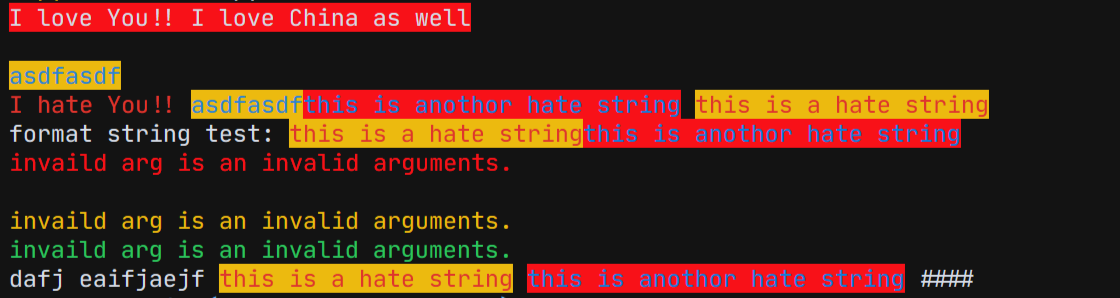
New Features
We add some default color config in our package.
from colorprt.default import warn_color, success_color, error_color

warn_color.print("Print a warn message")
success_color.print("Print a success message")
error_color.print("Print an error message")
We found that some people use this package on linux server, so that there is no auto completions. It will trouble users.
Therefore, we add a feature that
You don't need to type: mode=; foreground=; background=
just call functions or class like this:
In old versions:
from colorprt import colorprt, Back, Fore

# CAUTION: Do not use this after version: 3.0.0
colorprt("Hello World", backgound=Back.RED)
Use new features:
from colorprt import colorprt, Back, Fore

colorprt("Hello World", Back.RED, Fore.YELLOW)
Usage
Installation
pip install colorprt
Detailed Documentation
Function colorprt is a print funtion extention. You can customize the printing style.
from colorprt import colorprt, Back, Fore

hello_else = "Hello Michael"
colorprt("Hello World",hello_else,  Back.RED, Fore.BLUE end="x100 times\n")

- Back stands for background;
- Fore stands for foreground;
- Mode stands for printing mode. ( font style like: underline, bold, flash, reverse )
Also, you can use ColorprtConfig class to set colored strings.
from colorprt import ColorprtConfig, Mode, Back, Fore

pycolor_config = ColorprtConfig(Mode.BOLD, Back.DEFAULT, Fore.RED)

# You can use ColorprtConfig to set a color string configuration

colored_formatted_str = pycolor_config("I love You!!")

print(colored_formatted_str)

# or just use print method

pycolor_config.print("I love you!!", end="x10086\n")
If you just want the ansi colored formatted strings, you can use colorstr class.
from colorprt import colorstr, Mode, Back, Fore, ColorprtConfig

hate_print_config = ColorprtConfig(Mode.UNDER_LINE, Back.DEFAULT, Fore.YELLOW)
print(colorstr("I love You!!", Mode.BOLD, Back.DEFAULT, Fore.RED)
      + colorstr("I hate you", hate_print_config))
if you use str() to force change to string. You will get
>>> str(colorstr("I love You!!", Mode.BOLD, Back.DEFAULT, Fore.RED)
      + colorstr("I hate you", hate_print_config))
>>> '\x1b[0m\x1b[1;31mI love You!!\x1b[0m\x1b[4;33mI hate you\x1b[0m\x1b[0m'
from colorprt import colorstr, Mode, Back, Fore, ColorprtConfig

hate_print_config = ColorprtConfig(Mode.UNDER_LINE, Back.DEFAULT, Fore.YELLOW)

output = str(colorstr('I hate You', hate_print_config))
1 maintainer

Metadata
1 maintainer
Release files for colorprt 3.0.2
For a detailed explanation of source distributions (sdists) and built distributions (wheels), please see the package formats documentation.
Built distribution (wheel)
| File | Interpreter | ABI | Platform | Reset |
|---|---|---|---|---|
| colorprt-3.0.2-py3-none-any.whl | Python 3 | none | any | Details |
Release files / colorprt-3.0.2-py3-none-any.whl
| Download URL | colorprt-3.0.2-py3-none-any.whl |
|---|---|
| Size | 5.4 kB |
| Tags | Python 3 |
|
SHA-256 checksum How to use checksums |
ef6c601abfb1503a15a62777fd0d6deaf46c38bb0a455b268ff87ccca8350656
|
|
BLAKE2b-256 checksum How to use checksums |
182ba39abed540e282d1b41bdce51f886f8a349bc53a26404c7107dedd6cb313
|
| Upload date | |
|
Uploaded using Trusted Publishing? What is trusted publishing? |
No |
| Uploaded via |
twine/4.0.2 CPython/3.9.12
|














