
Backlight color for command line interface!

Project description
Colors-cli
The colors-cli help you for backlight and formatting your cli text
Usage:
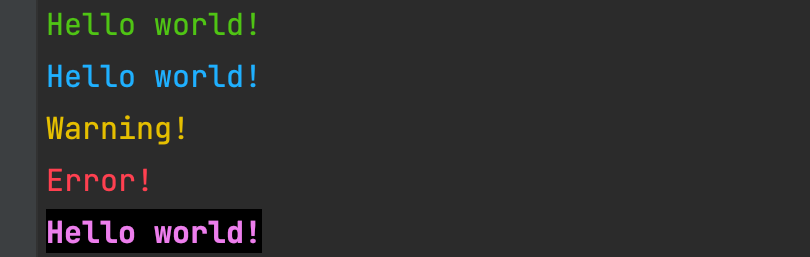
from colors_cli import Clrs

print(Clrs.green("Hello world!"))  # Output green text in cli

print(Clrs.blue("Hello world!"))  # Output blue text in cli

print(Clrs.warn("Warning!"))  # Output yellow color

print(Clrs.fail("Error!"))  # Output red color

print(Clrs.bold(Clrs.violet(Clrs.bckg("Hello world!"))))  # Output bold and violet with background text
Output
All methods:
green(string) -> str- Return green stringblue(string) -> str- Return blue stringcyan(string) -> str- Return cyan stringwarn(string) -> str- Return yellow stringfail(string) -> str- Return fail stringviolet(string) -> str- Return violet stringbold(string) -> str- Return bold stringunderline(string) -> str- Return underline stringbckg(string) -> str- Return string with background
All fields:
ENDC- For end colorREDBLUECYANGREENVIOLETYELLOWBOLDUNDERLINEBACKGROUND
Enjoy using! :)


Download files
Download the file for your platform. If you're not sure which to choose, learn more about installing packages.
Source Distribution
colors_cli-1.23.tar.gz
(1.9 kB
view details)
File details
Details for the file colors_cli-1.23.tar.gz.
File metadata
- Download URL: colors_cli-1.23.tar.gz
- Upload date:
- Size: 1.9 kB
- Tags: Source
- Uploaded using Trusted Publishing? No
- Uploaded via: twine/4.0.2 CPython/3.10.2
File hashes
| Algorithm | Hash digest | |
|---|---|---|
| SHA256 |
c8f6f2af37cc126f67c94086fad15f82be1d367ee10c004014f7af2806157b93
|
|
| MD5 |
82259ede89ca87c21d4842f8de584563
|
|
| BLAKE2b-256 |
829d4abfbbfef253e8163854d921f4d70c2f7aeb4e139df6bede490028942798
|






