

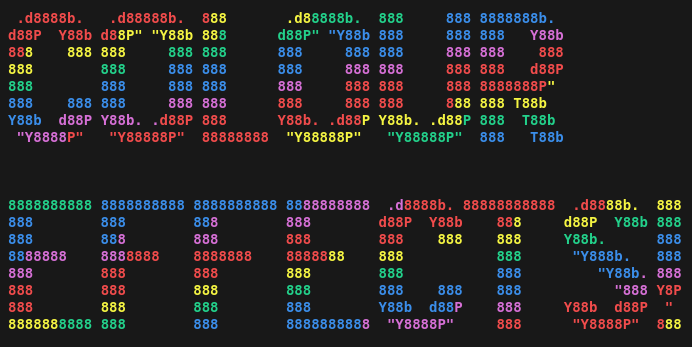
This a project to develop a Python PyPI package that not just handles colour text output but can also apply colour effects such as gradients to your text.
Introduction
This package uses ANSI escape sequence select graphics renditions in order to apply colour and style to text and backgrounds. How is this package any different to the others?
- 8 bit codes as well as 4 bit codes
- there is an ever expanding library of effects that can be applied to larger blocks of texts.
- super slick and simple interface
N.B.
Different terminals render colours differently, some terminals don't even render ANSI escape sequences at all, leading to a big mess of text. Playing around with ANSI escape codes is just that, it is playing.
Some basic colours used sparingly to highlight different logging levels is fine but you can't get carried away with colours in serious projects.
Getting started
First, there 4 bit and 8 bit codes available, import from colour_fx.four_bit and colour_fx.eight_bit respectively. However, both 8 bit and 4 bit codes can be used together without issue.
N.B.
The objects in these modules only provide the the value to be used inside an ANSI escape sequence. They will need to be compiled into an ANSI escape sequence using compile_ansi_code which can be imported with from colour_fx import compile_ansi_code.
4 bit example
from colour_fx import compile_ansi_code
from colour_fx.four_bit import Colour, Style

blinking_red_on_yellow = compile_ansi_code(
    # add as many ANSI values as you like and receive a single ANSI
    # escape sequence to handle all effects
    Colour.RED,
    Colour.YELLOW.bright_background,
    Style.BLINK
)

# an empty call to compile_ansi_code() gives the reset ANSI escape
# sequence which resets the way text is rendered
RESET = compile_ansi_code()

print(F"HELLO, {blinking_red_on_yellow}WORLD{RESET}!")

8 bit examples
N.B.
8 bit colours are much more unpredictable in appearance between different terminals than 4 bit colours are.
SimpleColour
from colour_fx import compile_ansi_code
from colour_fx.eight_bit import SimpleColour

red_on_yellow = compile_ansi_code(
    # add as many ANSI values as you like and receive a single ANSI
    # escape sequence to handle all effects
    SimpleColour.RED,
    SimpleColour.YELLOW.bright_background,
)

# an empty call to compile_ansi_code() gives the reset ANSI escape
# sequence which resets the way text is rendered
RESET = compile_ansi_code()

print(F"HELLO, {red_on_yellow}WORLD{RESET}!")
output

Grey
from colour_fx import compile_ansi_code
from colour_fx.eight_bit import Grey

# Grey has 24 different shades available, here we use 12 to apply a
# gradient to the text "HELLO, WORLD!"
grey_array = [
    Grey.AA,
    Grey.AC,
    Grey.AE,
    Grey.BB,
    Grey.BD,
    Grey.BF,
    Grey.CA,
    Grey.CC,
    Grey.CE,
    Grey.DB,
    Grey.DD,
    Grey.DF,
]

# converting shades in grey_array to background colours and
# reversing order
grey_back = [grey.background for grey in reversed(grey_array)]

# Compiling the values in grey_array and grey_back into codes
g = [
    compile_ansi_code(
        grey_array[idx],
        grey_back[idx],
    )
    for idx in range(len(grey_array))
]

# an empty call to compile_ansi_code() gives the reset ANSI escape
# sequence which resets the way text is rendered
RESET = compile_ansi_code()

# Accessing the individual ANSI escape codes in the list of codes to
# create a gradient
print(
    F"{g[0]}H{g[1]}E{g[2]}L{g[3]}L{g[4]}O{g[5]},"
    F"{g[6]} W{g[7]}O{g[8]}R{g[9]}L{g[10]}D{g[11]}!{RESET}"
)
output

RGB
from colour_fx import compile_ansi_code
from colour_fx.eight_bit import RGB


# RGB is different to the rest in that you need to pass values in and
# initialise the object rather than treating as an Enum
# RGB values should be an integer between 0 and 5 inclusive
spectrum = [
    RGB(5, 0, 0).foreground,
    RGB(3, 2, 0).foreground,
    RGB(1, 4, 0).foreground,
    RGB(0, 4, 1).foreground,
    RGB(0, 2, 3).foreground,
    RGB(0, 0, 5).foreground,
]

# compiling spectrum into ANSI escape sequences while adding a
# white background
s = [
    compile_ansi_code(spec, RGB(5, 5, 5).background)
    for spec in spectrum
]

# an empty call to compile_ansi_code() gives the reset ANSI escape
# sequence which resets the way text is rendered
RESET = compile_ansi_code()

# Accessing individual elements of s allows a gradient
print(F"{s[0]}HE{s[1]}LL{s[2]}O,{s[3]} WO{s[4]}RL{s[5]}D!{RESET}")
output

Getting advanced
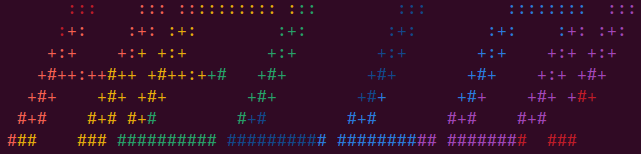
Now this is what inspired the creation of this package, being able to apply gradients to large blocks of text.
gradients
from colour_fx.four_bit import Colour
from colour_fx.effects.gradients import create_vertical_gradient_field
from colour_fx.effects import apply_ansi_field

rainbow_vals = [
    [Colour.RED],
    [Colour.RED.bright],
    [Colour.YELLOW.bright],
    [Colour.GREEN],
    [Colour.BLUE],
    [Colour.BLUE.bright],
    [Colour.MAGENTA],
]

text_to_render = (
    "       :::    ::: :::::::::: :::        :::        ::::::::  ::: \n"
    "      :+:    :+: :+:        :+:        :+:       :+:    :+: :+:  \n"
    "     +:+    +:+ +:+        +:+        +:+       +:+    +:+ +:+   \n"
    "    +#++:++#++ +#++:++#   +#+        +#+       +#+    +:+ +#+    \n"
    "   +#+    +#+ +#+        +#+        +#+       +#+    +#+ +#+     \n"
    "  #+#    #+# #+#        #+#        #+#       #+#    #+#          \n"
    " ###    ### ########## ########## ########## ########  ###       \n"
)

output_field = create_vertical_gradient_field(
    template=text_to_render,
    ansi_vals=rainbow_vals,
    indent=3,
    step=1,
)

output_text = apply_ansi_field(
    text=text_to_render,
    field=output_field
)

print(output_text)
output
Working on this?
Don't use Windows, install Python 3.9, then use source ./tooling && venv-setup to get yourself a venv set up with Python 3.9 (our lowest supported Python version)
Use command lint-cfx to lint work, and command test-cfx to test work.
Use a branch in your name to do feature work, then submit a pull request.
1 maintainer

Metadata
1 maintainer
Release files for colour-fx 2.0.0
For a detailed explanation of source distributions (sdists) and built distributions (wheels), please see the package formats documentation.
Source distribution (sdist)
| File | Size | Uploaded | |
|---|---|---|---|
| colour_fx-2.0.0.tar.gz | 444.8 kB | Details |
Built distribution (wheel)
| File | Interpreter | ABI | Platform | Reset |
|---|---|---|---|---|
| colour_fx-2.0.0-py3-none-any.whl | Python 3 | none | any | Details |
Total release size: 454.7 kB
Release files / colour_fx-2.0.0.tar.gz
| Download URL | colour_fx-2.0.0.tar.gz |
|---|---|
| Size | 444.8 kB |
| Tags | Source |
|
SHA-256 checksum How to use checksums |
69b2605f1d95b75b1a08a31a9a1735787fc4e9dd2992378d52654602306405a0
|
|
BLAKE2b-256 checksum How to use checksums |
6a80b145b7b3ec4e2c7d15e736c24a20abb433b48a6f6a4972b698d55d5aead5
|
| Upload date | |
|
Uploaded using Trusted Publishing? What is trusted publishing? |
No |
| Uploaded via |
twine/5.1.1 CPython/3.9.20
|
Release files / colour_fx-2.0.0-py3-none-any.whl
| Download URL | colour_fx-2.0.0-py3-none-any.whl |
|---|---|
| Size | 9.9 kB |
| Tags | Python 3 |
|
SHA-256 checksum How to use checksums |
459c76b1818535d62eb0ab265d9d3946b9c96d1471c26d87d0a050cf2eb3cb4e
|
|
BLAKE2b-256 checksum How to use checksums |
c506d0d103af5fead6bbfadcc0e4020302b8b1a6fb41fcfce8bd76af26345b46
|
| Upload date | |
|
Uploaded using Trusted Publishing? What is trusted publishing? |
No |
| Uploaded via |
twine/5.1.1 CPython/3.9.20
|














