
Colvert




Table of Contents
THIS PROJECT IS IN EARLY DEVELOPMENT
colvert is a tool for fast data exploration and visualization. Running on your machine you can explore large datasets using SQL an visualize them. AI generation of SQL queries is also supported.
colvert is a Frontend for DuckDB a fast and lightweight in-memory database designed for analytical queries. It's design to be a simple and easy to use tool for data analysis and visualization.
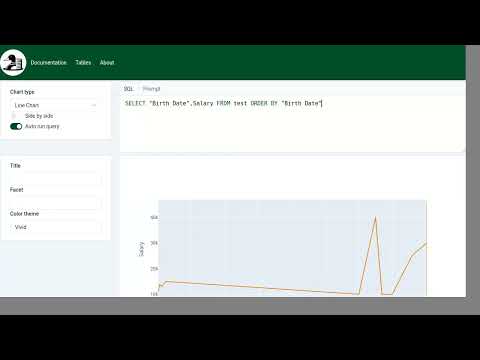
It's a web frontend running on top of DuckDB. It's support SQL queries and visualization using Plotly. Even if it's a web frontend it's designed to be used locally on your machine like a Jupyter notebook.
It's support loading data from CSV, Parquet, JSON files and directly from Hugging Face.
Using LiteLLM for AI support allow usage of multiple models like OpenAI, Anthropic, Mistral and more.


Charts
Line

Pie

Maps

Installation
We recommend installing colvert using pipx or uvx:
pipx install colvert
Pipx is a tool to install Python applications in isolated environments. It's a great way to install Python applications without cluttering your system Python environment.
Usage
colvert open samples/test.csv
This will detect the type of the file and open it in a new browser tab.
See the video below to see the tool in action:
Documentation
Once colvert is installed, you can access the documentation from the web interface. You can also access the documentation in the documentation folder.
License
colvert is distributed under the terms of the Apache 2.0 license.
FAQ
What does Colvert mean?
Colvert is the french name for the Mallard Duck. It's a reference to DuckDB the database engine used by Colvert and the fact the author is French and born in the region of France where Mallard Duck are important.
1 maintainer

Metadata
1 maintainer
Release files for colvert 0.3.0
For a detailed explanation of source distributions (sdists) and built distributions (wheels), please see the package formats documentation.
Source distribution (sdist)
| File | Size | Uploaded | |
|---|---|---|---|
| colvert-0.3.0.tar.gz | 3.1 MB | Details |
Built distribution (wheel)
| File | Interpreter | ABI | Platform | Reset |
|---|---|---|---|---|
| colvert-0.3.0-py3-none-any.whl | Python 3 | none | any | Details |
Total release size: 5.6 MB
Release files / colvert-0.3.0.tar.gz
| Download URL | colvert-0.3.0.tar.gz |
|---|---|
| Size | 3.1 MB |
| Tags | Source |
|
SHA-256 checksum How to use checksums |
762997e01397a6971262aaf9dfc3c6bd4396e7f34161688bbd2be4bb4b54c086
|
|
BLAKE2b-256 checksum How to use checksums |
5a82de39155e5623932f60b73d56a7c522b293002f323c83dd3ea635dc83cb5c
|
| Upload date | |
|
Uploaded using Trusted Publishing? What is trusted publishing? |
Yes |
| Uploaded via |
twine/6.0.1 CPython/3.12.8
|
Provenance
Provenance describes where a file came from. On PyPI, provenance is shared via attestations, which provide a verifiable record of the build or publishing details. View details, limitations and caveats.


PyPI Publish Attestation
PyPI verified that this artifact, at this checksum, originated from the publisher listed below.
Signed by GitHub Actions, verified by PyPI on Jan 4, 2025.
Transparency logRelease files / colvert-0.3.0-py3-none-any.whl
| Download URL | colvert-0.3.0-py3-none-any.whl |
|---|---|
| Size | 2.6 MB |
| Tags | Python 3 |
|
SHA-256 checksum How to use checksums |
83539d60af166231c22525da9355eb3495dfb7b621a59bbd53c2b2eb68f7142c
|
|
BLAKE2b-256 checksum How to use checksums |
9af6c43732938168332238793e1741c01295f738ddde4b2bf264e184f921f158
|
| Upload date | |
|
Uploaded using Trusted Publishing? What is trusted publishing? |
Yes |
| Uploaded via |
twine/6.0.1 CPython/3.12.8
|
Provenance
Provenance describes where a file came from. On PyPI, provenance is shared via attestations, which provide a verifiable record of the build or publishing details. View details, limitations and caveats.
PyPI Publish Attestation
PyPI verified that this artifact, at this checksum, originated from the publisher listed below.
Signed by GitHub Actions, verified by PyPI on Jan 4, 2025.
Transparency log













