
A local model & workflow dependency manager for ComfyUI
Verified details
These details have been verified by PyPIProject links
GitHub Statistics
Maintainers

Project description

A local-first dependency manager for your ComfyUI models and workflows — see what's used, what's missing, and what's safe to delete.



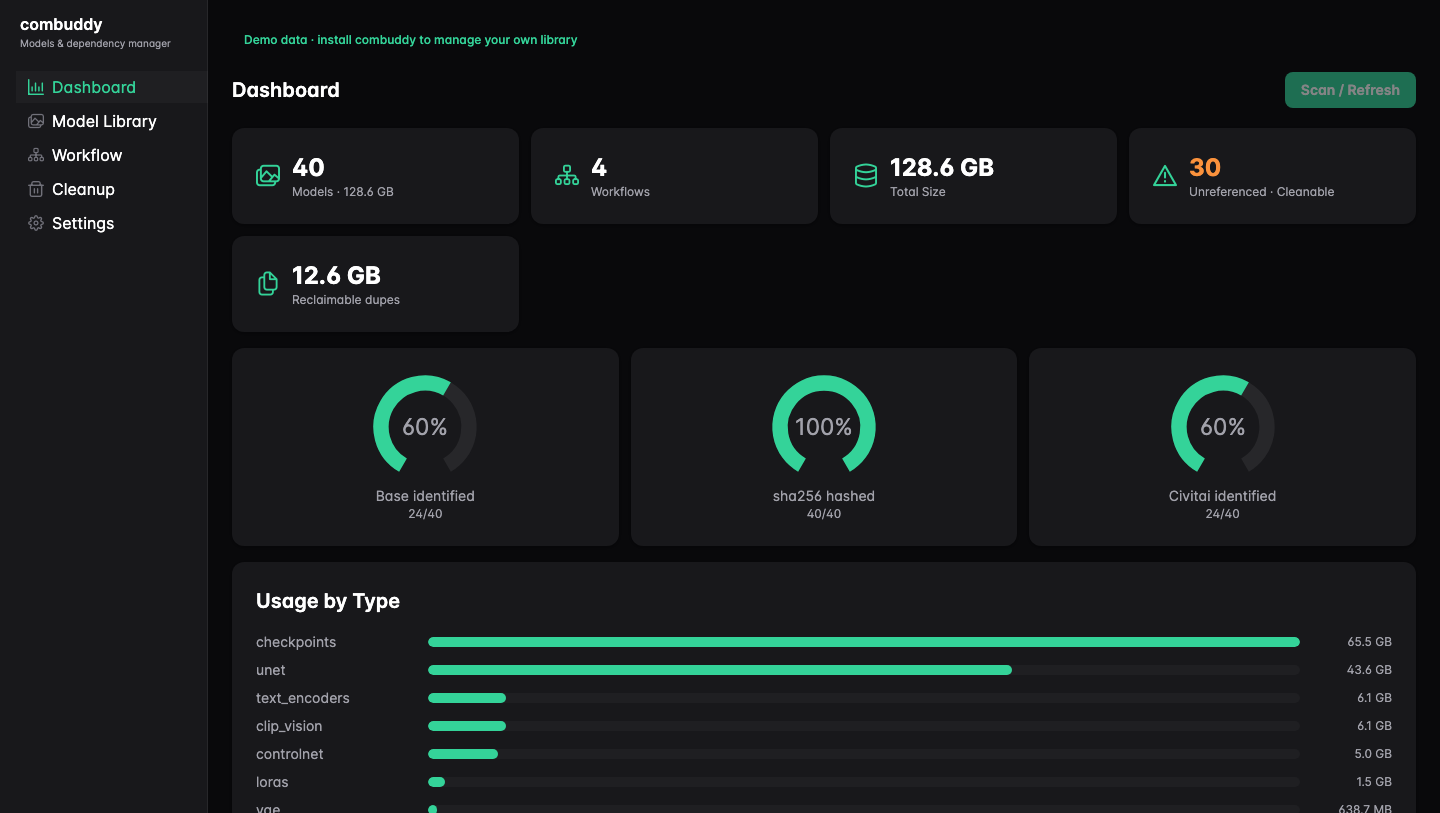
combuddy indexes your local ComfyUI model library and workflow files, then shows the dependency graph in a web UI. It helps answer practical questions: which workflows use this model, which models are missing for a workflow, what is safe to move to recoverable trash, and which duplicate files are wasting disk space.
Screenshots in this README use the bundled demo data.
Try It First
Run the demo without adding combuddy to your Python environment:
uvx combuddy demo
The demo opens the same app with bundled sample models and workflows. It uses a temporary database, does not scan your local library, does not write to ~/.combuddy, and does not contact Civitai.
Install
Desktop App
If you prefer a native window and no Python setup, download the latest desktop build from Releases:
- macOS Apple Silicon:
combuddy-X.Y.Z-macos-arm64.dmg - Windows x64 beta:
combuddy-X.Y.Z-windows-x64.exe
On macOS, open the DMG and drag combuddy.app into Applications. The macOS build is ad-hoc signed but not notarized, and the Windows build is unsigned, so your OS may show a one-time security prompt on first launch.
Terminal Install
Requires Python 3.11+.
pipx install combuddy
combuddy
You can also install into the current Python environment:
pip install combuddy
combuddy
Run Without Installing
uvx combuddy
First Run
combuddy starts a local server at http://127.0.0.1:8511 and opens your browser. On first run it performs read-only detection of common ComfyUI locations, including the official Comfy Desktop, and shows candidates for you to confirm. If your library lives somewhere custom, you can add model and workflow directories manually.
Initial model and workflow counts should appear quickly. Full SHA-256 hashing can continue in the background; if online enrichment is enabled, combuddy looks up Civitai metadata by content hash only.
What You Can Do
Dashboard
See total model count, disk usage, base-architecture coverage, duplicate waste, and how much of your library is currently unreferenced.
Model Library
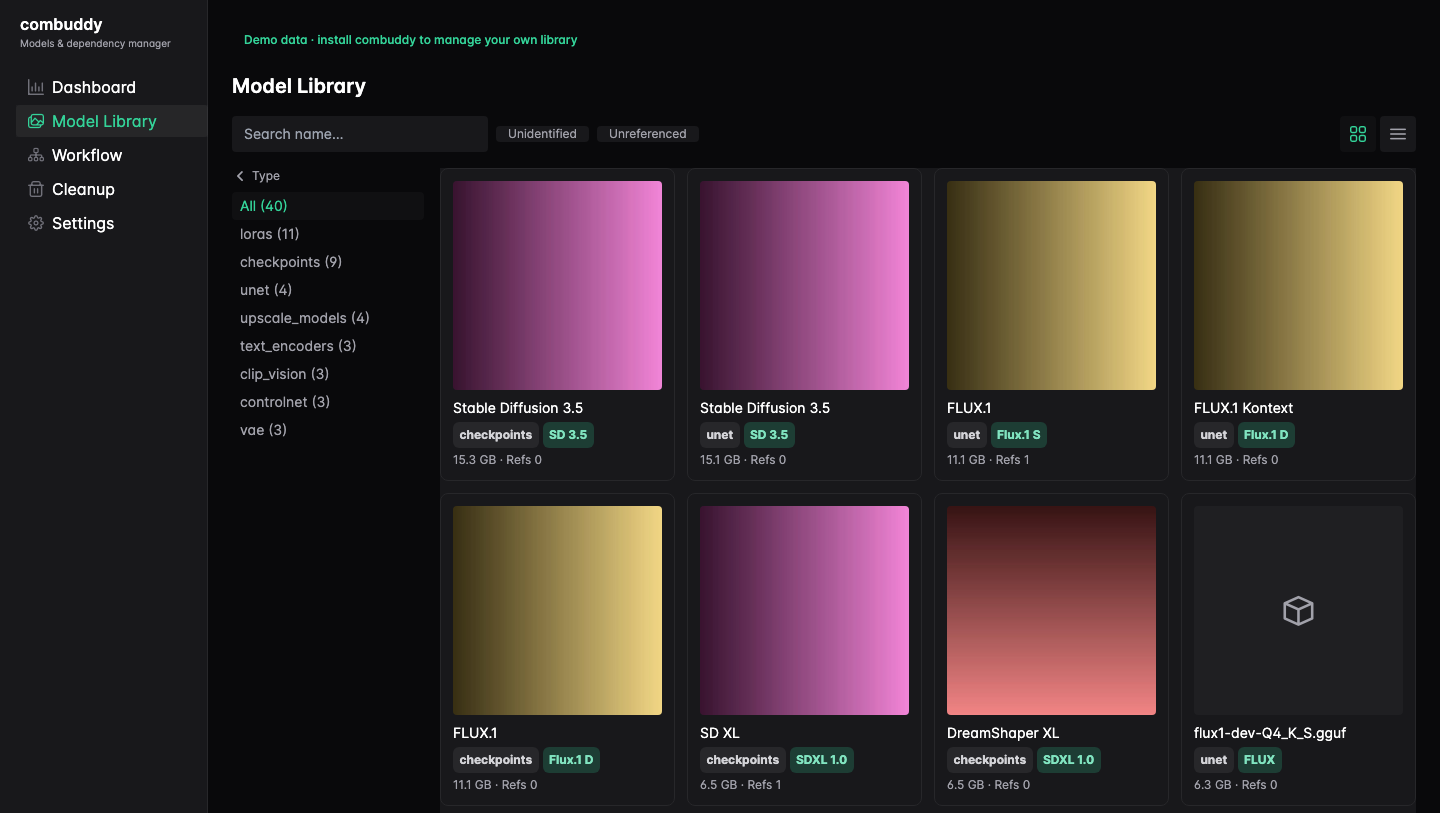
Search and filter every indexed model. Open a model to see local metadata, optional Civitai identity, trigger words, cached preview images, and reverse dependencies: the workflows that reference that model.
Workflow Resolution
Pick a workflow and inspect every referenced model. References are marked as resolved, ambiguous, or missing, so you can tell what a shared workflow needs before you run it.
Cleanup and Duplicates
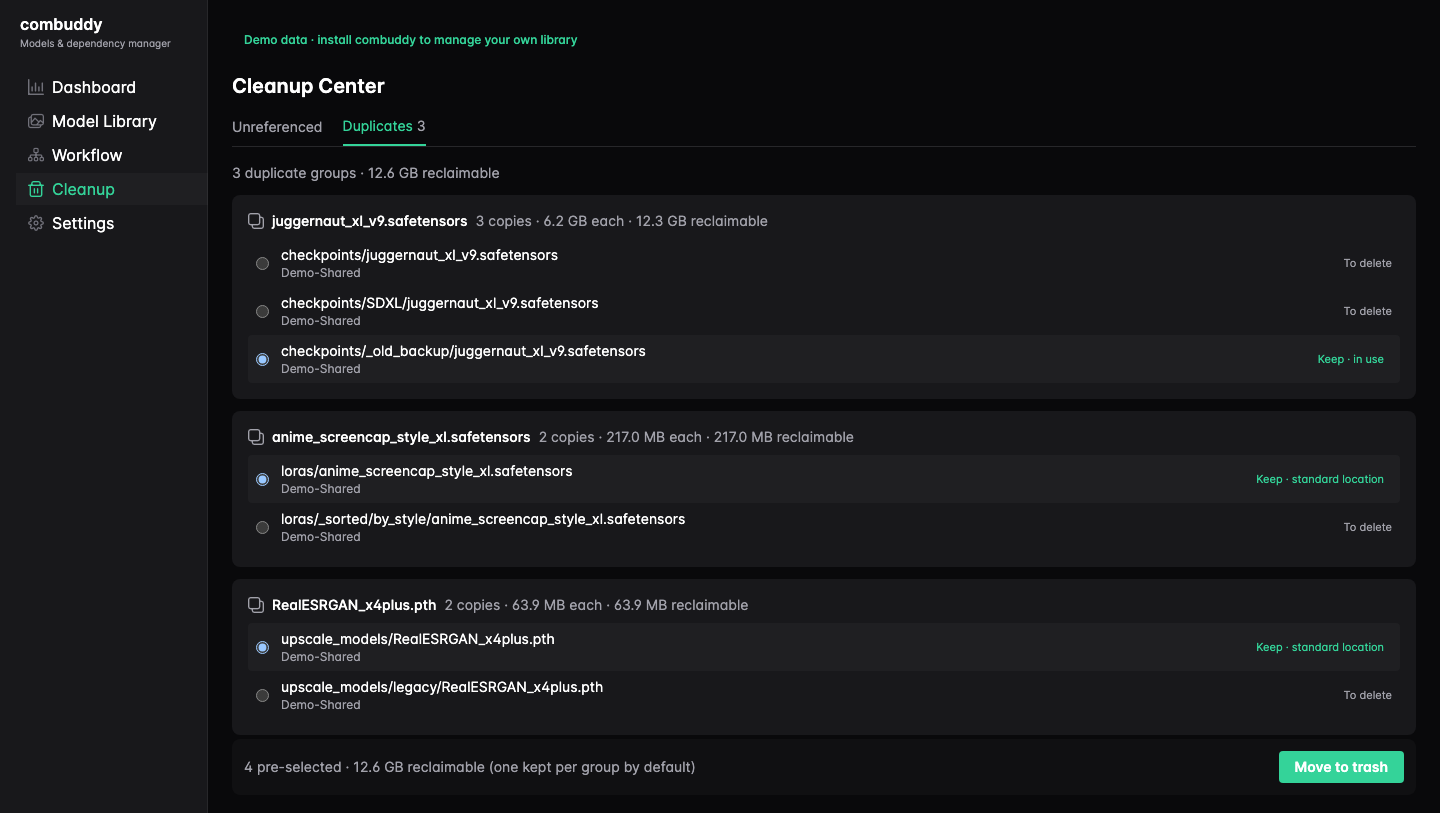
Review models that no workflow references and move them to a recoverable trash instead of deleting them permanently. Duplicate detection groups exact byte-for-byte matches by SHA-256 and helps identify unreferenced copies that can be reclaimed safely.
How It Works
combuddy scans configured model directories and ComfyUI workflow JSON files into a local SQLite index. Workflow references are matched to local files by directory type plus normalized relative path, so subfolders, case differences, Unicode names, and backslashes are handled without relying on fragile basename-only guesses.
Model identity is read locally from file headers where possible: base architecture, role labels, precision, and parameter counts. Content hashes are computed locally and cached for duplicate detection and optional Civitai enrichment.
Privacy & Network
combuddy is local-first: model files, workflow files, and local filesystem paths stay on your machine. The local index is stored under ~/.combuddy for normal runs.
Two network paths are intentional and limited:
- Civitai enrichment is on by default and can be turned off in Settings. Model lookup sends the locally computed SHA-256 hash to Civitai; model files and local paths are not uploaded. When a match is found, combuddy downloads and caches preview images.
- Desktop update checks run only in the desktop app and
combuddy desktop. They fetch GitHub latest-release metadata to decide whether to show an update banner. Plaincombuddyandcombuddy demodo not perform this check.
The demo uses bundled sample data, a temporary database, and no online enrichment.
Desktop App Notes
The desktop app bundles the same local FastAPI app and web UI into a native shell. On Windows, it needs Microsoft Edge WebView2 Runtime for the native window; if WebView2 is missing, combuddy shows a notice and opens the same local app in your browser.
Unsigned app warnings are expected for current desktop builds. The macOS build is ad-hoc signed for packaging, but it is not yet code-signed or notarized as an Apple Developer ID release. The Windows build is an unsigned beta. Download desktop builds only from the Releases page.
- macOS: after the first blocked launch, open System Settings → Privacy & Security, scroll down, and click Open Anyway. On older macOS versions, right-click
combuddy.appin Finder → Open → confirm. If macOS still blocks it, runxattr -c combuddy.appfrom the folder containing the app. - Windows: SmartScreen may say "Windows protected your PC". Click More info → Run anyway.
Advanced terminal install for the same native shell:
pipx install "combuddy[desktop]"
combuddy desktop
For Developers
Prerequisites
- Python 3.11+
- Node 20 recommended, matching CI
Backend Service
pip install -e ".[dev]"
combuddy
This starts the FastAPI/Uvicorn backend at http://127.0.0.1:8511 and serves the built frontend from combuddy/web.
Frontend Dev Server
In a second terminal:
cd frontend
npm install
npm run dev
Keep the backend running while using Vite. The dev server proxies /api to http://127.0.0.1:8511; open the Vite URL for hot module reload, not the backend's static page.
Demo-Backed UI Development
Use the demo backend instead of the normal backend when you do not have a local ComfyUI library handy.
Terminal 1:
combuddy demo
Terminal 2:
cd frontend
npm run dev
The demo backend does not scan real files, write ~/.combuddy, or use real path detection and scanning behavior.
Desktop Shell
pip install -e ".[dev,desktop]"
combuddy desktop
The desktop shell serves the built frontend bundle. After changing frontend/src, run npm run build before testing those changes through combuddy or combuddy desktop.
Tests And Builds
pytest -q

cd frontend
npm test
npm run build
npm run build writes the packaged frontend to ../combuddy/web. Release builds also include this generated web bundle.
For release and desktop packaging details, see RELEASING.md.
Status & Roadmap
combuddy is beta software for local ComfyUI library management. Current releases include local indexing, workflow resolution, duplicate detection, recoverable cleanup, optional Civitai enrichment, demo mode, and desktop builds for macOS Apple Silicon and Windows x64.
Possible next areas include a download workflow for missing models and dependency pinning for shareable workflows. Those are roadmap ideas, not current product capabilities.
Project details
Verified details
These details have been verified by PyPIProject links
GitHub Statistics
Maintainers


Download files
Download the file for your platform. If you're not sure which to choose, learn more about installing packages.
Source Distribution
Built Distribution
Filter files by name, interpreter, ABI, and platform.
If you're not sure about the file name format, learn more about wheel file names.
Copy a direct link to the current filters
File details
Details for the file combuddy-0.3.0.tar.gz.
File metadata
- Download URL: combuddy-0.3.0.tar.gz
- Upload date:
- Size: 1.3 MB
- Tags: Source
- Uploaded using Trusted Publishing? Yes
- Uploaded via: twine/6.1.0 CPython/3.13.12
File hashes
| Algorithm | Hash digest | |
|---|---|---|
| SHA256 |
5f2d851e79c6e249eee9815744f8dac6199766be0bbe75d0bbee4abd4ffe9587
|
|
| MD5 |
fd055038709bfeedf62b7c873bb06c4a
|
|
| BLAKE2b-256 |
5f64ce5f57d2ede5b86e0c48b58ddd2dcd7501288994222bcdf740d4aa246b77
|
Provenance
The following attestation bundles were made for combuddy-0.3.0.tar.gz:
Publisher:
release.yml on peilinok/combuddy
-
Statement:
-
Statement type:
https://in-toto.io/Statement/v1 -
Predicate type:
https://docs.pypi.org/attestations/publish/v1 -
Subject name:
combuddy-0.3.0.tar.gz -
Subject digest:
5f2d851e79c6e249eee9815744f8dac6199766be0bbe75d0bbee4abd4ffe9587 - Sigstore transparency entry: 2163365350
- Sigstore integration time:
-
Permalink:
peilinok/combuddy@ee79a906baedfec886853c52cff2db1ab6aa8001 -
Branch / Tag:
refs/heads/main - Owner: https://github.com/peilinok
-
Access:
public
-
Token Issuer:
https://token.actions.githubusercontent.com -
Runner Environment:
github-hosted -
Publication workflow:
release.yml@ee79a906baedfec886853c52cff2db1ab6aa8001 -
Trigger Event:
workflow_dispatch
-
Statement type:
File details
Details for the file combuddy-0.3.0-py3-none-any.whl.
File metadata
- Download URL: combuddy-0.3.0-py3-none-any.whl
- Upload date:
- Size: 1.3 MB
- Tags: Python 3
- Uploaded using Trusted Publishing? Yes
- Uploaded via: twine/6.1.0 CPython/3.13.12
File hashes
| Algorithm | Hash digest | |
|---|---|---|
| SHA256 |
ef2df02114c65e97b9a9033603b938e32286520a3e923aa3f4307fa86faa16cd
|
|
| MD5 |
dc521abcca46a407b56d7a071c97a8af
|
|
| BLAKE2b-256 |
f1412ec12a5a92e450f6db49a6830a9adddbc4d1c090ba9389e3d76c4d1d6333
|
Provenance
The following attestation bundles were made for combuddy-0.3.0-py3-none-any.whl:
Publisher:
release.yml on peilinok/combuddy
-
Statement:
-
Statement type:
https://in-toto.io/Statement/v1 -
Predicate type:
https://docs.pypi.org/attestations/publish/v1 -
Subject name:
combuddy-0.3.0-py3-none-any.whl -
Subject digest:
ef2df02114c65e97b9a9033603b938e32286520a3e923aa3f4307fa86faa16cd - Sigstore transparency entry: 2163365484
- Sigstore integration time:
-
Permalink:
peilinok/combuddy@ee79a906baedfec886853c52cff2db1ab6aa8001 -
Branch / Tag:
refs/heads/main - Owner: https://github.com/peilinok
-
Access:
public
-
Token Issuer:
https://token.actions.githubusercontent.com -
Runner Environment:
github-hosted -
Publication workflow:
release.yml@ee79a906baedfec886853c52cff2db1ab6aa8001 -
Trigger Event:
workflow_dispatch
-
Statement type:






