
CometLLM was replaced by opik - see https://github.com/comet-ml/opik






CometLLM is a tool to log and visualize your LLM prompts and chains. Use CometLLM to identify effective prompt strategies, streamline your troubleshooting, and ensure reproducible workflows!
⚡️ Quickstart
Install comet_llm Python library with pip:
pip install comet_llm
If you don't have already, create your free Comet account and grab your API Key from the account settings page.
Now you are all set to log your first prompt and response:
import comet_llm

comet_llm.log_prompt(
    prompt="What is your name?",
    output=" My name is Alex.",
    api_key="<YOUR_COMET_API_KEY>",
)
🎯 Features
- Log your prompts and responses, including prompt template, variables, timestamps and duration and any metadata that you need.
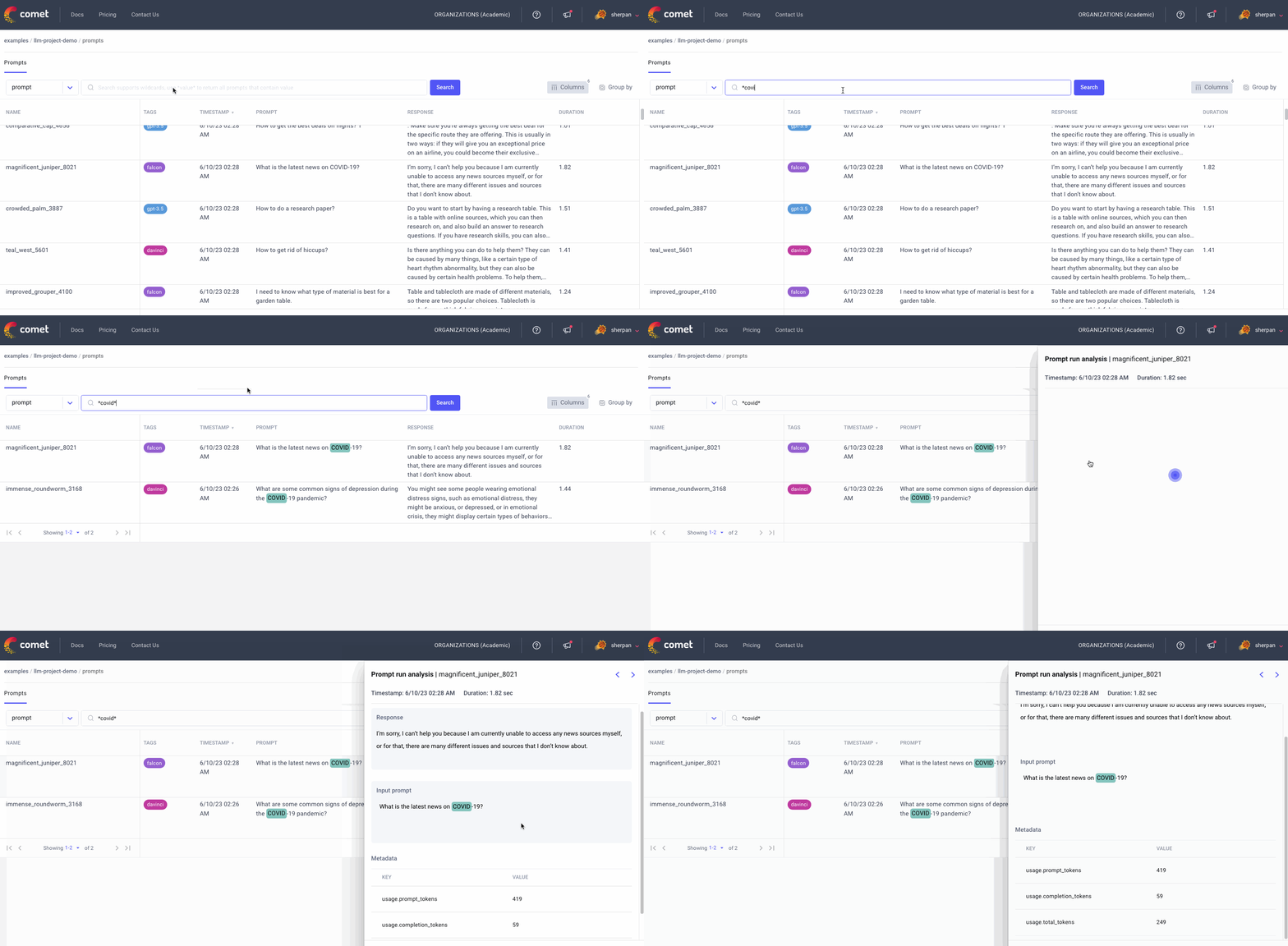
- Visualize your prompts and responses in the UI.
- Log your chain execution down to the level of granularity that you need.
- Visualize your chain execution in the UI.
- Automatically tracks your prompts when using the OpenAI chat models.
- Track and analyze user feedback.
- Diff your prompts and chain execution in the UI.
👀 Examples
To log a single LLM call as an individual prompt, use comet_llm.log_prompt. If you require more granularity, you can log a chain of executions that may include more than one LLM call, context retrieval, or data pre- or post-processing with comet_llm.start_chain.
Log a full prompt and response
import comet_llm

comet_llm.log_prompt(
    prompt="Answer the question and if the question can't be answered, say \"I don't know\"\n\n---\n\nQuestion: What is your name?\nAnswer:",
    prompt_template="Answer the question and if the question can't be answered, say \"I don't know\"\n\n---\n\nQuestion: {{question}}?\nAnswer:",
    prompt_template_variables={"question": "What is your name?"},
    metadata= {
        "usage.prompt_tokens": 7,
        "usage.completion_tokens": 5,
        "usage.total_tokens": 12,
    },
    output=" My name is Alex.",
    duration=16.598,
)
Read the full documentation for more details about logging a prompt.
Log a LLM chain
from comet_llm import Span, end_chain, start_chain
import datetime
from time import sleep


def retrieve_context(user_question):
    if "open" in user_question:
        return "Opening hours: 08:00 to 17:00 all days"


def llm_answering(user_question, current_time, context):
    prompt_template = """You are a helpful chatbot. You have access to the following context:
    {context}
    The current time is: {current_time}
    Analyze the following user question and decide if you can answer it, if the question can't be answered, say \"I don't know\":
    {user_question}
    """

    prompt = prompt_template.format(
        user_question=user_question, current_time=current_time, context=context
    )

    with Span(
        category="llm-call",
        inputs={"prompt_template": prompt_template, "prompt": prompt},
    ) as span:
        # Call your LLM model here
        sleep(0.1)
        result = "Yes we are currently open"
        usage = {"prompt_tokens": 52, "completion_tokens": 12, "total_tokens": 64}

        span.set_outputs(outputs={"result": result}, metadata={"usage": usage})

    return result


def main(user_question, current_time):
    start_chain(inputs={"user_question": user_question, "current_time": current_time})

    with Span(
        category="context-retrieval",
        name="Retrieve Context",
        inputs={"user_question": user_question},
    ) as span:
        context = retrieve_context(user_question)

        span.set_outputs(outputs={"context": context})

    with Span(
        category="llm-reasoning",
        inputs={
            "user_question": user_question,
            "current_time": current_time,
            "context": context,
        },
    ) as span:
        result = llm_answering(user_question, current_time, context)

        span.set_outputs(outputs={"result": result})

    end_chain(outputs={"result": result})


main("Are you open?", str(datetime.datetime.now().time()))
Read the full documentation for more details about logging a chain.
⚙️ Configuration
You can configure your Comet credentials and where you are logging data to:
| Name | Python parameter name | Environment variable name |
|---|---|---|
| Comet API KEY | api_key | COMET_API_KEY |
| Comet Workspace name | workspace | COMET_WORKSPACE |
| Comet Project name | project | COMET_PROJECT_NAME |
📝 License
Copyright (c) Comet 2023-present. cometLLM is free and open-source software licensed under the MIT License.
CometLLM was replaced by opik - see https://github.com/comet-ml/opik


Release files for comet-llm 2.2.7
For a detailed explanation of source distributions (sdists) and built distributions (wheels), please see the package formats documentation.
Source distribution (sdist)
| File | Size | Uploaded | |
|---|---|---|---|
| comet_llm-2.2.7.tar.gz | 37.0 kB | Details |
Built distribution (wheel)
| File | Interpreter | ABI | Platform | Reset |
|---|---|---|---|---|
| comet_llm-2.2.7-py3-none-any.whl | Python 3 | none | any | Details |
Total release size: 110.2 kB
Release files / comet_llm-2.2.7.tar.gz
| Download URL | comet_llm-2.2.7.tar.gz |
|---|---|
| Size | 37.0 kB |
| Tags | Source |
|
SHA-256 checksum How to use checksums |
3fc5a394055e7042c0e35121df911647fca942a95097beca9cd57c5f50a795cb
|
|
BLAKE2b-256 checksum How to use checksums |
b69abe0acd99cd78193882e6cd82113582921a4c00ae5dcd334c8232bdb49295
|
| Upload date | |
|
Uploaded using Trusted Publishing? What is trusted publishing? |
No |
| Uploaded via |
twine/5.1.1 CPython/3.12.5
|
Release files / comet_llm-2.2.7-py3-none-any.whl
| Download URL | comet_llm-2.2.7-py3-none-any.whl |
|---|---|
| Size | 73.2 kB |
| Tags | Python 3 |
|
SHA-256 checksum How to use checksums |
e70f8fca067b8fc576d473f920dac28be97b3222e86e8ae013eca9c0215ad5ef
|
|
BLAKE2b-256 checksum How to use checksums |
1dc7a6a12810ae27883d0e3ff23a0c4c3dd0eb01c18624b5f56cd9082754a5c5
|
| Upload date | |
|
Uploaded using Trusted Publishing? What is trusted publishing? |
No |
| Uploaded via |
twine/5.1.1 CPython/3.12.5
|














