



🏠Home • 🎇Features • 🔨Installation • 🚜Usage • 📘Documentation • 🤖API
✅Requirements • 💻CLI • 🐳Docker • 🚸Limitations



Python library to programmatically schedule ComfyUI workflows via the ComfyUI API






ComfyUI API Endpoint <| <=  Comfy Catapult <=> HTTP Server <| <=  Public users
                     <|                                    <|
                     <|         Your python program        <| Your Webui/JS frontend
                     <|                                    <|
                     <|           Your workflows           <|
                     <|          Your HTTP server          <|
What is it?
Comfy Catapult is a library for scheduling and running ComfyUI workflows from a Python program, via the existing API endpoint. ComfyUI typically works by hosting this API endpoint for its user interface.
This makes it easier for you to make workflows via the UI, and then use it from a program.
🎇 Features
- ComfyUI API client (interface, implementation).
- ComfyUI Workflow scheduler (interface, implementation).
- ComfyUI API Pydantic Schema (./comfy_catapult/comfy_schema.py).
- Helpers to handle uploading and downloading files to/from ComfyUI.
- Simple CLI to execute workflows.
🔨 Installation
# Inside your environment:

# From pypi:
pip install comfy_catapult

# From git:
pip install git+https://github.com/realazthat/comfy-catapult.git@v3.0.0
🚜 Usage
Related Projects
| Project | ComfyUI API Wrapper | Outsource Backend | Distribute Execution | Wrap Workflow | Studio |
|---|---|---|---|---|---|
| CushyStudio | ? | ? | ? | ? | Yes |
| ComfyUI-Serving-Toolkit | X | ? | ? | Yes | ? |
| ComfyUI_NetDist | X | ? | Yes | ? | ? |
| ComfyUI script_examples | Yes | No | No | No | No |
| comfyui-python-api | ? | ? | ? | Yes | ? |
| comfyui-deploy | ? | ? | ? | Yes | ? |
| ComfyUI-to-Python-Extension | ? | ? | ? | Yes | ? |
| ComfyScript | ? | ? | ? | Yes | ? |
| hordelib | ? | Yes | ? | ? | ? |
| comfyui-cloud | ? | Yes | ? | ? | ? |
| comfy_runner | ? | ? | ? | ? | ? |
| ComfyUI-ComfyRun | ? | ? | ? | ? | ? |
📘 Documentation
Scheduling a Job
From
comfy_catapult/catapult_base.py:
  async def Catapult(
      self,
      *,
      job_id: JobID,
      prepared_workflow: dict,
      important: Sequence[APINodeID],
      use_future_api: Literal[True],
      job_debug_path: Optional[Path] = None
  ) -> Tuple[JobStatus, 'asyncio.Future[dict]']:
Example usage:
From
examples/sdxlturbo_example_catapulter.py:
class ExampleWorkflowInfo:
  # Direct wrapper around the ComfyUI API.
  client: ComfyAPIClientBase
  # Job scheduler (the main point of this library).
  catapult: ComfyCatapultBase
  # Something to help with retrieving files from the ComfyUI storage.
  remote: RemoteFileAPIBase
  comfy_api_url: str

  # This should be the workflow json as a dict.
  workflow_template_dict: dict
  # This should begin as a deep copy of the template.
  workflow_dict: dict
  # This will hold the node ids that we must have results for.
  important: List[APINodeID]

  # Make this any string unique to this job.
  job_id: str

  # When the job is complete, this will be the `/history` json/dictionary for
  # this job.
  job_history_dict: Optional[dict]

  # These are inputs that modify this particular workflow.
  ckpt_name: Optional[str]
  positive_prompt: str
  negative_prompt: str
  # For this particular workflow, this will define the path to the output image.
  output_path: Path
async def RunExampleWorkflow(*, job_info: ExampleWorkflowInfo):

  # You have to write this function, to change the workflow_dict as you like.
  await PrepareWorkflow(job_info=job_info)

  job_id: str = job_info.job_id
  workflow_dict: dict = job_info.workflow_dict
  important: List[APINodeID] = job_info.important

  # Here the magic happens, the job is submitted to the ComfyUI server.
  status, future = await job_info.catapult.Catapult(
      job_id=job_id,
      prepared_workflow=workflow_dict,
      important=important,
      use_future_api=True)

  # Wait for the job to complete.
  while not future.done():
    status, _ = await job_info.catapult.GetStatus(job_id=job_id)
    print(f'status: {status}', file=sys.stderr)
    await asyncio.sleep(3)

  job_info.job_history_dict = await future

  # Now that the job is done, you have to write something that will go and get
  # the results you care about, if necessary.
  await DownloadResults(job_info=job_info)
Exporting workflows in the API json format
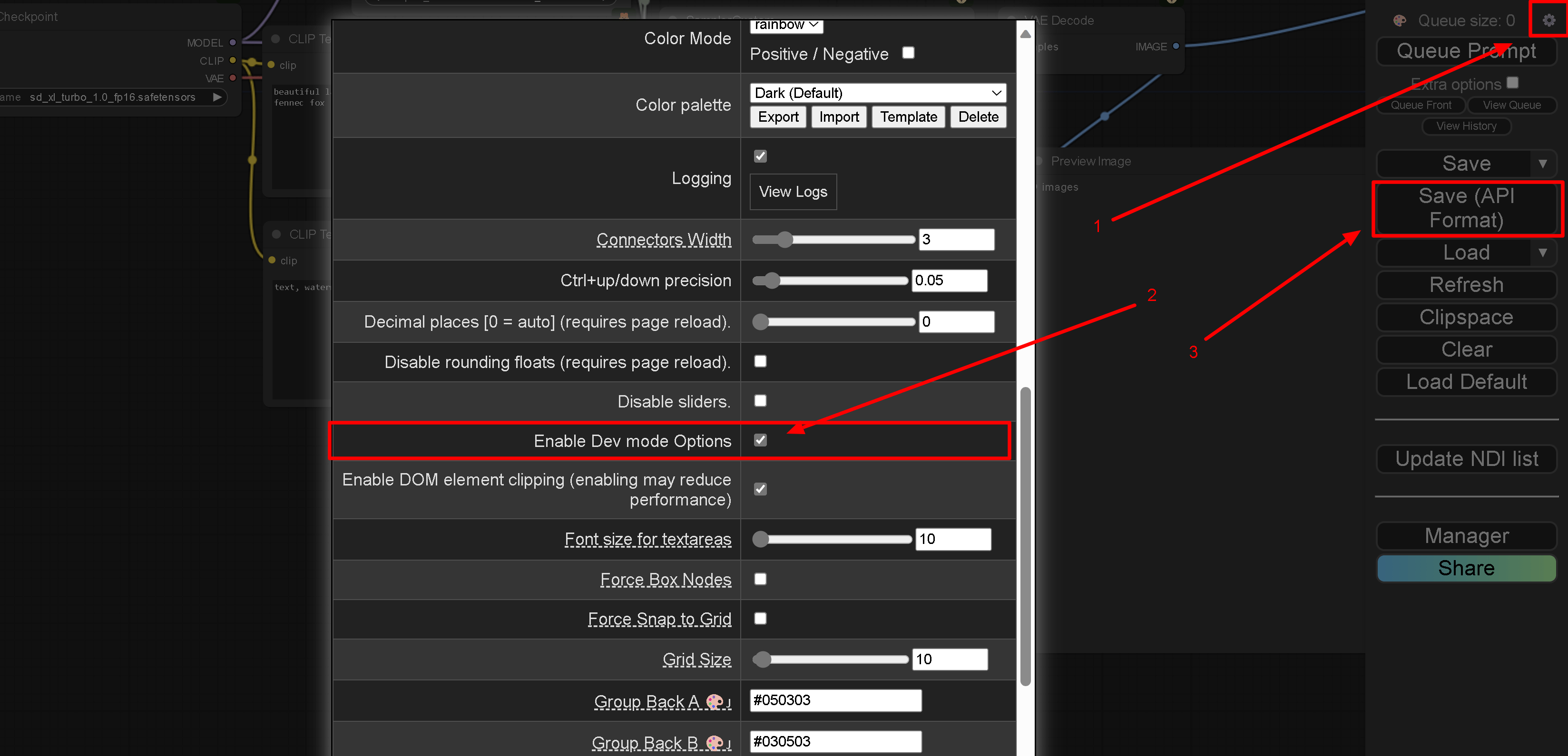
In ComfyUI web interface:
- Open settings (gear box in the corner).
- Enable the ability to export in the API format,
Enable Dev mode Options. - Click new menu item
Save (API format).
Example workflow: Prepare ComfyUI
If you don't want to try the example workflow, you can skip this section.
You need to get sd_xl_turbo_1.0_fp16.safetensors into the ComfyUI model
directory.
Hugging Face page: huggingface.co/stabilityai/sdxl-turbo/blob/main/sd_xl_turbo_1.0_fp16.safetensors.
Direct download link: huggingface.co/stabilityai/sdxl-turbo/resolve/main/sd_xl_turbo_1.0_fp16.safetensors.
Download the example workflow, and export it in the API format
This is optional, you can use the example workflow in test_data/ instead and
skip this step.
# Download the workflow:
wget https://github.com/comfyanonymous/ComfyUI_examples/raw/master/sdturbo/sdxlturbo_example.png

# 1. Open the Workflow in ComfyUI and export it. AFAIK there isn't a nice way
# to automated this right now.
#
# 2, Save to `./sdxlturbo_example_api.json`.
#
# Or just use `test_data/sdxlturbo_example_api.json`.
Run the examples
# If you set this environment variable, you don't have to specify it as an
# argument.
export COMFY_API_URL=http://127.0.0.1:8188
# Note, in WSL2 you may have to use the IP of the host to connect to ComfyUI.


python -m comfy_catapult.examples.sdxlturbo_example_catapulter \
  --api_workflow_json_path "$PWD/sdxlturbo_example_api.json" \
  --tmp_path "$PWD/.deleteme/tmp/" \
  --output_path "$PWD/.deleteme/output.png" \
  --positive_prompt "amazing cloudscape, towering clouds, thunderstorm, awe" \
  --negative_prompt "dull, blurry, nsfw"

# Optional if you don't want to set the environment variable:
#   --comfy_api_url "..."

# Done! Now $PWD/.deleteme/output.png should contain the output image.

# Some other examples:
python -m comfy_catapult.examples.add_a_node
python -m comfy_catapult.examples.using_pydantic
🤖 API
- Examine ./examples/sdxlturbo_example_catapulter.py to
see how to use the main
ComfyCatapultlibrary. - Examine ./test_data/sdxlturbo_example_api.json to see
the API format. This will be necessary in order to programmatically set the
proper inputs for the workflow.
- (Optional) See ./examples/using_pydantic.py for how to parse the API format into the Pydantic models schema for easier navigation.
- (Optional) See ./examples/add_a_node.py for how to add a new node to a workflow. This is useful when you need to add nodes at runtime (such as adding a bunch of LoadImage nodes).
- See ./comfy_catapult/catapult_base.py for the main library interface.
- (Optional) See ./comfy_catapult/catapult.py for the main library implementation.
- (Optional) See ./comfy_catapult/api_client_base.py for the direct ComfyUI API endpoint client library interface; you don't need to use this usually.
- (Optional) For those who want to do use the raw API themselves and learn how
it works: Examine ./comfy_catapult/api_client.py to see
the API client implementation if you want to directly interface with ComfyUI
endpoints yourself.
- (Optional) Also see
ComfyUI/server.py
(pinned to a specific commit) for the server
@routesendpoint implementations.
- (Optional) Also see
ComfyUI/server.py
(pinned to a specific commit) for the server
Parsing the API format into the Pydantic models schema for easier navigation
From ./examples/using_pydantic.py:
from comfy_catapult.comfy_schema import APIWorkflow

api_workflow_json_str: str = """
{
  "1": {
    "inputs": {
      "image": "{remote_image_path} [input]",
      "upload": "image"
    },
    "class_type": "LoadImage",
    "_meta": {
      "title": "My Loader Title"
    }
  },
  "25": {
    "inputs": {
      "images": [
        "8",
        0
      ]
    },
    "class_type": "PreviewImage",
    "_meta": {
      "title": "Preview Image"
    }
  }
}
"""
api_workflow: APIWorkflow = APIWorkflow.model_validate_json(
    api_workflow_json_str)

# Or, if you have a APIWorkflow, and you want to deal with a dict instead:
api_workflow_dict = api_workflow.model_dump()

# Or, back to json:
api_workflow_json = api_workflow.model_dump_json()

# See comfy_catapult/comfyui_schema.py for the schema definition.

print(api_workflow_json)
Adding a new node to a workflow
From examples/add_a_node.py:
from pathlib import Path

from comfy_catapult.comfy_schema import (APIWorkflow, APIWorkflowNodeInfo,
                                         APIWorkflowNodeMeta)
from comfy_catapult.comfy_utils import GenerateNewNodeID

api_workflow_json_str: str = """
{
  "1": {
    "inputs": {
      "image": "{remote_image_path} [input]",
      "upload": "image"
    },
    "class_type": "LoadImage",
    "_meta": {
      "title": "My Loader Title"
    }
  },
  "25": {
    "inputs": {
      "images": [
        "8",
        0
      ]
    },
    "class_type": "PreviewImage",
    "_meta": {
      "title": "Preview Image"
    }
  }
}
"""
api_workflow: APIWorkflow = APIWorkflow.model_validate_json(
    api_workflow_json_str)

path_to_comfy_input = Path('/path/to/ComfyUI/input')
path_to_image = path_to_comfy_input / 'image.jpg'
rel_path_to_image = path_to_image.relative_to(path_to_comfy_input)

# Add a new LoadImage node to the workflow.
new_node_id = GenerateNewNodeID(workflow=api_workflow)
api_workflow.root[new_node_id] = APIWorkflowNodeInfo(
    inputs={
        'image': f'{rel_path_to_image} [input]',
        'upload': 'image',
    },
    class_type='LoadImage',
    _meta=APIWorkflowNodeMeta(title='My Loader Title'))

print(api_workflow.model_dump_json())
💻 Command Line Options
Options:
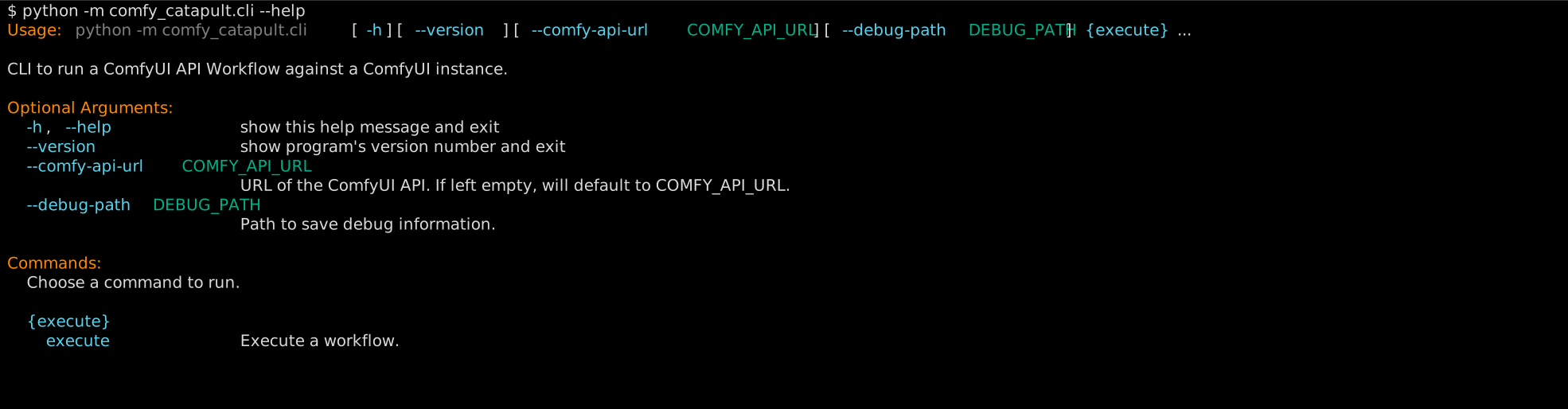
execute options:

Example usage:
python -m comfy_catapult.cli \
    execute --workflow-path ./test_data/sdxlturbo_example_api.json
✅ Requirements
- Python 3.10+
- ComfyUI server with API endpoint enabled.
Known to work on
- WSL2/Windows11, Ubuntu 22.04.2 LTS: Python 3.8.0.
- Ubuntu 20.04, Python
3.8.0, 3.9.0, 3.10.0, 3.11.0, 3.12.0, tested in GitHub Actions workflow (./.github/workflows/build-and-test.yml).
🐳 Docker Image
Docker images are published to ghcr.io/realazthat/comfy-catapult at each tag.
# Use the published images at https://ghcr.io/realazthat/comfy-catapult.
docker run --rm --tty ghcr.io/realazthat/comfy-catapult:v3.0.0 --help

# /data in the docker image is the working directory, so paths are simpler.
docker run --rm --tty \
  -v "${PWD}:/data" \
  -e "COMFY_API_URL=${COMFY_API_URL}" \
  ghcr.io/realazthat/comfy-catapult:v3.0.0 \
  execute --workflow-path ./test_data/sdxlturbo_example_api.json
If you want to build the image yourself, you can use the Dockerfile in the repository.
# Build the docker image.
docker build -t my-comfy-catapult-image .

# Print usage.
docker run --rm --tty my-comfy-catapult-image --help

# /data in the docker image is the working directory, so paths are simpler.
docker run --rm --tty \
  -v "${PWD}:/data" \
  -e "COMFY_API_URL=${COMFY_API_URL}" \
  my-comfy-catapult-image \
  execute --workflow-path ./test_data/sdxlturbo_example_api.json
🚸 Limitations
- Interrupting a job will interrupt any job, not the specific job interrupted. See #5.
TODO
- Helpers should support remote/cloud storage for ComfyUI input/output/model directories (Currently only supports local paths).
- ETA Estimator.
- Make sure the schema can parse the formats even if the format adds new fields.
Contributions
Development environment: Linux-like
-
For running
pre.sh(Linux-like environment).-
From ./.github/dependencies.yml, which is used for the GH Action to do a fresh install of everything:
bash: scripts.
findutils: scripts.
grep: tests.
xxd: tests.
git: scripts, tests.
xxhash: scripts (changeguard).
rsync: out-of-directory test.
jq: dependency for [yq](https://github.com/kislyuk/yq), which is used to generate
  the README; the README generator needs to use `tomlq` (which is a part of `yq`)
  to query `pyproject.toml`.
-
Requires
pyenv, or an exact matching version of python as in ./.python-version. -
jq, (installation) required for yq, which is itself required for our./README.mdgeneration, which usestomlq(from the yq package) to include version strings from ./pyproject.toml. -
act (to run the GH Action locally):
- Requires nodejs.
- Requires Go.
- docker.
-
Generate animation:
- docker
-
docker (for building the docker image).
-
Commit Process
- (Optionally) Fork the
developbranch. - Stage your files:
git add path/to/file.py. bash scripts/pre.sh, this will format, lint, and test the code.git statuscheck if anything changed (generated./README.mdfor example), if so,git addthe changes, and go back to the previous step.git commit -m "...".- Make a PR to
develop(or push to develop if you have the rights).
Release Process
These instructions are for maintainers of the project.
developbranch: Runbash ./scripts/pre.shto ensure everything is in order.developbranch: Bump the version in ./pyproject.toml, following semantic versioning principles. Also modify thelast_releaseandlast_stable_releasein the[tool.comfy_catapult-project-metadata]table as appropriate.developbranch: Commit these changes with a message like "Prepare release X.Y.Z". (See the contributions section above).masterbranch: Merge thedevelopbranch into themasterbranch:git checkout master && git merge develop --no-ff.masterbranch: Tag the release: Create a git tag for the release withgit tag -a vX.Y.Z -m "Version X.Y.Z".- Publish to PyPI: Publish the release to PyPI with
bash ./scripts/utilities/deploy-to-pypi.sh. - Push to GitHub: Push the commit and tags to GitHub with
git pushandgit push --tags. git checkout develop && git merge masterThe--no-ffoption adds a commit to the master branch for the merge, so refork the develop branch from the master branch.git push origin developPush the develop branch to GitHub.
1 maintainer

Release files for comfy-catapult 3.0.0
For a detailed explanation of source distributions (sdists) and built distributions (wheels), please see the package formats documentation.
Source distribution (sdist)
| File | Size | Uploaded | |
|---|---|---|---|
| comfy_catapult-3.0.0.tar.gz | 62.8 kB | Details |
Built distribution (wheel)
| File | Interpreter | ABI | Platform | Reset |
|---|---|---|---|---|
| comfy_catapult-3.0.0-py3-none-any.whl | Python 3 | none | any | Details |
Total release size: 118.4 kB
Release files / comfy_catapult-3.0.0.tar.gz
| Download URL | comfy_catapult-3.0.0.tar.gz |
|---|---|
| Size | 62.8 kB |
| Tags | Source |
|
SHA-256 checksum How to use checksums |
acb77052ba2f4464f1c91373308f956f9516b186c05a13e355791c147d1da519
|
|
BLAKE2b-256 checksum How to use checksums |
d5ed5d2b379469fa237917745932edb7dcb4f902c9137bf2bcb8410f8c7a7b5d
|
| Upload date | |
|
Uploaded using Trusted Publishing? What is trusted publishing? |
No |
| Uploaded via |
twine/5.1.1 CPython/3.8.0
|
Release files / comfy_catapult-3.0.0-py3-none-any.whl
| Download URL | comfy_catapult-3.0.0-py3-none-any.whl |
|---|---|
| Size | 55.5 kB |
| Tags | Python 3 |
|
SHA-256 checksum How to use checksums |
1c8d31ac7390e8257d3f41aa3e16d9be69c37728e0a553c81837aa3edd6bcc90
|
|
BLAKE2b-256 checksum How to use checksums |
63b75cbc0418732083f3bbc9079c486f2c8a080bc2665009e6b4b2e1da69ca2d
|
| Upload date | |
|
Uploaded using Trusted Publishing? What is trusted publishing? |
No |
| Uploaded via |
twine/5.1.1 CPython/3.8.0
|














