
Open Manager for ComfyUI 





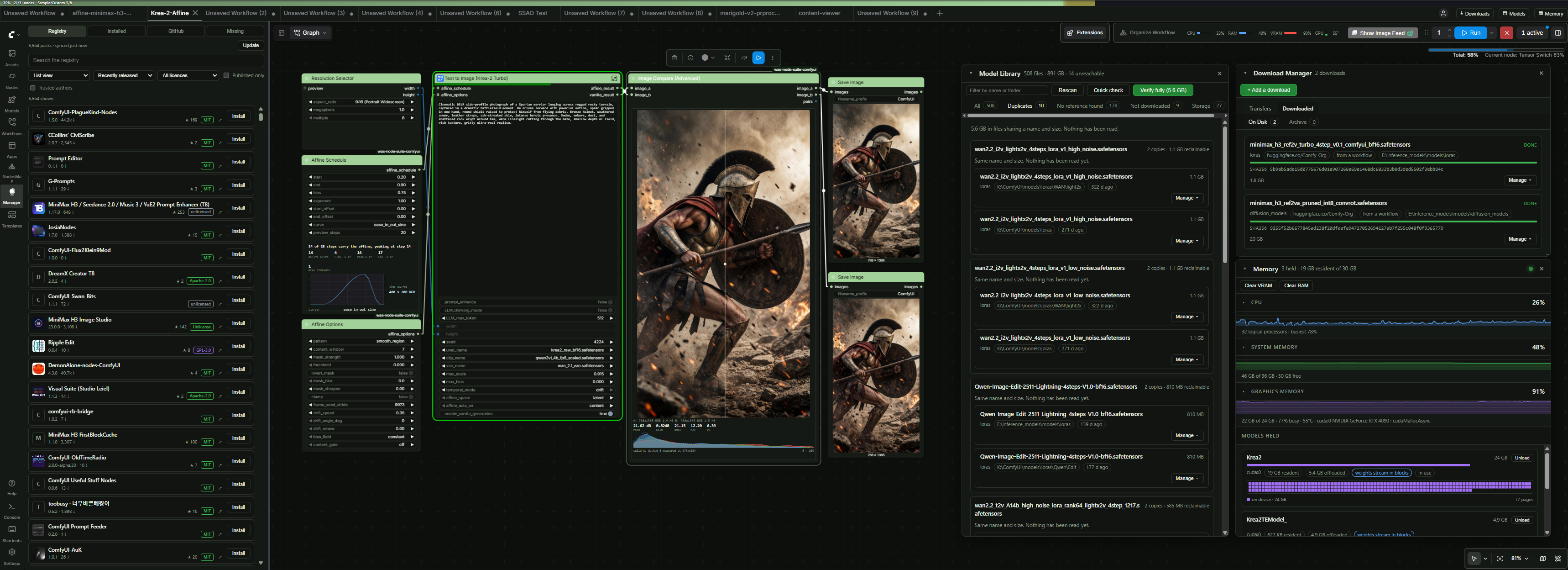
https://github.com/user-attachments/assets/58e5d65e-ce23-464b-8c9a-2a249818a1d1
An alternative package manager for ComfyUI.
Browse the Comfy Registry with ease, install from registry or GitHub, and see what an install would do to your environment before it runs. It warns; it never blocks.
Open Manager is not affiliated with ComfyUI-Manager or the Comfy Registry.
Features
| Every version | Flagged, withheld and banned included |
| Before you install | Findings, dependency changes, new nodes, hardware fit |
| Contents named | Binaries, pickles, wheels, bytecode |
| Licences | Per pack, sortable |
| Your own repos | By URL, kept in user/ |
| Any ref | Branch or commit |
| Workflow gaps | Missing nodes, and which pack won a duplicate name |
| Themes | Gradients, icons, backdrops |
| Fast sync | Whole registry in seconds |
Findings reword the confirmation. They never block Install.
What your pack can declare
Declare it once in pyproject.toml and every Open Manager reader sees it. Registry metadata is
the floor, not the ceiling.
| Access and capabilities | List what your pack does, shown as its own panel on your page |
| Release note | Your words above the version list, not a changelog guess |
| Incompatibilities | Name a package and version; readers are warned before installing |
| Install from GitHub | Say so, and the panel recommends it over the registry copy |
| Themes | Ship colour palettes with gradients, icons, backdrops and rulers |
| Example workflows | Loadable from your page, with thumbnails |
| Gallery | Screenshots from your repo or elsewhere |
| Docs and funding | Buttons in your page header |
Every field is documented under For pack authors below. Themes have their own reference in
THEMES.md.
Beyond packs
Three pieces sit alongside the pack manager. None of them adds a node to your graph.
| Default | ||
|---|---|---|
| Download Manager | Fetches the models a workflow needs: resumes, verifies, and picks the drive | on |
| Model Library | What is on disk across every registered folder: duplicates, unreferenced, storage | off |
| Resource Monitor | A compact CPU/RAM/VRAM strip, and a Memory panel behind it | off |
Installing
Two ways to load, one core. Pick either.
As a custom node, beside the official manager. Clone into custom_nodes and restart:
cd ComfyUI/custom_nodes
git clone https://github.com/WASasquatch/open-manager-comfyui.git
It coexists with ComfyUI-Manager and adds its own sidebar tab.
As a pip package from PyPI, through
--enable-manager:
pip uninstall comfyui-manager
pip install comfyui-open-manager

# Launch ComfyUI with --enable-manager flag
python main.py --enable-manager
On a uv-managed environment, which has no pip, use uv pip install comfyui-open-manager.
Open Manager detects that and installs pack requirements through uv as well.
Update with pip install --upgrade comfyui-open-manager. On a portable build, call its own
interpreter rather than the python on your PATH, or the install lands in the wrong
environment: ComfyUI_windows_portable\python_embeded\python.exe -m pip install ...
It takes the comfyui_manager name and replaces the official manager. Both packages own that
name, so pip uninstall comfyui-manager first; installing either afterwards, or a desktop
auto-update, puts the other one back.
In this mode it also writes user/comfyui.log, rotating to comfyui.prev.log and
comfyui.prev2.log, because ComfyUI writes no log of its own unless launched with
--file-log and the file usually there is written by the manager being replaced. Set
OPEN_MANAGER_NO_LOG to leave it alone.
Nothing is downloaded or built at load time. You decide what to install.
Access keys (Optional)
| For | Variable | Get one at |
|---|---|---|
| Gated and private models | HF_TOKEN |
huggingface.co/settings/tokens |
| Starring, higher rate limit | GITHUB_TOKEN |
github.com/settings/tokens |
| Scanning an install | VIRUS_TOTAL_KEY |
virustotal.com/gui/my-apikey |
Notes
Internet required. Open Manager reads the Comfy Registry live. It contacts these hosts, and only these:
| Host | When |
|---|---|
api.comfy.org |
browsing and installing |
cdn.comfy.org |
downloading a registry version to install |
codeload.github.com |
downloading a GitHub repository to install |
raw.githubusercontent.com |
licences, READMEs, images |
api.github.com |
a pack page's stats and gallery, branches and commits, starring, and the licence lookup when it is on |
| wherever a pack points | a gallery entry given as an absolute URL. Turn galleries off to keep to the hosts above |
Where it appears. A sidebar tab on the current interface. On ComfyUI's legacy menu
(Settings -> Comfy -> Use new menu -> Disabled) it adds an Open Manager button there
instead. Where it replaces the manager, the top menu's Extensions button opens it too.
What Extensions opens. It follows ComfyUI: the panel on the modern interface, and the
classic menu of destinations where ComfyUI was started with --enable-manager-legacy-ui.
Override it under What the Extensions button opens. Both carry every destination, so this
decides the way in rather than what is reachable, and the sidebar tab is unaffected.
Trust. Incoporated a simple trust gate for certain actions with Open Manager. Make sure you trust the authors.
Settings. Under Settings -> Open Manager. Set open_manager.registry.BASE_URL to route
the registry through a mirror or a private index. Set a GitHub token to raise the anonymous
60 calls an hour to 5,000; without one, pack pages still show their README, gallery and
versions.
Requirements. torch, torchaudio, torchsde and torchvision are never installed
from a pack's requirements: they carry the build your ComfyUI was set up with. Anything held
back is named in the install output. To substitute a package, map it in
user/open_manager/pip_overrides.json:
{ "opencv-python": "opencv-python-headless>=4.9" }
Trust. A pack from outside the registry asks who you are trusting before installing it,
and again before loading a workflow of theirs. Answer once per author or every time, under
Settings -> Open Manager. Trusted authors are written to
user/open_manager/trusted_authors.json, and trust never hides a finding.
Your GitHub list. Add repositories by URL or as owner/repo. Each installs, updates and
uninstalls like a registry pack. The list is written to
user/open_manager/github_sources.json, outside the pack, so it survives an uninstall.
Remove from list delists and uninstalls in one step.
For pack authors
Declare a [tool.open_manager] table in your pyproject.toml. Every field is optional and
packs without the table are unaffected. For an installed pack these are read from the copy on
disk, with the repository as the fallback.
[tool.open_manager]
incompatible = ["numpy>=2.0"]                   # declare known conflicts with other packages
source = "github"                               # prefer installing from the repository
branch = "main"                                 # default branch to install from
docs = "https://example.com/docs"               # documentation URL
funding = "https://ko-fi.com/you"               # funding URL
release_note = "1.4.0 needs config regen."      # shown above the version list, 600 chars
capabilities = [                                # what your pack does, its own page panel
  "filesystem", "network", "subprocess",        #   from a fixed list, see below
]
example_workflows = ["workflows/*.json"]        # a path, a glob, or a directory
themes = ["themes/my-theme.json"]               # list themes to offer
gallery = [                                     # shown off on the pack page, up to 24, `png`,
                                                # `jpg`, `jpeg`, `gif`, `webp`, `avif`, and
                                                # `mp4`, `webm`, `mov` for clips
  "docs/*.png",                                 #   a path or glob in your repository
  "https://cdn.example.com/after.webp",         #   or a file hosted anywhere
]
Leave example_workflows out and workflows/, workflow/, examples/, example/ and
example_workflows/ are read instead. docs and funding fall back to [project.urls].
Workflow thumbnails are not declared. An image sitting beside a workflow and named for it is
paired with it automatically, following
ComfyUI's workflow templates convention:
workflows/hdr.json picks up workflows/hdr.webp, .png, .jpg, .jpeg or .gif, and a
numbered variant such as hdr-1.png counts too. Workflows without one show as a plain row.
Access and capabilities
Your own account of what your pack does, shown as a panel on your page that reflows with the window. The vocabulary is fixed so that two packs describe themselves in the same words.
filesystem network subprocess binaries environment dynamic_code packages
models credentials telemetry compilation hardware
The list is fixed. Anything outside it is refused and named on your page as unrecognised,
rather than dropped in silence, so a guessed word is visible to you and never shown to a
reader. Case and hyphens are forgiven: Dynamic-Code resolves to dynamic_code.
Declaring nothing shows no panel. This is not verified and does not replace the archive inspection, which reads what is actually in the box; the two are worth comparing.
Themes
A theme is a ComfyUI colour palette plus an optional extras block: gradient or flat headers
per node category or class, a title icon, an image behind node bodies, see-through bodies, a
graph backdrop, shadow colours and a selection glow. Packs ship them and readers add them from
the pack page.
Full reference in docs/THEMES.md. Examples in
open_manager/themes/.
[tool.open_manager]
themes = ["themes/my-theme/my-theme.json"]
Licence
MIT, see LICENSE.
The GitHub mark shown on links to github.com is mark-github from
Octicons, MIT licensed, Copyright (c) GitHub Inc. It is
used only for links that go to GitHub.
1 maintainer

Download files
Download the file for your platform. If you're not sure which to choose, learn more about installing packages.
Source Distribution
Built Distribution
Filter files by name, interpreter, ABI, and platform.
If you're not sure about the file name format, learn more about wheel file names.
Copy a direct link to the current filters
File details
Details for the file comfyui_open_manager-0.1.8.tar.gz.
File metadata
- Download URL: comfyui_open_manager-0.1.8.tar.gz
- Upload date:
- Size: 339.9 kB
- Tags: Source
- Uploaded using Trusted Publishing? Yes
- Uploaded via:
twine/7.0.0 CPython/3.13.14
File hashes
| Algorithm | Hash digest | |
|---|---|---|
| SHA256 |
d1d4810de32376702b1b96d0645863db615eefc8187255386118e5dbd71bd47e
|
|
| MD5 |
ea209def021dbbacfb8d3f83ff2d5572
|
|
| BLAKE2b-256 |
9f2d89cf02a79597fb9ec73c1e2585432469a250e8daec7590a77196c631809f
|
Provenance
The following attestation bundles were made for comfyui_open_manager-0.1.8.tar.gz:
Publisher:
publish_pypi.yml on WASasquatch/open-manager-comfyui
-
Statement:
-
Statement type:
https://in-toto.io/Statement/v1 -
Predicate type:
https://docs.pypi.org/attestations/publish/v1 -
Subject name:
comfyui_open_manager-0.1.8.tar.gz -
Subject digest:
d1d4810de32376702b1b96d0645863db615eefc8187255386118e5dbd71bd47e - Sigstore transparency entry: 2848723747
- Sigstore integration time:
-
Permalink:
WASasquatch/open-manager-comfyui@24b08c2ea92acb1bc6a42e5b1d2dbe6dda384e7a -
Branch / Tag:
refs/heads/main - Owner: https://github.com/WASasquatch
-
Access:
public
-
Token Issuer:
https://token.actions.githubusercontent.com -
Runner Environment:
github-hosted -
Publication workflow:
publish_pypi.yml@24b08c2ea92acb1bc6a42e5b1d2dbe6dda384e7a -
Trigger Event:
push
-
Statement type:
File details
Details for the file comfyui_open_manager-0.1.8-py3-none-any.whl.
File metadata
- Download URL: comfyui_open_manager-0.1.8-py3-none-any.whl
- Upload date:
- Size: 363.3 kB
- Tags: Python 3
- Uploaded using Trusted Publishing? Yes
- Uploaded via:
twine/7.0.0 CPython/3.13.14
File hashes
| Algorithm | Hash digest | |
|---|---|---|
| SHA256 |
5f30352d17647e1a0d84e9c1f6b618097e02b342ec89939e9f139034a9545f2b
|
|
| MD5 |
fea7a16a4b7794c706a25e5987756874
|
|
| BLAKE2b-256 |
4769a2f52ec0aaa47f14f17bf6ccbee6232255c8ae5ab516336a9df33fae2fb1
|
Provenance
The following attestation bundles were made for comfyui_open_manager-0.1.8-py3-none-any.whl:
Publisher:
publish_pypi.yml on WASasquatch/open-manager-comfyui
-
Statement:
-
Statement type:
https://in-toto.io/Statement/v1 -
Predicate type:
https://docs.pypi.org/attestations/publish/v1 -
Subject name:
comfyui_open_manager-0.1.8-py3-none-any.whl -
Subject digest:
5f30352d17647e1a0d84e9c1f6b618097e02b342ec89939e9f139034a9545f2b - Sigstore transparency entry: 2848723807
- Sigstore integration time:
-
Permalink:
WASasquatch/open-manager-comfyui@24b08c2ea92acb1bc6a42e5b1d2dbe6dda384e7a -
Branch / Tag:
refs/heads/main - Owner: https://github.com/WASasquatch
-
Access:
public
-
Token Issuer:
https://token.actions.githubusercontent.com -
Runner Environment:
github-hosted -
Publication workflow:
publish_pypi.yml@24b08c2ea92acb1bc6a42e5b1d2dbe6dda384e7a -
Trigger Event:
push
-
Statement type:














