
Comiks
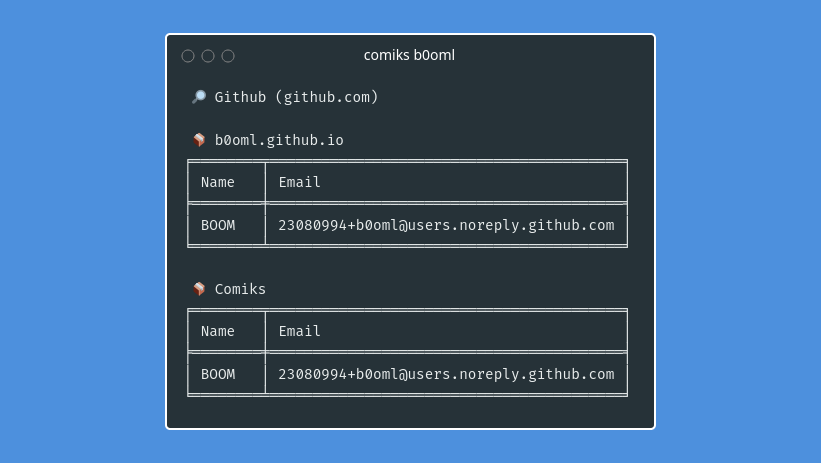
Comiks is a command line tool to retrieve authors informations (names and emails) in the repositories commits of a given user.
Installation
$ pip install git+https://github.com/b0oml/Comiks
Configuration
The first time comiks runs, it will generate a config file .config/comiks/config.toml in your home directory. This will be the default configuration file used when using comiks.
By default, only Github provider is enabled, other providers needs an API key/access token. To enable and configure others providers, you can update the configuration file in your home directory.
It is also possible to load the configuration file from another path with option -c, --config.
$ comiks -c ./path/to/config.toml username
If you wan to create your own configuration file, you can take example on this one.
Usage
$ comiks --help
usage: comiks [-h] [-c CONFIG] [-l HIGHLIGHT] [-p TAGS] [-sb] username

Retrieve authors informations from commits.

positional arguments:
  username              Username for which to scan commits.

optional arguments:
  -h, --help            show this help message and exit
  -c CONFIG, --config CONFIG
                        Custom config file (default is ~/.config/comiks/config.toml).
  -l HIGHLIGHT, --highlight HIGHLIGHT
                        Strings to highlight in output, separated by a comma (default is username).
  -p TAGS, --providers TAGS
                        Comma-sperated list of tags to select which providers to enable (default is in
                        config).
  -sb, --show-branches  Show in which branches authors have been found.
Examples
Normal scan, use config in home directory.
$ comiks b0oml
Scan using another config.
$ comiks -c my_config.toml b0oml
In tables output, comiks try to highlight names and emails similar to the given username. You can highlight based on other strings than the username by giving a comma-separated list of strings.
$ comiks -l john b0oml
$ comiks -l john,doe,something b0oml
You can enable/disable availables providers by updating config.toml. Now, let's imagine you have configured all the providers. But, for a given username, you only want to launch one of the providers. Rather than modifying the config each time this happens, you can select which provider to launch with tags.
$ comiks -p github,bitbucket b0oml
$ comiks -p gitlab b0oml
Providers
Below is listed all providers currently implemented.
| Name | Url | Authentication | Enabled by default | Tags |
|---|---|---|---|---|
| GitHub | github.com | Not needed, but allows to get a higher API rate limit | yes | github |
| GitLab | gitlab.com | Needed | no | gitlab |
| Bitbucket | bitbucket.org | Needed | no | bitbucket |
1 maintainer

Metadata
1 maintainer
Release files for comiks 1.0.0
For a detailed explanation of source distributions (sdists) and built distributions (wheels), please see the package formats documentation.
Source distribution (sdist)
| File | Size | Uploaded | |
|---|---|---|---|
| comiks-1.0.0.tar.gz | 9.8 kB | Details |
Built distribution (wheel)
| File | Interpreter | ABI | Platform | Reset |
|---|---|---|---|---|
| comiks-1.0.0-py3-none-any.whl | Python 3 | none | any | Details |
Total release size: 22.2 kB
Release files / comiks-1.0.0.tar.gz
| Download URL | comiks-1.0.0.tar.gz |
|---|---|
| Size | 9.8 kB |
| Tags | Source |
|
SHA-256 checksum How to use checksums |
50738db2850af265a238d5cddc87fc35370fbc767db6df1bfba958a44140628c
|
|
BLAKE2b-256 checksum How to use checksums |
5a54581e100e1cf898c07aec5feebcf9215dff406263804fae634cdcc7a23c39
|
| Upload date | |
|
Uploaded using Trusted Publishing? What is trusted publishing? |
No |
| Uploaded via |
poetry/1.1.13 CPython/3.8.10 Linux/5.13.0-1031-azure
|
Release files / comiks-1.0.0-py3-none-any.whl
| Download URL | comiks-1.0.0-py3-none-any.whl |
|---|---|
| Size | 12.4 kB |
| Tags | Python 3 |
|
SHA-256 checksum How to use checksums |
f02d679fe5a0d326e7a69a9db51997c31d873c3ff5acefa4ee1ad4c8502c7387
|
|
BLAKE2b-256 checksum How to use checksums |
114b35805fd8d107d7c784ac7c6887737132d408fb01104a3a5614f38b06455d
|
| Upload date | |
|
Uploaded using Trusted Publishing? What is trusted publishing? |
No |
| Uploaded via |
poetry/1.1.13 CPython/3.8.10 Linux/5.13.0-1031-azure
|













