
command-bridge




Talk to your coding agent from your phone. One command opens a page any phone browser can load — no app, no App Store — and carries audio both ways.
I wanted my own Jarvis: to drive my coding agents by voice while out of the house, without handing my screen or my speech to a third party. So the premise is deliberately small — a local CLI, so if your agent can run bash, it can talk to you. No server to host, no account, no API key.
Speech recognition and speech synthesis both run on your own machine, and the CLI is fully self-describing: your agent installs it and immediately knows how to drive it, without an MCP server or a doc you have to keep in sync. One caveat, and it is a browser rule rather than a choice: to use this from outside your own network you will want Tailscale or ngrok, because a phone will not give a web page a microphone over plain http.
Watch it work

Talking to a team of Claude Code agents by voice: ask for the roster, bring agents up, see the board of what each one is on, and watch one explain a blog post with a diagram it points at box by box.
Quick start
One command installs it straight from this repo — no npm, no PyPI, no account:
curl -fsSL https://raw.githubusercontent.com/JuanjoFuchs/command-bridge/main/install.sh | bash
On Windows, in PowerShell:
irm https://raw.githubusercontent.com/JuanjoFuchs/command-bridge/main/install.ps1 | iex
It finds Python, clones the repo into ~/command-bridge, builds a private virtualenv beside it,
and installs command-bridge with its neural engines — nothing touches your system Python. Put
<repo>/bin on your PATH and command-bridge works from anywhere. Then paste this to your coding
agent:
Run
command-bridge describeand follow it end to end: install anything missing, start command-bridge under your own name, give me the URL to open on my phone, and then stay inwatchso you can hear me.
That is the whole handoff. Your agent downloads the models, starts the server and hands you back a URL. Open it on your phone, tap once, and say "hey Claude, can you hear me?"
Needs Python 3.10+ on PATH. The installer builds a private environment inside the checkout and touches nothing else on your machine — removing that one directory removes all of it.
The one thing your agent cannot do for you: a phone needs HTTPS to reach a microphone at all,
so a plain LAN address gives no microphone rather than a broken one. Front the port with a
tunnel — ngrok http 8765 is the smallest, and command-bridge status detects it — and use the
https address it prints. Your agent will tell you when this applies, and status.phone.exposure
tells you what it costs.
Everything runs on your machine. No GPU. No account. No speech API.
Would rather drive it yourself? Use it is the manual path.
Why one line is enough
Point the agent at describe before anything else — the line above does exactly that:
command-bridge describe # the whole contract, as JSON
That one call is the entire onboarding — no MCP server, no daemon, no separate documentation to
keep in sync. It returns the loop to run, the turn schema, every command and argument, the exit
codes, and the two rules an agent gets wrong first: watch blocks, so an agent not sitting in
it has left you talking to nobody; and one thought arrives as several turns, so answering the
first one answers the wrong question. Every command also returns a next field telling the agent
what to do at the moment it applies, rather than in a document it read once.
describe is generated from the same source as the behaviour, so it cannot drift from the tool
the way a README can. When something is wrong, command-bridge doctor says what and hands back the
command that fixes it — read its degraded list even when ok is true, because a machine can
have a neural voice and a fast recognizer sitting on disk while this process uses neither.
That claim gets tested the only way it can be: hand an agent a fresh install, nothing but
command-bridge describe, and ask it to reach the best configuration the machine allows. Several
releases have come out of watching where those runs got stuck.
The wedge is borrowed from agent-mail.
What this is
The tool holds no model and makes no decisions. It turns your speech into lines in a log and text into speech; the agent that started it does the thinking. That is why it works with any agent — Claude Code, Codex and Grok have each driven it unchanged.
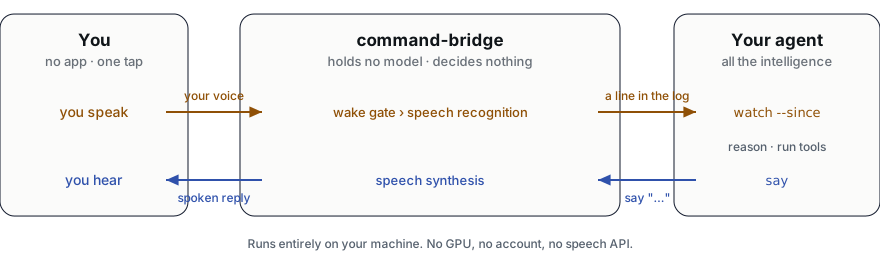
The cursor is what makes the split safe. watch --since <cursor> blocks until a turn lands and
returns everything after the cursor, so nothing you said is dropped while the agent spends thirty
seconds thinking about the last thing.
Install
Published packages (npm, PyPI, WinGet) are not out yet — for now command-bridge installs straight from this repository.
One line
curl -fsSL https://raw.githubusercontent.com/JuanjoFuchs/command-bridge/main/install.sh | bash # macOS / Linux
irm https://raw.githubusercontent.com/JuanjoFuchs/command-bridge/main/install.ps1 | iex # Windows
The installer finds Python 3.10+, clones the repo (into ~/command-bridge, or wherever CB_DIR
points), builds a private virtualenv beside it, and installs the package with every engine. It runs
the same whether piped or from a checkout (./install.sh / .\install.ps1), and reruns cleanly to
update. Nothing touches your system Python, and deleting the checkout removes all of it.
By hand
git clone https://github.com/JuanjoFuchs/command-bridge.git
cd command-bridge
python -m venv venv
venv/bin/python -m pip install -e ".[all]"      # venv/Scripts/python.exe on Windows
export PATH="$PWD/bin:$PATH"                     # then `command-bridge` works from anywhere
Better voice and better recognition
The one-line install already includes every engine. command-bridge setup then downloads all of
the models in one command — or fetch them individually:
command-bridge download asr          # Parakeet — 8x faster than whisper, more accurate
command-bridge download voice        # a neural voice instead of the robotic one
command-bridge download voiceprint   # learns your voice, so the wake phrase becomes optional
command-bridge download turn         # ends your turn when you SOUND finished, not on a timer
command-bridge download --list       # what is available, what you already have
Two independent things are involved and having one does not get you the other: the extras
supply the engines, the downloads supply the models. command-bridge doctor says which of them
this process is actually using, which is not always the best one present.
Models are downloaded, never bundled — a Parakeet checkpoint is 631 MB and would make the package unusable on a slow connection.
Use it
The manual path, if you would rather not hand the whole thing to an agent. Start command-bridge with your agent's own name, and put its page somewhere your phone can reach.
command-bridge serve --wake claude # or codex, grok, whatever is driving
Your phone needs HTTPS to reach a microphone at all — that is a browser rule, and a plain LAN
address like http://192.168.1.20:8765 gives no microphone, not a broken one. Front the port
with an https tunnel. The smallest is ngrok, which command-bridge status detects on its own:
ngrok http 8765
tailscale serve --bg 8765 works too and needs command-bridge config set COMMAND_BRIDGE_ALLOW_CIDRS 100.64.0.0/10 — but it takes over the device's DNS through MagicDNS,
system-wide, which can break a corporate VPN on the same machine. Anything else (cloudflared, a
reverse proxy) is invisible to this tool, so tell it: command-bridge config set COMMAND_BRIDGE_PUBLIC_URL <https url>.
Read this before you open a tunnel. A forwarder connects from
127.0.0.1, so everything it relays arrives as a loopback peer and passesCOMMAND_BRIDGE_ALLOW_CIDRSunconditionally. While a tunnel is up that allowlist filters nothing, and the token in the URL is the only gate on a live microphone — so treat that URL as a credential, setCOMMAND_BRIDGE_TOKENyourself rather than letting it be regenerated each restart, and take the tunnel down when you are done.command-bridge statusreports all of this underphone.exposure;command-bridge doctorwarns when the only gate is a token nobody chose.
Then, from the agent's side, this is the whole loop:
command-bridge watch --session dev --since -1   # BLOCKS until you speak; returns turns + a cursor
command-bridge say   --session dev "All green." # speaks back
command-bridge watch --session dev --since 7    # always resume from the cursor you were given
Saying its name
The summons is a greeting plus a name: "hey claude", "hi codex", "ok grok". The greeting
is always required, which is what makes any name safe — grok is an English verb and cursor
is a word you say constantly, but nobody says "hey grok" by accident.
command-bridge wake --name codex # change it, live, no restart
Once the voiceprint knows you, you are addressed without saying anything.
Interrupting it
Start talking while it is speaking and it stops — but only for your voice. The voiceprint has to agree before a reply is cut off, so the television, someone else in the room, and the agent's own voice coming back through your speakers all leave it talking.
That last one is not a corner case. Without echo cancellation a reply leaks into the microphone on almost any device, and "the agent interrupts itself" is the default failure. Measured here: the owner's voice scores 0.23 against a 0.15 threshold, the agent's own voice scores 0.000.
Needs command-bridge download voiceprint and a voice it has learned. Without one it stays quiet
rather than guessing, because a bridge that stops whenever the room makes a noise is worse than
one you cannot interrupt.
Knowing when you have finished
By default a turn ends after a fixed silence — 1.5 seconds. That number is a compromise: shorter cuts you off while you are still thinking, longer makes every quick question wait for nothing.
command-bridge download turn replaces it with Smart Turn v3.2 (8 MB, CPU, BSD-2-Clause),
which listens to how the sentence ended. A finished question closes early; a trailing "I was
thinking that maybe we could…" gets more room. It runs once at each pause, not continuously, and
if it is not installed the timer works exactly as it always has.
Requirements
No GPU. Every model here is CPU inference by construction — nothing in the codebase can use a graphics card. Measured on a 20-core desktop CPU:
| Memory | Disk | Speech recognition | |
|---|---|---|---|
Minimum — system voice + whisper base.en |
219 MB | ~150 MB | usable |
| Recommended — Parakeet + neural voice + voiceprint | ~1.0 GB | 788 MB | RTF 0.11 — 7.4 s of speech in 0.85 s |
- Python 3.10+ on PATH.
- A phone browser. Android Chrome is what this is tested on. The tab must stay in the foreground — background recording needs a native app, which this deliberately is not.
- HTTPS to the phone, via Tailscale or any tunnel. See Privacy.
- A slower CPU raises the real-time factor but does not break anything; the recognizer runs faster than real time with a lot of headroom.
Privacy
Speech recognition, synthesis, the voiceprint, and every turn of the transcript stay on your machine. There is no account and nothing is sent to a speech API.
The transport is your choice and they are not equivalent. Tailscale terminates TLS on your own device, so nobody else can decrypt the audio. An ngrok or Cloudflare tunnel terminates it at the vendor's edge — which puts the plaintext of everything you say on a machine you do not control. Sometimes that is the only thing that works, and it is still a trade worth making knowingly. If you expose it publicly, put real authentication in front of it: the built-in CIDR allowlist cannot help you there, because a tunnel forwards from localhost and every request therefore arrives from an allowed peer.
Your files are plain files. command-bridge config path says where. The voiceprint is a
192-dimension centroid — speech cannot be reconstructed from it.
Settings
command-bridge config show           # every setting, its value, and where it came from
command-bridge rate --speed 1.4      # talk faster — applies now and every session after
command-bridge verbose on            # narrate every action before doing it
command-bridge timing                # where the time actually went, per exchange
Precedence is process env > settings file > built-in default. .env.example documents every
variable.
Development
python -m venv venv
venv/Scripts/python -m pip install -e ".[dev,all]"

venv/Scripts/python -m pytest tests/ -q     # unit tests, no mic and no model
venv/Scripts/python scripts/e2e.py          # the pipeline, through a real browser
venv/Scripts/python scripts/layout.py       # page geometry, at five viewports
venv/Scripts/python scripts/channel.py      # the orb, mute and the speaking signal
venv/Scripts/python scripts/diagram.py      # regenerate the diagram above, both themes
| Path | What |
|---|---|
command_bridge/ |
store, asr, wake, tts, voiceprint, security, server, cli, config |
command_bridge/web/index.html |
the phone client, self-contained, no build step |
docs/ |
the README diagram, generated by scripts/diagram.py |
specs/ |
001 CLI identity · 002 packaging · 003 npm · 004 turn detection |
ai-docs/reference/ |
security model, turn-log contract, browser constraints |
License
MIT.
1 maintainer

Metadata
1 maintainer
Release files for command-bridge 0.3.0
For a detailed explanation of source distributions (sdists) and built distributions (wheels), please see the package formats documentation.
Source distribution (sdist)
| File | Size | Uploaded | |
|---|---|---|---|
| command_bridge-0.3.0.tar.gz | 1.0 MB | Details |
Built distribution (wheel)
| File | Interpreter | ABI | Platform | Reset |
|---|---|---|---|---|
| command_bridge-0.3.0-py3-none-any.whl | Python 3 | none | any | Details |
Total release size: 1.7 MB
Release files / command_bridge-0.3.0.tar.gz
| Download URL | command_bridge-0.3.0.tar.gz |
|---|---|
| Size | 1.0 MB |
| Tags | Source |
|
SHA-256 checksum How to use checksums |
9ff3ddcce6dc7bcaf4b3deaaea825f00fad76b42ab24adc1486f27ba29953fcb
|
|
BLAKE2b-256 checksum How to use checksums |
2b0a1e5b0a8e47a293f44f803c2a0a2efdba3406e01727b13de541a1c950448a
|
| Upload date | |
|
Uploaded using Trusted Publishing? What is trusted publishing? |
Yes |
| Uploaded via |
twine/7.0.0 CPython/3.13.14
|
Provenance
Provenance describes where a file came from. On PyPI, provenance is shared via attestations, which provide a verifiable record of the build or publishing details. View details, limitations and caveats.


PyPI Publish Attestation
PyPI verified that this artifact, at this checksum, originated from the publisher listed below.
Signed by GitHub Actions, verified by PyPI on Oct 14, 2026.
Transparency logRelease files / command_bridge-0.3.0-py3-none-any.whl
| Download URL | command_bridge-0.3.0-py3-none-any.whl |
|---|---|
| Size | 666.3 kB |
| Tags | Python 3 |
|
SHA-256 checksum How to use checksums |
018380e250d688407f66bb30853bfb2f725e52e4be67cc8900f9e779c6ae4f7d
|
|
BLAKE2b-256 checksum How to use checksums |
5f0107e83e2571cbb067006c277569eb610f85b58aa4ab68a639ad613e3b731c
|
| Upload date | |
|
Uploaded using Trusted Publishing? What is trusted publishing? |
Yes |
| Uploaded via |
twine/7.0.0 CPython/3.13.14
|
Provenance
Provenance describes where a file came from. On PyPI, provenance is shared via attestations, which provide a verifiable record of the build or publishing details. View details, limitations and caveats.
PyPI Publish Attestation
PyPI verified that this artifact, at this checksum, originated from the publisher listed below.
Signed by GitHub Actions, verified by PyPI on Oct 14, 2026.
Transparency log












