
commandLineMusicVideo
This is a Python3 pip package that uses ffmpeg to render videos using an image and audio file as inputs.
Tutorial Video: https://www.youtube.com/watch?v=tR6U8RrHubE
Example video rendered using this package: https://www.youtube.com/watch?v=5SqLD4GEVHc&t=911s
Quickstart
-
Make sure you have ffmpeg installed on your command line, ensure ffmpeg is downloaded by running the command:
ffmpegWhich should give you an output with info on the version of ffmpeg installed. -
Download the commandLineMusicVideo package with this command:
pip install commandLineMusicVideo -
Run the installed package with
python3 -m commandLineMusicVideo -h -tto view the help page and test your ffmpeg.
Examples
Rendering individual videos and a full album video for a folder.
python3 -m commandLineMusicVideo -songs "../../../Infernal Love/Violet Eves - Promenade [1988, IRA]/" mp3 "front.jpg" -fullAlbum -removeFirst 19
This command will get 'front.jpg' and all the mp3 files located in the specified folder:
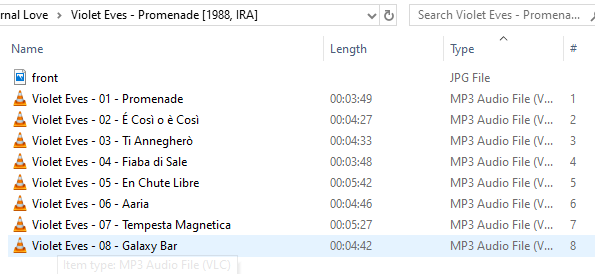
The -removeFirst 19 tag will format the individual song output filenames based on their input filename, for example, the filename Violet Eves - 04 - Fiaba di Sale after having its first 19 chars removed, would be: Fiaba di Sale
After running the full commandLineMusicVideo command, the folder output (with all the individual songs AND the fullAlbum) will look like this:
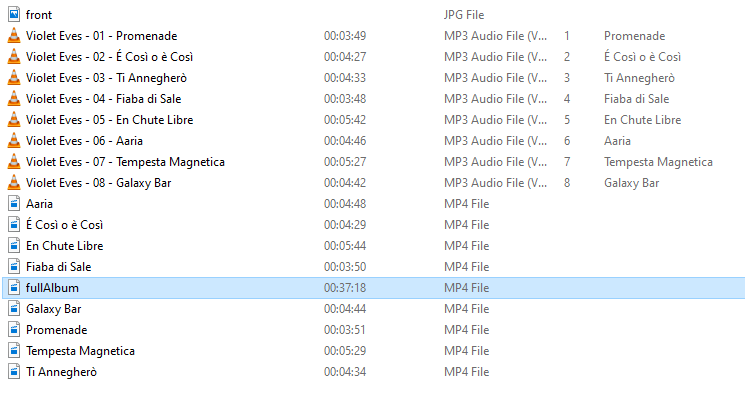
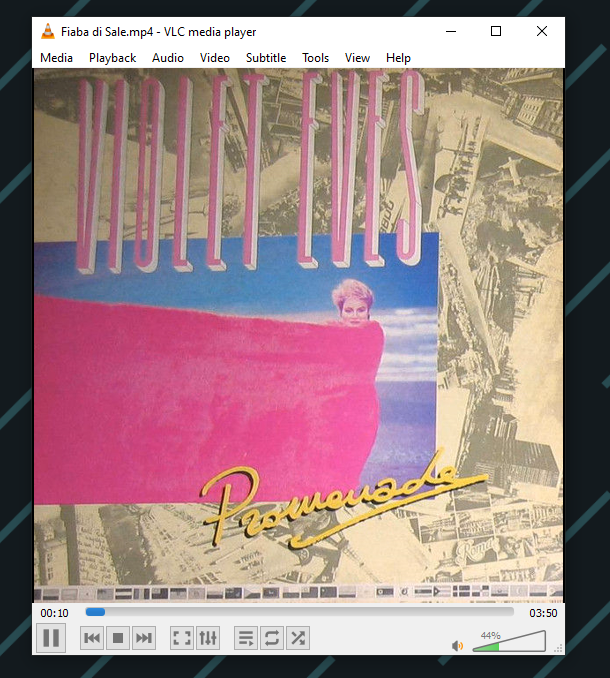
The output videos will keep the image's aspect ratio.
Flags
-h Display help.
-test Test your ffmpeg.
-songs "folderFilepath/" "audioFormat" "imageName.jpeg" Render each audioFormat file in the folderFilepath, using the imageName also found in the folderFilepath.
-fullAlbum Render full album with these songs as well.
-fullAlbumOnly Only render the full album.
-outputResolution 1920:1080 Set output resolution for video.
- Output Filename Formatting Flags:
-removeFirst # Remove first # chars from song filename for output filename.
-removeUpTo "-" Remove everything up to and including the first instance of this char.
-removeAfter "-" Remove everything after and including this char.
-titleize Capitalize first letter of each word of output filename')
1 maintainer

Metadata
1 maintainer
Release files for commandLineMusicVideo 0.2.0
For a detailed explanation of source distributions (sdists) and built distributions (wheels), please see the package formats documentation.
Source distribution (sdist)
| File | Size | Uploaded | |
|---|---|---|---|
| commandLineMusicVideo-0.2.0.tar.gz | 4.7 kB | Details |
Built distribution (wheel)
| File | Interpreter | ABI | Platform | Reset |
|---|---|---|---|---|
| commandLineMusicVideo-0.2.0-py3-none-any.whl | Python 3 | none | any | Details |
Total release size: 10.6 kB
Release files / commandLineMusicVideo-0.2.0.tar.gz
| Download URL | commandLineMusicVideo-0.2.0.tar.gz |
|---|---|
| Size | 4.7 kB |
| Tags | Source |
|
SHA-256 checksum How to use checksums |
81dfe4c1ccc5720c13c5ddfac7914fb205a687e73a47e0479b7da0e991043fac
|
|
BLAKE2b-256 checksum How to use checksums |
0a9d8f83b64662a0ed9c9b6cc39a94510cbee4249e9cb9f363039262e2206ef7
|
| Upload date | |
|
Uploaded using Trusted Publishing? What is trusted publishing? |
No |
| Uploaded via |
twine/3.2.0 pkginfo/1.5.0.1 requests/2.22.0 setuptools/45.2.0 requests-toolbelt/0.9.1 tqdm/4.47.0 CPython/3.8.2
|
Release files / commandLineMusicVideo-0.2.0-py3-none-any.whl
| Download URL | commandLineMusicVideo-0.2.0-py3-none-any.whl |
|---|---|
| Size | 5.9 kB |
| Tags | Python 3 |
|
SHA-256 checksum How to use checksums |
a5c210c7175f3a1239ee2b709d7791f7e5ed71f2b2db5e4ba398ebda8c9aea9a
|
|
BLAKE2b-256 checksum How to use checksums |
7d31c6f39ae19b1dac051ec62f6ff9c71d8677026b1317e2e3ec6ed7b052106c
|
| Upload date | |
|
Uploaded using Trusted Publishing? What is trusted publishing? |
No |
| Uploaded via |
twine/3.2.0 pkginfo/1.5.0.1 requests/2.22.0 setuptools/45.2.0 requests-toolbelt/0.9.1 tqdm/4.47.0 CPython/3.8.2
|














