
Commit Check








Table of Contents
- Overview
- Quick Start
- Installation
- Configuration
- AI-Native Usage
- Examples
- Badging your repository
- Why Commit Check?
- Versioning
- Have question or feedback?
- License
Overview
Commit Check is a lightweight policy engine for Git commit metadata.
It validates commit messages, branch names, author identity, signoff trailers, AI attribution policy, and push safety — using one versioned TOML policy across local hooks, CI, GitHub Actions, the hosted GitHub App, and AI automation.
- One policy file:
cchk.toml - Multiple enforcement points: CLI, pre-commit, CI / GitHub Actions, or the Commit Check GitHub App with no workflow file
- Machine-readable output: JSON + Python API for automation and AI agents
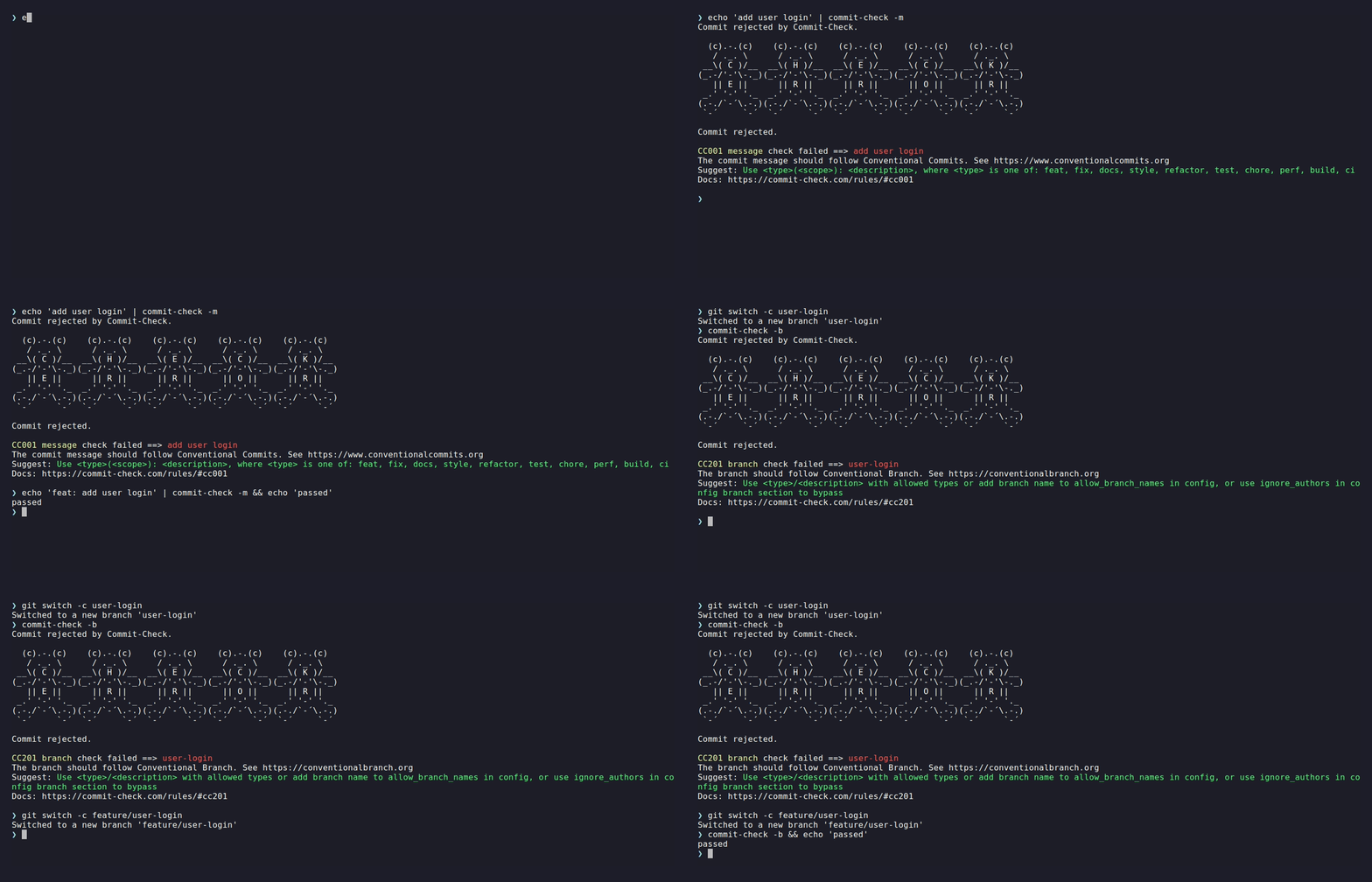
Quick Start
1. Install and run with zero configuration:
pip install commit-check
commit-check --message --branch
2. Add to your pre-commit hooks (.pre-commit-config.yaml):
repos:
  - repo: https://github.com/commit-check/commit-check
    rev: v2.18.0
    hooks:
      - id: check-message
      - id: check-branch
3. Add a badge to your repository:
[](https://github.com/commit-check/commit-check)
Installation
To install Commit Check, you can use pip:
pip install commit-check
Or install directly from the GitHub repository:
pip install git+https://github.com/commit-check/commit-check.git@main
Then, run commit-check --help or cchk --help (alias for commit-check) from the command line.
For more information, see the docs.
Configuration
Commit Check can be configured in three ways (in order of priority):
- Command-line arguments — Override settings for specific runs
- Environment variables — Configure via
CCHK_*environment variables - Configuration files — Use
cchk.tomlorcommit-check.toml
Use Default Configuration
-
Commit Check uses a default configuration if you do not provide a
cchk.tomlorcommit-check.tomlfile. -
The default configuration is lenient — it only checks whether commit messages follow the Conventional Commits specification and branch names follow the Conventional Branch convention.
Use Custom Configuration File
To customize the behavior, create a configuration file named cchk.toml or commit-check.toml in your repository's root directory or in the .github folder, e.g., cchk.toml or .github/cchk.toml.
# Rules to report without enforcing: they print in full, never fail the run.
# Name a check or its rule ID. See "Report a rule without enforcing it" below.
warn = ["branch"]

[commit]
# https://www.conventionalcommits.org
conventional_commits = true
subject_imperative = true
subject_max_length = 80
allow_commit_types = ["feat", "fix", "docs", "style", "refactor", "test", "chore", "ci"]
allow_merge_commits = true
allow_wip_commits = false
require_signed_off_by = false
# Bypass checks for bot/automation authors and co-authors:
ignore_authors = ["dependabot[bot]", "renovate[bot]", "copilot[bot]"]
# AI attribution policy: "ignore" (default), "forbid" or "disclose".
# "forbid" rejects commits carrying known AI tool signatures; "disclose"
# accepts AI assistance disclosed with an Assisted-by: or Generated-by:
# trailer and rejects the tool as a co-author or a sign-off.
# See "AI Attribution Policy" below.
ai_attribution = "disclose"

[branch]
# https://conventionalbranch.org
conventional_branch = true
# Optional: the defaults are a superset of the Conventional Branch spec — spec
# types plus Conventional Commit types (build, ci, docs, perf, refactor, style,
# test) and AI/bot prefixes (ai, claude, codex, copilot, cursor, dependabot,
# renovate), see https://commit-check.com/configuration/. Omit this option to use the defaults.
allow_branch_types = [
    "feature",
    "bugfix",
    "hotfix",
    "release",
    "chore",
    "feat",
    "fix",
    "build",
    "ci",
    "docs",
    "perf",
    "refactor",
    "style",
    "test",
]
[!TIP] IDE Autocompletion
commit-check's TOML schema is published on SchemaStore, so editors like VS Code (via Even Better TOML), PyCharm, and IntelliJ provide autocompletion, validation, and documentation tooltips for
cchk.tomlout of the box — no manual schema path configuration needed.
Report a rule without enforcing it
A rule is normally on or off. warn gives it a third setting: run, report
the finding in full, and never fail the run. Name a check or its rule ID:
warn = ["branch", "CC003"]
A warned rule prints the same block as a failure with warning in place of
failed, no rejection banner, and one closing line saying the run is not
failed by it; with --compact it is one [WARN] line. The exit code counts
only enforced rules, and in --format json the check's status is warn, the
top-level status stays pass, and warnings counts them. This is how a team
adopts a rule gradually: turn it on
as a warning, watch what it catches, then drop it from warn when the history
is clean. A name that matches no rule is a configuration error, so a typo
cannot leave a rule silently enforced.
Organization-Level Configuration (inherit_from)
Share a base configuration across all repositories in your organization using inherit_from:
# .github/cchk.toml — inherits from org-level config, then overrides locally
inherit_from = "github:my-org/.github:cchk.toml"

[commit]
subject_max_length = 72  # Local override
The inherit_from field accepts:
- A GitHub shorthand (recommended):
inherit_from = "github:owner/repo:path/to/cchk.toml" - A GitHub shorthand with ref:
inherit_from = "github:owner/repo@main:path/to/cchk.toml" - A local file path (relative or absolute):
inherit_from = "../shared/cchk.toml" - An HTTPS URL:
inherit_from = "https://example.com/cchk.toml"
The github: shorthand fetches from raw.githubusercontent.com. HTTP (non-TLS) URLs are rejected for security.
Local settings always override the inherited base configuration.
Use CLI Arguments or Environment Variables
For one-off checks or CI/CD pipelines, you can configure via CLI arguments or environment variables:
# Using CLI arguments
commit-check --message --subject-imperative=true --subject-max-length=72

# Using environment variables
export CCHK_SUBJECT_IMPERATIVE=true
export CCHK_SUBJECT_MAX_LENGTH=72
commit-check --message

# In pre-commit hooks (.pre-commit-config.yaml)
repos:
  - repo: https://github.com/commit-check/commit-check
    rev: v2.18.0
    hooks:
      - id: check-message
        args:
          - --subject-imperative=false
          - --subject-max-length=100
      - id: check-author-email
        args:
          - --no-banner
          - --author-email
          - --author-email-pattern=^.+@example\.com$
The table below lists every option; https://commit-check.com/configuration/ has the long-form rule descriptions.
Configuration reference
Every setting, with its built-in default, the CLI flag and the CCHK_* environment
variable that override it (priority: CLI > env > TOML > default). Booleans accept
true/false, yes/no, 1/0; lists are comma-separated on the CLI and in env vars.
| Key | Default | CLI flag | Env var | Meaning |
|---|---|---|---|---|
warn (top level) |
[] |
— | — | Checks or rule IDs to report without failing the run (see "Report a rule without enforcing it") |
commit.conventional_commits |
true |
--conventional-commits |
CCHK_CONVENTIONAL_COMMITS |
Enforce the Conventional Commits format (CC001) |
commit.message_pattern |
"" |
— | CCHK_MESSAGE_PATTERN |
Custom regex the whole message must match; when set it replaces the Conventional Commits check (still reported as CC001) |
commit.subject_capitalized |
false |
--subject-capitalized |
CCHK_SUBJECT_CAPITALIZED |
Require the subject to start with a capital letter (CC002) |
commit.subject_imperative |
false |
--subject-imperative |
CCHK_SUBJECT_IMPERATIVE |
Require the subject to use the imperative mood (CC003) |
commit.subject_max_length |
80 |
--subject-max-length |
CCHK_SUBJECT_MAX_LENGTH |
Maximum subject length (CC004) |
commit.subject_min_length |
5 |
--subject-min-length |
CCHK_SUBJECT_MIN_LENGTH |
Minimum subject length (CC005) |
commit.allow_commit_types |
feat, fix, docs, style, refactor, test, chore, perf, build, ci |
--allow-commit-types |
CCHK_ALLOW_COMMIT_TYPES |
Allowed <type> values in the subject |
commit.allow_merge_commits |
true |
--allow-merge-commits |
CCHK_ALLOW_MERGE_COMMITS |
Allow merge commits (CC006) |
commit.allow_revert_commits |
true |
--allow-revert-commits |
CCHK_ALLOW_REVERT_COMMITS |
Allow revert commits (CC007) |
commit.allow_empty_commits |
true |
--allow-empty-commits |
CCHK_ALLOW_EMPTY_COMMITS |
Allow empty commit messages (CC008) |
commit.allow_fixup_commits |
true |
--allow-fixup-commits |
CCHK_ALLOW_FIXUP_COMMITS |
Allow fixup! commits (CC009) |
commit.allow_wip_commits |
true |
--allow-wip-commits |
CCHK_ALLOW_WIP_COMMITS |
Allow WIP commits (CC010) |
commit.require_body |
false |
--require-body |
CCHK_REQUIRE_BODY |
Require a commit body (CC011) |
commit.require_signed_off_by |
false |
--require-signed-off-by |
CCHK_REQUIRE_SIGNED_OFF_BY |
Require a Signed-off-by: trailer (CC012) |
commit.ignore_authors |
[] |
--ignore-authors |
CCHK_IGNORE_AUTHORS |
Authors and co-authors whose commits skip the commit checks |
commit.ai_attribution |
"ignore" |
--ai-attribution |
CCHK_AI_ATTRIBUTION |
ignore, forbid or disclose. forbid rejects commits carrying known AI tool signatures (CC013); disclose accepts AI assistance disclosed with one of ai_disclosure_trailers (CC014) and rejects the tool as a co-author (CC015) or as a sign-off (CC016) |
commit.ai_disclosure_trailers |
Assisted-by, Generated-by |
--ai-disclosure-trailers |
CCHK_AI_DISCLOSURE_TRAILERS |
Trailers that disclose AI assistance under disclose; the first is the one a fix is written with. List Co-authored-by to accept the tool as a co-author |
commit.ai_disclosure_pattern |
"" |
--ai-disclosure-pattern |
CCHK_AI_DISCLOSURE_PATTERN |
Regex the disclosure's value must match under disclose, e.g. ^\S+/\S+ for agent/model; empty accepts any value, but a trailer with no value at all is always reported |
commit.author_email_pattern |
"^.+@.+$" |
--author-email-pattern |
CCHK_AUTHOR_EMAIL_PATTERN |
Regex the author email must match (CC102, with --author-email) |
commit.author_name_pattern |
"" |
--author-name-pattern |
CCHK_AUTHOR_NAME_PATTERN |
Regex the author name must match (CC101, with --author-name) |
branch.conventional_branch |
true |
--conventional-branch |
CCHK_CONVENTIONAL_BRANCH |
Enforce <type>/<description> branch names (CC201) |
branch.allow_branch_types |
feature, bugfix, hotfix, release, chore, feat, fix, build, ci, docs, perf, refactor, test, style, ai, claude, codex, copilot, cursor, dependabot, renovate |
--allow-branch-types |
CCHK_ALLOW_BRANCH_TYPES |
Allowed branch <type> prefixes; each entry is a regex matched against the whole type |
branch.allow_branch_names |
[] |
--allow-branch-names |
CCHK_ALLOW_BRANCH_NAMES |
Extra branch names allowed besides main, master, HEAD, PR-.+; each entry is a regex matched against the whole branch name, so create-pull-request/.+ allows a family of them |
branch.require_rebase_target |
"" |
--require-rebase-target |
CCHK_REQUIRE_REBASE_TARGET |
Branch the current branch must be rebased onto (CC202); empty disables |
branch.ignore_authors |
[] |
--branch-ignore-authors |
CCHK_BRANCH_IGNORE_AUTHORS |
Authors whose branches skip the branch checks |
push.allow_force_push |
true |
— (--no-force-push runs the check) |
CCHK_ALLOW_FORCE_PUSH |
Reserved; has no effect today. CC301 runs only with --no-force-push, which always rejects a non-fast-forward push |
tag.regex |
SemVer with optional v |
--tag-regex |
CCHK_TAG_REGEX |
Pattern tag names must match (CC401); empty disables |
files.max_size |
"" (off) |
--files-max-size |
CCHK_FILES_MAX_SIZE |
Largest committed file, in bytes or with KB/MB/GB (CC302) |
files.prohibited_patterns |
[] |
--files-prohibited-patterns |
CCHK_FILES_PROHIBITED_PATTERNS |
fnmatch patterns committed paths must not match (CC303) |
files.max_path_length |
0 (off) |
--files-max-path-length |
CCHK_FILES_MAX_PATH_LENGTH |
Longest allowed committed path, in characters (CC304) |
Output/appearance is not configuration: --format json, --no-banner, --compact,
--dry-run, --rev, --config are per-run flags, and color follows NO_COLOR /
FORCE_COLOR (https://no-color.org).
Check Push Safety
Use --no-force-push in a pre-push hook to inspect the ref updates Git
provides on stdin, or run it directly to compare HEAD with the current
branch's configured upstream:
# Standalone preflight check against the current branch's upstream
commit-check --no-force-push
# In pre-commit hooks (.pre-commit-config.yaml)
repos:
  - repo: https://github.com/commit-check/commit-check
    rev: v2.18.0
    hooks:
      - id: check-no-force-push
        stages: [pre-push]
[!NOTE] Piping
git pushintocommit-checkis not a prevention mechanism. The push has already been started, and standardgit pushoutput does not carry the pre-push ref metadata thatcommit-checkuses.
Check Tag Names
Use --tag to validate the name of every tag pointing at HEAD (or at
--rev). The default pattern accepts SemVer with an optional leading v
(v1.2.3 or 1.2.3, pre-release and build suffixes included); set
regex in the [tag] config section or pass --tag-regex to change it.
A commit with no tag is reported as skipped, not failed.
# Validate the tag(s) at HEAD, e.g. in a CI job triggered by a tag push
commit-check --tag

# Enforce a custom scheme
commit-check --tag --tag-regex '^v\d+\.\d+\.\d+$'
# In pre-commit hooks (.pre-commit-config.yaml): validates the tag names
# a push carries, from the pre-push ref metadata on stdin
repos:
  - repo: https://github.com/commit-check/commit-check
    rev: v2.18.0
    hooks:
      - id: check-tag
        stages: [pre-push]
Check Committed Files
Use --files to police metadata about the files a commit touches — never
their contents. Three independent, opt-in limits live in the [files]
config section: a size cap, prohibited path patterns, and a path-length
cap. GitHub's own push rules do this only on Team and Enterprise plans;
here it works on every plan and every forge.
[files]
# Reject files larger than this (bytes, or with a KB/MB/GB suffix)
max_size = "5MB"

# Reject paths matching any fnmatch pattern; a bare pattern like *.pem
# also matches the file name at any depth
# Patterns are case-sensitive on every platform, like git pathspecs
prohibited_patterns = ["*.pem", "*.key", ".env", "id_rsa*"]

# Reject paths longer than this many characters
max_path_length = 250
# Validate the commit at HEAD, or any commit via --rev
commit-check --files
commit-check --files --rev abc1234
# In pre-commit hooks (.pre-commit-config.yaml): a native git pre-push hook
# feeds the pushed refs on stdin, and every commit the push adds is validated
# (a tag on already-pushed history adds nothing, so it is skipped)
repos:
  - repo: https://github.com/commit-check/commit-check
    rev: v2.18.0
    hooks:
      - id: check-files
        stages: [pre-push]
A commit that only deletes files is reported as skipped — removing a file adds nothing to police. Content scanning (entropy, token detection) is deliberately out of scope: pair these checks with a scanner like gitleaks if you need it.
AI Attribution Policy
AI coding tools stamp the commits they help with — Co-authored-by: Claude <noreply@anthropic.com>, Co-authored-by: Copilot <...>, a 🤖 Generated with line — and projects have started writing down what they want instead:
the Linux kernel, Fedora and FluxCD ask for an Assisted-by: trailer, the
Apache Software Foundation for Generated-by:, and the kernel adds that a
tool must never add a Signed-off-by: line, because only a person can
certify the Developer Certificate of Origin. ai_attribution turns that
policy into a check:
| Policy | What it means | Rules |
|---|---|---|
"ignore" (default) |
No opinion; nothing is checked | — |
"forbid" |
Commit messages carry no AI attribution at all | CC013 |
"disclose" |
AI assistance is welcome, disclosed with one of ai_disclosure_trailers; the tool is not credited as a co-author and does not sign off |
CC014, CC015, CC016 |
[commit]
ai_attribution = "disclose"
# Optional: the trailers that count as a disclosure (default shown); the
# first one is what a fix is written with
ai_disclosure_trailers = ["Assisted-by", "Generated-by"]
# Optional: what the trailer's value must look like, e.g. agent/model
# ai_disclosure_pattern = '^\S+/\S+'
A commit that a tool stamped but nobody disclosed fails with the disclosure already written:
printf 'feat: add caching\n\nCo-Authored-By: Claude Opus 5 <noreply@anthropic.com>' | commit-check -m --compact
[FAIL] CC014 ai-disclosure: Co-Authored-By: Claude Opus 5 <noreply@anthropic.com>
[FAIL] CC015 ai-co-author: Co-Authored-By: Claude Opus 5 <noreply@anthropic.com>
Both carry the same fix: the co-author line replaced by Assisted-by: Claude Opus 5. A commit that already discloses the tool passes CC014, and
CC015 then asks only for the co-author line to go. Disclosure that is
appreciated rather than required is warn = ["ai_disclosure"]; a project
that accepts the tool as a co-author lists Co-authored-by among the
trailers.
The check reads what the message says, not what happened: assistance that left no trace is invisible to it, as it is to every other tool.
Exit Codes and Dry Run
| Exit code | Meaning |
|---|---|
0 |
Every enforced check passed, or every check was skipped. |
1 |
A check failed. This is a verdict on the commit. |
2 |
The run could not start: bad usage, a --rev that does not resolve, a setting whose regex does not compile, or a config file that is missing, is not valid TOML, or names an unknown rule. Nothing was validated. |
A configuration error names the file, so a broken .github/cchk.toml is
reported as:
Error: .github/cchk.toml: Expected ']' at the end of a table declaration (at line 1, column 8)
A setting that can also be given as a flag or a CCHK_* variable names
itself instead of guessing at a file, and echoes the value it could not use:
Error: [commit] message_pattern is not a valid regex: '^(unclosed' (missing ), unterminated subpattern at position 1)
Scripts that treat any non-zero exit as a rejected commit keep working. Scripts
that want to tell a broken policy from a broken commit can check for 2, which
is also the code argparse uses for a bad command line.
--dry-run runs every requested check and prints the findings exactly as a
normal run does, then exits 0 even when a check failed, with one line on
stderr saying so:
echo "wip bad commit" | commit-check -m --dry-run --compact
[FAIL] CC001 message: wip bad commit
⊘ dry run: a check failed, but --dry-run forces exit code 0
Use it to preview a rule set in CI before enforcing it. In --format json the
status still says fail; only the exit code is softened. A configuration
error is not softened: nothing ran, so there is nothing to preview, and a green
exit would hide the broken file.
AI-Native Usage
Commit Check is designed to be consumed by AI agents, LLM toolchains, and automation scripts — not just by humans reading terminal output.
Machine-Readable JSON Output (--format json)
Pass --format json to any CLI invocation to receive structured JSON instead
of human-readable ASCII art. The exit code is unchanged (0 = pass, 1 = fail,
2 = configuration error; see Exit Codes and Dry Run),
so existing CI scripts continue to work:
echo "feat: add streaming support" | commit-check -m --format json
{
  "status": "pass",
  "warnings": 0,
  "checks": [
    {
      "rule_id": "CC001",
      "check": "message",
      "status": "pass",
      "value": "feat: add streaming support",
      "error": "",
      "suggest": "",
      "fix": "",
      "docs_url": "https://commit-check.com/rules/#cc001"
    },
    {
      "rule_id": "CC004",
      "check": "subject_max_length",
      "status": "pass",
      "value": "feat: add streaming support",
      "error": "",
      "suggest": "",
      "fix": "",
      "docs_url": "https://commit-check.com/rules/#cc004"
    },
    {
      "rule_id": "CC005",
      "check": "subject_min_length",
      "status": "pass",
      "value": "feat: add streaming support",
      "error": "",
      "suggest": "",
      "fix": "",
      "docs_url": "https://commit-check.com/rules/#cc005"
    }
  ]
}
On failure the failing checks carry the full error and suggest fields
an agent needs to self-correct:
echo "wip bad commit" | commit-check -m --format json
{
  "status": "fail",
  "warnings": 0,
  "checks": [
    {
      "rule_id": "CC001",
      "check": "message",
      "status": "fail",
      "value": "wip bad commit",
      "error": "The commit message should follow Conventional Commits. See https://www.conventionalcommits.org",
      "suggest": "Use <type>(<scope>): <description>, where <type> is one of: feat, fix, docs, style, refactor, test, chore, perf, build, ci",
      "fix": "",
      "docs_url": "https://commit-check.com/rules/#cc001"
    },
    {
      "rule_id": "CC004",
      "check": "subject_max_length",
      "status": "pass",
      "value": "wip bad commit",
      "error": "",
      "suggest": "",
      "fix": "",
      "docs_url": "https://commit-check.com/rules/#cc004"
    },
    {
      "rule_id": "CC005",
      "check": "subject_min_length",
      "status": "pass",
      "value": "wip bad commit",
      "error": "",
      "suggest": "",
      "fix": "",
      "docs_url": "https://commit-check.com/rules/#cc005"
    }
  ]
}
When the correction is mechanical, fix carries the corrected value and
suggest names it, so an agent (or a person) can apply it without
interpreting anything: a type written Fix or misspelt feta, a missing
colon, a lowercase description under subject_capitalized, a WIP: marker,
a missing Signed-off-by trailer, a branch typed Feature/x, AI
attribution lines under ai_attribution = "forbid", or a vendor's co-author
line rewritten as the project's disclosure trailer under "disclose".
Anything that takes a judgment, such as choosing a type for a bare subject or
shortening a long one, leaves fix empty and suggest generic.
echo "Fix: add streaming support" | commit-check -m --format json
{
  "status": "fail",
  "warnings": 0,
  "checks": [
    {
      "rule_id": "CC001",
      "check": "message",
      "status": "fail",
      "value": "Fix: add streaming support",
      "error": "The commit message should follow Conventional Commits. See https://www.conventionalcommits.org",
      "suggest": "Use \"fix: add streaming support\"",
      "fix": "fix: add streaming support",
      "docs_url": "https://commit-check.com/rules/#cc001"
    }
  ]
}
(The passing checks are omitted from this example.)
Quieter Human-Readable Output
For terminal workflows that still want plain text, commit-check now supports two lower-noise output modes:
--no-bannerkeeps the normal failure details and suggestions, but removes the ASCII-art failure banner.--compactemits a single[FAIL]line per failing check and implies--no-banner.
echo "wip bad commit" | commit-check -m --no-banner
CC001 message check failed ==> wip bad commit
The commit message should follow Conventional Commits. See https://www.conventionalcommits.org
Suggest: Use <type>(<scope>): <description>, where <type> is one of: feat, fix, docs, style, refactor, test, chore, perf, build, ci
Docs: https://commit-check.com/rules/#cc001
echo "wip bad commit" | commit-check -m --compact
[FAIL] CC001 message: wip bad commit
Python API (no subprocess required)
The commit_check.api module exposes a lightweight, import-friendly interface
so AI agents, tools, and scripts can validate commits without spawning a
subprocess. All functions return plain dicts that are easy to serialise,
forward to an LLM, or chain into larger workflows:
from commit_check.api import validate_message, validate_branch, validate_all

# --- validate a single commit message ---
result = validate_message("feat: add streaming support")
print(result["status"])          # "pass"

# --- validate a branch name ---
result = validate_branch("feature/add-streaming")
print(result["status"])          # "pass"

# --- run multiple checks at once ---
result = validate_all(
    message="feat: implement new feature",
    branch="feature/new-feature",
    author_name="Ada Lovelace",
    author_email="ada@example.com",
)
if result["status"] == "fail":
    for check in result["checks"]:
        if check["status"] == "fail":
            print(f"[{check['check']}] {check['error']}")
            print(f"  suggestion: {check['suggest']}")

# --- supply a custom config to restrict allowed types ---
result = validate_message(
    "docs: update readme",
    config={"commit": {"allow_commit_types": ["feat", "fix"]}},
)
print(result["status"])          # "fail" — 'docs' not in allowed types
Return-value schema (all API functions):
{
    "status": "pass" | "fail" | "skip",
    "warnings": <number of checks with status "warn">,
    "checks": [
        {
            "rule_id":  "<rule identifier, e.g. CC001>",
            "check":    "<rule name>",
            "status":   "pass" | "fail" | "warn" | "skip",
            "value":    "<actual value that was checked>",
            "error":    "<human-readable error description>",
            "suggest":  "<how to fix>",
            "fix":      "<the corrected value, when it is unambiguous; else empty>",
            "docs_url": "<link to the rule's documentation>",
        },
        # ... one entry per active rule
    ]
}
warn means the rule was not satisfied but is listed under warn in the
config: the finding is reported and does not fail the run, and warnings
counts these. skip means the rule never ran — the author matched
ignore_authors, or there was nothing to check. It is deliberately not pass: a skipped rule
validated nothing, so reporting it as a pass makes a bypassed policy
indistinguishable from an enforced one. A skipped check carries no value,
since nothing was examined.
The top-level status is skip only when every check skipped; one real
verdict makes it pass or fail as before. Only fail is an error, and the
CLI exit code follows that — a fully skipped run still exits 0, so code
branching on status == "fail" is unaffected.
echo "chore(deps): bump commit-check" | CCHK_IGNORE_AUTHORS="dependabot[bot]" commit-check -m --format json
{
  "status": "skip",
  "warnings": 0,
  "checks": [
    {
      "rule_id": "CC001",
      "check": "message",
      "status": "skip",
      "value": "",
      "error": "",
      "suggest": "",
      "fix": "",
      "docs_url": "https://commit-check.com/rules/#cc001"
    },
    {
      "rule_id": "CC004",
      "check": "subject_max_length",
      "status": "skip",
      "value": "",
      "error": "",
      "suggest": "",
      "fix": "",
      "docs_url": "https://commit-check.com/rules/#cc004"
    },
    {
      "rule_id": "CC005",
      "check": "subject_min_length",
      "status": "skip",
      "value": "",
      "error": "",
      "suggest": "",
      "fix": "",
      "docs_url": "https://commit-check.com/rules/#cc005"
    }
  ]
}
Available API functions:
validate_message(message, *, config=None)— validate a commit message stringvalidate_branch(branch=None, *, config=None)— validate a branch name (defaults to current git branch)validate_author(name=None, email=None, *, config=None)— validate author name/emailvalidate_all(message, branch, author_name, author_email, *, config=None)— run all checks at once
For detailed usage instructions including pre-commit hooks, CLI commands, and STDIN examples, see the Usage Examples documentation.
Examples
Check Commit Message Failed
Commit rejected by Commit-Check.

  (c).-.(c)    (c).-.(c)    (c).-.(c)    (c).-.(c)    (c).-.(c)
   / ._. \      / ._. \      / ._. \      / ._. \      / ._. \
 __\( C )/__  __\( H )/__  __\( E )/__  __\( C )/__  __\( K )/__
(_.-/'-'\-._)(_.-/'-'\-._)(_.-/'-'\-._)(_.-/'-'\-._)(_.-/'-'\-._)
   || E ||      || R ||      || R ||      || O ||      || R ||
 _.' '-' '._  _.' '-' '._  _.' '-' '._  _.' '-' '._  _.' '-' '._
(.-./`-´\.-.)(.-./`-´\.-.)(.-./`-´\.-.)(.-./`-´\.-.)(.-./`-´\.-.)
 `-´     `-´  `-´     `-´  `-´     `-´  `-´     `-´  `-´     `-´

CC001 message check failed ==> test commit message check
The commit message should follow Conventional Commits. See https://www.conventionalcommits.org
Suggest: Use <type>(<scope>): <description>, where <type> is one of: feat, fix, docs, style, refactor, test, chore, perf, build, ci
Docs: https://commit-check.com/rules/#cc001
Check Branch Naming Failed
Branch rejected by Commit-Check.

  (c).-.(c)    (c).-.(c)    (c).-.(c)    (c).-.(c)    (c).-.(c)
   / ._. \      / ._. \      / ._. \      / ._. \      / ._. \
 __\( C )/__  __\( H )/__  __\( E )/__  __\( C )/__  __\( K )/__
(_.-/'-'\-._)(_.-/'-'\-._)(_.-/'-'\-._)(_.-/'-'\-._)(_.-/'-'\-._)
   || E ||      || R ||      || R ||      || O ||      || R ||
 _.' '-' '._  _.' '-' '._  _.' '-' '._  _.' '-' '._  _.' '-' '._
(.-./`-´\.-.)(.-./`-´\.-.)(.-./`-´\.-.)(.-./`-´\.-.)(.-./`-´\.-.)
 `-´     `-´  `-´     `-´  `-´     `-´  `-´     `-´  `-´     `-´

CC201 branch check failed ==> test-branch
The branch should follow Conventional Branch. See https://conventionalbranch.org
Suggest: Use <type>/<description> with an allowed type, or add the branch to allow_branch_names in config
Docs: https://commit-check.com/rules/#cc201
For more examples, see the example documentation.
Badging your repository
You can add a badge to your repository to show that you use commit-check!
Markdown
[](https://github.com/commit-check/commit-check)
reStructuredText
.. image:: https://img.shields.io/badge/commit--check-enabled-brightgreen?logo=Git&logoColor=white&color=%232c9ccd
    :target: https://github.com/commit-check/commit-check
    :alt: commit-check
Why Commit Check?
The table below compares common approaches to commit policy enforcement.
commitlint is a specialized commit-message linter. GitHub Rulesets
are platform-native server-side enforcement. Custom Git hooks and the
pre-commit framework are integration mechanisms, so the last column
reflects a DIY approach rather than built-in product features.
| Feature | Commit Check | commitlint | YACC1 | GitHub Rulesets | Custom hooks |
|---|---|---|---|---|---|
| Conventional Commits enforcement | ✅ | ✅ | Partial | Partial2 | DIY |
| Branch naming validation | ✅ | ❌ | ✅ | ✅2 | DIY |
| Tag naming validation | ✅ | ❌ | ❌ | ✅2 | DIY |
| File size / path restrictions | ✅ | ❌ | ❌ | ✅3 | DIY |
| Force push blocking | ✅ | ❌ | ❌ | ✅ | DIY |
| Author name / email validation | ✅ | ❌ | ✅ | ✅2 | DIY |
| Signed-off-by trailer enforcement | ✅ | Partial4 | ❌ | ❌ | DIY |
| Co-author ignore list | ✅ | ❌ | Partial5 | ❌ | DIY |
| Organization-level shared config | ✅ | ✅ | ✅ | ✅ | DIY |
| Zero-config defaults | ✅ | ❌ | ❌ | ❌ | ❌ |
| Works without Node.js | ✅ | ❌ | ✅ | ✅ | Depends |
| Native TOML configuration | ✅ | ❌ | ❌ | ❌ | Depends |
| Git hook / pre-commit integration | ✅ | Partial | ❌ | ❌ | ✅ |
| CI/CD-friendly configuration | ✅ | Partial | ❌ | ❌ | DIY |
| Open source & free | ✅ | ✅ | ❌ | ❌3 | ✅ |
| Client-side (pre-commit) enforcement | ✅ | ✅ | ❌ | ❌ | ✅ |
| AI-native (JSON API + Python SDK) | ✅ | ❌ | ❌ | ❌ | ❌ |
For commitlint, organization-level shared config is typically delivered via
shareable config packages or local files.
For YACC (Yet Another Commit Checker), conventional commit enforcement
is regex-based rather than Conventional Commits-aware; author validation
verifies committer name/email against Bitbucket user accounts or custom regex;
the plugin supports global → project → repository config inheritance;
it is a server-side pre-receive hook and merge check (no client-side
pre-commit), is paid (per-user licensing), and runs on Java (no Node.js needed).
For GitHub Rulesets, push rulesets enforce metadata via regex patterns — they can match branch/tag names, commit messages, and author email, but have no awareness of Conventional Commits semantics (types, scopes, breaking-change markers). They apply server-side and require a GitHub plan (Free for public repos, Team/Enterprise for private/internal repos with push rulesets). They are not portable to other Git platforms and do not provide local pre-commit feedback.
DIY means you can implement a
capability with custom Git hooks or pre-commit scripts, but it is not
provided as a turnkey policy layer.
Versioning
Versioning follows Semantic Versioning.
Have question or feedback?
Please post to issues or start a discussion for feedback, feature requests, or bug reports.
License
This project is released under the MIT License.
-
Yet Another Commit Checker is a paid Bitbucket Server / Data Center plugin (server-side pre-receive hook and merge check). ↩
-
GitHub Rulesets enforce these via regex patterns in push rulesets (metadata restrictions). They are regex-based and do not understand Conventional Commits or Conventional Branch semantics. ↩ ↩2 ↩3 ↩4
-
GitHub Rulesets require a GitHub plan. Push rulesets (metadata restrictions) require Team or Enterprise plans for private/internal repos; branch/tag rulesets are available on Free plans for public repos. ↩ ↩2
-
commitlintprovides a communitysigned-off-byrule (@commitlint/rule-signed-off-by) that must be installed and configured separately; it is not part of the default@commitlint/config-conventionalpreset. ↩ -
YACC can exclude commits from specific Bitbucket users, user groups, or service users (bots), but does not parse
Co-authored-by:trailers in commit messages. ↩
Download files
Download the file for your platform. If you're not sure which to choose, learn more about installing packages.
Source Distributions
Built Distribution
Filter files by name, interpreter, ABI, and platform.
If you're not sure about the file name format, learn more about wheel file names.
Copy a direct link to the current filters
File details
Details for the file commit_check-2.18.0-py3-none-any.whl.
File metadata
- Download URL: commit_check-2.18.0-py3-none-any.whl
- Upload date:
- Size: 88.8 kB
- Tags: Python 3
- Uploaded using Trusted Publishing? No
- Uploaded via:
twine/7.0.0 CPython/3.13.14
File hashes
| Algorithm | Hash digest | |
|---|---|---|
| SHA256 |
61192c6526be9769c2c790b3775c45dcd83a24ef85893054f523a5e56ef09e0c
|
|
| MD5 |
20e4fd48a8700a488bfe1e9b1d91a795
|
|
| BLAKE2b-256 |
e2a0083cfce9134bc010fee674d2854b28d9a74860534d152e5b69007c9a26fb
|














