
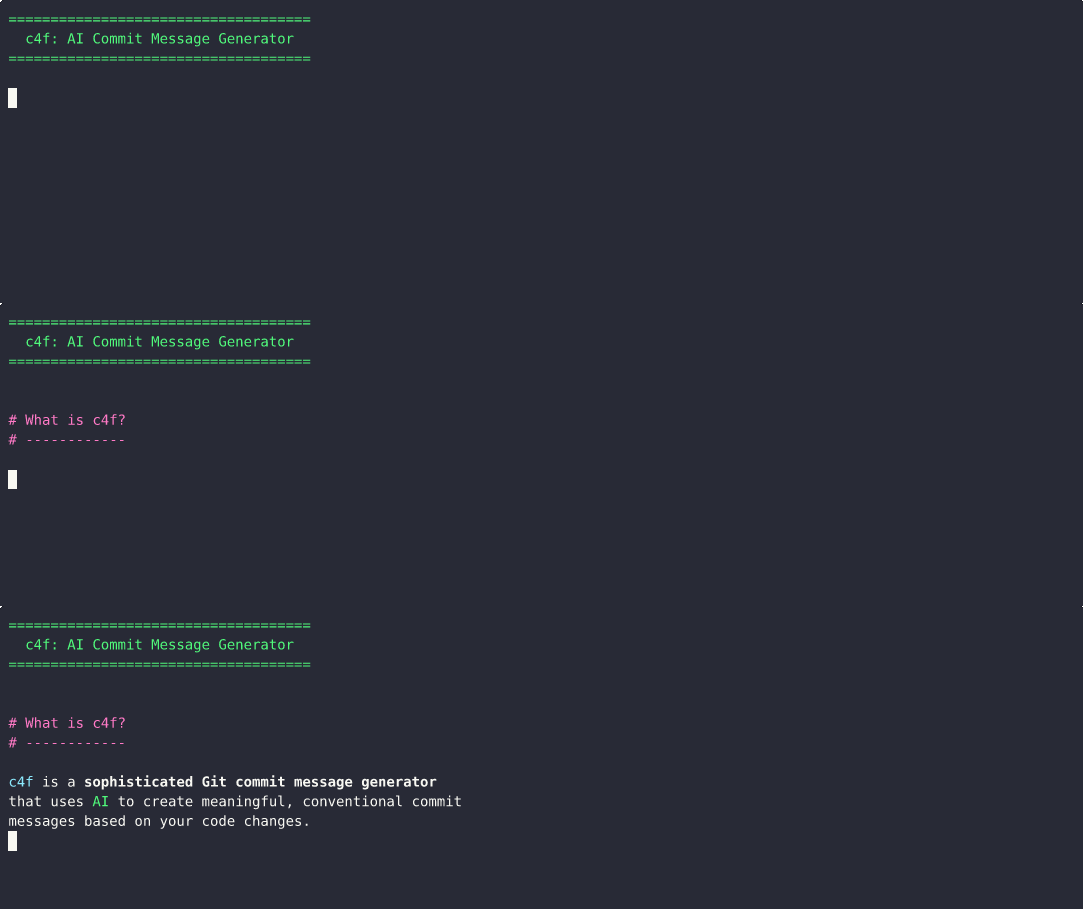
A sophisticated Git commit message generator that uses AI to create meaningful, conventional commit messages based on your code changes.

Project description
C4F - Commit For Free



A sophisticated Git commit message generator that uses AI to create meaningful, conventional commit messages based on your code changes.
Note: While the GitHub repository is named
c4f, the package is published on PyPI ascommit-for-freesince the namec4fwas already taken. All installation commands should usecommit-for-freeas the package name.
_____ _ _ _____ / ____| || | | ___| | | | || |_ | |_ | | |__ _| | _| | |____ | | | | \_____| |_| |_|Commit For Free - AI-Powered Git Commit Message Generator
Features
- 🤖 AI-powered commit message generation using GPT models
- 📝 Follows Conventional Commits format
- 🔍 Smart analysis of file changes and diffs
- 🎨 Beautiful CLI interface with rich formatting
- ⚡ Efficient handling of both small and large changes
- 🔄 Fallback mechanisms for reliability
- 🎯 Automatic change type detection (feat, fix, docs, etc.)
- 📊 Progress tracking and status display
- 🚀 Optional emoji icons for commit types (✨ feat, 🐛 fix, etc.)
Demo
See C4F in action:
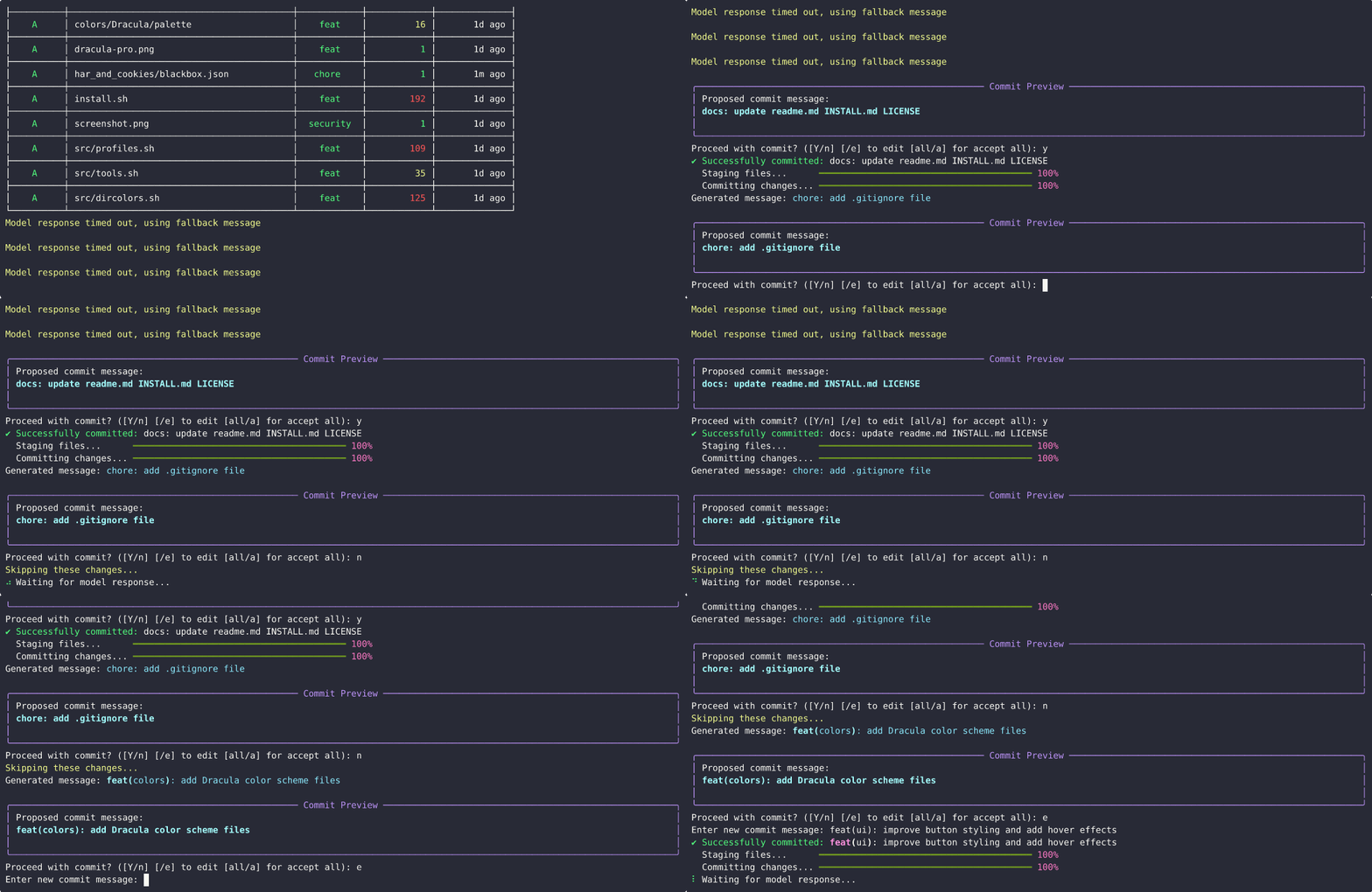
Note: It's normal to occasionally see model response timeouts as shown in the demo. This is due to limitations of the free GPT models provided by
g4f. After all configured attempts, the package automatically creates a fallback commit message to ensure you can always complete your workflow.
Installation
⚠️ Important: C4F requires Python 3.11 or higher to run.
Using pip
pip install commit-for-free
Using pipx (Recommended for non-Windows platforms)
For a clean, isolated installation that doesn't interfere with your system Python:
# Install pipx if you don't have it
python -m pip install --user pipx
python -m pipx ensurepath

# Install c4f
pipx install commit-for-free
With Enhanced Resource Monitoring
For more accurate system resource monitoring (CPU, memory, process tree):
pip install commit-for-free[monitoring]
From source
- Clone the repository:
git clone https://github.com/alaamer12/c4f.git
cd c4f
- Install using Poetry:
poetry install
Or with pip:
pip install -e .
Usage
Basic Usage
Simply run the command in your Git repository:
c4f
The tool will:
- Detect staged and unstaged changes in your repository
- Analyze the changes and their context
- Generate an appropriate commit message using AI
- Stage and commit the changes with the generated message

Command-line Options
usage: c4f [-r PATH] [-m MODEL] [-a NUM] [-t SEC] [-f] [-i] [-A]

Intelligent Git Commit Message Generator

options:
  -r PATH, --root PATH  Set the root directory for git operations [default: current project root]
  -m MODEL, --model MODEL
                        Set the AI model to use for commit message generation [default: gpt-4-mini]
                        Choices: gpt-4-mini, gpt-4, gpt-3.5-turbo

Generation Options:
  Configure the commit message generation process

  -a NUM, --attempts NUM
                        Set the number of generation attempts before falling back [default: 3]
                        Range: 1-10
  -t SEC, --timeout SEC
                        Set the fallback timeout in seconds for model response [default: 10]
                        Range: 1-60

Formatting Options:
  Configure the commit message format

  -f, --force-brackets  Force conventional commit type with brackets (e.g., feat(scope): message)
  -i, --icon            Add emoji icons to commit messages (e.g., ✨ feat: new feature)
  -A, --ascii-only      Use ASCII alternatives instead of Unicode emojis for better terminal compatibility
Examples
Generate commit messages with the default settings:
c4f
Use a specific AI model:
c4f --model gpt-4
Set custom generation parameters:
c4f --attempts 5 --timeout 20
Force brackets in conventional commit format:
c4f --force-brackets
Enable emoji icons in commit messages:
c4f --icon
Use ASCII alternatives instead of Unicode emojis:
c4f --icon --ascii-only
Specify a different root directory:
c4f --root /path/to/your/repo
Features in Detail
- Smart Change Analysis: Automatically detects the type of changes (feature, fix, documentation, etc.) based on file paths and content
- Comprehensive Messages: Generates detailed commit messages for larger changes with bullet points and breaking change notifications
- Interactive Interface: Displays changes in a formatted table and allows user interaction when needed
- Progress Tracking: Shows real-time progress for file analysis and commit operations
- Fallback Mechanism: Includes a fallback system if AI generation fails or times out
- Emoji Icons: Optionally adds relevant emojis (✨, 🐛, etc.) or ASCII alternatives ([+], [!], etc.) based on change type to make commits more visually informative
- Terminal Compatibility: Auto-detects terminal capabilities and uses ASCII alternatives in environments that don't support Unicode emojis
Configuration
Key configuration options available through command-line arguments:
| Option | Description | Default |
|---|---|---|
--model |
AI model to use | gpt-4-mini |
--attempts |
Number of message generation attempts | 3 |
--timeout |
Timeout in seconds for AI response | 10 |
--threads |
Number of concurrent threads for requests | 3 |
--force-brackets |
Force brackets in conventional format | False |
--icon |
Add emoji icons to commit messages | False |
--ascii-only |
Use ASCII alternatives instead of Unicode | False |
--models |
Display all available models and exit | - |
Model Performance
We've extensively tested various G4F models to find the optimal balance between response quality and speed. Based on our testing, we recommend using one of the following models:
gpt-4-mini(default, reliable and fast)gpt-3.5-turbo(good alternative)MetaAI(good for general purpose commit messages)default(balanced between quality and speed)
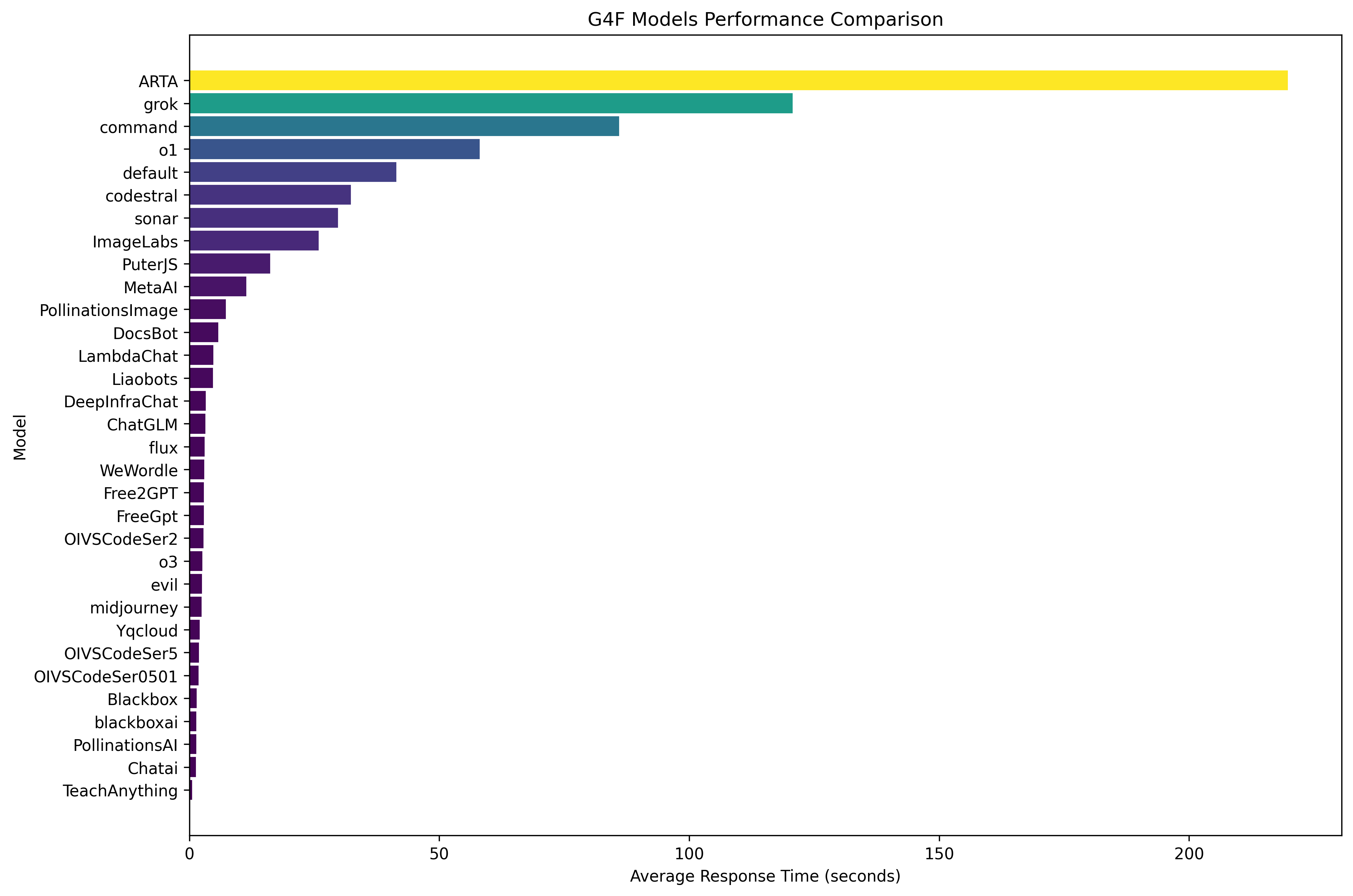
The chart above shows average response times for different models. As you can see, some models (like ARTA) have significantly longer response times, while others are much faster.
Concurrent Model Requests
C4F implements a threading approach that sends multiple concurrent requests to the model and uses the first successful response. This significantly improves reliability and reduces wait times when dealing with potentially unstable free API endpoints.
To adjust the number of concurrent threads:
c4f --threads 5 # Maximum concurrency (faster but more resource intensive)
or
c4f --threads 1 # Disable concurrency (slower but uses less resources)
Viewing Available Models
To see all available models and get recommendations:
c4f --models
This will display a formatted table of all supported models with recommended ones highlighted.
Handling Timeouts
⚠️ Warning: If you experience frequent timeouts during commit message generation, try one of the following:
- Increase the timeout value:
c4f --timeout 30- Switch to a faster model:
c4f --model MetaAI- Reduce the number of changes in a single commit
Different models have varying response times and reliability. If one model consistently times out, try another from the recommended list.
Requirements
- Python 3.11+ - C4F uses modern Python features that require version 3.11 or higher
- Git - Required for accessing repository information and making commits
- Required Python packages:
g4f- Provides free access to AI models for generating commit messagesrich- Powers the beautiful terminal interface and formatted output
System Requirements
- Any modern operating system (Windows, macOS, Linux)
- Approximately 100MB of disk space (including dependencies)
- Stable internet connection for AI model access
Contributing
Contributions are welcome! Please feel free to submit a Pull Request.
- Fork the repository
- Create your feature branch (
git checkout -b feature/amazing-feature) - Commit your changes using c4f itself! 😉
- Push to the branch (
git push origin feature/amazing-feature) - Open a Pull Request
Development Setup
# Clone the repository
git clone https://github.com/alaamer12/c4f.git
cd c4f

# Install development dependencies
poetry install --with dev

# Run tests
pytest

# Run Coverage
coverage -m pytest
Model Compatibility
While c4f has been primarily tested with gpt-4-mini, gpt-4, and gpt-3.5-turbo, the underlying g4f library supports many additional models. However, please note:
⚠️ Warning: Although most g4f-supported models may technically work with c4f, they have not been extensively tested and are not officially recommended. Using untested models may result in:
- Lower quality commit messages
- Slower performance
- Unexpected errors or timeouts
Always use the latest version of g4f to ensure compatibility and access to the most recent models and improvements. You can update g4f with:
pip install -U g4f
For the best experience, we recommend using one of the officially supported models specified in the command-line options.
License
This project is licensed under the MIT License - see the LICENSE file for details.
Changelog
See the CHANGELOG.md file for details about version history and updates.
Security
Please review our SECURITY.md file for information about:
- How to report security vulnerabilities
- Our responsible disclosure policy
- Security best practices when using this tool
- Dependency tracking and security audits
Acknowledgments
Release history Release notifications | RSS feed


Download files
Download the file for your platform. If you're not sure which to choose, learn more about installing packages.
Source Distribution
Built Distribution
Filter files by name, interpreter, ABI, and platform.
If you're not sure about the file name format, learn more about wheel file names.
Copy a direct link to the current filters
File details
Details for the file commit_for_free-1.1.4.tar.gz.
File metadata
- Download URL: commit_for_free-1.1.4.tar.gz
- Upload date:
- Size: 61.8 kB
- Tags: Source
- Uploaded using Trusted Publishing? No
- Uploaded via: twine/6.1.0 CPython/3.11.6
File hashes
| Algorithm | Hash digest | |
|---|---|---|
| SHA256 |
4a99de9c8e092b086464f01093844d8ca9d382c211af05a13420097df8db5159
|
|
| MD5 |
18ac5fd1c8b2782959857484748ae9ef
|
|
| BLAKE2b-256 |
0a67af3cdf43e0ab7988563f0f6cfc130197243a5e2c7b70eb35fbb95ba261de
|
File details
Details for the file commit_for_free-1.1.4-py3-none-any.whl.
File metadata
- Download URL: commit_for_free-1.1.4-py3-none-any.whl
- Upload date:
- Size: 65.9 kB
- Tags: Python 3
- Uploaded using Trusted Publishing? No
- Uploaded via: twine/6.1.0 CPython/3.11.6
File hashes
| Algorithm | Hash digest | |
|---|---|---|
| SHA256 |
3866d37fe9709a90008574dd0d4cb0f91df4cec7c3057ef167417c2274cddffe
|
|
| MD5 |
8e406026074a44f14ab84d82cb4a6ea7
|
|
| BLAKE2b-256 |
d5d12179f9ef27d5cbb3ef7610a4fd805f03abb9fce34d11144d87192e51225d
|






