
A Text Processor Targeted at Organizing Commit Messages.
Verified details
These details have been verified by PyPIProject links
GitHub Statistics
Maintainers

Project description
Commit Text Organizer
A Text Processor targeted at organizing Commit Messages.
Do you like to organize your commit messages? CTO does! CTO operates on commit messages structured in a simple readable format.
The input messages are cleaned up, condensed, and sorted alphabetically before being returned.
File Oriented Commit Information (FOCI)
FOCI is inspired by the following statement:
A Commit may change many files, but it has just one purpose.
FOCI Concepts
- Headers
- Signify the start of a commit message group
- Make it easier to categorize and locate related changes
- Commit Lines
- Lines grouped together under each header
- Detail changes to files or groups of files
- Enhancing traceability and readability
- Subjects
- The start of a Commit Line
- Indicating the file or group of files
- Allowing for quick identification of affected areas
- Content Details
- The end of a Commit Line
- Comma separated list of text describing specific changes
- Providing clarity on the nature of the modification.
CTO and FOCI ensure that commit messages are well-organized and convey the intended changes in a clear, concise manner. This is key to making revision history easy to revisit.
Commit Message Structure
At a high level, messages are organized into groups.
Each group has a unique header name.
Headers
Structure your commits using your own set of headers, such as:
- Database Migration 32
- Database Integration
- Test Database Migrations
When writing commits, ensure that you add a colon (:) immediately after the header name.
Then, the lines immediately below the header are included in that group. These are called Commit Lines.
A Commit Line starts with a subject, corresponding to a file, or group of files.
Subjects (Files or Groups of Files)
A Subject is the start of a Commit Line in a header Group. It will usually describe a change in a single file, but you can group files into the subject.
Subject Matching
Lines in the same Header Group can be merged, but only if the subjects match.
When Content details are merged, they are separated from the Subject, sorted alphabetically, and joined with a comma-space separator.
Subject Content Separators
The subject is separated from content details by one of these separators: (+) or (-).
If a separator appears more than once in a Commit Line, it is ignored.
A subject may include a verb, such as "Update", which can be replaced with a prefix shortcut.
Commit Line Prefix Shortcuts
To reduce typing the same word for so many file changes (such as "Update", or "Create"), CTO includes a Line Prefix recognition and replacement feature.
cto/text/commit_line_prefixes.py
It recognizes prefixes (that you can change) and replaces them with the most commonly used words.
Commit Line Prefix Shortcuts
| Shortcut | Prefix |
|---|---|
| c | Create |
| d | Delete |
| f | Fix |
| m | Move |
| r | Remove |
| t | Test |
| u | Update |
| cr | Create |
| del | Delete |
| mv | Move |
| up | Update |
Important Commit Line Characters
- A header ends with a colon ":"
- A blank line will start a new group
- Commit Lines start with the star (*)
- Subject is separated from content by (+) or (-)
- Content may contain multiple changes that are comma-separated
Sorting
By default, your squashed PR message will have groups organized alphabetically by their header names.
- Subjects within each group are sorted alphabetically
- Sorting is done after applying Commit Line Prefix Shortcuts.
Example
Input:
Header 1:
*u File.c - new method hello_world()
*u File.c - new method foo()

Header 2:
*c NewFile.c

Header 2:
*r OldFile.c
Output:
Header 1:
* Update File.c - new method hello_world(), new method foo()

Header 2:
* Create NewFile.c
* Remove OldFile.c
How To Use It
- Install: Use
python -m pip install commit-text-organizer, or manage it manually. - Main Script: Run the script with a file path argument containing the commit messages.
- Commit Message Structure: Commit messages are organized into groups defined by headers (e.g., "Database Migration 32"). Each group contains commit lines starting with a star (*) and details changes to subjects (files or groups of files).
- Subject Matching and Content Details: Commit lines within the same header group can be merged if their subjects match. The tool sorts and joins content details alphabetically, separated by a comma-space.
- Line Prefix Shortcuts: To simplify repetitive prefixes like "Update" or "Create", CTO includes a feature to recognize and replace line prefix shortcuts with their full forms (e.g., "c" for "Create").
- Sorting and Output: The tool sorts groups and lines within groups alphabetically.
- Output: The output is printed to the standard output. Pipe it to a file, or it will be printed on screen.
Requirements
Python 3.10 or higher is required to run Commit-Text-Organizer. This is because the Union Type Operator is used (not available in 3.9 or earlier).
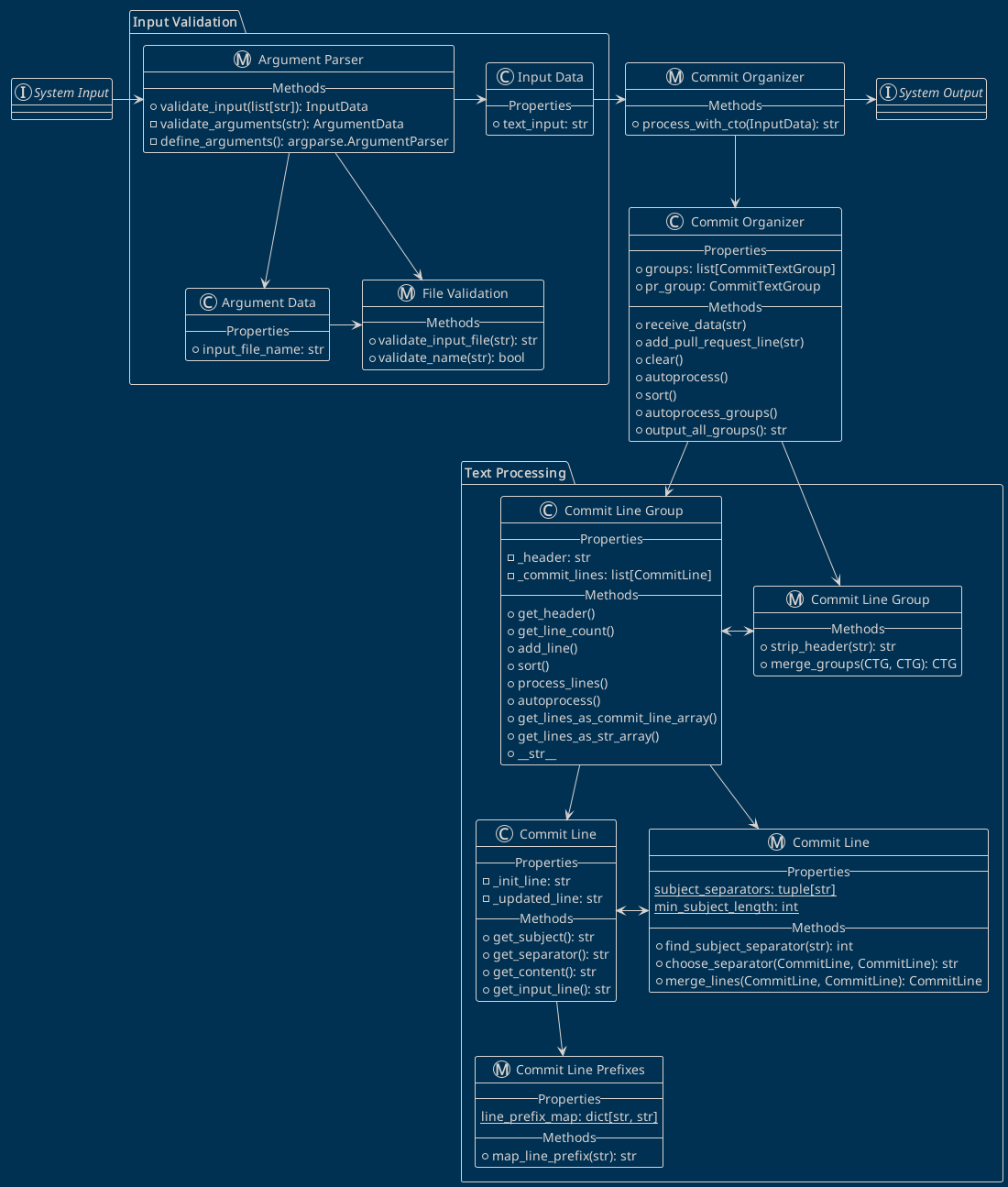
Program Architecture
All python modules are contained in the commit_text_organizer package. In the following diagram, modules are grouped into symbolic packages for better understanding.
Project Vision
Enhancements should aim to make CTO more versatile, user-friendly, and integrated with workflows. Examples:
- Run git subprocess and read commit messages from a branch instead of a file
- Allow users to add their own prefix shortcuts in a config file
Project details
Verified details
These details have been verified by PyPIProject links
GitHub Statistics
Maintainers


Download files
Download the file for your platform. If you're not sure which to choose, learn more about installing packages.
Source Distribution
Built Distribution
Filter files by name, interpreter, ABI, and platform.
If you're not sure about the file name format, learn more about wheel file names.
Copy a direct link to the current filters
File details
Details for the file commit_text_organizer-1.1.3.tar.gz.
File metadata
- Download URL: commit_text_organizer-1.1.3.tar.gz
- Upload date:
- Size: 29.6 kB
- Tags: Source
- Uploaded using Trusted Publishing? Yes
- Uploaded via: twine/6.1.0 CPython/3.13.7
File hashes
| Algorithm | Hash digest | |
|---|---|---|
| SHA256 |
ba6fd8f7edcffbac6040e4ff058a231bf2c08ade07a4c29b34fb50c4723f77f4
|
|
| MD5 |
e6bef338dafcf7ad2bc9a6d6fd80f6e6
|
|
| BLAKE2b-256 |
b991d9e26b5923b8b990989d0dd48ed68044510fa992f13f459b5a200dd87674
|
Provenance
The following attestation bundles were made for commit_text_organizer-1.1.3.tar.gz:
Publisher:
publish.yml on DK96-OS/cto
-
Statement:
-
Statement type:
https://in-toto.io/Statement/v1 -
Predicate type:
https://docs.pypi.org/attestations/publish/v1 -
Subject name:
commit_text_organizer-1.1.3.tar.gz -
Subject digest:
ba6fd8f7edcffbac6040e4ff058a231bf2c08ade07a4c29b34fb50c4723f77f4 - Sigstore transparency entry: 660867146
- Sigstore integration time:
-
Permalink:
DK96-OS/cto@97e12b0f1bb5ccd4e4ea5ee1066a1712a2c434df -
Branch / Tag:
refs/tags/v1.1.3 - Owner: https://github.com/DK96-OS
-
Access:
public
-
Token Issuer:
https://token.actions.githubusercontent.com -
Runner Environment:
github-hosted -
Publication workflow:
publish.yml@97e12b0f1bb5ccd4e4ea5ee1066a1712a2c434df -
Trigger Event:
release
-
Statement type:
File details
Details for the file commit_text_organizer-1.1.3-py3-none-any.whl.
File metadata
- Download URL: commit_text_organizer-1.1.3-py3-none-any.whl
- Upload date:
- Size: 28.9 kB
- Tags: Python 3
- Uploaded using Trusted Publishing? Yes
- Uploaded via: twine/6.1.0 CPython/3.13.7
File hashes
| Algorithm | Hash digest | |
|---|---|---|
| SHA256 |
209daf3470d52d548d36927ca91bf90c1af06917e5142ea7dac6643559075baa
|
|
| MD5 |
f8169a6516c1a05f7027c4af25689f16
|
|
| BLAKE2b-256 |
a6e2e0466a270286d4b81a0ac912bd4a12a5606e356feda6c1d98b51f5e8dcee
|
Provenance
The following attestation bundles were made for commit_text_organizer-1.1.3-py3-none-any.whl:
Publisher:
publish.yml on DK96-OS/cto
-
Statement:
-
Statement type:
https://in-toto.io/Statement/v1 -
Predicate type:
https://docs.pypi.org/attestations/publish/v1 -
Subject name:
commit_text_organizer-1.1.3-py3-none-any.whl -
Subject digest:
209daf3470d52d548d36927ca91bf90c1af06917e5142ea7dac6643559075baa - Sigstore transparency entry: 660867149
- Sigstore integration time:
-
Permalink:
DK96-OS/cto@97e12b0f1bb5ccd4e4ea5ee1066a1712a2c434df -
Branch / Tag:
refs/tags/v1.1.3 - Owner: https://github.com/DK96-OS
-
Access:
public
-
Token Issuer:
https://token.actions.githubusercontent.com -
Runner Environment:
github-hosted -
Publication workflow:
publish.yml@97e12b0f1bb5ccd4e4ea5ee1066a1712a2c434df -
Trigger Event:
release
-
Statement type:






