
A lightweight Python library for comparing two dictionaries and getting only the differences.

Project description
Compare Dicts Lib 🛠️
A lightweight and efficient Python library for comparing two dictionaries and retrieving only the differences.
✨ Features
- Compare two dictionaries and get only the changed keys.
- Detect added, modified, and deleted keys.
- Handle nested dictionaries automatically.
- Ignore specific keys during comparison.
- Flexible type checking (
strict_type_checking=Falseto treat1and"1"as equal). - Works with lists of dictionaries, automatically matching elements by
"id". - Apply a diff to update a dictionary with changes.
- 🚀 43x faster than
deepdiffwhile using the same memory! (see benchmark below)
⚡ Performance Benchmark
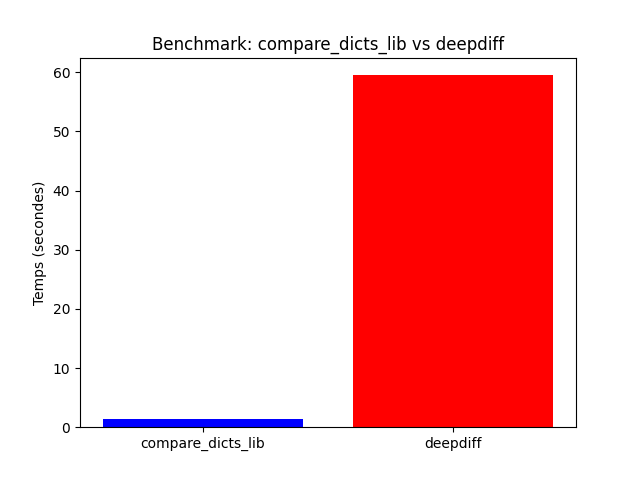
We compared compare_dicts_lib against deepdiff over 1000 iterations:
| Library | Execution Time (1000 runs) | Memory Usage |
|---|---|---|
| compare_dicts_lib | 1.41 sec | 92.65 MiB |
deepdiff |
61.58 sec | 92.65 MiB |
📌 compare_dicts_lib is ~43x faster than deepdiff while using the same memory! 🚀
📊 Performance Graph
💡 Need a high-performance dictionary comparison tool?
✅ Faster execution
✅ Lightweight & easy to use
✅ Perfect for API responses, JSON diffs, and change tracking
📦 Installation
pip install git+https://github.com/ton_github/compare_dicts_lib.git
🚀 Usage
🔍 Basic Comparison
from compare_dicts_lib import compare_dicts

old_data = {"name": "Alice", "age": 30}
new_data = {"name": "Alice", "age": 31, "email": "alice@example.com"}

diff = compare_dicts(new_data, old_data)
print(diff)
Output:
{"age": 31, "email": "alice@example.com"}
📑 Detailed Comparison (detailed=True)
from compare_dicts_lib import compare_dicts

old_data = {
    "name": "Alice",
    "age": 30,
    "address": {"zip": "75000", "city": "Paris"}
}
new_data = {
    "name": "Alice",
    "age": 31,
    "email": "alice@example.com",
    "address": {"city": "Paris"}
}

diff = compare_dicts(new_data, old_data, detailed=True)
print(diff)
Output:
{
    "age": {
        "type": "modified",
        "old_value": 30,
        "new_value": 31
    },
    "email": {
        "type": "added",
        "new_value": "alice@example.com"
    },
    "address": {
        "zip": {
            "type": "deleted",
            "old_value": "75000"
        }
    }
}
🎯 Ignoring Specific Keys (ignore_keys)
from compare_dicts_lib import compare_dicts

old_data = {
    "name": "Alice",
    "age": 30,
    "timestamp": "2024-03-13T10:00:00Z"
}
new_data = {
    "name": "Alice",
    "age": 31,
    "email": "alice@example.com",
    "timestamp": "2024-03-13T11:00:00Z"
}

diff = compare_dicts(new_data, old_data, ignore_keys=["timestamp"])
print(diff)
Output:
{"age": 31, "email": "alice@example.com"}
🔢 Disabling Strict Type Checking (strict_type_checking=False)
from compare_dicts_lib import compare_dicts

old_data = {"value": 1, "name": "Alice"}
new_data = {"value": "1", "name": "Alice"}

diff = compare_dicts(new_data, old_data, strict_type_checking=False)
print(diff)
Output:
{}
🔄 Detecting Order Changes in Lists (detect_order_changes=True)
By default, compare_dicts will detect when the order of elements in a list has changed.
from compare_dicts_lib import compare_dicts

old_data = {"numbers": [1, 2, 3]}
new_data = {"numbers": [3, 1, 2]}

diff = compare_dicts(new_data, old_data, detailed=True)
print(diff)
Output:
{
    "numbers": {
        "modified": [
            {
                "type": "reordered",
                "old_value": [1, 2, 3],
                "new_value": [3, 1, 2]
            }
        ]
    }
}
If you want to ignore order changes, set detect_order_changes=False:
diff = compare_dicts(new_data, old_data, detailed=True, detect_order_changes=False)
print(diff)
Output:
{}
🛠️ Applying a Diff (apply_diff)
Basic Usage
from compare_dicts_lib import apply_diff

old_data = {"name": "Bob", "age": 30, "job": "developer"}
diff = {"name": "Robert", "age": None}

new_data = apply_diff(old_data, diff, detailed=False)
print(new_data)
Output:
{"name": "Robert", "job": "developer"}
📋 Applying a Detailed Diff (detailed=True)
from compare_dicts_lib import apply_diff

old_data = {
    "users": [{"id": 1, "name": "Alice"}, {"id": 2, "name": "Bob"}]
}
diff = {
    "users": {
        "modified": [
            {
                "id": 2,
                "type": "modified",
                "old_value": {"id": 2, "name": "Bob"},
                "new_value": {"id": 2, "name": "Robert"}
            }
        ]
    }
}

new_data = apply_diff(old_data, diff, detailed=True)
print(new_data)
Output:
{
    "users": [
        {"id": 1, "name": "Alice"},
        {"id": 2, "name": "Robert"}
    ]
}
📖 API Reference
compare_dicts(new_dict, old_dict, detailed=False, ignore_keys=None, strict_type_checking=True) -> dict
Compares two dictionaries and returns only the differences.
| Parameter | Type | Default | Description |
|---|---|---|---|
new_dict |
dict |
Required | The updated dictionary. |
old_dict |
dict |
Required | The original dictionary. |
detailed |
bool |
False |
If True, returns structured changes (added, modified, deleted). |
ignore_keys |
list |
None |
Keys to exclude from the comparison. |
strict_type_checking |
bool |
True |
If False, considers 1 and "1" as equal. |
apply_diff(original_dict, diff, detailed=False) -> dict
Applies a diff to update an existing dictionary.
| Parameter | Type | Default | Description |
|---|---|---|---|
original_dict |
dict |
Required | The original dictionary to update. |
diff |
dict |
Required | The differences returned by compare_dicts(). |
detailed |
bool |
False |
If True, expects a structured diff with added, modified, and deleted. |
👨💻 Contributing
If you find a bug or want to add features, feel free to submit a pull request!
📜 License
MIT License - Free to use and modify.
Release history Release notifications | RSS feed


Download files
Download the file for your platform. If you're not sure which to choose, learn more about installing packages.
Source Distribution
Built Distribution
Filter files by name, interpreter, ABI, and platform.
If you're not sure about the file name format, learn more about wheel file names.
Copy a direct link to the current filters
File details
Details for the file compare_dicts_lib-0.2.0.tar.gz.
File metadata
- Download URL: compare_dicts_lib-0.2.0.tar.gz
- Upload date:
- Size: 7.2 kB
- Tags: Source
- Uploaded using Trusted Publishing? No
- Uploaded via: twine/6.1.0 CPython/3.12.3
File hashes
| Algorithm | Hash digest | |
|---|---|---|
| SHA256 |
eb9d3fbf7ec5578b7f915546831004d4bfd9fb6e72ef9f91e4db691aa4b49617
|
|
| MD5 |
0a527c9bc8973258af73a3147c0ce27a
|
|
| BLAKE2b-256 |
cd0c28f0e8dafecceecb49827d705472996a309cbd4fbee4f5b6c1f7c8c10e79
|
File details
Details for the file compare_dicts_lib-0.2.0-py3-none-any.whl.
File metadata
- Download URL: compare_dicts_lib-0.2.0-py3-none-any.whl
- Upload date:
- Size: 7.0 kB
- Tags: Python 3
- Uploaded using Trusted Publishing? No
- Uploaded via: twine/6.1.0 CPython/3.12.3
File hashes
| Algorithm | Hash digest | |
|---|---|---|
| SHA256 |
6b5ed0fb2f91d1526436b768a767536b8f4318a633f03a9e822a8c4d0b392401
|
|
| MD5 |
261cb8de94cc4906d6a02d20af888542
|
|
| BLAKE2b-256 |
7e389fd3cfa24e5798580ecf87ba5272d67b98507e80a964c6d7871ab6cfe955
|






