
Compare My Stocks
General
Visualize the performance of stocks in your portfolio or that you are interested in. There is maximal control over charts, and a variaty of comparision options.
This app is basically BYOK. Currently, it uses solely Interactive Brokers for market data.
So unfortunately, the app is much less usable for users who don't have Interactive Brokers account (they can still see the sample data and check it). Though, I might add BYOK source in the future.
You can divide the stocks into sectors, and compare the performance of different sector!
For instance:
- Chart of profit of sectors in your portfolio and of the entire portfolio relative to a certain point in time.
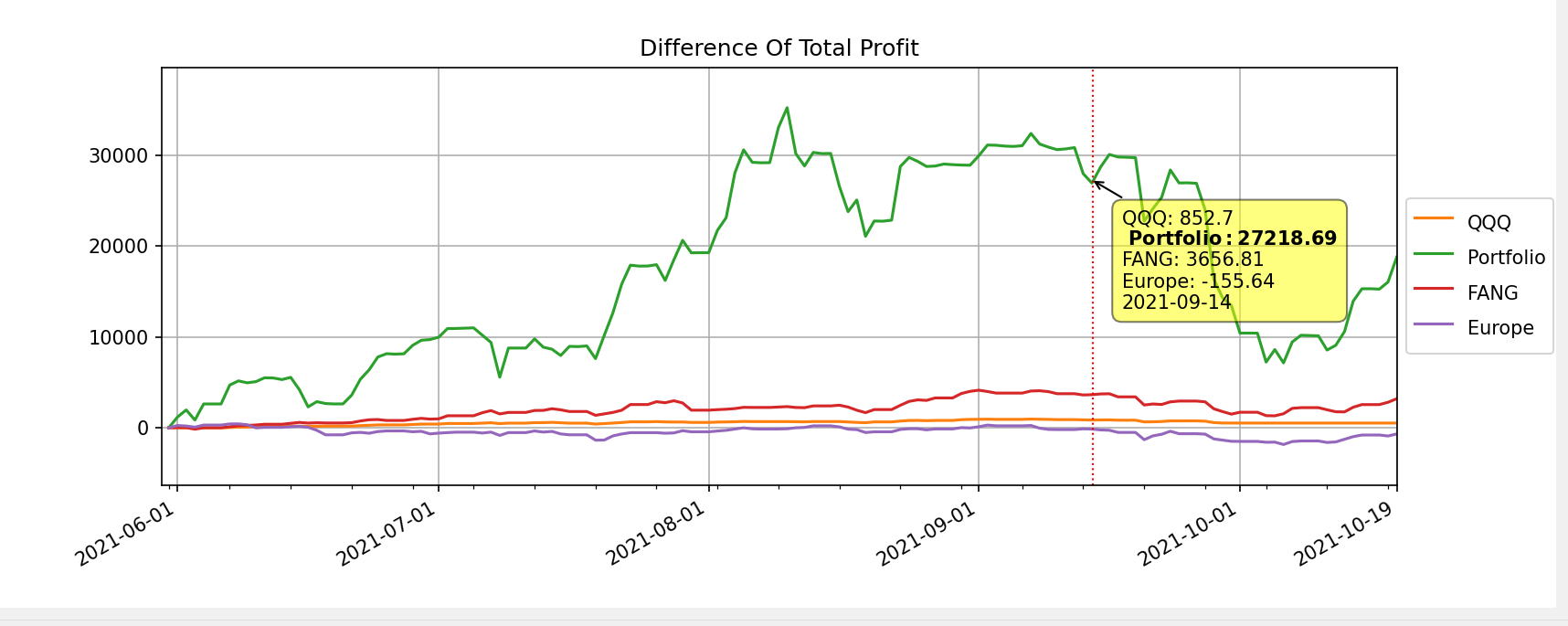
(You won't see your portfolio unless you will upload your transactions)
- Chart of specific airlines and the airlines as a group compared with nasdaq:
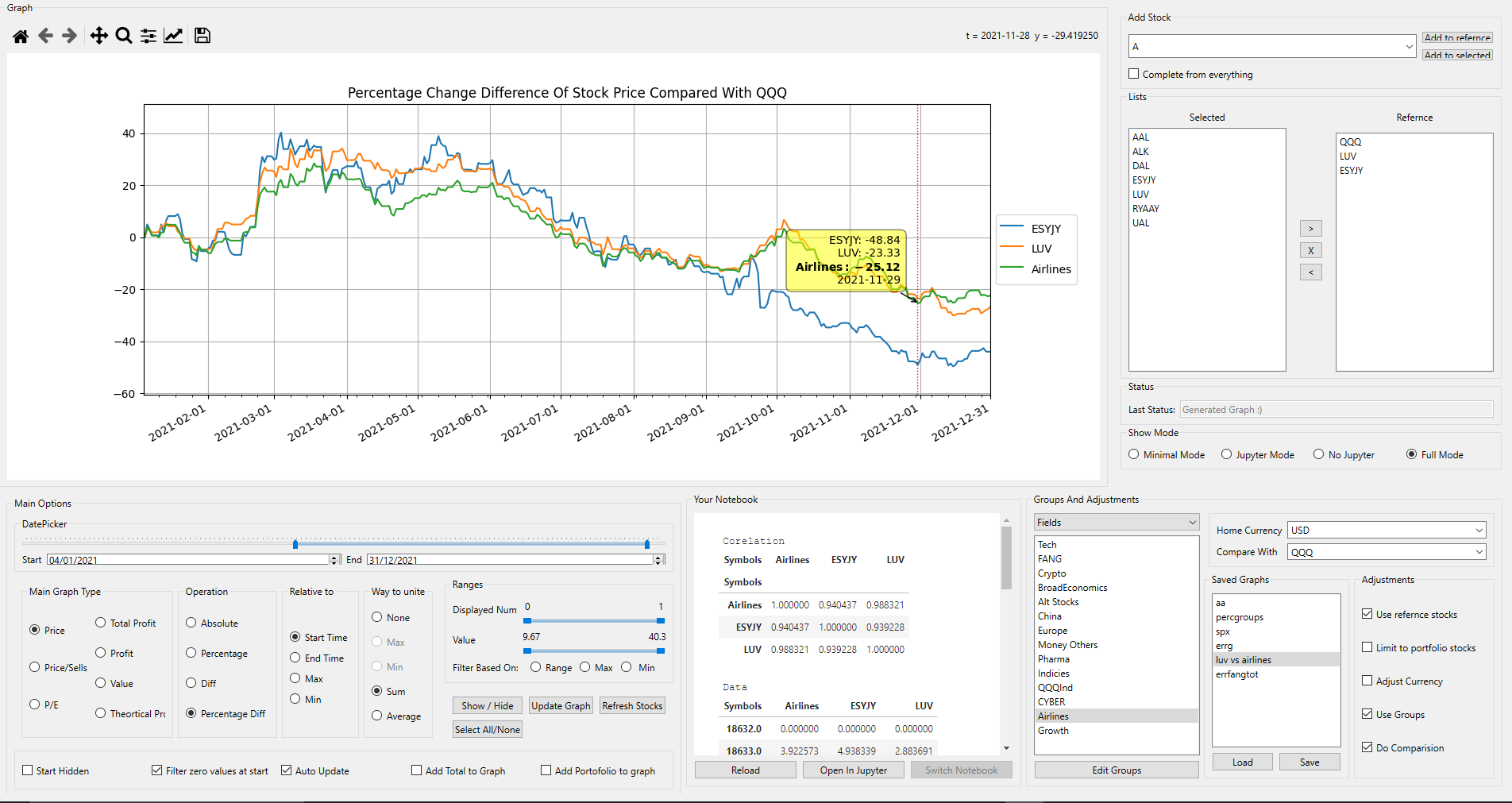
(The difference in the change percentage-wise since 04/01/2021 between ESYJY and the nasdaq is ~48% at this point at time, signficantly lower than the airlines as a group. This is example of an advanced usage.)
Features
⚕️ Planned ✅ Working ⚪ Present but not working yet
Stocks from all over the world
✅ Get price history from Interactive Brokers
✅ Crypto support
✅ ETF support
Connect with your portfolio
✅ Export your transactions from My Stocks Protofolio
(Doesn't matter which broker you work with)
✅ Pull transactions data directly from Interactive Brokers TWS.
Smart Calculations
✅ Adjust Prices and profit relative to a currency.
✅ Adjust holdings based on stock splits (using stockprices API).
✅ Combine IB transaction data into MyStocksPortfolio (by exporting csv).
Maximum control over graphs
✅ Compare performance of group of stocks vs other stock vs your portfolio!
✅ Many graph types ( Total Profit, Price, Realized Profit, etc...)
✅ Display percentage change / percentage diff , from certain time / maximum / minimum
✅ Pick only top stocks for graphs / limit by value range
✅ Groups of stock can be united by avg price/performance
✅ Save and load graphs with all parameters instantly!
⚪ Compare your profit to a theoretical situation in which you have bought the index!
(the exact same time you have made a purchase)
Close Integration With Jupyter
✅ Display your jupyter notebook with graph!
i.e. find corelations in your graph (a single line of code. presented by default)
mydata.act.df.corr(method='pearson')
✅ Mainipulate data easily in runtime and display graph externally
⚪ Use Jupyter to display graphs inline (if you want)
gen_graph(Parameters(type=Types.PRICE | Types.COMPARE,compare_with='QQQ',groups=["FANG"], starthidden=0))
✅ Edit/reload notebook directly
More
✅ Edit categories and groups (using a GUI interface)!
i.e. Airlines stocks, Growth stocks (Can be compared as a group)
✅ Completely free and open source!
Planned Features
⚪ Introducing advanced features like P/E and price to sells.
⚪ Get price history from Interactive Brokers
⚕️ Bar graphs (hmmmm, not critical.. )
⚕️ Adjusted performance based on inflation.
⚕️ All this in a web interface!
🔴 Not planned - all these technical analysis nonsense..
Installation Instructions
For Developers
- pip install compare-my-stocks[full]
- consider updating ibflex (from git) as the app in pypi is quite old (
pip install git+https://github.com/csingley/ibflex.git) - better to copy
site-packages\compare_my_stocks\datato~/.compare_my_stocks(Notice that it displays a console with running log)
For Users
- Use setup
- If something goes wrong, you can view console with
compare_my_stocks.exe --console. Recommended. There is also log file.
For both
Remark: Really recommended steps, but will work basically without it
-
Inspect at
data/myconfig.yamland set it as you wish ( or~/.compare_my_stocks/myconfig.yaml).Notice that it is recommended to provide a CSV in MyStocksProtoflio format for every transaction (Type is Buy/Sell):
-
Follow the next steps for configuring IB
Configuring Interactive Brokers
-
Run Trader Workstation and sign in (could be readonly).
-
API -> Settings -> Enable ActiveX And Socket Clients
-
Make sure PortIB matches the port in there. ( Here with pictures )
Running Instructions
- Run Trader Workstation and sign in (could be readonly). It could be also done after running the app.
- (For developers) python -m compare_my_stocks
- (For users) run compare-my-stocks.exe
Legal Words
I would like to add that:
- IN NO EVENT SHALL THE AUTHORS BE LIABLE FOR ANY CLAIM, DAMAGES OR OTHER LIABILITY, WHETHER IN AN ACTION OF CONTRACT, TORT OR OTHERWISE, ARISING FROM, OUT OF OR IN CONNECTION WITH THE SOFTWARE OR THE USE OR OTHER DEALINGS IN THE SOFTWARE. That is also true for the any claim associated with usage of Interactive Brokers Api by this code.
Please consult the corresponding site's license before using this software, and use it accordingly.
-
The sofware can use CSVs obtained from using My Stocks Portfolio & Widget by Peeksoft.
-
This project was developed individually in my free time and without any compensation. I am an in no way affiliated with the mentioned companies.
-
I of course take no responsibilty on the correctness of the displayed graphs/data.
-
Investpy is not supported currently. So you have to have an account in interactive brokers to be able to work properly with it.
Final words
-
**Not fully tested, and prerelease. Some features may not work correctly (but most are just fine):) **
-
This is being developed in QT with matplotlib amd pandas. I tried to use advanced features of pandas and numpy for fast calculation(sometimes).
-
I belive this software provides many useful features that are usually paid for. This despite developing this in a short period, on my spare time. I would very much apperiate community contribution. And welcome you to contribute, send bugs and discuss (will open gitter when appropriate).
-
The controls should be self explantory... Try it. Some things requres some developer mentality..
-
Feel free to contact me at eyalk5@gmail.com.
Remarks
1 maintainer

Metadata
1 maintainer
Release files for compare-my-stocks 1.0.5
For a detailed explanation of source distributions (sdists) and built distributions (wheels), please see the package formats documentation.
Source distribution (sdist)
| File | Size | Uploaded | |
|---|---|---|---|
| compare_my_stocks-1.0.5.tar.gz | 215.0 kB | Details |
Built distribution (wheel)
| File | Interpreter | ABI | Platform | Reset |
|---|---|---|---|---|
| compare_my_stocks-1.0.5-py3-none-any.whl | Python 3 | none | any | Details |
Total release size: 449.7 kB
Release files / compare_my_stocks-1.0.5.tar.gz
| Download URL | compare_my_stocks-1.0.5.tar.gz |
|---|---|
| Size | 215.0 kB |
| Tags | Source |
|
SHA-256 checksum How to use checksums |
7b8a95b09d897e59fd5a8ee0d2ece64181a8d7606f229a0dc286f304cd906754
|
|
BLAKE2b-256 checksum How to use checksums |
42c476596329d59786ea387c63ec48822638e7f563377797686405c3883f8fa8
|
| Upload date | |
|
Uploaded using Trusted Publishing? What is trusted publishing? |
No |
| Uploaded via |
poetry/1.4.2 CPython/3.9.6 Windows/10
|
Release files / compare_my_stocks-1.0.5-py3-none-any.whl
| Download URL | compare_my_stocks-1.0.5-py3-none-any.whl |
|---|---|
| Size | 234.8 kB |
| Tags | Python 3 |
|
SHA-256 checksum How to use checksums |
6c9f10c251877decb46faa4297b1997882337aea4a3c579600f3392de0e65496
|
|
BLAKE2b-256 checksum How to use checksums |
e9fbd60bb75f07861fc28e20b6e87791638c7f46f3bdb6bdf7f92d158ee8267e
|
| Upload date | |
|
Uploaded using Trusted Publishing? What is trusted publishing? |
No |
| Uploaded via |
poetry/1.4.2 CPython/3.9.6 Windows/10
|













