
COMPAS CEM








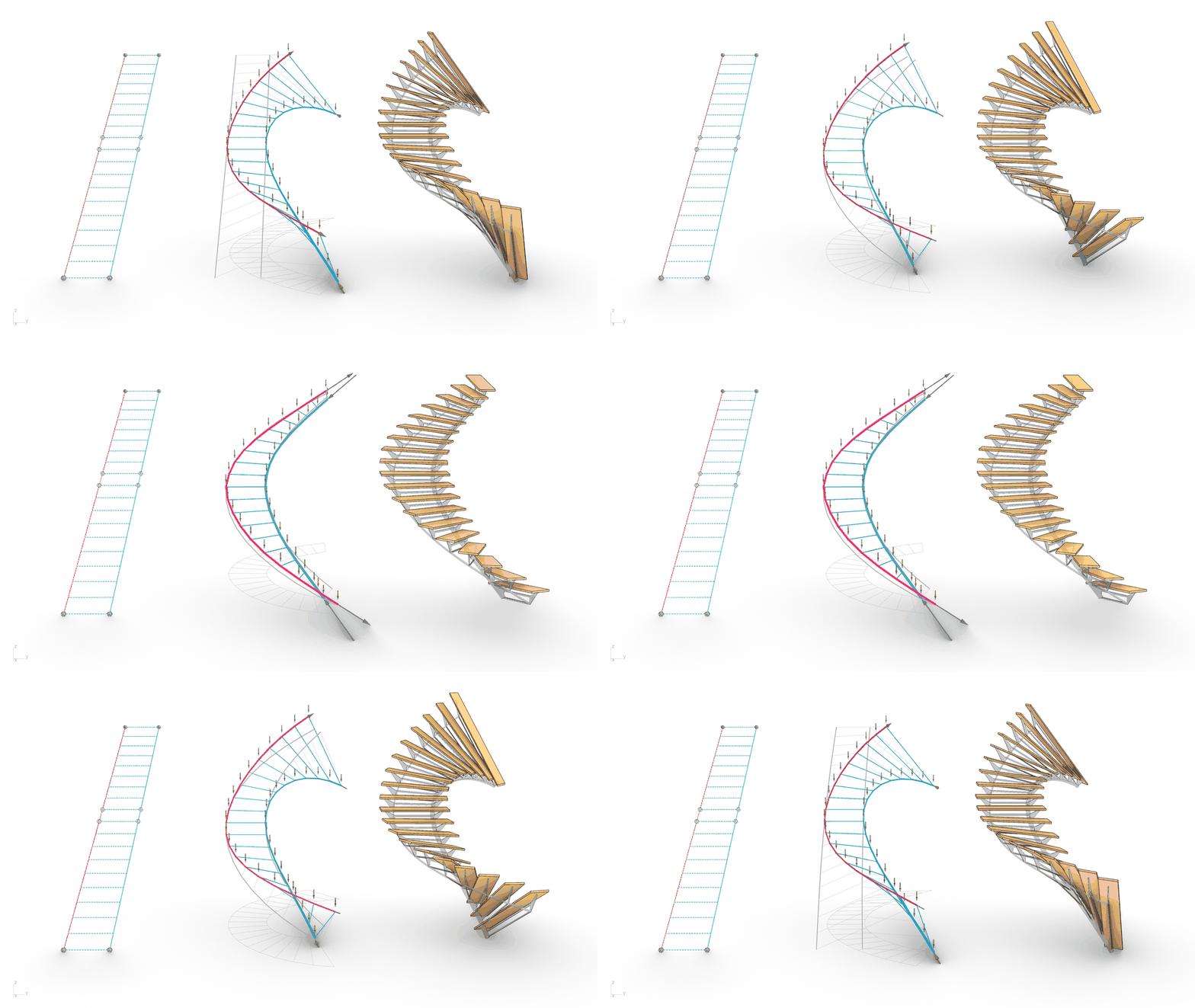
The Combinatorial Equilibrium Modeling (CEM) framework for COMPAS.
The CEM framework is a numerical form-finding approach to generate forms in static equilibrium for spatial bar structures subjected to combinations of tension-compression forces and design goals. COMPAS CEM encapsulates the CEM framework into an open-source structural design tool that enables the formulation and the solution of constrained form-finding problems in plain and simple Python code.
Main features
-
Mix tension and compression forces: Explore a wider spectrum of structural typologies by combining internal tension and compression forces in the same structure. Design space frames, bridges, tensegrities, and staircases and go beyond the conventional catalog of compression-only shells and cable-nets!
-
Solve constrained form-finding problems efficiently via automatic differentiation: Generate forms in static equilibrium that simultaneously meet a priori design goals such as best-fitting a global target shape, restraining bar lengths, and controlling the reaction forces at the supports of a structure.
-
Usable across different 3D modeling software and operating systems: COMPAS CEM runs on Windows, MacOS and Linux (perhaps one day in the metaverse) and it does not depend on any CAD software to work. However, it provides the necessary interfaces to be seamlessly used inside popular design environments like Rhino, Blender, and Grasshopper. As a COMPAS extension, COMPAS CEM offers native integration and data exchange with other extensions and plugins in the COMPAS ecosystem.
-
Move those sliders with the Grasshopper plugin: Are you a Grasshopper person? Worry not. COMPAS CEM is also shipped as a precooked Grasshopper plugin to readily integrate our constrained form-finding engine into your next spaghetti pipeline 🍝.
Installation
These are succint instructions to install COMPAS CEM and its Grasshopper plugin. For detailed guidance, please refer to the COMPAS CEM Docs.
Install COMPAS CEM with pip. It requires Python 3.9 or newer, and pulls in compas for you:
pip install compas-cem
To draw diagrams with the plotter or the viewer, as the examples do, install the viz extra instead:
pip install "compas-cem[viz]"
To double-check that everything is up and running, type the following in the command line and hit enter:
python -c "import compas_cem"
If no errors show up, celebrate 🎉! You have a working installation of COMPAS CEM.
Grasshopper plugin
Warning: The Grasshopper plugin is not installable in this release. It targeted Rhino 6 and 7 through compas_rhino.install, which does not exist in COMPAS 2, and it is being reworked for Rhino 8 and 9 with yak packaging. Until that lands, use COMPAS CEM from Python.
First steps
Are you a bug hunter?
If you find a bug or want to suggest a potential enhancement, please help us tackle it by filing a report.
Questions and feedback
We encourage the use of the COMPAS framework forum for questions and discussions.
Contributing
Pull requests are warmly welcome! Check the Contributor's Guide for more details.
Citing
If you use COMPAS CEM for a project or research, please cite us using these references.
Acknowledgements
This work has been supported in part by the U.S. National Science Foundation under grant OAC-2118201 and the NSF Institute for Data Driven Dynamical Design.
License
MIT
1 maintainer

Metadata
1 maintainer
Release files for compas-cem 0.9.0
For a detailed explanation of source distributions (sdists) and built distributions (wheels), please see the package formats documentation.
Source distribution (sdist)
| File | Size | Uploaded | Provenance | Actions |
|---|---|---|---|---|
| compas_cem-0.9.0.tar.gz | 275.0 kB | Without provenance | Details for compas_cem-0.9.0.tar.gz |
Built distribution (wheel)
| File | Interpreter | ABI | Platform | Actions Reset |
|---|---|---|---|---|
| compas_cem-0.9.0-py3-none-any.whl | Python 3 | none | any | Details for compas_cem-0.9.0-py3-none-any.whl |
Total release size: 676.4 kB
Release files / compas_cem-0.9.0.tar.gz
| Download URL | compas_cem-0.9.0.tar.gz |
|---|---|
| Size | 275.0 kB |
| Tags | Source |
|
SHA-256 checksum How to use checksums |
911d0200fb8a63932f43ff9ad0248b64312d684bdb48b5c370ec718c31cee31c
|
|
BLAKE2b-256 checksum How to use checksums |
95c46e27ef8f86dfec8f73adc0d28aa0de16240d40babdd7982500d48eecb868
|
| Upload date | |
|
Uploaded using Trusted Publishing? What is trusted publishing? |
No |
| Uploaded via |
twine/7.0.0 CPython/3.10.11
|
Release files / compas_cem-0.9.0-py3-none-any.whl
| Download URL | compas_cem-0.9.0-py3-none-any.whl |
|---|---|
| Size | 401.4 kB |
| Tags | Python 3 |
|
SHA-256 checksum How to use checksums |
89b9650e9236c8dcdc258596219313e0757399788a5488281d3fa2e9d5f915c7
|
|
BLAKE2b-256 checksum How to use checksums |
fce31ede8346496c6bdcb9dbff68b646612d9e394699cab4ffb0d4ac24359d0b
|
| Upload date | |
|
Uploaded using Trusted Publishing? What is trusted publishing? |
No |
| Uploaded via |
twine/7.0.0 CPython/3.10.11
|
Security for compas-cem 0.9.0
Provenance
Provenance describes where a file came from. On PyPI, provenance is shared via attestations, which provide a verifiable record of the build or publishing details. View details, limitations and caveats.
No provenance found
None of the files in this release were uploaded with provenance metadata.
A note on package security
PyPI is a repository for distributing packages, not a service for auditing them. While third-party security researchers and our staff do their best to detect and remove malicious packages, PyPI cannot guarantee the quality, security or suitability of any given package.
To learn more about protecting yourself from malicious actors, visit our package security documentation.














