
Complexplorer



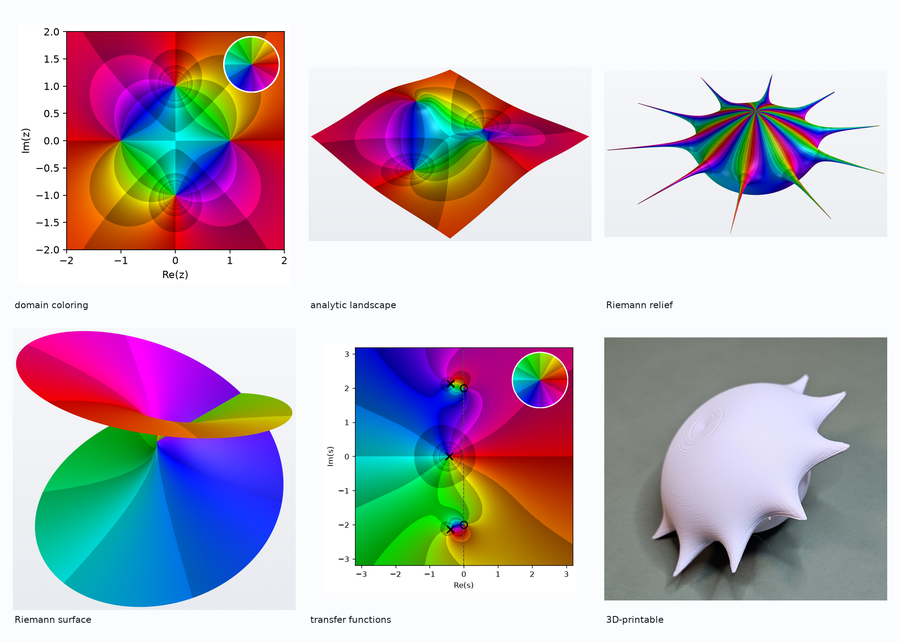
Complexplorer turns a complex function into something you can look at — and, if you want, hold. It draws phase portraits, lifts them into 3D analytic landscapes, wraps them onto the Riemann sphere, unfolds multivalued functions onto their Riemann surfaces, and exports any of it as an STL you can print.
Install and draw something
pip install complexplorer
import complexplorer as cp

cp.plot(
    cp.Rectangle(4, 4),
    lambda z: (z**2 - 1) / (z**2 + 1),
    cmap=cp.Phase(phase_sectors=6, auto_scale_r=True),
    legend=True,
)
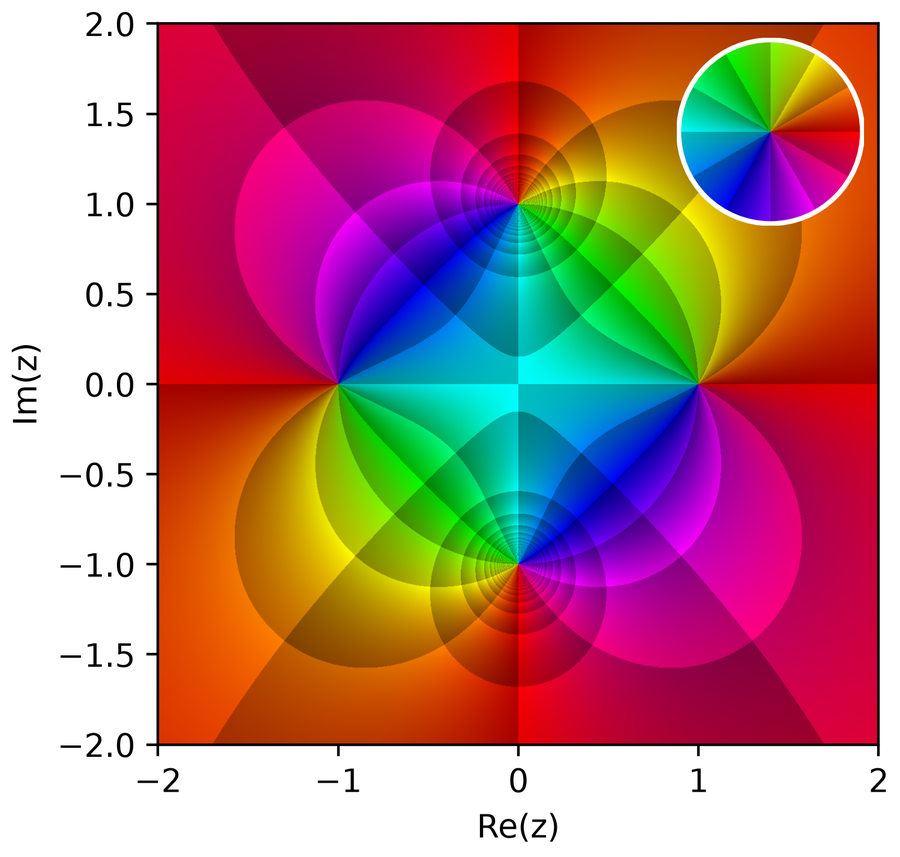
Hue is the phase of f(z) and the shaded cells are its contour bands, so zeros and poles read as
opposite winding directions. The inset legend is the same colormap applied to the identity map,
which is what makes the picture decodable.
The same function in 3D, with |f(z)| as height:
cp.plot_landscape_pv(cp.Rectangle(4, 4), lambda z: (z**2 - 1) / (z**2 + 1))
→ Installation and a first portrait
What's new in 3.0
- PyVista is the sole 3D backend, and a required dependency. The matplotlib 3D paths are
removed;
plot_landscape_pv,pair_plot_landscape_pvandriemann_pvreplace them. - Riemann surfaces: multi-sheeted covers of
z^(1/n),log, and algebraic curvesw² = P(z), with branch points emerging from the geometry. - Thirteen colormaps, including the perceptual families built on OkLCh and cubehelix.
- A function catalog (
cp.catalog) with exact zero/pole/branch-point answer keys, and a CLI that renders and exports from the terminal. - Engineering mode (
cp.ee): transfer functions as first-class complex callables. - A typed public API with a
py.typedmarker, and colormap configuration validated at construction.
Upgrading? The migration guide maps every removed and renamed name to its replacement.
What it does
| Phase portraits | Classic and enhanced domain coloring, with a phase-wheel legend |
| Analytic landscapes | |f(z)| as height, phase as colour, rendered by PyVista |
| Riemann sphere | The compactified plane, so infinity is a place you can look at |
| Riemann surfaces | The multi-sheeted cover on which a multivalued function is single-valued |
| Domains | Rectangles, disks, annuli, and set operations on them |
| Colormaps | Thirteen, including perceptual families and greyscale pattern maps |
| Modulus scaling | Ten transfer functions from |f(z)| to height or radius |
| Engineering mode | H(s) / H(z) with portrait, pole-zero, Bode and Nyquist views |
| STL export | Modulus-scaled Riemann relief ornaments for 3D printing |
| CLI | complexplorer render | stl | list | gallery |
A few more lines
# One-liners with sensible defaults: "2d", "3d", "riemann"
cp.quick_plot(lambda z: 1 / z, mode="riemann")

# A curated function, with its exact zeros and poles recorded
preset = cp.catalog.get("pole_flower_10")
cp.quick_plot(preset.func, **cp.PlotPresets.publication_ready())

# Transfer functions are plain callables, so every renderer accepts them
H = cp.ee.TransferFunction([1], [1, 0.2, 1])
cp.ee.transfer_portrait(H, legend=True)
cp.plot_landscape_pv(cp.Rectangle(6, 6), H)

# A printable ornament
cp.create_ornament(lambda z: z / (z**10 - 1), "flower.stl", size_mm=80)
From the terminal:
complexplorer list
complexplorer render preset:pole_flower_10 -o flower.png
complexplorer stl "z / (z**10 - 1)" --size-mm 80 -o flower.stl
From mathematics to an object on your desk
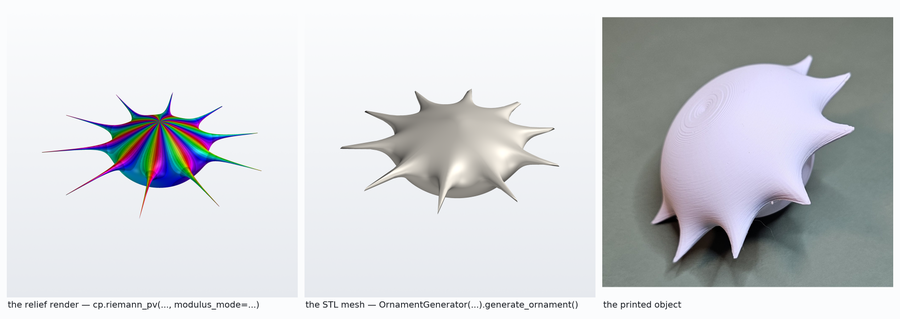
The relief is the mathematics, the mesh is the geometry that survives losing the colour, and the print is the object on a desk. Ten poles become ten spikes around the central zero.
→ STL export and the physical workflow
Documentation
The documentation site has the visual tour, the guides, and a generated API reference.
- Reading a phase portrait — what the colours encode, and which colormap to choose (with measured colour-vision-deficiency behaviour)
- 3D and the Riemann sphere — including headless rendering and reproducible cameras
- Gallery — every preset and colormap, with the code that made it
- API map — one entry point per task, and what each returns
- Migration guide and changelog
A note on backends
matplotlib draws the 2D portraits and the stereographic charts. PyVista draws everything 3D and builds the export meshes, because 3D here is a mesh, camera, lighting and export problem, which is what PyVista is for and what matplotlib's 3D engine is not. As of 3.0 PyVista is a required dependency, so there is no capability flag to check. The reasoning, with the measured install footprint and import cost, is in the backend policy.
Contributing
See CONTRIBUTING.md for setup, the checks, the spec-driven workflow, and the release runbook.
Citing
Citation metadata is in CITATION.cff; GitHub's "Cite this repository" button generates BibTeX from it.
Acknowledgements
Inspired by Elias Wegert's Visual Complex Functions: An Introduction with Phase Portraits (Birkhäuser, 2012), which is the book to read if you want to understand what these pictures show.
License
MIT for the code; see LICENSE. The gallery images and ornament designs are under LICENSE.art.
1 maintainer

Metadata
1 maintainer
Release files for complexplorer 3.0.0
For a detailed explanation of source distributions (sdists) and built distributions (wheels), please see the package formats documentation.
Source distribution (sdist)
| File | Size | Uploaded | |
|---|---|---|---|
| complexplorer-3.0.0.tar.gz | 81.8 kB | Details |
Built distribution (wheel)
| File | Interpreter | ABI | Platform | Reset |
|---|---|---|---|---|
| complexplorer-3.0.0-py3-none-any.whl | Python 3 | none | any | Details |
Total release size: 176.1 kB
Release files / complexplorer-3.0.0.tar.gz
| Download URL | complexplorer-3.0.0.tar.gz |
|---|---|
| Size | 81.8 kB |
| Tags | Source |
|
SHA-256 checksum How to use checksums |
cb7c967310ea228fa280cb3308a1990bec5c5bbc8288fd187659fab46be75cd0
|
|
BLAKE2b-256 checksum How to use checksums |
637f730b6f92ad0ea7c5416467a11572ab6fd6a263de21bcc4bdaf917159b87b
|
| Upload date | |
|
Uploaded using Trusted Publishing? What is trusted publishing? |
No |
| Uploaded via |
twine/7.0.0 CPython/3.12.13
|
Release files / complexplorer-3.0.0-py3-none-any.whl
| Download URL | complexplorer-3.0.0-py3-none-any.whl |
|---|---|
| Size | 94.3 kB |
| Tags | Python 3 |
|
SHA-256 checksum How to use checksums |
84ac577a5b7489d3006caede2b5486788491ca93547ff8b1746fa9eb40091af0
|
|
BLAKE2b-256 checksum How to use checksums |
cd39c768932fa98d80e6debf43e128d6b29fd9d821204e32807010d7abf9666c
|
| Upload date | |
|
Uploaded using Trusted Publishing? What is trusted publishing? |
No |
| Uploaded via |
twine/7.0.0 CPython/3.12.13
|














