

A small, framework-agnostic MVVM layer for building UIs in Python. You declare views as typed
attrs classes. They hold the state of the UI, but no toolkit code: in
MVVM terms, they are the view-models
(how ComposeUI maps to MVVM).
A Renderer binds each view to a toolkit widget, which plays the View role of MVVM:
- a desktop window with Qt, through
qtpy; - a terminal with Textual;
- a web page served with Starlette and htmx.
Signal objects carry events between view, model, and application code.
Status: early-stage / pre-alpha. The API is small and still moving.
Why
- Declarative views. A view is an
attrsclass with typed fields. You don't build widgets or wire their signals by hand. - Reactive by construction. When you set an attribute of a view (
view.text = "..."), the view pushes the change to its renderer. Normal state changes need noupdate()orrefresh()calls. - Toolkit-agnostic core.
composeui.coredoesn't import Qt, Textual, or Starlette when Python imports it. Each backend is imported only when a view renders with it. - Typed callback injection.
Signal.connectandApplication.connectread the parameter names of a callback. They injectview,main_view, ormodelwhen the callback asks for them. So callbacks stay short, without manual lookups.
When to use it
- Choose ComposeUI when one app must show as a desktop window, in a terminal, and in a browser, or may move from one to another later. It also suits an app whose state must be typed, saved as a file, and tested without a UI (Testing your app).
- Compared with Streamlit, the views are explicit classes that keep their state, and nothing runs the script again on each change. The same app also runs as a desktop window or in a terminal.
- Compared with Qt, Textual, or a web framework alone, the app gives up the widgets that only one toolkit has, and keeps one code base for the three.
- Not yet for an app that needs a stable API, or a widget that is still missing, such
as a context menu or a wizard (see
ROADMAP.md).
Installation
Requires Python >= 3.9. Install ComposeUI from PyPI with the extras of the backends that you want, for example the web and Qt backends:
uv add "composeui[web,pyside6]" # or: pip install "composeui[web,pyside6]"
Each extra adds a backend or a feature:
| Extra | Installs | For |
|---|---|---|
web |
Starlette, uvicorn | The web backend, the default |
pyside6 |
PySide6 | The Qt backend, a desktop window |
tui |
Textual | The Textual backend, a terminal |
report |
matplotlib | The report images of charts |
dataframe |
narwhals | A large table of a pandas, Polars, or PyArrow frame |
reload |
watchfiles | A faster --reload in development |
To try ComposeUI and its example apps, clone the repository and install every extra:
git clone https://github.com/ehmoussi/composeui
cd composeui
uv sync --all-extras
To choose extras, give them all in one command, for example
uv sync --extra web --extra pyside6. Each uv sync removes the extras that it does not
name, so a second uv sync --extra tui would remove the web and Qt backends.
Quickstart
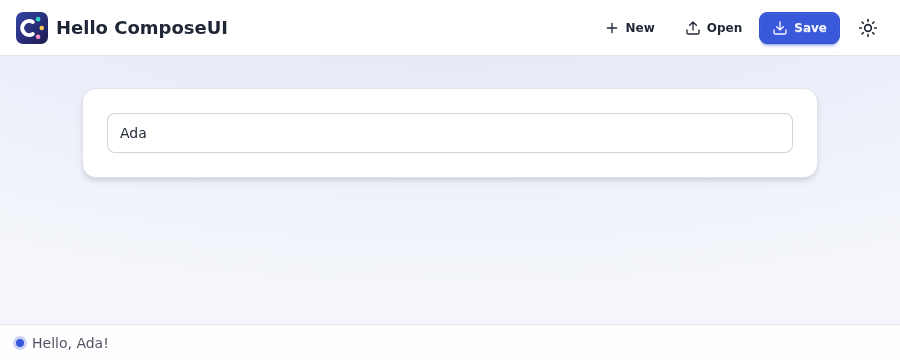
A minimal window with a text input. As you type your name, the status bar greets you:
from attrs import Factory

from composeui.core.application import run
from composeui.core.view import InputView, MainView, define_view


@define_view
class GreetingInputView(InputView):
    def __attrs_post_init__(self) -> None:
        super().__attrs_post_init__()
        self.placeholder = "Type your name..."
        self.text_edited.connect(self._on_name_changed)

    # `main_view` is injected automatically because it's a requested parameter.
    def _on_name_changed(self, text: str, *, main_view: MainView) -> None:
        main_view.status_bar.show_message(f"Hello, {text}!" if text else "")


@define_view
class HelloMainView(MainView):
    app_title = "Hello ComposeUI"
    extension = ".hello"  # the file type of its studies, which the File menu saves

    greeting: GreetingInputView = Factory(GreetingInputView)


if __name__ == "__main__":
    run(HelloMainView)
Run it with one of the backends. Each backend needs its extra:
uv run python hello.py --backend qt        # a window: the pyside6 extra
uv run python hello.py --backend textual   # a terminal: the tui extra
uv run python hello.py                     # a web page, the default: the web extra
The web backend serves the page at http://127.0.0.1:8000. run imports only the backend
that you choose, and leaves the rest of the command line to the app (--help lists it).
Next steps
- Read the core concepts of the user guide: views, signals, the model, and studies.
- Build a form with its layout and its checks, in Building views.
- Run the example apps, in the order of the
examples guide.
The first,
src/examples/pipeform.py, has forms, radio groups, a check box, a read-only table, checks, and a File menu that saves and opens:uv run python -m examples.pipeform --backend qt, ortextual, orweb.
Documentation
The documentation site, at https://ehmoussi.github.io/composeui/, has the guides below, a widget catalog, and the API reference.
- The user guide explains how to build an app: the views, their layout, forms and their checks, the widgets, pages, tabs, dialogs, tables, charts, maps, threads, SQLite models, CSV imports, translations, the differences between the backends, testing an app, and a skill for coding agents.
- The examples guide says what each example app shows, and how to run it.
- The technical guide explains how ComposeUI works inside, and how to develop it: the architecture, how to add a widget or a backend, the tests, and the checks.
CHANGELOG.mdlists the changes of each release.ROADMAP.mdlists the work that is left.
License
MIT, see LICENSE.
1 maintainer

Metadata
1 maintainer
Release files for composeui 0.3.0
For a detailed explanation of source distributions (sdists) and built distributions (wheels), please see the package formats documentation.
Source distribution (sdist)
| File | Size | Uploaded | Provenance | Actions |
|---|---|---|---|---|
| composeui-0.3.0.tar.gz | 1.4 MB | With provenance | Details for composeui-0.3.0.tar.gz |
Built distribution (wheel)
| File | Interpreter | ABI | Platform | Actions Reset |
|---|---|---|---|---|
| composeui-0.3.0-py3-none-any.whl | Python 3 | none | any | Details for composeui-0.3.0-py3-none-any.whl |
Total release size: 2.3 MB
Release files / composeui-0.3.0.tar.gz
| Download URL | composeui-0.3.0.tar.gz |
|---|---|
| Size | 1.4 MB |
| Tags | Source |
|
SHA-256 checksum How to use checksums |
978736712ba81d5e7e79faae81b46f4ed7c42c95b6480e5d4ad2a85a0dad2c0f
|
|
BLAKE2b-256 checksum How to use checksums |
ff7261ea285d7f3b12eeeba1f7387f7370462566be6a037e3608771e64b698bb
|
| Upload date | |
|
Uploaded using Trusted Publishing? What is trusted publishing? |
Yes |
| Uploaded via |
twine/7.0.0 CPython/3.13.16
|
Provenance
Provenance describes where a file came from. On PyPI, provenance is shared via attestations, which provide a verifiable record of the build or publishing details. View details, limitations and caveats.


PyPI Publish Attestation
PyPI verified that this artifact, at this checksum, originated from the publisher listed below.
Signed by GitHub Actions, verified by PyPI on Nov 2, 2026.
Transparency logRelease files / composeui-0.3.0-py3-none-any.whl
| Download URL | composeui-0.3.0-py3-none-any.whl |
|---|---|
| Size | 942.5 kB |
| Tags | Python 3 |
|
SHA-256 checksum How to use checksums |
34ed7cf3db9fd703dafbc08d0f4501dc47771c4403e6870dcaa27c5c9e3a1390
|
|
BLAKE2b-256 checksum How to use checksums |
c9a056c35a2e0c385d635908cf5221817b8ae92719e5bb67af77d8115a44fb18
|
| Upload date | |
|
Uploaded using Trusted Publishing? What is trusted publishing? |
Yes |
| Uploaded via |
twine/7.0.0 CPython/3.13.16
|
Provenance
Provenance describes where a file came from. On PyPI, provenance is shared via attestations, which provide a verifiable record of the build or publishing details. View details, limitations and caveats.
PyPI Publish Attestation
PyPI verified that this artifact, at this checksum, originated from the publisher listed below.
Signed by GitHub Actions, verified by PyPI on Nov 2, 2026.
Transparency logSecurity for composeui 0.3.0
Provenance
Provenance describes where a file came from. On PyPI, provenance is shared via attestations, which provide a verifiable record of the build or publishing details. View details, limitations and caveats.
Full provenance
All 2 files in this release have been uploaded with provenance metadata.
Attestation for composeui-0.3.0.tar.gz
PyPI Publish Attestation
PyPI verified that this artifact, at this checksum, originated from the publisher listed below.
Signed by GitHub Actions, verified by PyPI on Nov 2, 2026.
Transparency logA note on package security
PyPI is a repository for distributing packages, not a service for auditing them. While third-party security researchers and our staff do their best to detect and remove malicious packages, PyPI cannot guarantee the quality, security or suitability of any given package.
To learn more about protecting yourself from malicious actors, visit our package security documentation.














