


Computer Control MCP
MCP server that provides computer control capabilities, like mouse, keyboard, OCR, etc. using PyAutoGUI, RapidOCR, ONNXRuntime. Similar to 'computer-use' by Anthropic. With Zero External Dependencies.




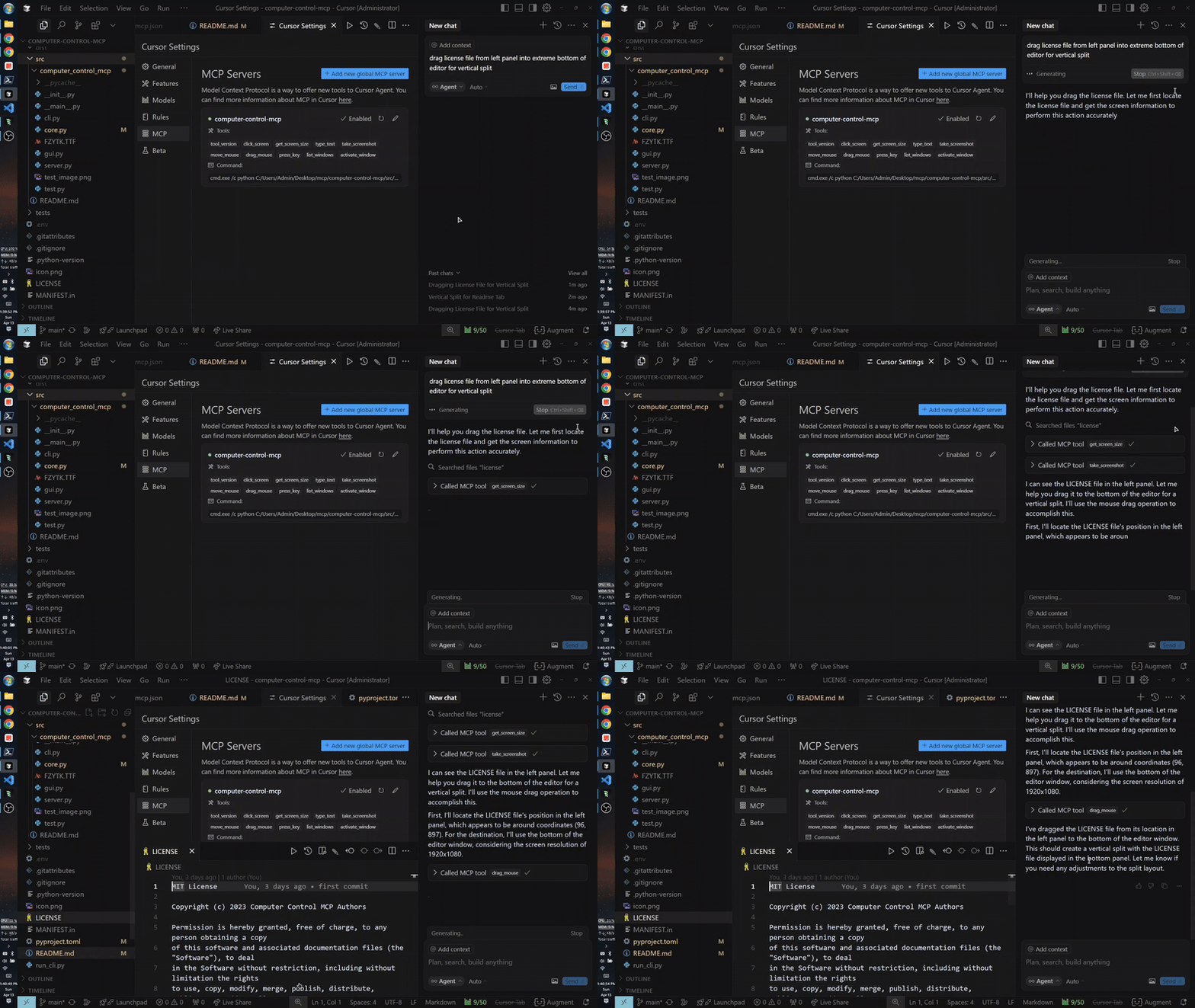
Quick Usage (MCP Setup Using uvx)
Note: Running uvx computer-control-mcp@latest for the first time will download python dependencies (around 70MB) which may take some time. Recommended to run this in a terminal before using it as MCP. Subsequent runs will be instant.
{
  "mcpServers": {
    "computer-control-mcp": {
      "command": "uvx",
      "args": ["computer-control-mcp@latest"]
    }
  }
}
OR install globally with pip:
pip install computer-control-mcp
Then run the server with:
computer-control-mcp # instead of uvx computer-control-mcp, so you can use the latest version, also you can `uv cache clean` to clear the cache and `uvx` again to use latest version.
Features
- Control mouse movements and clicks
- Type text at the current cursor position
- Take screenshots of the entire screen or specific windows with optional saving to downloads directory
- Extract text from screenshots using OCR (Optical Character Recognition)
- List and activate windows
- Press keyboard keys
- Drag and drop operations
Available Tools
Mouse Control
click_screen(x: int, y: int): Click at specified screen coordinatesmove_mouse(x: int, y: int): Move mouse cursor to specified coordinatesdrag_mouse(from_x: int, from_y: int, to_x: int, to_y: int, duration: float = 0.5): Drag mouse from one position to anothermouse_down(button: str = "left"): Hold down a mouse button ('left', 'right', 'middle')mouse_up(button: str = "left"): Release a mouse button ('left', 'right', 'middle')
Keyboard Control
type_text(text: str): Type the specified text at current cursor positionpress_key(key: str): Press a specified keyboard keykey_down(key: str): Hold down a specific keyboard key until releasedkey_up(key: str): Release a specific keyboard keypress_keys(keys: Union[str, List[Union[str, List[str]]]]): Press keyboard keys (supports single keys, sequences, and combinations)
Screen and Window Management
take_screenshot(title_pattern: str = None, use_regex: bool = False, threshold: int = 60, scale_percent_for_ocr: int = None, save_to_downloads: bool = False): Capture screen or windowtake_screenshot_with_ocr(title_pattern: str = None, use_regex: bool = False, threshold: int = 10, scale_percent_for_ocr: int = None, save_to_downloads: bool = False): Extract adn return text with coordinates using OCR from screen or windowget_screen_size(): Get current screen resolutionlist_windows(): List all open windowsactivate_window(title_pattern: str, use_regex: bool = False, threshold: int = 60): Bring specified window to foreground
Development
Setting up the Development Environment
# Clone the repository
git clone https://github.com/AB498/computer-control-mcp.git
cd computer-control-mcp

# Install in development mode
pip install -e .

# Start server
python -m computer_control_mcp.core

# -- OR --

# Build
hatch build

# Non-windows
pip install dist/*.whl --upgrade

# Windows
$latest = Get-ChildItem .\dist\*.whl | Sort-Object LastWriteTime -Descending | Select-Object -First 1
pip install $latest.FullName --upgrade

# Run
computer-control-mcp
Running Tests
python -m pytest
API Reference
See the API Reference for detailed information about the available functions and classes.
License
MIT
For more information or help
1 maintainer

Metadata
1 maintainer
Release files for computer-control-mcp-fastmcp 0.3.7
For a detailed explanation of source distributions (sdists) and built distributions (wheels), please see the package formats documentation.
Source distribution (sdist)
| File | Size | Uploaded | |
|---|---|---|---|
| computer_control_mcp_fastmcp-0.3.7.tar.gz | 1.8 MB | Details |
Built distribution (wheel)
| File | Interpreter | ABI | Platform | Reset |
|---|---|---|---|---|
| computer_control_mcp_fastmcp-0.3.7-py3-none-any.whl | Python 3 | none | any | Details |
Total release size: 1.8 MB
Release files / computer_control_mcp_fastmcp-0.3.7.tar.gz
| Download URL | computer_control_mcp_fastmcp-0.3.7.tar.gz |
|---|---|
| Size | 1.8 MB |
| Tags | Source |
|
SHA-256 checksum How to use checksums |
e7363ee31e63aaf0db01db3d30df62bec8a9a7f69234d6ef8c1787959030cec3
|
|
BLAKE2b-256 checksum How to use checksums |
9b2ff7bcc6c71c65c0a8ba937cf1e59143c52cbe0325a6565df2241026b1bd4e
|
| Upload date | |
|
Uploaded using Trusted Publishing? What is trusted publishing? |
No |
| Uploaded via |
uv/0.8.22
|
Release files / computer_control_mcp_fastmcp-0.3.7-py3-none-any.whl
| Download URL | computer_control_mcp_fastmcp-0.3.7-py3-none-any.whl |
|---|---|
| Size | 4.7 kB |
| Tags | Python 3 |
|
SHA-256 checksum How to use checksums |
c4b67d1cf767f41ea8a20d6a62f4753c3d38984d8766a717cca41647748b3bdf
|
|
BLAKE2b-256 checksum How to use checksums |
02799e11d66786b15458a29be8ddbd273fdaea6ca478820fef6c909025e1553f
|
| Upload date | |
|
Uploaded using Trusted Publishing? What is trusted publishing? |
No |
| Uploaded via |
uv/0.8.22
|













