
Conc


Introduction to Conc
Conc is a Python library that brings tools for corpus linguistic analysis to Jupyter notebooks. Conc aims to allow researchers to analyse large corpora in efficient ways using standard hardware, with the ability to produce clear, publication-ready reports and extend analysis where required using standard Python libraries.
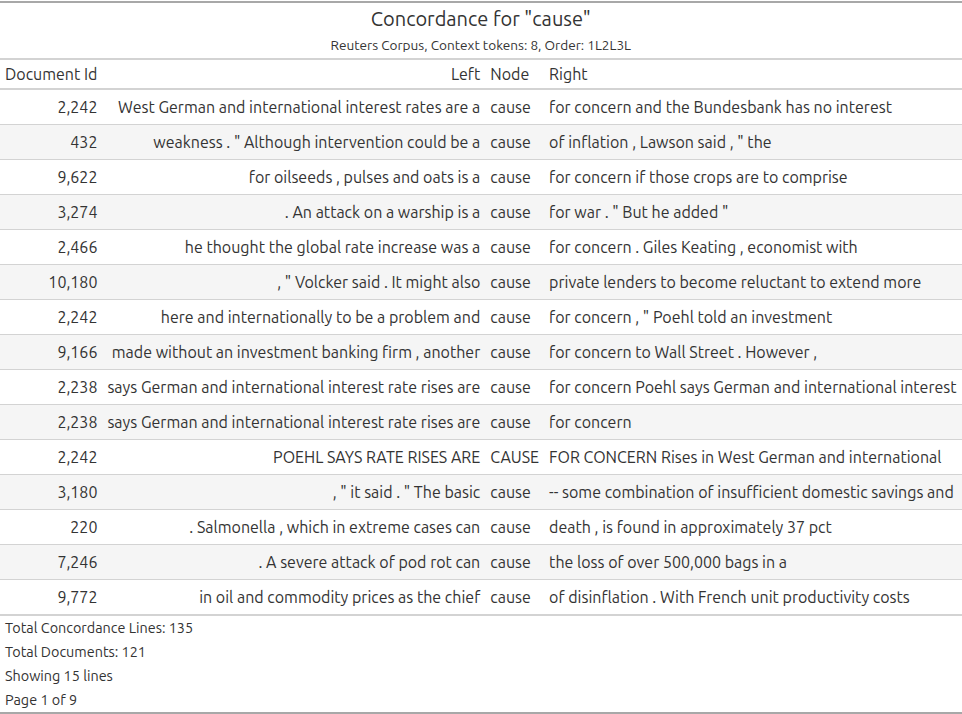
A staple of data science, Jupyter notebooks allow researchers to present their analysis in an interactive form that combines code, reporting and discussion. They are an ideal format for collaborating with other researchers during research or to share analysis in a way others can reproduce and interact with.
Conc uses spaCy for tokenising texts. SpaCy functionality to annotate texts will be supported soon.
Conc uses well-supported Python libraries for processing data and prioritises fast code libraries and data structures. The library produces clear reports with important information to interpret result by default. Conc makes it easy to extend analysis using other libraries or software. Conc’s corpus format is well-documented and there are code examples to help you work with Conc results and data structures outside of Conc if you want to extend your analysis.
Conc’s documentation site has more information on Conc, why it was developed and the principles guiding Conc’s development.
Table of Contents
Direct links to Conc documentation
- Getting Started
- Tutorials (Tutorials to get you started with Conc)
- Documentation (Explanations, Conc API Reference, information on Development)
Acknowledgements
Conc is developed by Dr Geoff Ford.
Work to create this Python library has been made possible by funding/support from:
- “Mapping LAWS: Issue Mapping and Analyzing the Lethal Autonomous Weapons Debate” (Royal Society of New Zealand’s Marsden Fund Grant 19-UOC-068)
- “Into the Deep: Analysing the Actors and Controversies Driving the Adoption of the World’s First Deep Sea Mining Governance” (Royal Society of New Zealand’s Marsden Fund Grant 22-UOC-059)
- Sabbatical, University of Canterbury, Semester 1 2025.
Thanks to Jeremy Moses and Sian Troath from the Mapping LAWS project team for their support and feedback as first users of ConText (a web-based application built on an earlier version of Conc that I’ve also recently released).
Dr Ford is a researcher with Te Pokapū Aronui ā-Matihiko | UC Arts Digital Lab (ADL). Thanks to the ADL team and the ongoing support of the University of Canterbury’s Faculty of Arts who make work like this possible.
Thanks to Dr Chris Thomson and Karin Stahel for their feedback on early versions of Conc.
Above all, thanks to my family for their love, patience and kindness.
Development Status
Conc is in active development. It is currently released for beta testing. See the CHANGELOG for notes on releases and the Roadmap for planned updates.
Although this is a Beta release, I’m currently using Conc for research and postgraduate teaching. I’m keen to support new users. If you have any questions, encounter hurdles using Conc or have feature requests, create an issue.
Installation
Installing Conc is simple. Below is the essential information if you want to use Conc. The installation page has more information. You can also install the development version of Conc, which may include new functionality and bug fixes. If you want to download sample corpora you will need to install optional dependencies. If you have an older computer with a pre-2013 CPU, you will probably need to install a version of Polars compiled for older machines, see the install page for details.
1. Install via pip
Conc is tested with Python 3.10+. You can install Conc from pypi using this command:
pip install conc
Add the -U flag to upgrade if you are already running Conc.
2. Install a spaCy model for tokenization
Conc uses a SpaCy language model for tokenization. After installing Conc, install a model. If you are working with English-language texts, install SpaCy’s small English model (which is Conc’s default) like this:
python -m spacy download en_core_web_sm
If you are working with a different language or want to use a different ‘en’ model, check the SpaCy models documentation for the relevant model name.
Using Conc
Getting started
A good place to start is the Get started with Conc tutorial, which demonstrates how to build a corpus and output Conc reports. There are also simple code recipes for common Conc tasks.
Conc Documentation
There is a dedicated Conc documentation site. This includes tutorials, examples demonstrating how to create reports for analysis, explanation of Conc functionality and its Corpus format, and a reference to Conc’s classes and methods. Here are links to the documentation site sections:
- Tutorials to get you started with Conc
- The Explanations section includes information on how Conc works, how to work with the Conc corpus format and Conc results with other Python libraries
- The Conc API Reference provides detailed documentation of Conc classes and functions
- The Development section gives information on Conc development, including a Roadmap and Developer’s Guide
1 maintainer

Metadata
1 maintainer
Release files for conc 0.1.13
For a detailed explanation of source distributions (sdists) and built distributions (wheels), please see the package formats documentation.
Source distribution (sdist)
| File | Size | Uploaded | |
|---|---|---|---|
| conc-0.1.13.tar.gz | 60.7 kB | Details |
Built distribution (wheel)
| File | Interpreter | ABI | Platform | Reset |
|---|---|---|---|---|
| conc-0.1.13-py3-none-any.whl | Python 3 | none | any | Details |
Total release size: 124.9 kB
Release files / conc-0.1.13.tar.gz
| Download URL | conc-0.1.13.tar.gz |
|---|---|
| Size | 60.7 kB |
| Tags | Source |
|
SHA-256 checksum How to use checksums |
0c51475ec6271d49e8ca0a455fffa8167081ca9c66d2b362aaa1fd3f5177561b
|
|
BLAKE2b-256 checksum How to use checksums |
5f07507251064168336cb6b60c8f86d6db7476ab6ba336f0fbdb69aead3752cf
|
| Upload date | |
|
Uploaded using Trusted Publishing? What is trusted publishing? |
No |
| Uploaded via |
twine/6.1.0 CPython/3.11.13
|
Release files / conc-0.1.13-py3-none-any.whl
| Download URL | conc-0.1.13-py3-none-any.whl |
|---|---|
| Size | 64.2 kB |
| Tags | Python 3 |
|
SHA-256 checksum How to use checksums |
93eeec4a28929b122329ea4eaeedcfc79d9e377c3e2e8b6257be453e8d2029d5
|
|
BLAKE2b-256 checksum How to use checksums |
39432c5fc879534ea5979d0101d839dfd371971794bbd4a5ab5603f81ebbee9e
|
| Upload date | |
|
Uploaded using Trusted Publishing? What is trusted publishing? |
No |
| Uploaded via |
twine/6.1.0 CPython/3.11.13
|














