
Synthetic benchmarks for evaluating Concept Bottleneck Models.

Project description
Concept Benchmark


Concept Benchmark is a Python package for generating synthetic datasets to benchmark concept bottleneck models (CBMs). It provides datasets with fully-specified ground-truth concept labels, letting you vary concept granularity, annotation quality, and the labeling rule — then measure exactly how each factor affects model performance and the value of interventions.
The package includes two benchmarks:
- Robot Classification — a decision-support task where a human corrects concept predictions to improve accuracy. Available as image and text modalities.
- Sudoku Validation — an automation task where the model handles routine cases and defers uncertain ones. Demonstrates selective classification and AND-fragility of concepts.
Table of Contents
Installation
The package requires the cairo graphics library. Install it first:
# macOS
brew install cairo pkg-config

# Ubuntu / Debian
sudo apt-get install libcairo2-dev pkg-config python3-dev

# Fedora / RHEL
sudo dnf install cairo-devel pkg-config python3-devel
Then install the package:
pip install concept-benchmark
Dataset generation works out of the box with pip install. Model training, interventions, and evaluation (experiments/ package) require cloning the repo:
git clone https://anonymous.4open.science/r/concept-benchmark-84D2.git
cd concept-benchmark
uv sync
Verify the installation:
python3 -c "import concept_benchmark; print('OK')"
Optional: CEM, ProbCBM, and ECBM Baselines
The repo supports three additional CBM families beyond the standard CBM/DNN:
- CEM — Concept Embedding Model (
--cbm-family cem) - ProbCBM — Probabilistic Concept Bottleneck Model (
--cbm-family probcbm) - ECBM — Energy-based Concept Bottleneck Model (
--cbm-family ecbm)
ECBM is included in the repo and works out of the box. CEM and ProbCBM require the official mateoespinosa/cem package — install it with:
./scripts/install_cem_repo.sh
If you prefer the manual path:
git clone https://github.com/mateoespinosa/cem.git third_party/cem
python -m pip install "pytorch-lightning>=1.6,<2.0" "torchmetrics<1.0"
python -m pip install -r third_party/cem/requirements.txt
python -m pip install -e third_party/cem
Once installed, use --cbm-family to select the model in any pipeline script:
# Train and evaluate a CEM on the robot benchmark
python scripts/robot_pipeline.py --seed 1014 --cbm-family cem

# Train and evaluate a ProbCBM on the robot benchmark
python scripts/robot_pipeline.py --seed 1014 --cbm-family probcbm

# CEM / ProbCBM on tabular sudoku
python scripts/sudoku_pipeline.py --seed 171 --data-type tabular --cbm-family cem --stages setup cs intervene
python scripts/sudoku_pipeline.py --seed 171 --data-type tabular --cbm-family probcbm --stages setup cs intervene
Key configuration options (set via --flags or in the config dataclass):
| Parameter | Default | Description |
|---|---|---|
cem_emb_size |
16 | Concept embedding dimension for CEM |
cem_training_intervention_prob |
0.25 | Intervention probability during CEM training |
probcbm_train_class_mode |
independent |
ProbCBM class training: independent or sequential |
probcbm_n_samples_inference |
50 | Monte Carlo samples during ProbCBM inference |
Notes:
- Existing CBM / DNN / conceptual-safeguards paths do not require these packages.
- Robot support is implemented for the benchmark pipeline.
- Sudoku support is currently limited to the tabular variant for
cem/probcbm. - Alignment and plotting remain on the original
cbmpath.
Quick Start
A concept bottleneck model (CBM) first predicts interpretable concepts from inputs (e.g., "has pointy feet"), then uses those concepts to predict the final label. This two-stage design lets users inspect and correct the model's reasoning at test time — an operation called an intervention. This package gives you synthetic datasets where the ground-truth concepts are known, so you can measure exactly how much interventions help under different conditions.
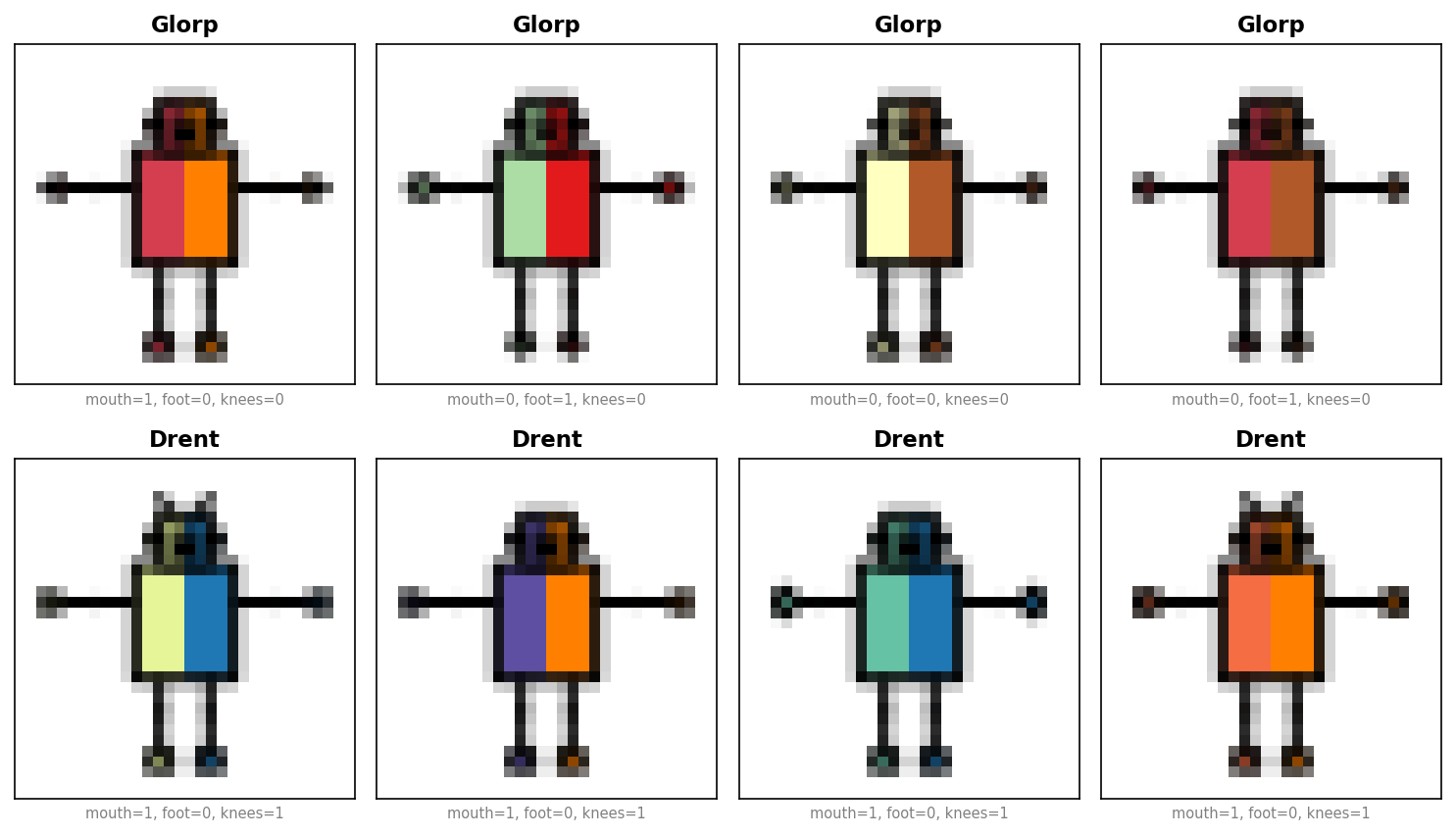
Robot — classify fictional robots (Glorps vs. Drents) from body features:
from concept_benchmark.robots import DatasetGenerator
from concept_benchmark.transforms import ConceptDropGenerator

dataset = DatasetGenerator(
    seed=1014,
    concept_preset="foot_subtypes",  # expand foot_shape into subtypes (default: "ground_truth")
    render_images=True,              # set False to skip rendering for quick exploration
).generate()

# Drop some concepts to get a 12-concept setup
dataset = ConceptDropGenerator(dataset, [
    "has_elbows", "hand_shape", "foot_shape",
    "foot_shape_flat_rounded", "foot_shape_flat_lshaped",
    "foot_shape_pointy_trapezoid", "foot_shape_pointy_3sided",
]).generate()
dataset.sample(test_size=10000, val_size=0.2, train_size=3800, seed=1014)

print(dataset.train.C.shape)   # (3800, 12) — concept annotations
print(dataset.train.concepts)
# ['head_shape', 'body_shape', 'has_knees', 'has_antennae', 'ears_shape',
#  'mouth_type', 'foot_shape_flat_trapezoid', 'foot_shape_flat_square',
#  'foot_shape_flat_5sided', 'foot_shape_pointy_rounded',
#  'foot_shape_pointy_square', 'foot_shape_pointy_4sided']
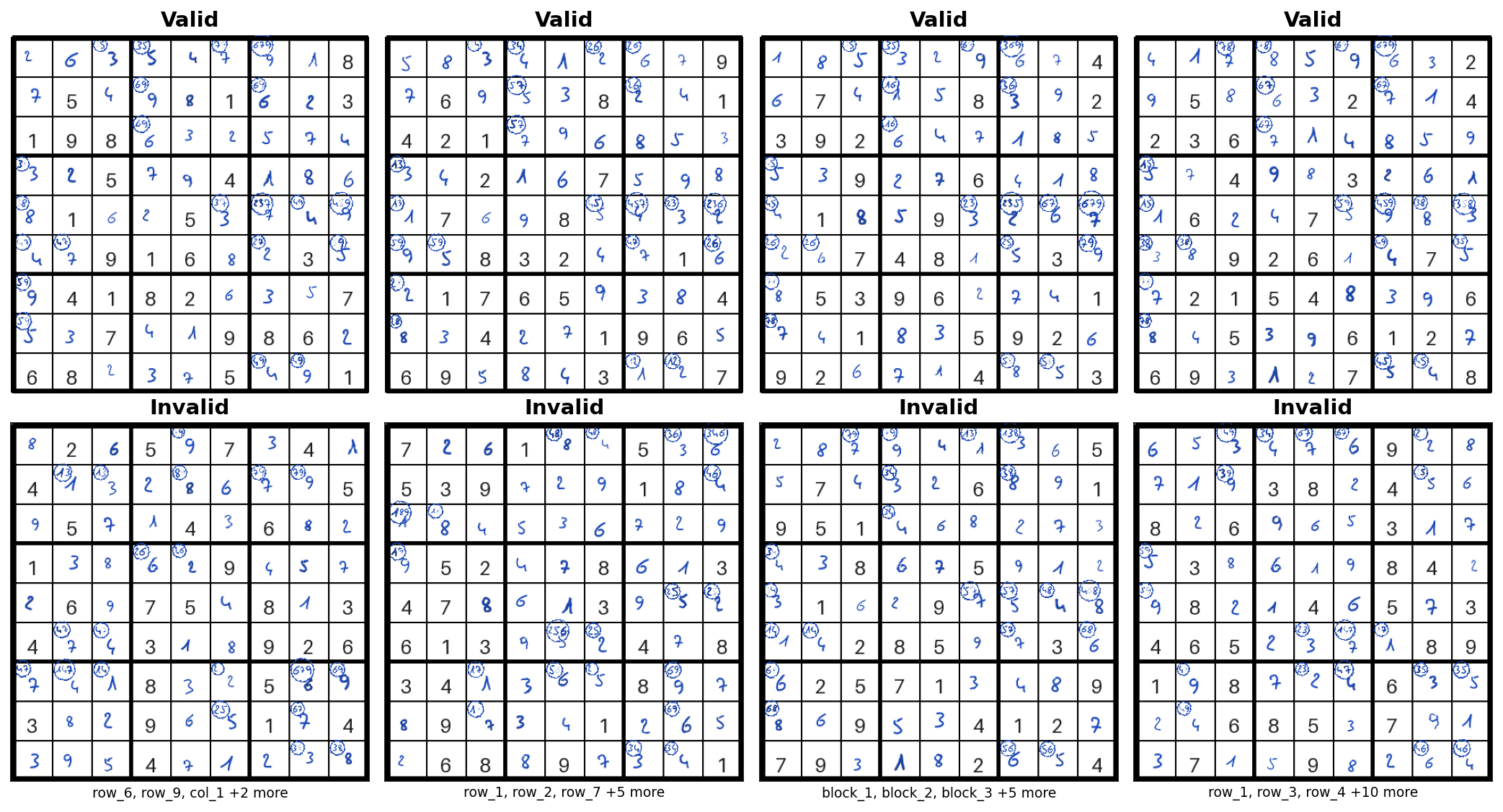
Sudoku — determine whether a 9×9 board is valid. 27 concepts capture row, column, and block validity:
from concept_benchmark.sudoku import DatasetGenerator

dataset = DatasetGenerator(
    seed=171,             # reproducibility
    n_boards=1000,        # number of boards
    max_cell_swaps=9,     # cells swapped in invalid boards (higher = subtler errors)
    valid_board_ratio=0.5,  # fraction of valid boards
    render_images=False,  # set True to generate board images (slower)
).generate()

# Stratified split — preserves valid/invalid ratio in each split
dataset.sample(test_size=0.2, val_size=0.2, stratify=dataset.y, seed=171)

print(dataset.train.C.shape)   # (600, 27) — 27 concept annotations
print(dataset.train.concepts)  # ['row_valid_1', 'row_valid_2', ..., 'block_valid_9']
For complete walkthroughs including training and evaluation, see examples/robot_pipeline_example.py and examples/sudoku_quickstart.py.
Benchmarks
Robot Classification
Parameters
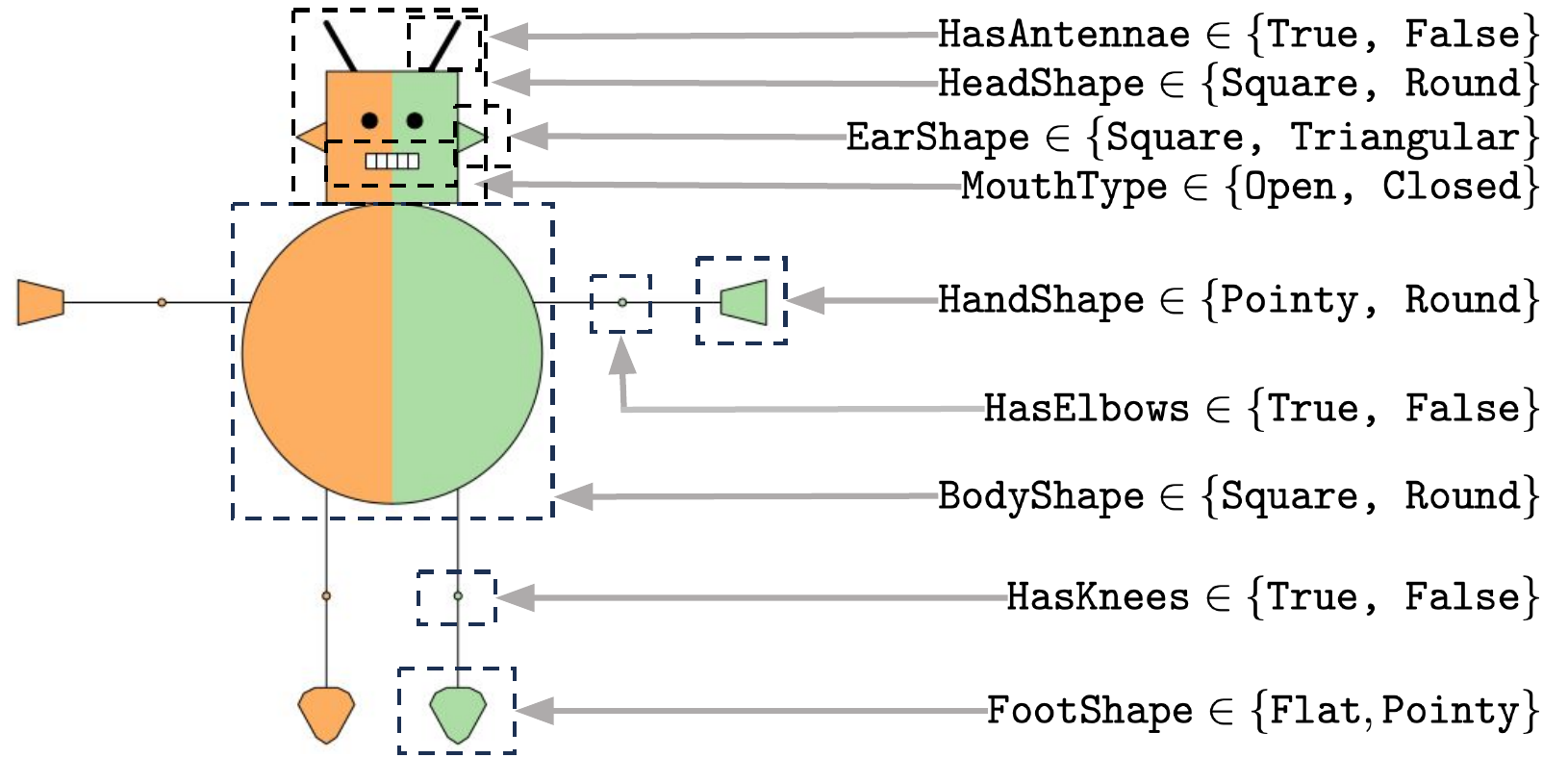
All parameters below can be passed to DatasetGenerator(...) (imported from concept_benchmark.robots). Common parameters apply to both image and text modalities; scope-specific parameters are ignored when the other modality is selected.
from concept_benchmark.robots import DatasetGenerator, LabelFormula, F

dataset = DatasetGenerator(
    # ── Common (image + text) ──
    seed=1014,                       # random seed (default: 1014 for image, 1337 for text)
    data_type="image",               # "image" (default) or "text"
    concepts={                           # 9 features (default: ROBOT_CONCEPTS)
        "head_shape": ["square", "round"],
        "body_shape": ["square", "round"],
        "has_knees": ["false", "true"],
        "has_elbows": ["false", "true"],
        "has_antennae": ["false", "true"],
        "ears_shape": ["square", "triangle"],
        "mouth_type": ["closed", "open"],
        "hand_shape": ["round", "edgy"],       # collapsed to binary by default
        "foot_shape": ["flat", "pointy"],      # collapsed to binary by default
        # Subconcepts (use expand_concepts to expose individual subtypes):
        #   hand_shape: round_circle, round_oval, round_oval2,
        #               edgy_triangle, edgy_square, edgy_trapezoid
        #   foot_shape: flat_trapezoid, flat_rounded, flat_square, flat_5sided,
        #               flat_lshaped, pointy_trapezoid, pointy_rounded,
        #               pointy_square, pointy_3sided, pointy_4sided
    },
    label_formula=LabelFormula(       # scoring rule for class assignment
        score=(                       #   score = 5·[mouth=closed] + 8·[foot=pointy] - 5·[knees=true] + 2
            5 * F("mouth_type").closed
            + 8 * F("foot_shape").pointy
            - 5 * F("has_knees").true
            + 2
        ),
        temperature=4.2,              #   P(Glorp) = σ(4.2 × score)
        stochastic=True,
    ),
    concept_preset="foot_subtypes",  # "ground_truth" or "foot_subtypes" (expands foot_shape into subtypes)
    renders_per_robot=4,             # samples per unique robot config (image: 4, text: 1)
    expand_concepts=["foot_shape"],                 # which features expand into subconcepts
    # ── Image-only (data_type="image") ──
    image_size="medium",             # "small" (8px), "medium" (32px), or "large" (600px)
    color_mode="color",              # "color" or "grayscale"
    render_images=True,              # set False to skip rendering PNGs (faster)
    # ── Text-only (data_type="text") ──
    template_complexity="high",      # template complexity level
).generate()
Inspecting the data
dataset.train.to_dataframe().head(2)
#    head_shape  body_shape  has_knees  ...  foot_shape_pointy_4sided  label  class
# 0           0           0          0  ...                         0      1  glorp
# 1           0           0          0  ...                         0      1  glorp
For interactive browsing with Renumics Spotlight (pip install concept-benchmark[explore]):
dataset.train.explore() # opens in the browser
Post-processing
After generating, you can drop concepts and split into train/val/test:
from concept_benchmark.transforms import ConceptDropGenerator

# Remove concepts from the concept set
dataset = ConceptDropGenerator(dataset, ["has_elbows", "hand_shape"]).generate()

# Split into train/val/test
dataset.sample(test_size=10000, val_size=0.2, train_size=3800, seed=1014)
For the paper's skewed splits (ensuring minimum representation of rare concept patterns), drop additional foot subtypes and use sampling_constraints:
from concept_benchmark.config import PRESET_EXCLUDED_CONCEPTS
from concept_benchmark.transforms import ConceptDropGenerator

dataset = ConceptDropGenerator(dataset, PRESET_EXCLUDED_CONCEPTS["foot_subtypes"]).generate()
# drops: has_elbows, hand_shape, foot_shape, foot_shape_flat_rounded,
#        foot_shape_flat_lshaped, foot_shape_pointy_trapezoid, foot_shape_pointy_3sided

dataset.sample(
    test_size=10000, val_size=0.2, train_size=3800, seed=1014,
    sampling_constraints=[
        {"concepts": {"foot_shape_pointy_4sided": 1}, "min_fraction": 0.49},
    ],
)
Pipeline
python scripts/robot_pipeline.py --seed 1014 --concept-preset foot_subtypes
python scripts/robot_pipeline.py --seed 1014 --concept-preset foot_subtypes --cbm-family cem
python scripts/robot_pipeline.py --seed 1014 --concept-preset foot_subtypes --cbm-family probcbm

# Add plot to generate figures from results
python scripts/robot_pipeline.py --seed 1014 --stages setup cbm dnn intervene align collect plot
Run python scripts/robot_pipeline.py --help for the full list of options (including training, intervention, and regime parameters).
Training and evaluation
Train CBMs on both concept sets and compare (requires cloning the repo):
from concept_benchmark.robots import DatasetGenerator
from concept_benchmark.transforms import ConceptDropGenerator
from concept_benchmark.evaluation import accuracy, plot_concept_discovery
from experiments.models import ConceptDetector, FrontEndModel, ConceptBasedModel, RobotConceptClassifier
import pandas as pd

def train_and_evaluate(concept_preset, drop_list):
    """Generate data, train CBM, return accuracy."""
    ds = DatasetGenerator(seed=1014, concept_preset=concept_preset).generate()
    ds = ConceptDropGenerator(ds, drop_list).generate()
    ds.sample(test_size=10000, val_size=0.2, train_size=3800, seed=1014)

    cd = ConceptDetector(model=RobotConceptClassifier(num_concepts=ds.train.n_concepts, input_size=32))
    cbm = ConceptBasedModel(concept_detector=cd)
    cbm.fit(ds.train, ds.val, concept_fit_params={"epochs": 50, "lr": 1e-3, "patience": 10})
    return accuracy(cbm.predict(ds.test), ds.test.y)

# Step 1: Train on ideal concepts (7 concepts)
ideal_acc = train_and_evaluate("ground_truth", [
    "has_elbows", "hand_shape",
    "foot_shape_flat_rounded", "foot_shape_pointy_trapezoid", "foot_shape_pointy_3sided",
    "foot_shape_flat_lshaped", "foot_shape_pointy_4sided", "foot_shape_pointy_square",
    "foot_shape_pointy_rounded", "foot_shape_flat_5sided", "foot_shape_flat_square",
    "foot_shape_flat_trapezoid",
])
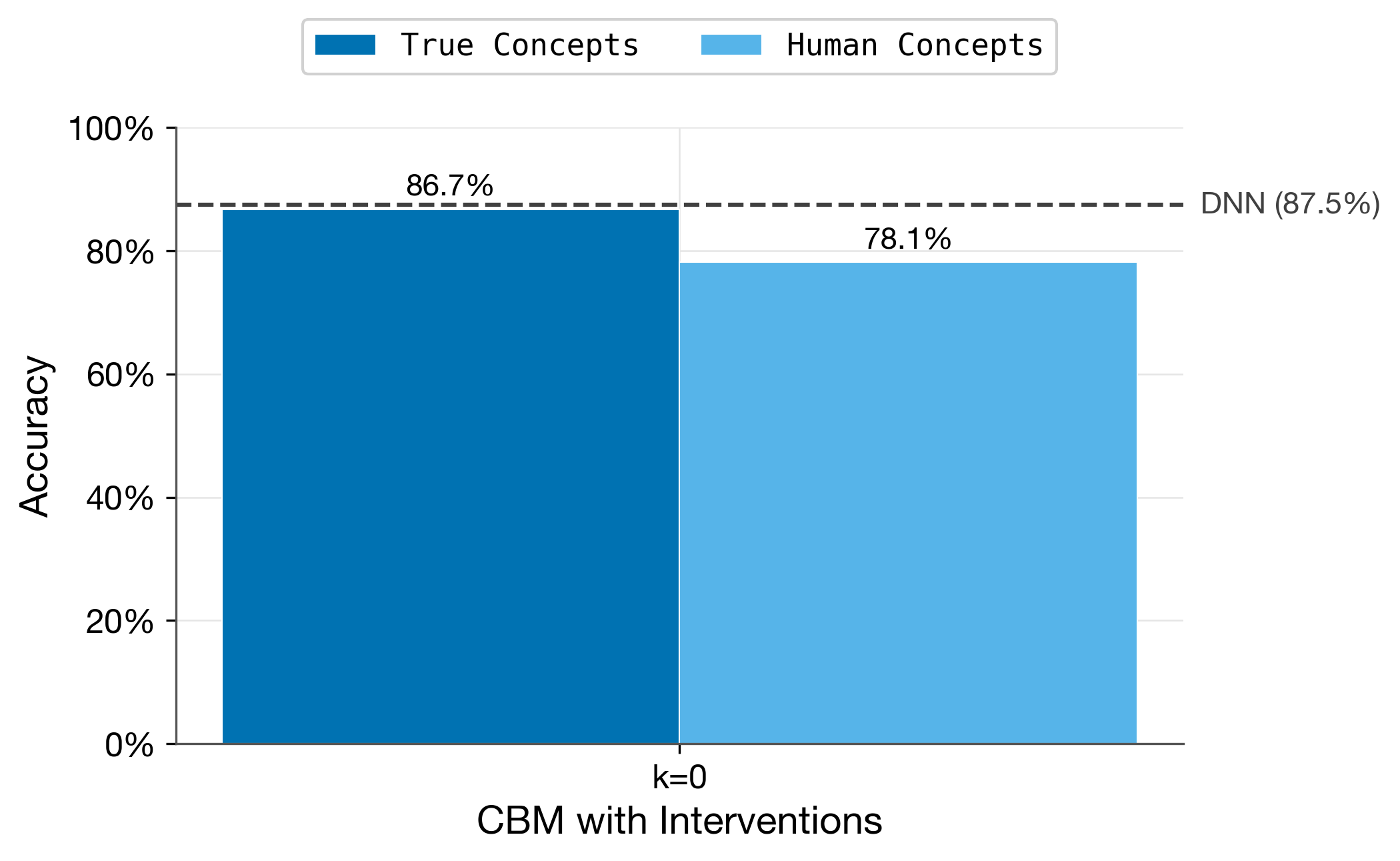
print(f"Ideal CBM: {ideal_acc:.4f}")      # 0.8673

# Step 2: Train on subconcepts (12 concepts)
sub_acc = train_and_evaluate("foot_subtypes", [
    "has_elbows", "hand_shape", "foot_shape",
    "foot_shape_flat_rounded", "foot_shape_flat_lshaped",
    "foot_shape_pointy_trapezoid", "foot_shape_pointy_3sided",
])
print(f"Subconcept CBM: {sub_acc:.4f}")    # 0.7812

# Step 3: Plot the comparison
ideal_df = pd.DataFrame({"budget": [0], "accuracy": [ideal_acc]})
sub_df = pd.DataFrame({"budget": [0], "accuracy": [sub_acc]})
fig, ax = plot_concept_discovery(ideal_df, sub_df, dnn_accuracy=0.8746, budgets=[0])
For a complete walkthrough including interventions, alignment, and regime comparisons, see examples/robot_pipeline_example.py.
Sudoku Validation
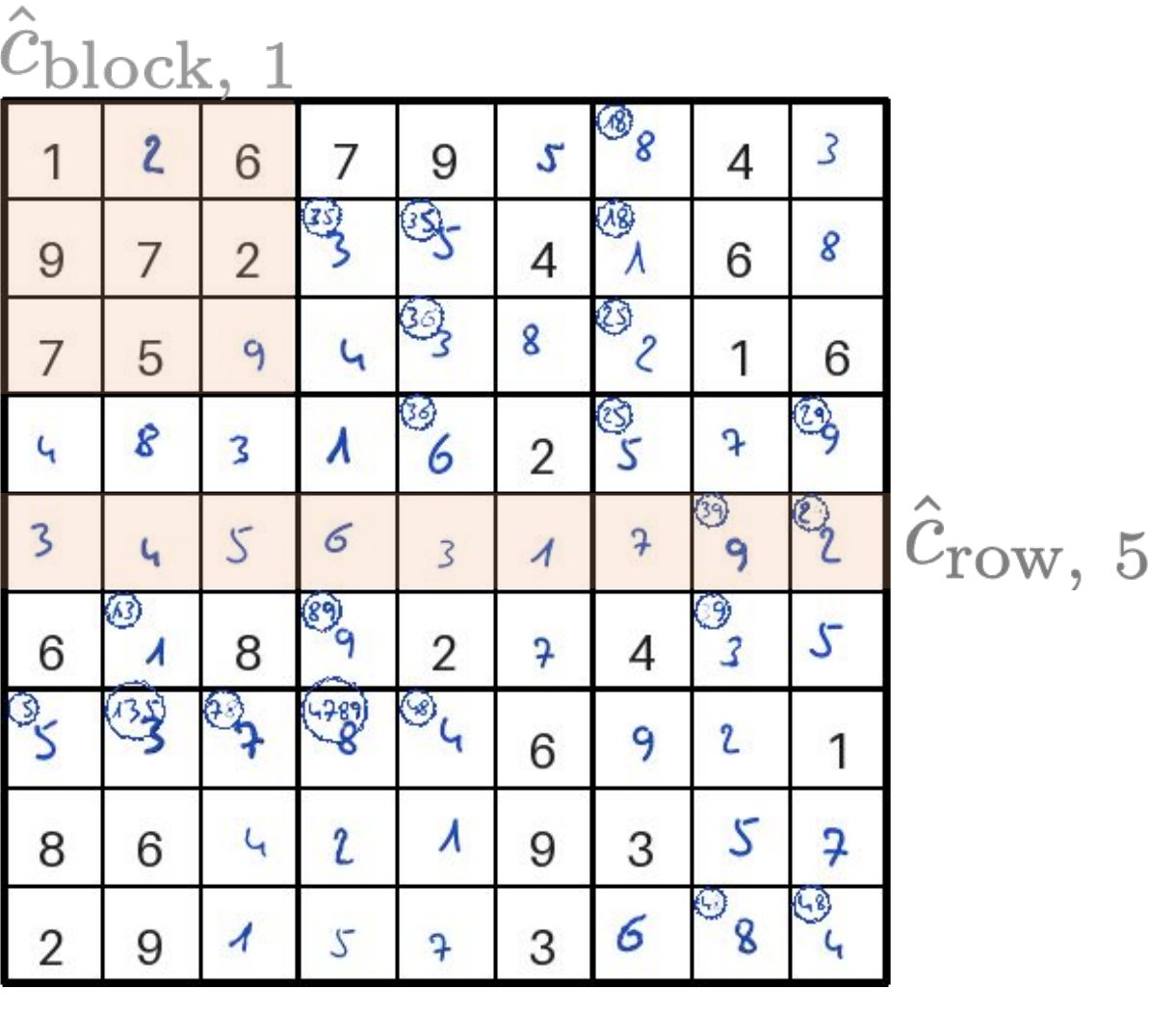
This benchmark targets automation settings where the system handles routine cases and defers uncertain ones to a human. The task is to determine whether a 9×9 Sudoku board is valid, i.e., contains the digits 1–9 exactly once in each row, column, and block. The 27 concepts correspond to the validity of each row, column, and 3×3 block. A board is valid if and only if all 27 concepts are true (AND structure), so a single violated concept is enough to invalidate the board. When the model abstains, a human can verify specific concepts (e.g., "is row 5 valid?") to resolve the uncertainty.
Parameters
from concept_benchmark.sudoku import DatasetGenerator

dataset = DatasetGenerator(
    seed=171,                  # random seed
    data_type="image",         # "image" (renders board PNGs) or "tabular" (digit vectors)
    render_images=True,        # set False to skip rendering PNGs (faster, image only)
    block_size=3,              # block size (3 = standard 9×9 board)
    n_boards=1000,             # number of boards to generate
    max_cell_swaps=9,          # cells swapped in invalid boards (higher = subtler errors)
    valid_board_ratio=0.5,     # fraction of valid boards
    # ── Rendering (image only) ──
    font_style="handwritten",  # "handwritten" or "printed"
    font_size=25,              # digit font size in pixels
    cell_px=50,                # cell size in pixels
    cell_margin_px=2,          # cell margin in pixels
    gridline_px=2,             # grid line width in pixels
    block_border_px=5,         # block border width in pixels
).generate()
Inspecting the data
df = dataset.train.to_dataframe()
show_cols = list(dataset.train.concepts[:5]) + ["label"]
print(df[show_cols])
#      row_valid_1  row_valid_2  row_valid_3  row_valid_4  row_valid_5  label
# 0              1            1            1            1            1      1
# ..           ...          ...          ...          ...          ...    ...
# 301            1            0            0            1            1      0
Pipeline
python scripts/sudoku_pipeline.py --seed 171
python scripts/sudoku_pipeline.py --seed 171 --data-type tabular --cbm-family cem --stages setup cs intervene
python scripts/sudoku_pipeline.py --seed 171 --data-type tabular --cbm-family probcbm --stages setup cs intervene
Run python scripts/sudoku_pipeline.py --help for the full list of options (including training, intervention, and evaluation parameters).
Training and evaluation
Train a concept-supervised model and evaluate selective classification (requires cloning the repo):
from concept_benchmark.sudoku import DatasetGenerator
from experiments.models import ConceptDetector, FrontEndModel, ConceptBasedModel, GroupPoolingConceptSudokuCNN
from experiments.utils import determine_device, get_loader_config
import numpy as np

# Generate data and train CS model
dataset = DatasetGenerator(seed=171, n_boards=1000, max_cell_swaps=9).generate()
dataset.sample(test_size=0.2, val_size=0.2, stratify=dataset.y, seed=171)

cd = ConceptDetector(model=GroupPoolingConceptSudokuCNN())
cd.fit(dataset.train, dataset.val, fit_params={
    "epochs": 100, "lr": 1e-3, "patience": 20,
    "device": str(determine_device()), **get_loader_config(),
})
fe = FrontEndModel()
fe.fit(dataset.train.C, dataset.train.y)
cbm = ConceptBasedModel(concept_detector=cd, label_predictor=fe)

# Selective classification — abstain when uncertain
# Binary concept predictions → frontend probability → confidence score
# (for concept-level uncertainty propagation, use cd.predict_proba() instead)
C_pred = cd.predict(dataset.test).astype(np.float32)
label_proba = fe.predict_proba(C_pred)[:, 1]
y_pred = fe.predict(C_pred)
confidence = np.abs(label_proba - 0.5)

# Find threshold for 95% selective accuracy
for tau in np.linspace(0, 0.5, 500):
    keep = confidence >= tau
    if keep.sum() > 0 and np.mean(y_pred[keep] == dataset.test.y[keep]) >= 0.95:
        break

sel_acc = np.mean(y_pred[keep] == dataset.test.y[keep])
cov = keep.mean()
print(f"CS model: selective_acc={sel_acc:.3f}, coverage={cov:.3f}")  # ~0.98, ~1.0

For a complete walkthrough including selective classification and interventions, see examples/sudoku_quickstart.py.
Benchmark Your Own Model
This guide shows how to evaluate your own concept bottleneck model on the benchmarks provided by this package. All examples below use the robot benchmark, but the same approach works for sudoku.
Prerequisite: You need the full repository (not just
pip install concept-benchmark) to run the pipeline scripts and examples.
Getting data for your model
Generate a dataset as shown in the Quick Start, then access the splits:
train, val, test = dataset.train, dataset.val, dataset.test
Each split is a ConceptDatasetSample with these attributes:
| Attribute | Type | Description |
|---|---|---|
X |
np.ndarray |
Input features (images or tabular) |
C |
np.ndarray |
Concept labels (N, n_concepts) |
y |
np.ndarray |
Target labels (N,) |
concepts |
list[str] |
Concept names |
n_concepts |
int |
Number of concepts |
classes |
list[str] |
Class names |
n |
int |
Number of samples |
Access formats:
# NumPy arrays (default)
X_train, C_train, y_train = train.X, train.C, train.y

# PyTorch DataLoader
loader = train.loader(batch_size=64, shuffle=True)
for x_batch, c_batch, y_batch in loader:
    ...

# Pandas DataFrame
df = train.to_dataframe()
Splitting
sample() splits the dataset into train/val/test. Sizes can be absolute counts or fractions:
# Absolute counts
dataset.sample(test_size=10000, val_size=1000, train_size=3800, seed=42)

# Fractions (of total dataset size)
dataset.sample(test_size=0.2, val_size=0.2, seed=42)

# Stratified — preserves class proportions in each split
dataset.sample(test_size=0.2, val_size=0.2, stratify=dataset.y, seed=42)

# Group-based — no group appears in multiple splits (e.g., robot identity)
dataset.sample(test_size=0.2, val_size=0.2, groups=group_ids, seed=42)

# Skewed training set — ensure min-fraction of specific concept patterns
dataset.sample(
    test_size=10000, val_size=0.2, train_size=3800,
    sampling_constraints=[{"concepts": {"my_concept": 1}, "min_fraction": 0.3}],
    seed=42,
)
You can re-split at any time by calling sample() again.
Concept missingness
Simulate missing concept annotations (e.g., incomplete labels from crowdsourcing). Use the generator transforms to produce a new dataset with missingness applied:
from concept_benchmark.transforms import ConceptMissingnessGenerator

dataset.sample(test_size=0.2, val_size=0.2, seed=42)

# MCAR: each concept label independently missing with probability p
dataset = ConceptMissingnessGenerator(dataset, p=0.2, mechanism="mcar", seed=99).generate()

# MNAR: missingness depends on concept value (present concepts more likely observed)
dataset = ConceptMissingnessGenerator(
    dataset, p=0.2, mechanism="mnar", seed=99,
    mnar_config={"present_prob": 0.8, "absent_prob": 0.1},
).generate()
Similarly, ConceptNoiseGenerator adds symmetric or asymmetric label flips, and LabelNoiseGenerator corrupts target labels:
from concept_benchmark.transforms import ConceptNoiseGenerator, LabelNoiseGenerator

dataset = ConceptNoiseGenerator(dataset, p=0.1, seed=99).generate()
dataset = LabelNoiseGenerator(dataset, p=0.05, seed=99).generate()
Wrapping your concept detector
The intervention runner requires a ConceptDetector subclass. Wrap your model:
from experiments.models import ConceptDetector

class MyConceptDetector(ConceptDetector):
    def __init__(self, my_model):
        super().__init__()
        self._my_model = my_model

    def predict_proba(self, dataset, **kwargs):
        """Must return (N, n_concepts) float array in [0, 1]."""
        return self._my_model.predict_concept_probs(dataset.X)
Key point: Override predict_proba() — it receives a ConceptDatasetSample, not raw arrays. Access inputs via dataset.X. The base class predict() calls predict_proba() and thresholds at 0.5 automatically.
Using a PyTorch module directly
If your model is already a PyTorch nn.Module, you can pass it directly instead of subclassing. Your module's forward() must:
- Accept a batched input tensor (e.g.
(B, 3, 32, 32)for images) - Return
(B, n_concepts)raw logits (pre-sigmoid) — sigmoid is applied internally bypredict()
The return value can also be a tuple (first element is used) or a dict with a "logits" key.
cd = ConceptDetector(model=my_pytorch_module)
cd.fit(train, val, fit_params={"epochs": 50, "lr": 1e-3})
You can also split your model into a backbone + concept head using the embedding_model parameter. The detector will probe the backbone's output shape and attach an MLP head automatically:
cd = ConceptDetector(embedding_model=my_backbone)
cd.fit(train, val, fit_params={"epochs": 50, "lr": 1e-3})
Wrapping your label predictor
Subclass FrontEndModel and override predict() and predict_proba():
from experiments.models import FrontEndModel

class MyFrontEnd(FrontEndModel):
    def __init__(self, my_classifier):
        super().__init__()
        self._clf = my_classifier

    def predict(self, C):
        """C is (N, n_concepts) binary 0/1. Returns (N,) int labels."""
        return self._clf.predict(C)

    def predict_proba(self, C):
        """C is (N, n_concepts) binary 0/1. Returns (N, n_classes) probs."""
        return self._clf.predict_proba(C)
Key point: C is already binarized at 0.5 — binary 0/1 values, not probabilities.
For a simple logistic regression baseline, the built-in FrontEndModel() works out of the box:
fe = FrontEndModel()
fe.fit(train.C, train.y)
Assembling and evaluating
Combine your concept detector and label predictor into a ConceptBasedModel:
from experiments.models import ConceptBasedModel

cbm = ConceptBasedModel(
    concept_detector=MyConceptDetector(my_concept_model),
    label_predictor=MyFrontEnd(my_classifier),
)

predictions = cbm.predict(test)
accuracy = np.mean(predictions == test.y)
print(f"CBM accuracy: {accuracy:.4f}")
For running interventions and alignment on your model, see the Interventions and Alignment section and examples/robot_pipeline_example.py.
Metrics and Plots
The concept_benchmark.evaluation module provides standalone metric functions and plotting utilities for evaluating CBMs:
from concept_benchmark.evaluation import (
    accuracy, gain, selective_accuracy, coverage,
    plot_intervention_curve, plot_regime_comparison,
)
Metrics:
| Function | Description |
|---|---|
accuracy(y_pred, y_true) |
Fraction of correct predictions |
delta_accuracy(y_after, y_before, y_true) |
Improvement in accuracy from interventions |
gain(y_pred, y_true, baseline_accuracy) |
Accuracy gain over a baseline model (e.g. DNN) |
selective_accuracy(y_pred, y_true, confidence, threshold) |
Accuracy on non-abstained samples |
coverage(confidence, threshold) |
Fraction of samples where the model does not abstain |
net_work_automated(confidence, threshold, n_interventions, n_concepts) |
Net fraction of work automated after intervention cost |
Plots:
| Function | Description |
|---|---|
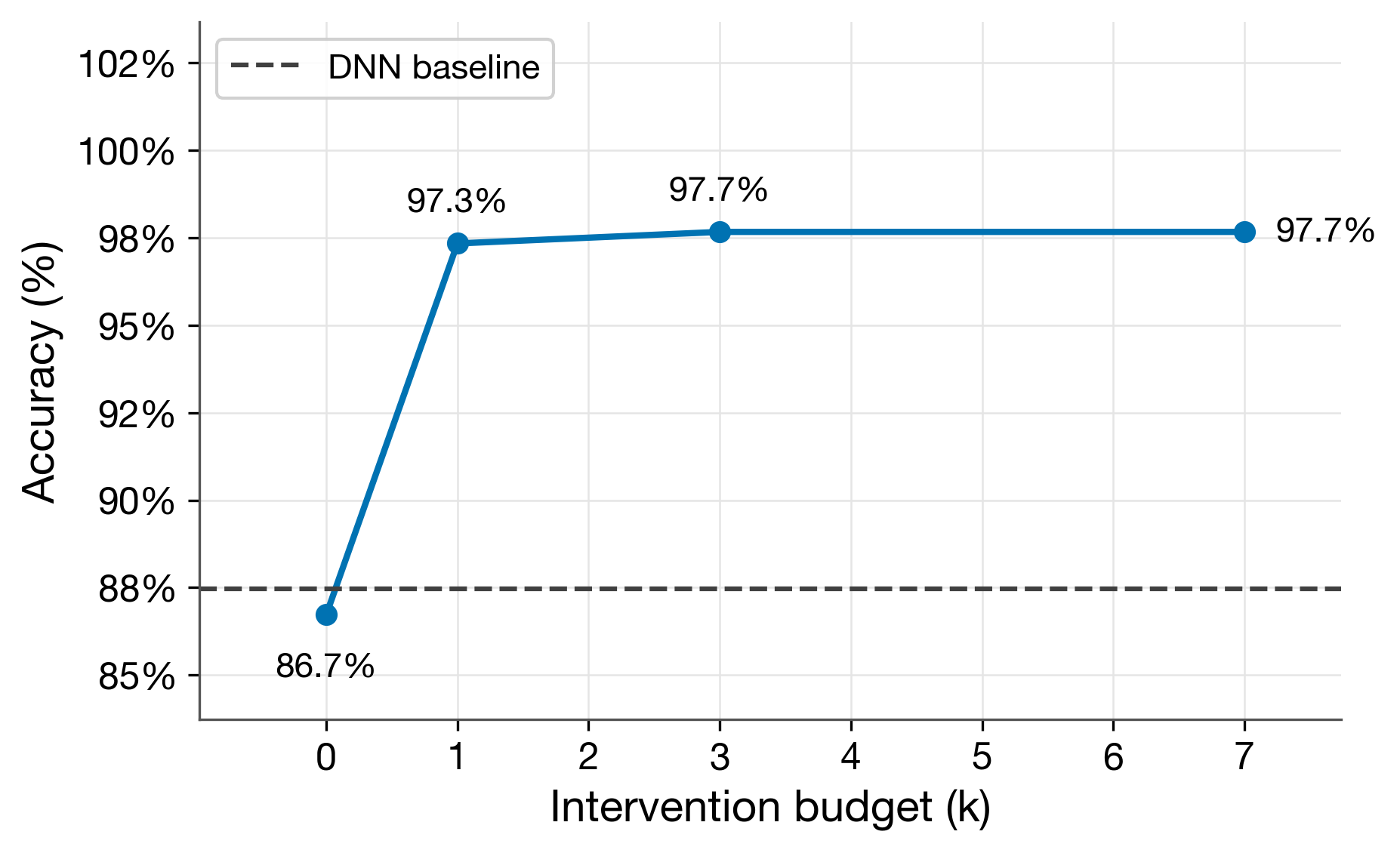
plot_intervention_curve(results_df, baseline_accuracy=...) |
Line plot of accuracy vs intervention budget k |
plot_regime_comparison(regime_df) |
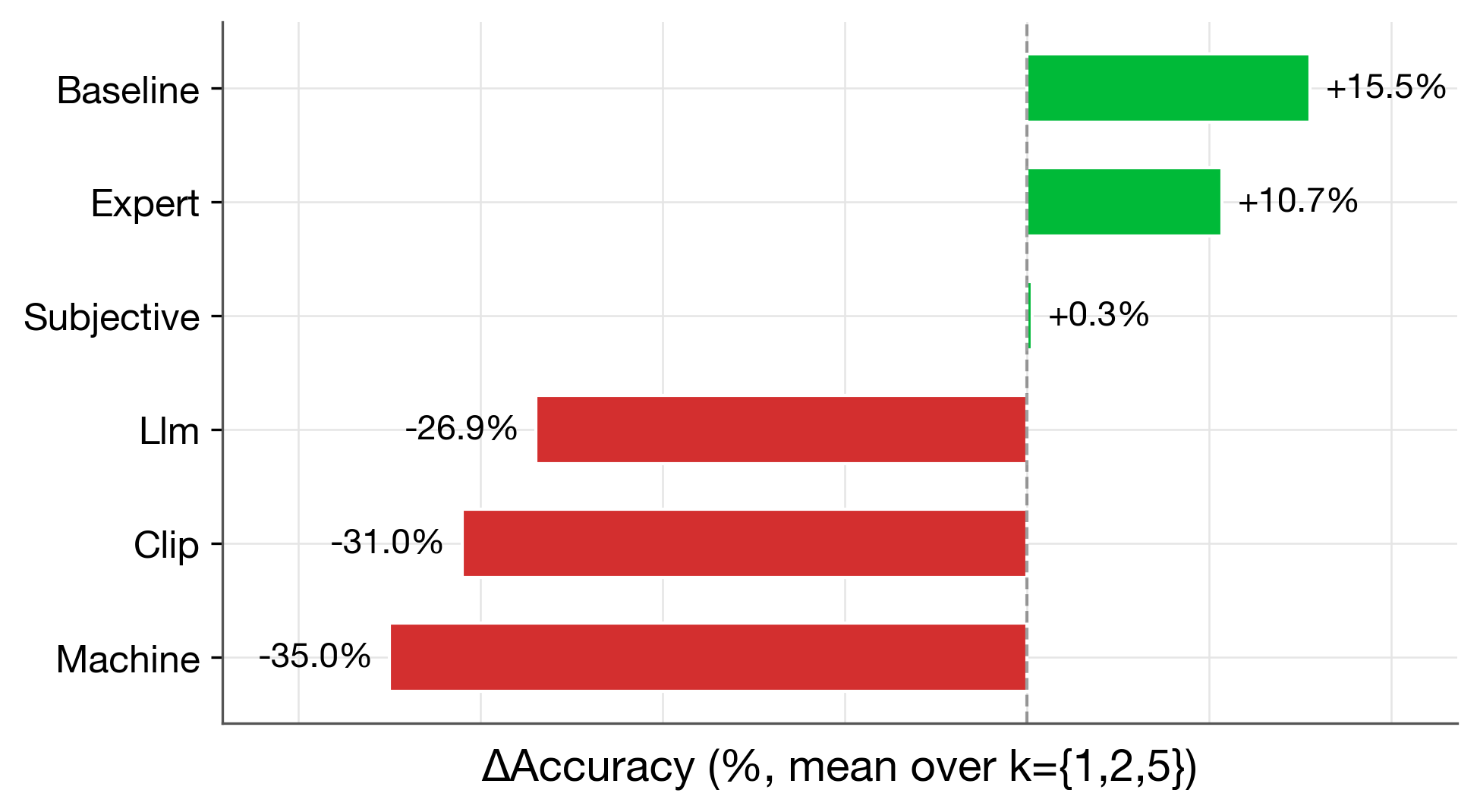
Horizontal bar chart of mean delta-accuracy per regime |
plot_concept_discovery(ideal_df, subconcept_df, dnn_accuracy) |
Clustered bar chart of ideal vs subconcept accuracy |
plot_selective_classification(dnn_metrics, cbm_metrics) |
Grouped bar chart comparing DNN vs CBM on selective metrics |
plot_alignment_comparison(results_dict) |
Horizontal bar chart of CBM vs aligned CBM gain |
All plot functions return (fig, ax) and accept an optional ax parameter for composing multiple plots.
Interventions and Alignment
Interventions
Interventions are the core benefit of concept bottleneck models: at test time, a user (or automated system) can inspect and correct the model's concept predictions before the final label is determined.
Oracle interventions (manual approach)
The simplest way to run interventions is to directly manipulate concept predictions. After training a ConceptDetector and FrontEndModel, the workflow is:
- Get concept probabilities from the detector
- Identify the most uncertain concepts per sample
- Replace them with ground-truth values
- Re-predict with the label model
import numpy as np
from experiments.models import ConceptDetector, FrontEndModel

# Assume cd and fe are already trained (see examples/robot_pipeline_example.py)

# Step 1: Get concept probabilities
concept_probs = cd.predict_proba(test)

# Step 2-3: For each sample, replace the k most uncertain concepts
# with ground-truth values
for k in [1, 3]:
    C_intervened = concept_probs.copy()
    uncertainty = np.abs(concept_probs - 0.5)  # distance from decision boundary
    for i in range(len(test)):
        most_uncertain = np.argsort(uncertainty[i])[:k]
        C_intervened[i, most_uncertain] = test.C[i, most_uncertain]

    # Step 4: Threshold to binary and predict
    preds = fe.predict((C_intervened > 0.5).astype(np.float32))
    acc = np.mean(preds == test.y)
    print(f"k={k}: accuracy={acc:.4f}")
Using the intervention API
For more complex intervention scenarios (budgets, strategies, batched evaluation), use the ConceptInterventionRunner:
import numpy as np
from experiments.models import ConceptBasedModel
from experiments.intervention import ConceptInterventionRunner, InterventionConfig
from experiments.kflip import KFlipInterventionStrategy

# Combine detector and label predictor into a CBM
cbm = ConceptBasedModel(concept_detector=cd, label_predictor=fe)

# Configure the intervention
config = InterventionConfig(
    max_concepts_per_instance=3,  # correct up to 3 concepts per sample
    score_threshold=0.2,          # only intervene on concepts with
                                  # probability within 0.2 of 0.5
)

# Run interventions
runner = ConceptInterventionRunner(model=cbm)
strategy = KFlipInterventionStrategy()
result = runner.run(strategy, config, test)

# InterventionResult contains y_prob_before/after and y_pred_after
acc_before = np.mean(np.argmax(result.y_prob_before, axis=1) == test.y)
acc_after = np.mean(result.y_pred_after == test.y)
print(f"Accuracy before: {acc_before:.4f}")
print(f"Accuracy after:  {acc_after:.4f}")
print(f"Concepts corrected: {result.mask.sum()}")
Key classes
InterventionConfig— controls intervention budgets, thresholds, and per-instance capsKFlipInterventionStrategy— the default strategy: evaluates all subsets of up to k concepts per sample and selects the intervention that maximizes predicted confidenceConceptInterventionRunner— coordinates intervention execution and before/after evaluation
Writing a custom strategy
You can implement your own intervention strategy by subclassing InterventionStrategy and implementing the propose() method.
The intervention flow
When ConceptInterventionRunner.run() is called, it:
- Builds an
InterventionBatchfrom the dataset (concept predictions + ground truth) - Calls
strategy.propose(model, batch, config)→ returns aStrategyProposal - Applies the proposal's
maskto replace predicted concepts with ground truth - Re-predicts labels with the corrected concepts
- Returns an
InterventionResultwith before/after predictions
Key data classes
InterventionBatch — the input your strategy receives:
| Field | Type | Description |
|---|---|---|
C_pred |
(N, C) float |
Predicted concept probabilities |
C_true |
(N, C) float |
Ground-truth concept values |
y_true |
(N,) int or None |
True labels (optional) |
n_samples |
int |
Number of samples |
n_concepts |
int |
Number of concepts |
StrategyProposal — what your strategy returns:
| Field | Type | Description |
|---|---|---|
mask |
(N, C) bool |
True = replace prediction with ground truth |
ordering_used |
array or None |
Concept order applied (optional) |
selected_instances |
array or None |
Instance indices that received interventions |
details |
dict |
Additional metadata |
Minimal example
Here's a strategy that intervenes on concepts closest to the 0.5 decision boundary:
import numpy as np
from experiments.intervention import InterventionStrategy, StrategyProposal

class UncertaintyStrategy(InterventionStrategy):
    def __init__(self):
        super().__init__(name="uncertainty")

    def propose(self, model, batch, config):
        k = config.per_instance_limit(batch.n_concepts)
        mask = np.zeros((batch.n_samples, batch.n_concepts), dtype=bool)

        # Rank concepts by uncertainty (closeness to 0.5)
        uncertainty = 0.5 - np.abs(batch.C_pred - 0.5)
        for i in range(batch.n_samples):
            top_k = np.argsort(uncertainty[i])[-k:]
            mask[i, top_k] = True

        return StrategyProposal(mask=mask)
Use it with the runner:
result = runner.run(
    strategy=UncertaintyStrategy(),
    config=InterventionConfig(max_concepts_per_instance=3, score_threshold=0.2),
    dataset=test,
)
The prepare() hook
Override prepare() if your strategy needs a validation pass before inference — for example, to precompute a global concept ordering:
class MyStrategy(InterventionStrategy):
    def prepare(self, model, batch, config):
        """Called once on the validation set before run()."""
        # Compute concept importance from validation data
        self._state["concept_order"] = compute_importance(model, batch)

    def propose(self, model, batch, config):
        order = self._state["concept_order"]
        # ... use precomputed order
Call runner.prepare() before runner.run() to trigger the hook:
runner.prepare(strategy, config, validation_dataset=val)
result = runner.run(strategy, config, dataset=test)
Intervention regimes
The package supports six intervention regimes that simulate different real-world annotation scenarios. Each regime varies the concept source (how concepts are predicted) and the intervention source (who corrects them):
| Regime | Concepts from | Corrected by | Description |
|---|---|---|---|
| baseline | Ground truth | Ground truth | Perfect oracle — upper bound on intervention benefit |
| expert | Ground truth | Noisy human (80% acc) | Realistic human annotator |
| subjective | Noisy CBM (20% label noise) | Noisy human (80% acc) | Concepts trained on noisy labels |
| machine | LFCBM (GT descriptions) | Noisy human (80% acc) | Machine-discovered concepts |
| llm | LFCBM (LLM descriptions) | LLM (Gemini by default) | Fully automated with LLM |
| clip | LFCBM (CLIP keywords) | LLM (Gemini by default) | Fully automated with CLIP |
Run regimes via the pipeline script:
python scripts/robot_pipeline.py --seed 1014 --concept-preset foot_subtypes \
    --regimes baseline expert subjective machine
The pipeline also exposes a custom regime slot for an additional automated baseline with your own concept descriptions. It requires an explicit concepts file. You can use API-backed providers or switch to local CLI loops with --llm-provider codex_exec or --llm-provider claude_exec:
python scripts/robot_pipeline.py --seed 1014 --concept-preset foot_subtypes \
    --regimes custom \
    --custom-concepts-file path/to/my_concepts.jsonl \
    --llm-provider codex_exec
For a complete end-to-end example using ConceptInterventionRunner with training, interventions, and alignment, see examples/robot_pipeline_example.py.
Alignment
Alignment constraints force the label predictor's concept weights to match a user's prior expectations about concept-label relationships. For example, if a domain expert knows that "has knees" should positively predict the Glorp class, alignment constrains that weight to be positive during retraining.
Why alignment matters
In standard CBM training, the label predictor (logistic regression on concept activations) learns weights freely from data. This can produce counterintuitive weights — e.g., has_knees getting a negative weight even when knees truly indicate Glorp — because the model exploits correlations among imperfect concept predictions.
The paper (Section 5.2) shows that alignment constraints:
- Preserve training accuracy — the aligned model performs comparably at k=0 (no interventions).
- Destroy intervention benefit — at k=3, the aligned subconcept model goes from +16% gain to -8% loss.
This happens because alignment forces the model into a weight configuration that is locally optimal for the training distribution but incompatible with ground-truth concept corrections at test time.
Usage
After training a ConceptBasedModel, use run_alignment() to retrain the frontend with sign constraints and compare:
from experiments.utils import run_alignment

results = run_alignment(
    concept_based_model=cbm,
    train_dataset=train,
    test_dataset=test,
    monotonicity_constraints={"has_knees": 1},  # force positive weight
)

print(f"Original accuracy: {results['original_accuracy']:.4f}")
print(f"Aligned accuracy:  {results['aligned_accuracy']:.4f}")
print(f"Accuracy change:   {results['accuracy_change']:+.4f}")
# Expected (seed=1014, subconcept): original 0.7812, aligned 0.7656 (-0.0156)
The monotonicity_constraints dict maps concept names to their required sign: +1 for positive weight, -1 for negative.
Expected results
| Setup | CBM (k=0) | Aligned (k=0) | CBM (k=3) gain | Aligned (k=3) gain |
|---|---|---|---|---|
| ideal (7 concepts) | 0.8673 | 0.8657 | +10.2% | -0.4% |
| subconcept (12 concepts) | 0.7812 | 0.7656 | +6.9% | -8.0% |
For a complete end-to-end example with training, interventions, and alignment, see examples/robot_pipeline_example.py.
Citation
If you use this package in your research, please cite:
@article{anonymous2026concept,
  title={Measuring What Matters: Synthetic Benchmarks for Concept Bottleneck Models},
  author={Anonymous Authors},
  year={2026},
}


Download files
Download the file for your platform. If you're not sure which to choose, learn more about installing packages.
Source Distribution
Built Distribution
Filter files by name, interpreter, ABI, and platform.
If you're not sure about the file name format, learn more about wheel file names.
Copy a direct link to the current filters
File details
Details for the file concept_benchmark-0.3.1.tar.gz.
File metadata
- Download URL: concept_benchmark-0.3.1.tar.gz
- Upload date:
- Size: 2.8 MB
- Tags: Source
- Uploaded using Trusted Publishing? No
- Uploaded via: twine/6.2.0 CPython/3.12.11
File hashes
| Algorithm | Hash digest | |
|---|---|---|
| SHA256 |
2f763a1e78f87a4f8f3c9e772c97fdbbd8e6bbd47c77423e35fd69a14681d070
|
|
| MD5 |
0ebff56165d53ef3c17ff9557695895b
|
|
| BLAKE2b-256 |
70fa8c49d31434f9c8e37cccfe49fbc6b60130d33f0113854ca606848d5f6e4c
|
File details
Details for the file concept_benchmark-0.3.1-py3-none-any.whl.
File metadata
- Download URL: concept_benchmark-0.3.1-py3-none-any.whl
- Upload date:
- Size: 156.8 kB
- Tags: Python 3
- Uploaded using Trusted Publishing? No
- Uploaded via: twine/6.2.0 CPython/3.12.11
File hashes
| Algorithm | Hash digest | |
|---|---|---|
| SHA256 |
2b6538c89b704f6237ff9e0f976b53c2161a9aa43e079fc4b90130aac739fa31
|
|
| MD5 |
03b9d93367491d16dfd550c3c35c66ef
|
|
| BLAKE2b-256 |
df719a872ae78dab4610b960dd4a93638b953d9e6c8d48e132b61df01c69b1bd
|






