
concept-mapmaker


Build interactive concept maps from Markdown and a small optional YAML presentation spec. Each build creates an HTML map, a downloadable Markdown copy, and a PDF.
The HTML is a single generated file, but it loads D3 and Markmap from jsDelivr when opened.
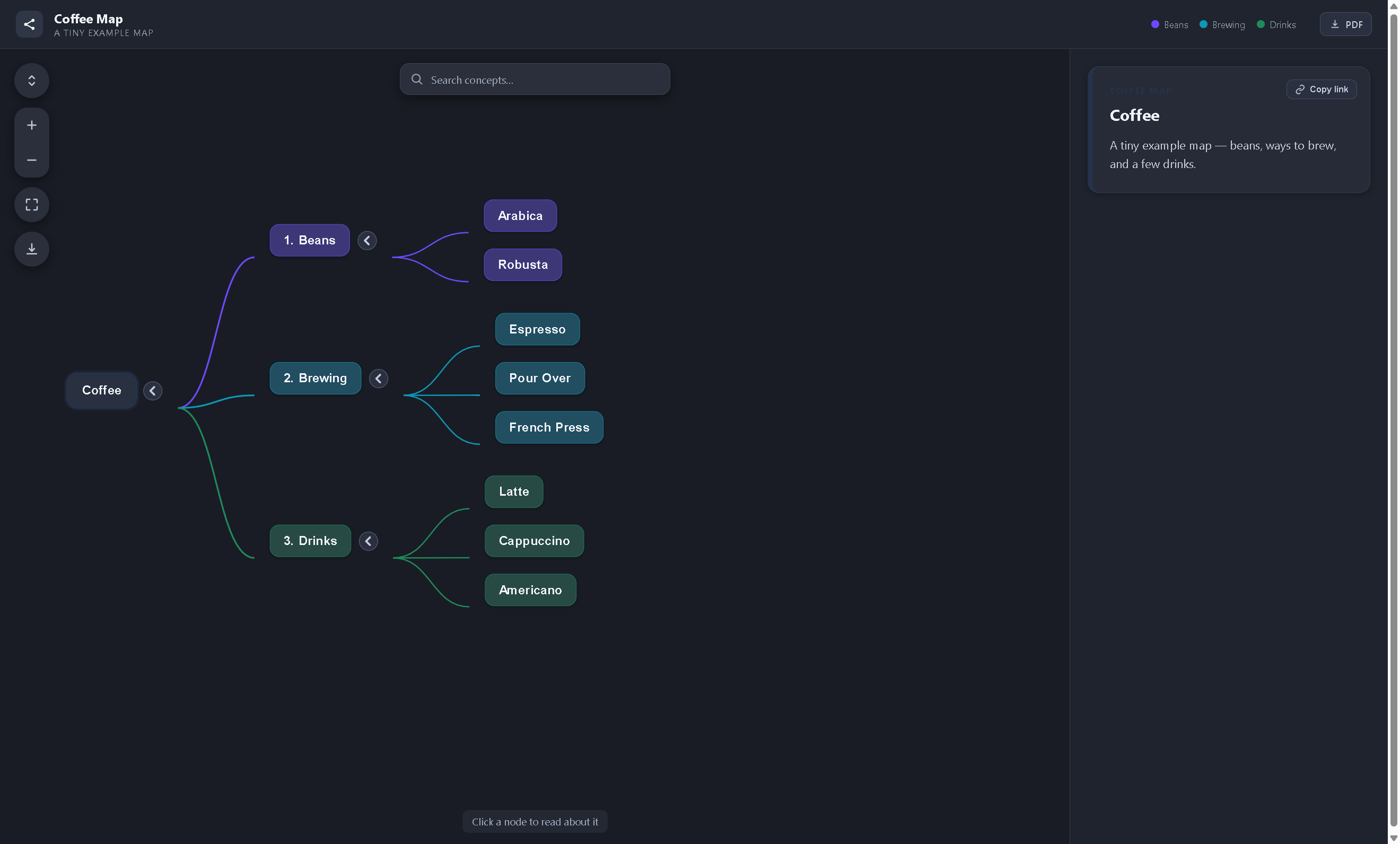
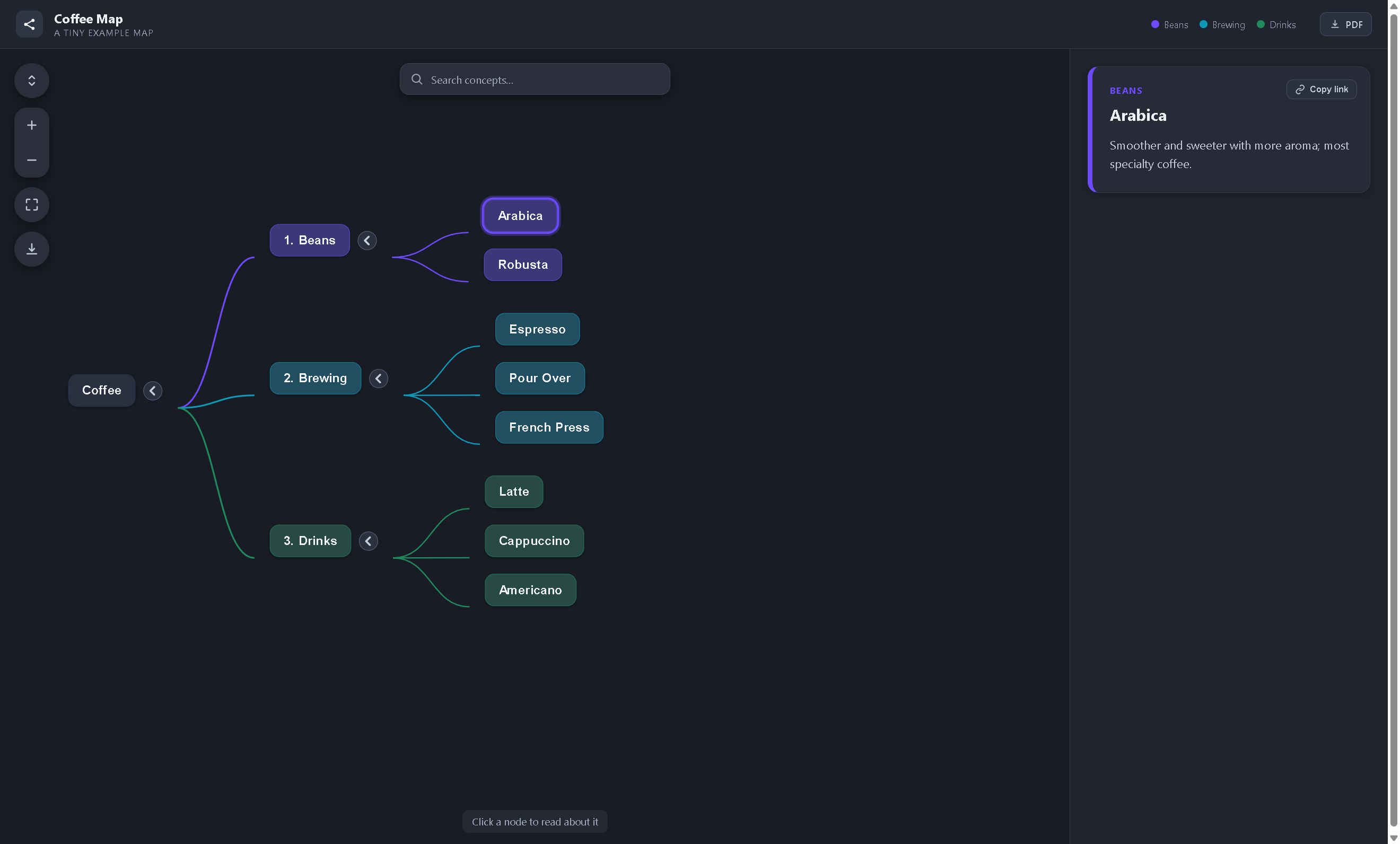
Branch types are color-coded from the legend; clicking any node reveals its description in the side panel, with a copyable deep link:
Install
pip install concept-mapmaker
Requires Python 3.10+. PDF generation is included in the default installation.
Quickstart
Run these from your content project's folder. init scaffolds a starter map, build renders it,
and serve previews the result over HTTP:
concept-map init          # writes map.md + config.yaml + map.css into the current folder
concept-map build map.md  # -> web/map.html (+ web/downloads/*.md/.pdf)
concept-map serve         # preview at http://127.0.0.1:8080
A project is one flat folder — a source doc plus two optional files, and a generated web/:
my-project/
  my-map.md
  config.yaml         # optional; presentation spec, auto-discovered beside the doc
  map.css             # optional; custom colors, auto-discovered beside the doc
  web/                # generated
    my-map.html
    downloads/
      my-map.md
      my-map.pdf
CLI reference
concept-map init                                     # scaffold map.md + config.yaml + map.css
concept-map build my-map.md                          # -> web/my-map.html
concept-map build my-map.md --spec presentation.yaml # explicit spec (else config.yaml beside doc)
concept-map build my-map.md --output public/map.html # override the output path
concept-map build my-map.md --template custom.html   # custom node-display layout
concept-map serve                                    # preview the newest map in web/
concept-map serve public/map.html --port 8000        # preview a specific file / port
The bundled template is the default look; --template is a layout-only extension point for
supplying your own node-display HTML. See "Python API" for passing extra __KEY__ values a custom
template needs.
Markdown authoring contract
- Headings (
#through######) define structure. - Bullets written as
- **Name**: descriptiondefine concepts. - Two spaces of bullet indentation add one level beneath the current heading.
- A paragraph directly under a heading becomes that heading node's description.
- A
-*-token on a heading or concept marks that node with a star.
The map shown above comes straight from these rules. Its source (examples/demo.md) begins:
# Coffee

A tiny example map — beans, ways to brew, and a few drinks.

## 1. Beans

The two species behind almost all coffee.

- **Arabica**: Smoother and sweeter with more aroma; most specialty coffee.
- **Robusta**: More caffeine and a bolder, more bitter cup; common in espresso blends.
# Coffee becomes the root (its paragraph is the root's description); each ## N. heading is a
branch whose numbering the legend matches on (below); and each - **Name**: description bullet is
a clickable concept node with the text shown in the side panel. Build it yourself with:
concept-map build examples/demo.md --spec examples/config.yaml
concept-map serve web/demo.html
YAML spec
Every field is optional:
| Key | Purpose | Default |
|---|---|---|
title |
Header brand and panel eyebrow | Map |
subtitle |
Small header subtitle | Empty |
page_title |
Browser tab title | title |
legend |
Ordered branch-type matching + labels | One neutral color, no legend |
Example:
title: Coffee Map
subtitle: A Tiny Example Map

legend:
  - {match: '^1\.', key: beans, label: Beans}
  - {match: '^2\.', key: brewing, label: Brewing}
Each legend entry is a branch type: the first match regex that hits a node's label sets its
branch, and the subtree inherits it. Branches are colored from a built-in palette in order (the
palette lives in the display template). With no legend, all nodes use one neutral color and the
legend is hidden.
Custom colors (map.css)
To override colors, drop a map.css beside the source doc (or in the project root). It is
appended after the generated branch bindings, so its rules win. Redefine a palette slot, or a
specific branch:
:root { --pal-1: #b5179e; }        /* recolor the first branch type */
:root { --branch-brewing: #0e7c86; } /* recolor one branch by key */
See examples/map.css for a copy-paste starting point (concept-map init also writes one).
Python API
from concept_mapmaker import build_map, load_spec

spec = load_spec("config.yaml")
build_map("my-map.md", spec, output="web/my-map.html")
Writable output always goes to the caller's project; package installation files are read-only. The display template is bundled inside the installed wheel.
To embed the engine, build_map exposes three optional extension seams: template (a path to a
custom node-display template), parse_fn (swap in a different input parser), and extra_context
(supply or override __KEY__ values your custom template consumes):
build_map("my-map.md", spec, output="web/my-map.html",
          template="custom.html", extra_context={"FOOTER": "© 2026"})
Contributing and releasing
Development setup, the test suite, and the maintainer release process (Trusted Publishing to
TestPyPI/PyPI) are documented in CONTRIBUTING.md. The worked example lives in
examples/.
1 maintainer

Metadata
1 maintainer
Release files for concept-mapmaker 0.1.0
For a detailed explanation of source distributions (sdists) and built distributions (wheels), please see the package formats documentation.
Source distribution (sdist)
| File | Size | Uploaded | Provenance | |
|---|---|---|---|---|
| concept_mapmaker-0.1.0.tar.gz | 31.7 kB | With provenance | Details |
Built distribution (wheel)
| File | Interpreter | ABI | Platform | Reset |
|---|---|---|---|---|
| concept_mapmaker-0.1.0-py3-none-any.whl | Python 3 | none | any | Details |
Total release size: 61.6 kB
Release files / concept_mapmaker-0.1.0.tar.gz
| Download URL | concept_mapmaker-0.1.0.tar.gz |
|---|---|
| Size | 31.7 kB |
| Tags | Source |
|
SHA-256 checksum How to use checksums |
084ac43340747f7a49e6e8b9f6ead9bc07a73d302b2de1fd1ff3ba88316e276b
|
|
BLAKE2b-256 checksum How to use checksums |
d04a58b9eb2d6e9a7754b4c4dd8be51cdcbc87374fa682ebd160aa013c1fe45f
|
| Upload date | |
|
Uploaded using Trusted Publishing? What is trusted publishing? |
Yes |
| Uploaded via |
twine/7.0.0 CPython/3.13.14
|
Provenance
Provenance describes where a file came from. On PyPI, provenance is shared via attestations, which provide a verifiable record of the build or publishing details. View details, limitations and caveats.


PyPI Publish Attestation
PyPI verified that this artifact, at this checksum, originated from the publisher listed below.
Signed by GitHub Actions, verified by PyPI on Sep 4, 2026.
Transparency logRelease files / concept_mapmaker-0.1.0-py3-none-any.whl
| Download URL | concept_mapmaker-0.1.0-py3-none-any.whl |
|---|---|
| Size | 29.9 kB |
| Tags | Python 3 |
|
SHA-256 checksum How to use checksums |
7edb8b0abf652b8846d944ccbc206cecf9a7e49412eae9313f1a086fe7fb89f7
|
|
BLAKE2b-256 checksum How to use checksums |
da19c68047f5cd6d98f6e80fd72baff74ac5bc0b289cd8d1b5def49a22e6317d
|
| Upload date | |
|
Uploaded using Trusted Publishing? What is trusted publishing? |
Yes |
| Uploaded via |
twine/7.0.0 CPython/3.13.14
|
Provenance
Provenance describes where a file came from. On PyPI, provenance is shared via attestations, which provide a verifiable record of the build or publishing details. View details, limitations and caveats.
PyPI Publish Attestation
PyPI verified that this artifact, at this checksum, originated from the publisher listed below.
Signed by GitHub Actions, verified by PyPI on Sep 4, 2026.
Transparency logSecurity for concept-mapmaker 0.1.0
Provenance
Provenance describes where a file came from. On PyPI, provenance is shared via attestations, which provide a verifiable record of the build or publishing details. View details, limitations and caveats.
Full provenance
All 2 files in this release have been uploaded with provenance metadata.
Attestation for concept_mapmaker-0.1.0.tar.gz
PyPI Publish Attestation
PyPI verified that this artifact, at this checksum, originated from the publisher listed below.
Signed by GitHub Actions, verified by PyPI on Sep 4, 2026.
Transparency logA note on package security
PyPI is a repository for distributing packages, not a service for auditing them. While third-party security researchers and our staff do their best to detect and remove malicious packages, PyPI cannot guarantee the quality, security or suitability of any given package.
To learn more about protecting yourself from malicious actors, visit our package security documentation.













