
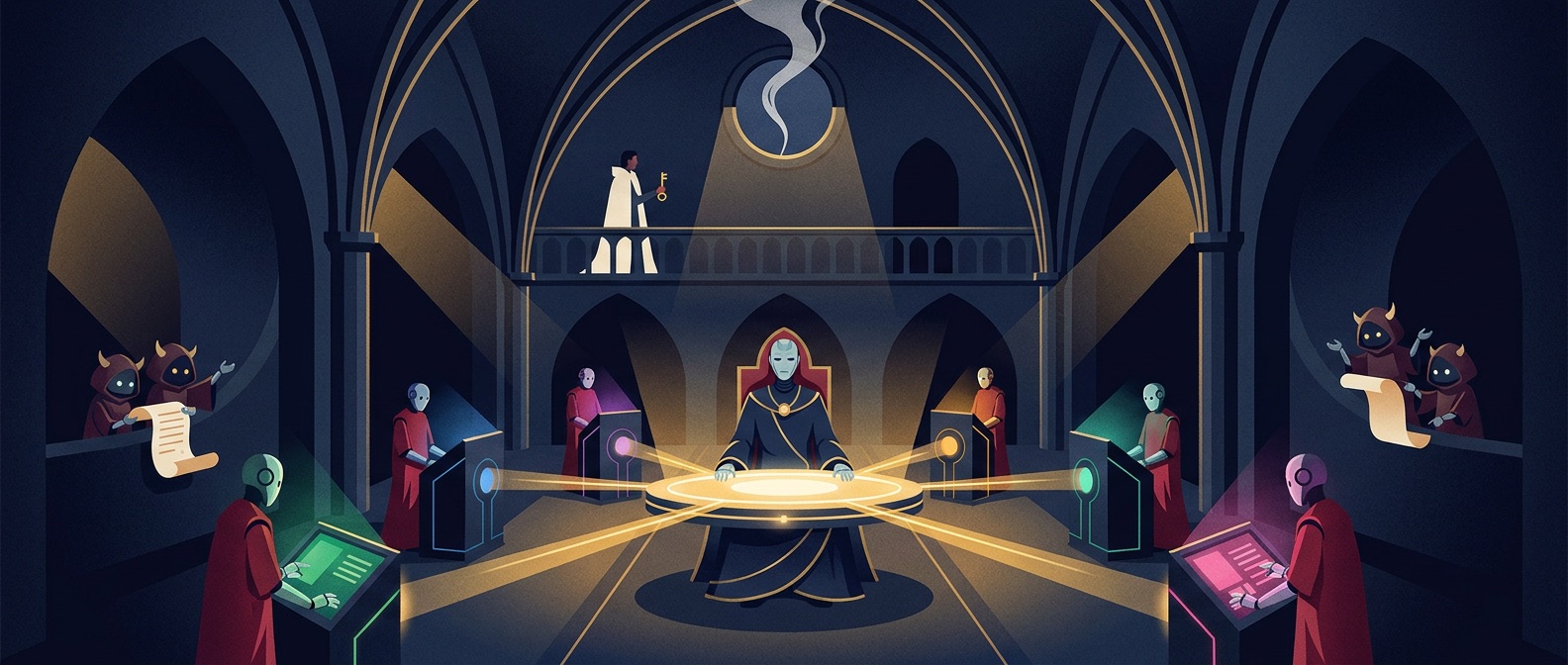
Conclave
A managed agent team for long, measurable goals.
One Dean orchestrates many Cardinals on any model. Devils argue back. You're the Pope.
Quickstart · Any model · Skills · How it works · Examples
You give it a goal with a number on it, like "make search 2x faster", "push this benchmark" or "get this kernel under 50 µs". A team of coding agents then works on it for hours or days, each on its own git branch. They measure before they build, write down every dead end, and check in with you only for wins and real decisions.
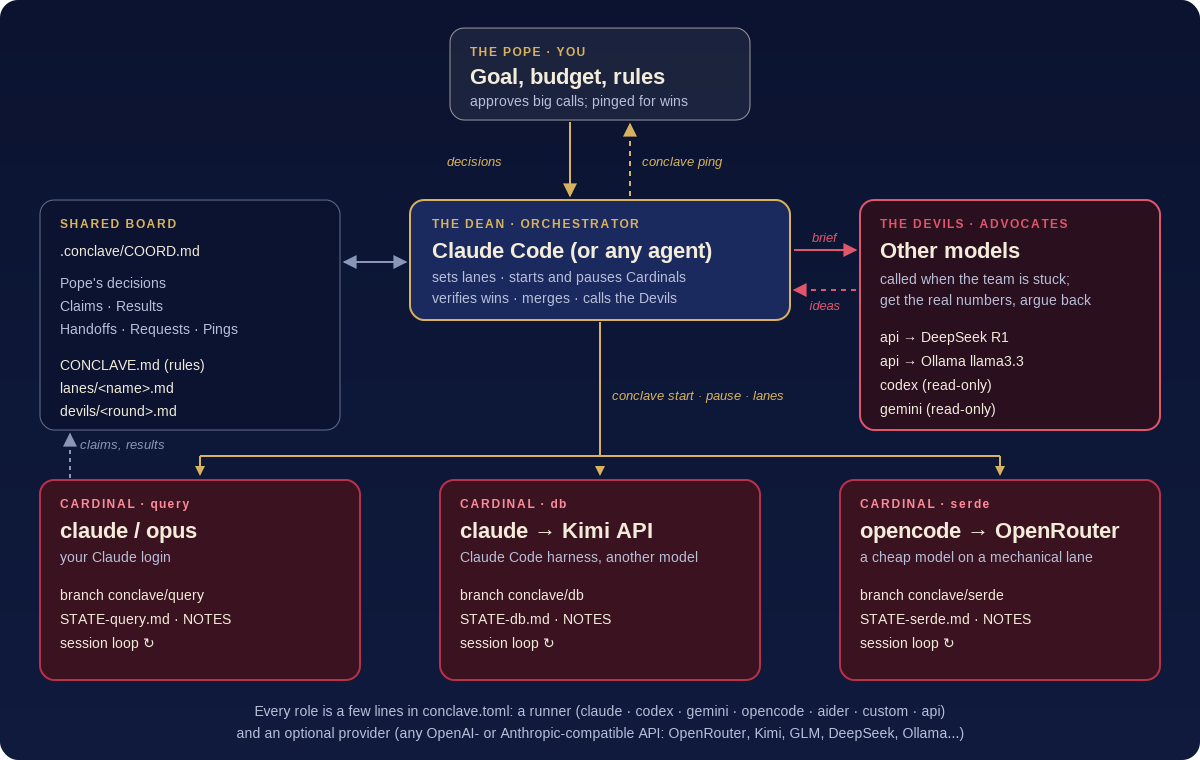
It's not a swarm. A swarm is peers with no one in charge. A Conclave has a hierarchy and a human veto, so it's an agent team you manage:
| Role | Who plays it | What it does | |
|---|---|---|---|
 |
Pope | you | Sets the goal, the finish line, the budget and the rules. Says yes or no to the big stuff. Gets pinged only for wins, decisions and "done". |
 |
Dean | your agent (Claude Code, Codex...) with the conclave skill |
Splits the work into lanes, starts and pauses Cardinals, verifies every claimed win, merges, keeps the board, and calls the Devils when the team is stuck. |
 |
Cardinals | headless agent CLIs: claude, codex, gemini, opencode, aider, or your own |
One lane each, on their own branch. Fresh short sessions in a loop. Test before building. Commits state the measured numbers. |
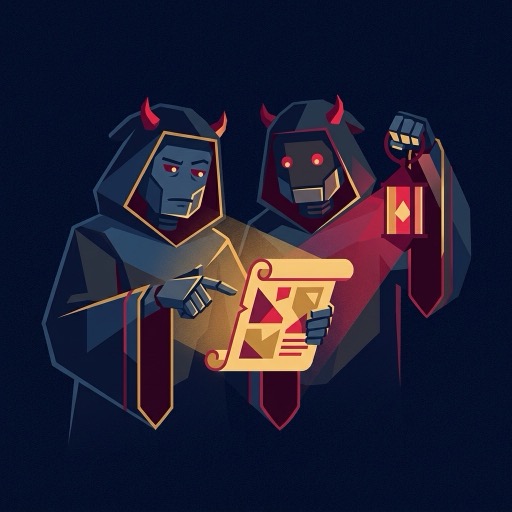 |
Devils | different models, via any API | Devil's advocates. They get the team's real numbers and argue back: what's wrong with the plan, what nobody tried, what to stop doing. |
Born in a GPU kernel competition. The Conclave ran three Cardinals for five nights on one shared H100 in the Open Kernel Challenge (2026). They built a full MoE decoder layer that measured 2.2x faster than SGLang on the judge's H200. That setup ships as
examples/gpu-kernel-race.toml.
Quickstart
You talk to your coding agent. It does the setup. Install once:
uv tool install conclave-team # the CLI (Python 3.11+, git; no other dependencies)
/plugin marketplace add tech-cosmos/conclave      # in Claude Code: the Dean skills
/plugin install conclave@conclave
Then, in the repo you want to improve, say:
Start a Conclave on making our search API 2x faster. Budget: 2 days and $40. Done when p95 is under 50 ms.
Your agent becomes the Dean. It reads the repo, finds or writes the command that measures the goal, records the baseline, picks a model for each role from the CLIs and keys you have, splits the work into lanes, checks the setup and starts the Cardinals. It asks you once, and only for what it can't decide itself: a missing finish line or budget, logins only you can do, gray-area rules.
After that, ask in plain words:
| You say | The Dean |
|---|---|
| "How's the Conclave?" | Best result vs baseline per lane, in five lines, with real numbers it re-checked. |
| "Call the Devils." | Briefs other models with the team's real numbers and brings back ideas worth testing. |
| "Pause the Conclave." / "End the Conclave." | Stops the Cardinals, checks every branch is pushed, writes the report. |
| "Show me a Conclave demo." | Runs conclave demo: a throwaway repo, one short Cardinal session, before/after. |
What only you do: log in to the agent CLIs and export API keys (they're your accounts), set the goal and the budget, and say yes or no to the big calls. You get pinged for wins, real decisions and "done".
Just want to see it work first? uvx --from conclave-team conclave demo (nothing to install). It makes a
throwaway repo with one slow script, walks you through the setup with answers filled in, runs one Cardinal
for about a minute (a few cents on Claude Haiku), and prints the numbers before and after.
Not on Claude Code? Copy skills/conclave and skills/conclave-setup into your agent's skills folder
(details), or drive the CLI yourself (commands).
Wire each role to any model
Every role is a few lines in conclave.toml. Two ideas:
- runner: the program that plays the role. Cardinals need tools, so they use an agent CLI
(
claude,codex,gemini,opencode,aider, orcustom). Devils can also beapi: a plain chat call with no tools, which is the cheapest way to get a different brain. - provider: where the model lives, and which env var holds the key.
kind = "openai"covers any OpenAI-compatible URL (OpenAI, OpenRouter, Gemini, DeepSeek, Groq, Ollama, vLLM...).kind = "anthropic"covers Anthropic and Anthropic-compatible gateways. Setprovideron a Cardinal and Conclave points its CLI at that API, so Claude Code can drive Kimi, GLM or DeepSeek and Codex can drive any OpenAI-compatible model.
[providers.openrouter]
kind = "openai"
base_url = "https://openrouter.ai/api/v1"
api_key_env = "OPENROUTER_API_KEY"

[providers.kimi]
kind = "anthropic"
base_url = "https://api.moonshot.ai/anthropic"
api_key_env = "MOONSHOT_API_KEY"

[[cardinals]]                  # hardest lane: strongest model, your Claude login
name = "query"
lane = "Query planning and the index lookup"
runner = "claude"
model = "opus"
paths = ["src/search/"]

[[cardinals]]                  # Claude Code's harness, Kimi's brain
name = "db"
runner = "claude"
provider = "kimi"
model = "kimi-k2-thinking"

[[cardinals]]                  # mechanical lane: a cheap model through opencode
name = "serde"
runner = "opencode"
model = "openrouter/qwen/qwen3-coder"

[[devils]]                     # a plain API call
name = "r1"
provider = "openrouter"
model = "deepseek/deepseek-r1"
persona = "a database engineer who thinks every latency problem is a missing index"

[[devils]]                     # an agent CLI as a Devil, run read-only so it can look at the code
name = "codex-devil"
runner = "codex"
Rule of thumb: put the strongest model on the hardest lane, cheap models on mechanical lanes, and make
the Devils different model families from the Cardinals so they don't share the same blind spots.
Full reference: skills/conclave-setup/SKILL.md. Complete configs:
examples/.
The skills
Two Agent Skills ship with the repo:
| Skill | Use it for |
|---|---|
conclave |
Makes your agent the Dean: understands "Start a Conclave...", "How's the Conclave?", "Call the Devils", "Pause/End the Conclave". |
conclave-setup |
Installing, wiring roles to models and keys, remote GPU boxes, fixing conclave doctor. |
Claude Code (plugin):
/plugin marketplace add tech-cosmos/conclave
/plugin install conclave@conclave
On Claude Code 2.1.275 or later, one line does both: /plugin install conclave --marketplace tech-cosmos/conclave
Other agents: copy skills/conclave and skills/conclave-setup into your agent's skills folder.
For Codex that's ~/.codex/skills/. conclave dean also opens your configured Dean with its playbook
(.conclave/DEAN.md) already loaded.
How it works
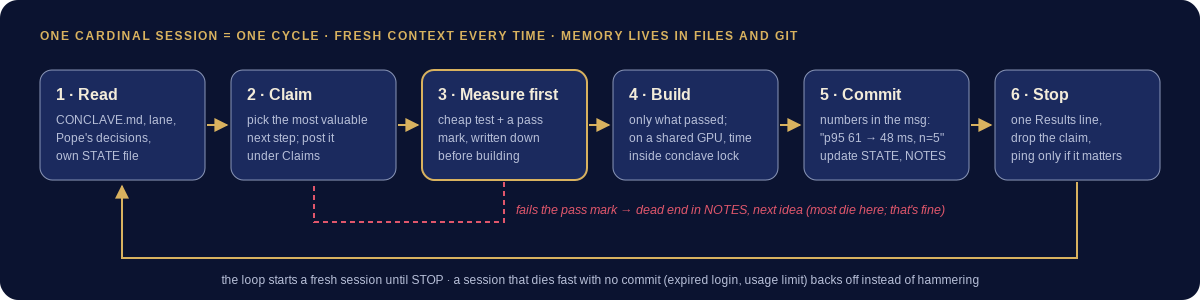
Memory lives in files and git, never in a chat context. Each Cardinal session starts fresh, reads its briefs, does one cycle (45-90 min), commits, writes notes and exits. The loop starts the next session, so a Cardinal can run for days without its context filling up or drifting.
conclave.toml              every role → runner / model / provider; compute; loop settings
.conclave/
  CONCLAVE.md              the rules every Cardinal reads first (yours to edit)
  DEAN.md                  the Dean's playbook, filled in for this Conclave
  COORD.md                 the shared board: Pope's decisions · Claims · Results · Handoffs · Requests · Pings
  lanes/<name>.md          one brief per Cardinal
  worktrees/<name>/        each Cardinal's checkout on branch conclave/<name>, with STATE-<name>.md and NOTES-<name>.md
  devils/<round>.md        every Devils round, answers side by side
  logs/                    loop logs and full session transcripts
What's built in, so you don't have to ask:
- Test before building. Every idea gets a cheap measurement and a pass mark first. Most die there, and get logged as dead ends so nobody tries them twice.
- Every Cardinal keeps its own git trail: its own branch, a one-page
STATE, a longNOTESlog, commits that state the measured numbers, pushed after every session. - The board is safe for concurrent writers. It uses a file lock and atomic replace, so ten Cardinals writing at once lose nothing.
- An idle Cardinal gets paused, not handed busywork.
- Back-off. A session that dies in seconds without a commit (expired login, usage limit, outage) backs off instead of burning the budget.
- Shared hardware.
conclave lock gpu -- python bench.pyserializes timing runs, so numbers from Cardinals sharing one GPU stay clean. - The Pope's veto. Rule changes, deletions, anything public, new logins and overspending all go to you first.
Commands
| Command | What it does |
|---|---|
conclave demo [dir] |
Try it: a throwaway repo with a slow script, the wizard pre-filled, one short Cardinal session, before/after numbers. |
conclave init |
Wizard: writes conclave.toml and .conclave/. Detects installed CLIs and API keys. --yes for no questions. |
conclave doctor [--ping] |
Checks git, runners and keys; --ping makes one tiny call per Devil provider. |
conclave start [names] / resume |
Start (or restart) Cardinal loops in the background. |
conclave status [--json] |
Who's working, sessions, last commits, claims, requests, pings. |
conclave devils "<brief>" [-f file] [--only name]... |
One Devils round, in parallel. Answers land in .conclave/devils/. |
conclave pause [names] [--now] |
Stop after the current session (--now kills it). Warns about unpushed work. |
conclave end [--out path] |
Stop everything, check every branch is pushed, write the report (e.g. into your Obsidian vault). |
conclave ping "<msg>" |
Notify the Pope: desktop, phone (ntfy:<topic>) or any command. |
conclave board <Section> "<line>" |
Append a line to COORD.md (Cardinals use this). |
conclave lock <name> -- <cmd> |
Run a command holding a shared lock (one GPU, one judge). |
conclave logs <name> |
Tail a Cardinal's latest session transcript. |
conclave dean |
Open your Dean agent with the playbook loaded. |
Remote compute (GPU boxes, sandboxes)
Clone the repo on the box, install conclave there, and log the agent CLIs in there (only you can do that
part). Then, locally:
[compute]
backend = "remote"
exec_prefix = ["ssh", "gpu-box"]   # anything that runs a command on the box
remote_dir = "~/myrepo"
locks = ["gpu"]
Every command except init and dean is forwarded to the box. Set [pope] notify = "ntfy:<topic>" so pings
reach your phone. Cloud sandboxes are sometimes deleted when stopped, so run conclave end first: it warns
about anything unpushed.
Safety
Cardinals run unattended with full permissions in their worktree (claude --dangerously-skip-permissions,
codex --dangerously-bypass-approvals-and-sandbox, gemini --yolo). That's what makes overnight runs
possible, and it also means they can run any command your user can. Run Conclaves in a container, VM or
cloud sandbox unless you trust the repo and the lanes. Keep secrets out of the box, and set a budget
your provider dashboards enforce. Devils that run on an agent CLI are started read-only.
Status
v0.1: the loop, the board, the Devils, the skills, and local and remote compute all work. They're covered by
tests that use a stand-in agent (python -m unittest discover tests), and were checked end to end with real
Claude Code Cardinals and OpenRouter Devils. Next up: a live web view of the board, cost tracking per
Cardinal, and first-class Daytona/Modal backends. Issues and PRs are welcome.
License
MIT
1 maintainer

Metadata
1 maintainer
Release files for conclave-team 0.1.1
For a detailed explanation of source distributions (sdists) and built distributions (wheels), please see the package formats documentation.
Source distribution (sdist)
| File | Size | Uploaded | Provenance | Actions |
|---|---|---|---|---|
| conclave_team-0.1.1.tar.gz | 32.8 kB | With provenance | Details for conclave_team-0.1.1.tar.gz |
Built distribution (wheel)
| File | Interpreter | ABI | Platform | Actions Reset |
|---|---|---|---|---|
| conclave_team-0.1.1-py3-none-any.whl | Python 3 | none | any | Details for conclave_team-0.1.1-py3-none-any.whl |
Total release size: 71.3 kB
Release files / conclave_team-0.1.1.tar.gz
| Download URL | conclave_team-0.1.1.tar.gz |
|---|---|
| Size | 32.8 kB |
| Tags | Source |
|
SHA-256 checksum How to use checksums |
4cb075ccc7729823d34ab94e140ed5975b527bdd47086cd1732b48a576a061d3
|
|
BLAKE2b-256 checksum How to use checksums |
507b13eacecd8a1c38356ce79549b2ce7b3ce2f608b9c9b0835a533a0326be18
|
| Upload date | |
|
Uploaded using Trusted Publishing? What is trusted publishing? |
Yes |
| Uploaded via |
twine/7.0.0 CPython/3.13.16
|
Provenance
Provenance describes where a file came from. On PyPI, provenance is shared via attestations, which provide a verifiable record of the build or publishing details. View details, limitations and caveats.


PyPI Publish Attestation
PyPI verified that this artifact, at this checksum, originated from the publisher listed below.
Signed by GitHub Actions, verified by PyPI on Nov 10, 2026.
Transparency logRelease files / conclave_team-0.1.1-py3-none-any.whl
| Download URL | conclave_team-0.1.1-py3-none-any.whl |
|---|---|
| Size | 38.4 kB |
| Tags | Python 3 |
|
SHA-256 checksum How to use checksums |
2ec49f43a287d1b794540b0a1e09ed177edfb2c91f4b6970ab1a4b793de84334
|
|
BLAKE2b-256 checksum How to use checksums |
60f755c881d9eebcddaba33a885250dcdab195601bd7e375a26043a1517c5c0f
|
| Upload date | |
|
Uploaded using Trusted Publishing? What is trusted publishing? |
Yes |
| Uploaded via |
twine/7.0.0 CPython/3.13.16
|
Provenance
Provenance describes where a file came from. On PyPI, provenance is shared via attestations, which provide a verifiable record of the build or publishing details. View details, limitations and caveats.
PyPI Publish Attestation
PyPI verified that this artifact, at this checksum, originated from the publisher listed below.
Signed by GitHub Actions, verified by PyPI on Nov 10, 2026.
Transparency logSecurity for conclave-team 0.1.1
Provenance
Provenance describes where a file came from. On PyPI, provenance is shared via attestations, which provide a verifiable record of the build or publishing details. View details, limitations and caveats.
Full provenance
Both files in this release have been uploaded with provenance metadata.
Attestation for conclave_team-0.1.1.tar.gz
PyPI Publish Attestation
PyPI verified that this artifact, at this checksum, originated from the publisher listed below.
Signed by GitHub Actions, verified by PyPI on Nov 10, 2026.
Transparency logA note on package security
PyPI is a repository for distributing packages, not a service for auditing them. While third-party security researchers and our staff do their best to detect and remove malicious packages, PyPI cannot guarantee the quality, security or suitability of any given package.
To learn more about protecting yourself from malicious actors, visit our package security documentation.














