

Concordancer
This library loads and indexes a corpus in RAM and provides concordance search to retrieve data from the corpus with (a subset of) Corpus Query Language (CQL).
Installation
pip install -U concordancer
Usage
Concordancer is designed with this workflow in mind:
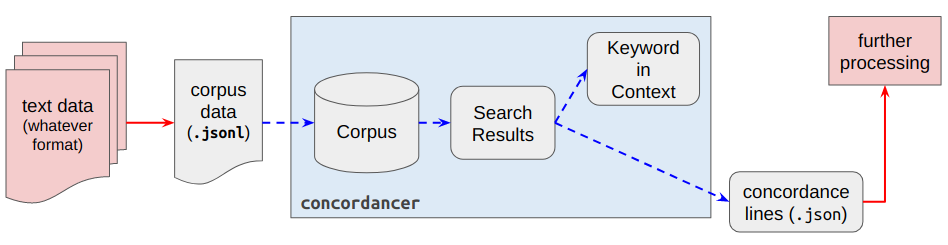
The user is expected to preprocess the text data to match the corpus data required by concordancer. Once this is done, subsequent tasks such as indexing the copus, writing query functions to search the corpus, and displaying results in an aligned keyword-in-context format are all done by concordancer. The user could then further process the search results (exported as JSON by concordancer) for other uses.
Input corpus data structure
concordancer requires the corpus to be structured (minimally) as:
[  # a corpus
    {       # a text
        'text': [
            [<tk>, <tk>, <tk>, ...],   # a sentence in a text
            [<tk>, <tk>, <tk>, ...],   # another sentence in a text
            ...
            [<tk>, <tk>, <tk>, ...]    # the last sentence in a text
        ]
    },
    {...},  # another text
    ...
]
where <tk> is a dictionary representating a token, which may resemble something like:
{
    'word': 'hits',
    'lemma': 'hit',
    'pos': 'V'
}
This structure allows the corpus to be saved conveniently as a newline-delimited JSON file (.jsonl), where each line of the file corresponds to a single text in the corpus, represented as a JSON object (i.e., a dictionary in Python). You can see an example of the corpus file saved in .jsonl here. The code below uses a corpus saved in .jsonl format for demonstration.
Loading a corpus from file
The code below uses an example corpus, which is saved as a newline-delimited JSON file (described in the previous section).
import json
from concordancer.demo import download_demo_corpus
from concordancer.concordancer import Concordancer
from concordancer import server

# Load demo corpus
fp = download_demo_corpus(to="~/Desktop")
with open(fp, encoding="utf-8") as f:
    corpus = [ json.loads(l) for l in f ]

# Index and initiate the corpus as a concordancer object
C = Concordancer(corpus)
C.set_cql_parameters(default_attr="word", max_quant=3)
Interactive Search Interface
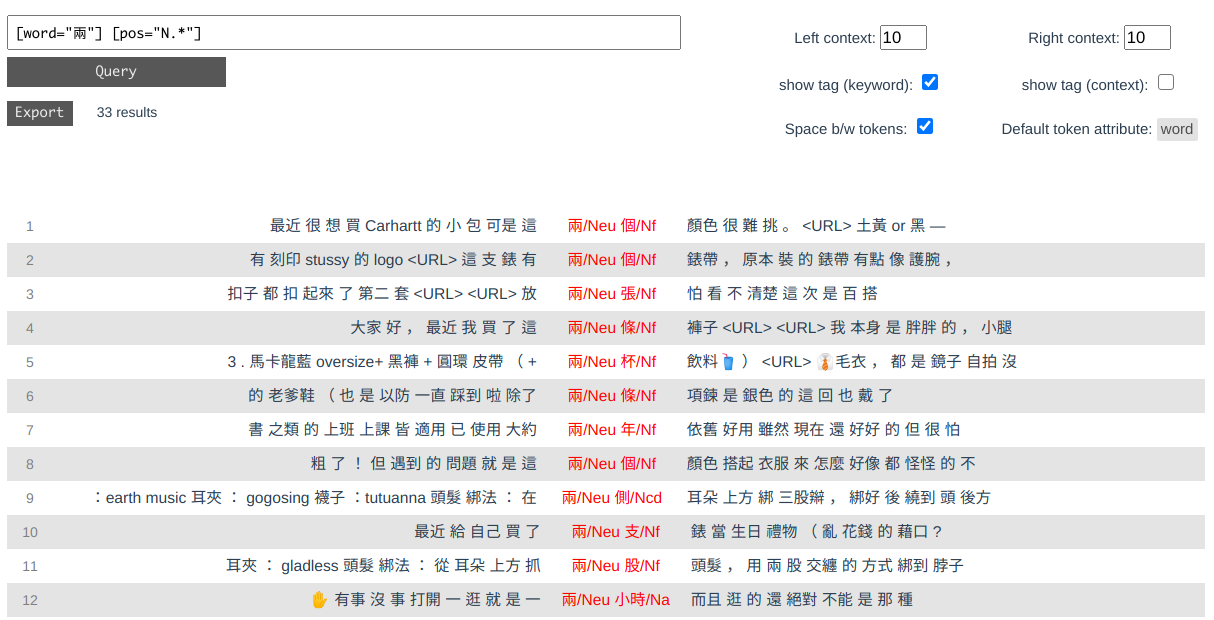
You can start an interactive server to query and read results through your browser:
>>> server.run(C)
Initializing server...
Start serving at http://localhost:1420
CQL Concordance search
Alternatively, you can work with the Concordancer object, which allows you to send CQL queries to the corpus:
cql = '''
verb:[pos="V.*"] noun:[pos="N[abch]"]
'''
concord_list = C.cql_search(cql, left=2, right=2)
The results of a query is returned as a generator, which can be converted to a list of dictionaries (and then to JSON or other data structures for further uses):
>>> concord_list = list(concord_list)
>>> concord_list[:2]
[
    {
        'left': [{'word': '買', 'pos': 'VC'}, {'word': '了', 'pos': 'Di'}],
        'keyword': [{'word': '覺得', 'pos': 'VK'}, {'word': '材質', 'pos': 'Na'}],
        'right': [{'word': '很', 'pos': 'Dfa'}, {'word': '對', 'pos': 'VH'}],
        'position': {'doc_idx': 78, 'sent_idx': 13, 'tk_idx': 9},
        'captureGroups': {'verb': [{'word': '覺得', 'pos': 'VK'}],
                          'noun': [{'word': '材質', 'pos': 'Na'}]}
    },
    {
        'left': [{'word': '“', 'pos': 'PARENTHESISCATEGORY'},
                 {'word': '不', 'pos': 'D'}],
        'keyword': [{'word': '戴', 'pos': 'VC'}, {'word': '錶', 'pos': 'Na'}],
        'right': [{'word': '世代', 'pos': 'Na'}, {'word': '”', 'pos': 'VC'}],
        'position': {'doc_idx': 52, 'sent_idx': 7, 'tk_idx': 36},
        'captureGroups': {'verb': [{'word': '戴', 'pos': 'VC'}],
                          'noun': [{'word': '錶', 'pos': 'Na'}]}
    }
]
Keyword in Context
To better read the concordance lines, pass concord_list into concordancer.kwic_print.KWIC() to print them as a keyword-in-context format in the console:
>>> from concordancer.kwic_print import KWIC
>>> KWIC(concord_list[:5])
left                        keyword          right             LABEL: verb    LABEL: noun
--------------------------  ---------------  ----------------  -------------  -------------
買/VC 了/Di                 覺得/VK 材質/Na  很/Dfa 對/VH      覺得/VK        材質/Na
“/PARENTHESISCATEGORY 不/D  戴/VC 錶/Na      世代/Na ”/VC      戴/VC          錶/Na
聯名鞋/Na 趁著/P            過年/VA 期間/Na  穿出去/VB 四處/D  過年/VA        期間/Na
走/VA  /WHITESPACE          燒/VC 錢/Na      啊/T ~/FW        燒/VC          錢/Na
正/VH 韓/Nc                 賣/VD 家/Nc      裡面/Ncd 很/Dfa   賣/VD          家/Nc
Supported CQL features
CQL search is supported through cqls, which implements a (quite useful) subset of CQL:
- token:
[],"我",[word="我"],[word!="我" & pos="N.*"] - token-level quantifier:
+,*,?,{n,m} - grouping:
("a" "b"? "c"){1,2} - label:
lab1:[word="我" & pos="N.*"] lab2:("a" "b")
1 maintainer

Release files for concordancer 0.1.16
For a detailed explanation of source distributions (sdists) and built distributions (wheels), please see the package formats documentation.
Source distribution (sdist)
| File | Size | Uploaded | |
|---|---|---|---|
| concordancer-0.1.16.tar.gz | 14.0 kB | Details |
Built distribution (wheel)
| File | Interpreter | ABI | Platform | Reset |
|---|---|---|---|---|
| concordancer-0.1.16-py3-none-any.whl | Python 3 | none | any | Details |
Total release size: 27.9 kB
Release files / concordancer-0.1.16.tar.gz
| Download URL | concordancer-0.1.16.tar.gz |
|---|---|
| Size | 14.0 kB |
| Tags | Source |
|
SHA-256 checksum How to use checksums |
c783f34d7a88eda5e5db4439c621a6f54f9d3f785d404246d4c64aa7d45eff49
|
|
BLAKE2b-256 checksum How to use checksums |
38c7df64e983d09c6e8229094228355672a3ad426351d3fa0ca6b22770715f9c
|
| Upload date | |
|
Uploaded using Trusted Publishing? What is trusted publishing? |
No |
| Uploaded via |
twine/5.1.1 CPython/3.11.9
|
Release files / concordancer-0.1.16-py3-none-any.whl
| Download URL | concordancer-0.1.16-py3-none-any.whl |
|---|---|
| Size | 13.9 kB |
| Tags | Python 3 |
|
SHA-256 checksum How to use checksums |
a98dfac8d0b791ea41fcd7296935fbfc06250aa61aff6177815a82ad63e508a7
|
|
BLAKE2b-256 checksum How to use checksums |
68cb62afcacbf260f9115a101f855a3ae3f41a8ac0822785e2cb5ef5de573496
|
| Upload date | |
|
Uploaded using Trusted Publishing? What is trusted publishing? |
No |
| Uploaded via |
twine/5.1.1 CPython/3.11.9
|














