



Concurim
See how Python runs together. Concurim records what your threads and asyncio tasks actually do, then replays that one run as an animation.
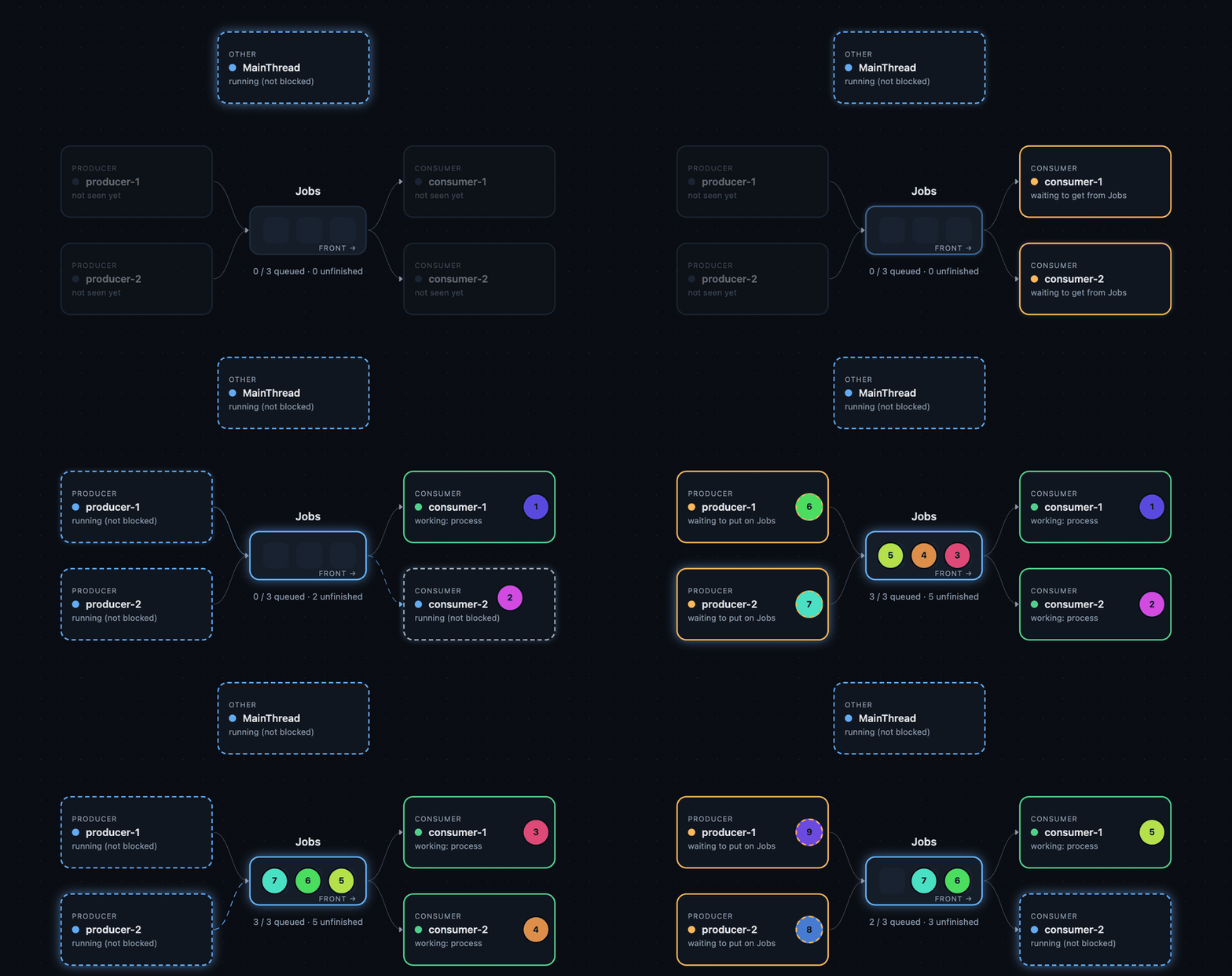
The first 60 events of a recording of threaded_pipeline.py:
two producers and two consumers share a queue of capacity 3.
Status: 1.0. Threads, queues, locks, events, barriers, pools, and asyncio are included. What is and is not observed.
Setup
pip install concurim
concurim
Or from a checkout. The examples below use uv run concurim from there;
after pip install, the command is concurim. uvx concurim opens the
same home screen without installing.
git clone https://github.com/ej-sanmartin/concurim.git
cd concurim
uv sync
uv run concurim
Opens the page in your browser. Drop a .py file or a folder, read the
plan, then click Record execution. Drop a .concurim file, or open
an example, and nothing runs.
uv run concurim demo
Records the bundled pipeline (the picture above) and opens it.
uv run concurim record --open --auto sync my_app.py
Runs my_app.py and writes a trace. --auto sync records threads,
queues, locks, events, barriers, and pools. The default is thread start
and finish. --open opens the viewer when the run returns. Options on
record come before the script; everything after the script path is
passed to your program.
uv run concurim record --open --include-source -o run.concurim my_app.py arg1
Runs my_app.py with the argument arg1. --include-source embeds
source so the Code view can show it. -o writes the trace to
run.concurim (the default path is <script>.concurim). This example
records threads only.
uv run concurim view run.concurim
uv run concurim inspect run.concurim
uv run concurim compare one.concurim two.concurim
view opens a saved trace. inspect prints when the trace was
recorded, how long it ran, and how many events it holds. compare
opens two recordings side by side.
uv run concurim export run.concurim -o clip.mp4 --events 5:40
Renders events 5 through 40 as clip.mp4. It only reads the trace. It
needs a Chrome-family browser and ffmpeg (uv run --with imageio-ffmpeg,
or pip install 'concurim[video]').
uvx concurim record cannot import a project's packages. Install it
there with uv add --dev concurim and use uv run.
Guide
| Getting started | The page, the commands, a stuck run |
| Concepts | One schedule, observed versus inferred, what you can trust |
| Recording | Home screen, --auto, record(), Traced* |
| Reading a run | Animation, Code, Timeline, compare, export |
| Teaching | Which example to open |
| Cost | Overhead of recording |
| Limitations | Caveats |
| Trace format | The .concurim file |
| Security | Local only. Review a trace before sharing it |
| Contributing | Tests, style, publishing |
| Changelog | What each release contains |
The viewer binds 127.0.0.1 and has no telemetry. Source and payload
previews are off unless you ask for them.
MIT licensed.
1 maintainer

Metadata
1 maintainer
Release files for concurim 1.1.0
For a detailed explanation of source distributions (sdists) and built distributions (wheels), please see the package formats documentation.
Source distribution (sdist)
| File | Size | Uploaded | Provenance | Actions |
|---|---|---|---|---|
| concurim-1.1.0.tar.gz | 2.5 MB | With provenance | Details for concurim-1.1.0.tar.gz |
Built distribution (wheel)
| File | Interpreter | ABI | Platform | Actions Reset |
|---|---|---|---|---|
| concurim-1.1.0-py3-none-any.whl | Python 3 | none | any | Details for concurim-1.1.0-py3-none-any.whl |
Total release size: 3.2 MB
Release files / concurim-1.1.0.tar.gz
| Download URL | concurim-1.1.0.tar.gz |
|---|---|
| Size | 2.5 MB |
| Tags | Source |
|
SHA-256 checksum How to use checksums |
1848b90d9ad7ca38c4cf8422481ada594ef53abf123fbe361a7b0f58666c9430
|
|
BLAKE2b-256 checksum How to use checksums |
2fca10fd63321e73992fb7832d5c40e700435956b1fe69eeadb7f723dcfb6be9
|
| Upload date | |
|
Uploaded using Trusted Publishing? What is trusted publishing? |
Yes |
| Uploaded via |
twine/7.0.0 CPython/3.13.16
|
Provenance
Provenance describes where a file came from. On PyPI, provenance is shared via attestations, which provide a verifiable record of the build or publishing details. View details, limitations and caveats.


PyPI Publish Attestation
PyPI verified that this artifact, at this checksum, originated from the publisher listed below.
Signed by GitHub Actions, verified by PyPI on Nov 8, 2026.
Transparency logRelease files / concurim-1.1.0-py3-none-any.whl
| Download URL | concurim-1.1.0-py3-none-any.whl |
|---|---|
| Size | 739.7 kB |
| Tags | Python 3 |
|
SHA-256 checksum How to use checksums |
962521ec44428f1e689e70ccfa0a3a9565fbf0723660ec1405b9ab3691f95e03
|
|
BLAKE2b-256 checksum How to use checksums |
b3e241e6e595305822a0149b8c32f7bfcfea46f7f659d6b04b74945757d256d8
|
| Upload date | |
|
Uploaded using Trusted Publishing? What is trusted publishing? |
Yes |
| Uploaded via |
twine/7.0.0 CPython/3.13.16
|
Provenance
Provenance describes where a file came from. On PyPI, provenance is shared via attestations, which provide a verifiable record of the build or publishing details. View details, limitations and caveats.
PyPI Publish Attestation
PyPI verified that this artifact, at this checksum, originated from the publisher listed below.
Signed by GitHub Actions, verified by PyPI on Nov 8, 2026.
Transparency logSecurity for concurim 1.1.0
Provenance
Provenance describes where a file came from. On PyPI, provenance is shared via attestations, which provide a verifiable record of the build or publishing details. View details, limitations and caveats.
Full provenance
Both files in this release have been uploaded with provenance metadata.
Attestation for concurim-1.1.0.tar.gz
PyPI Publish Attestation
PyPI verified that this artifact, at this checksum, originated from the publisher listed below.
Signed by GitHub Actions, verified by PyPI on Nov 8, 2026.
Transparency logA note on package security
PyPI is a repository for distributing packages, not a service for auditing them. While third-party security researchers and our staff do their best to detect and remove malicious packages, PyPI cannot guarantee the quality, security or suitability of any given package.
To learn more about protecting yourself from malicious actors, visit our package security documentation.














