
Concurra — Structured concurrency, effortless parallelism, built-in dependency management

Project description






Concurra is a lightweight Python library for concurrent and parallel task execution, built to simplify the orchestration of complex workflows. It provides a high-level interface for running tasks using threads or processes, while automatically handling dependencies, timeouts, errors, and fast-fail behavior.
With built-in support for dependency management, you can define execution chains where tasks wait for others to finish—allowing for flexible and safe coordination across multiple workers. Whether you're handling I/O-bound or CPU-bound operations, Concurra helps you manage concurrency with minimal boilerplate.
🚀 Features
- ✅ Simple API: Add tasks and execute them in parallel with minimal setup.
- 🔀 Parallel Task Execution: Run multiple tasks concurrently using threading or multiprocessing.
- 🔗 Dependency Management: Define task dependencies (a DAG) to ensure correct execution order across complex pipelines.
- 🔁 Cycle & Validation Checks: Circular dependencies (of any length) and unknown dependency labels are detected and rejected.
- 💥 Fast Fail Support: Stop all remaining tasks as soon as one fails (optional).
- ⚠️ Error Handling: Automatically captures exceptions and tracebacks, with optional logging.
- 📊 Progress & Status Tracking: Track execution status and view structured results.
- 🪄 Background Execution: Run tasks asynchronously and fetch results later.
- 🧠 Multiprocessing Support: Bypass the GIL for CPU-bound tasks using true parallelism.
- 🛟 Pickle-safe Multiprocessing: Unpicklable tasks fail with a clear message, or optionally fall back to a thread.
- 🛑 Abort Support: Gracefully abort background task execution.
- ⏱️ Per-task Timeouts: Set a timeout that applies to each task individually.
❓ Why Not Use Native Threading or Multiprocessing?
Python offers several ways to run tasks concurrently — threading, multiprocessing, asyncio, and executors like ThreadPoolExecutor. These are powerful tools, but they come with steep learning curves, hidden complexities, and minimal guardrails — especially when managing multiple interdependent tasks.
Concurra builds on top of these foundations to provide a clean, opinionated abstraction that simplifies concurrent execution, dependency management, and runtime control — so you can focus on what to execute rather than how. Acting as a smart orchestration layer, Concurra emphasizes safe, structured, and configurable concurrency, enabling developers to build reliable task pipelines without reinventing the wheel.
Concurra models task dependencies using principles of a Directed Acyclic Graph (DAG). Each task declares its dependencies, and Concurra ensures correct execution order by resolving these relationships dynamically at runtime.
| Challenge Using Native APIs | How Concurra Solves It |
|---|---|
| Setting up thread/process pools | ✅ Built-in with max_concurrency, no boilerplate |
| Handling exceptions from worker threads/processes | ✅ Automatically captured, logged, and available in results |
| Task identification | ✅ Assign unique labels for tracking and debugging |
| Coordinating dependent tasks | ✅ Declarative depends_on, resolved as a DAG |
| Terminating long-running or stuck tasks | ✅ Built-in per-task timeout and abort() support |
| Ensuring a task runner is only used once | ✅ Enforced internally—no accidental re-use |
| Progress logging | ✅ Automatic progress display and task status updates |
| Fast fail if a task breaks | ✅ Opt-in fast_fail support for early termination |
| Safe background execution | ✅ execute_in_background() and get_background_results() |
| Verifying task success | ✅ One-call verify() to ensure everything worked |
| Preventing duplicate task labels | ✅ Built-in validation |
Why Developers Love Concurra
- Fewer bugs: No manual thread/process management.
- More control: Configure concurrency, fast-fail, timeout, and logging easily.
- Safer pipelines: Tasks execute only when dependencies are met.
- Better visibility: Structured results help with monitoring and debugging.
- Great for pipelines: Ideal for data processing, test automation, ETL jobs, and more.
Whether you're running 3 tasks or 300, Concurra gives you composability, clarity, and control—all while making concurrent execution feel intuitive and safe.
📦 Installation
pip install concurra
🚀 Quick Start
Run your first parallel tasks in under a minute with Concurra.
🧱 Step 1: Create a TaskRunner
import concurra

runner = concurra.TaskRunner(max_concurrency=2)
➕ Step 2: Add your tasks
def say_hello():
    return "Hello World"

def say_universe():
    return "Hello Universe"

runner.add_task(say_hello, label="greet_world")
runner.add_task(say_universe, label="greet_universe")
▶️ Step 3: Run tasks and collect results
results = runner.run()
print(results["greet_world"]["result"])     # "Hello World"
print(results["greet_universe"]["result"])  # "Hello Universe"
⚠️ Important Notes:
- A
TaskRunnerobject can be run only once. - Once
run()orexecute_in_background()is called, you cannot add more tasks. - For a new batch of parallel tasks, create a new
TaskRunnerobject.
🧠 Core Concepts
Execution model
Concurra keeps tasks in a pending queue, starts only tasks whose dependencies are ready, runs them through thread or process workers, and records structured results.

Threads vs. Processes
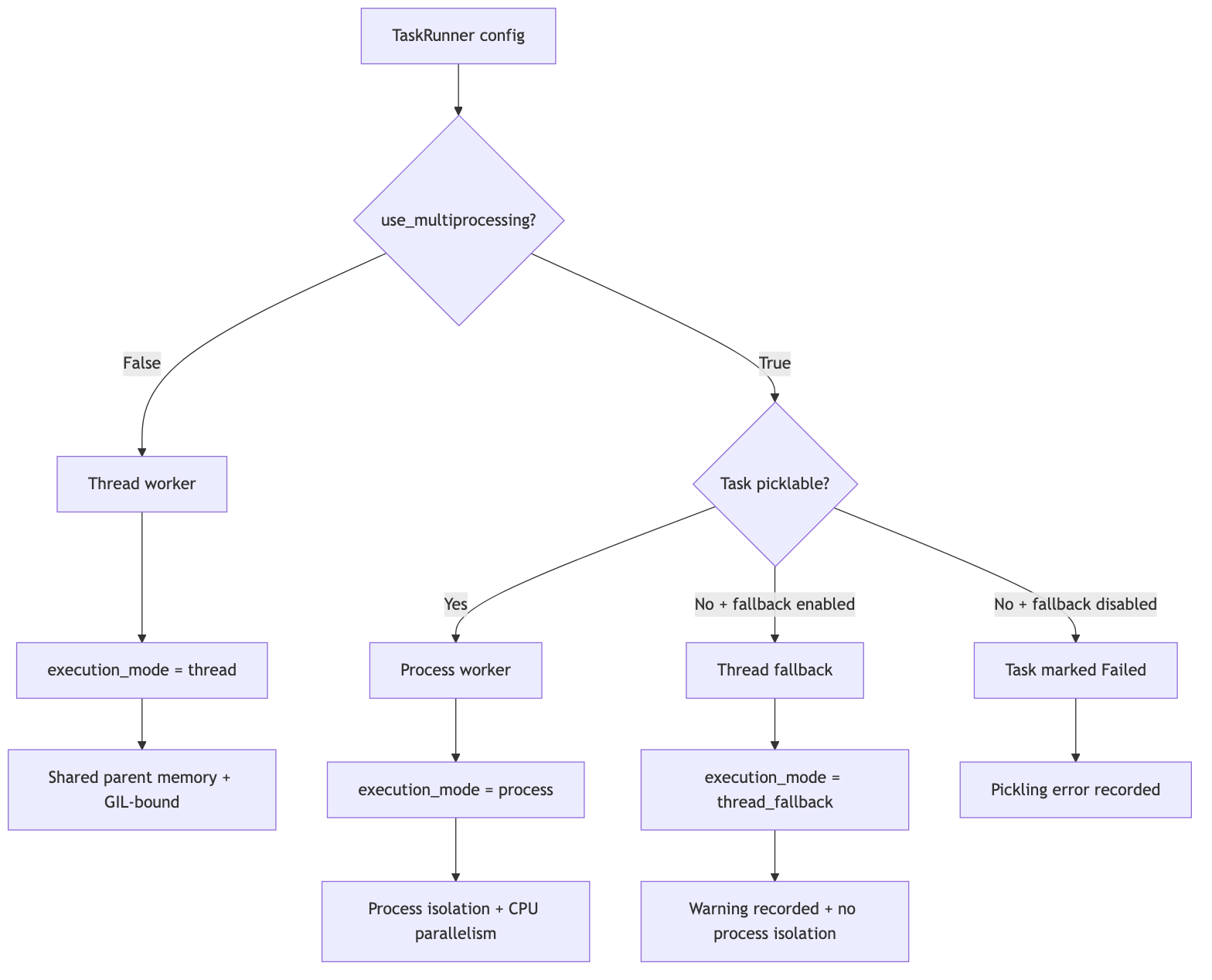
By default Concurra runs tasks in threads, which is ideal for I/O-bound work (network calls, disk, subprocess waits). For CPU-bound work, set use_multiprocessing=True to run tasks in separate processes and bypass the GIL.
runner = concurra.TaskRunner(use_multiprocessing=True) # CPU-bound
Multiprocessing requires picklable tasks
When use_multiprocessing=True, each task's function and its arguments must be picklable, because they are sent to a worker process. This means:
- ✅ Use top-level (module-level) functions.
- ❌ Avoid lambdas, locally-defined (nested) functions, and unpicklable arguments (e.g., open file handles, locks).
If a task is not picklable, Concurra fails that task with a clear error while letting the remaining tasks run (unless fast_fail=True, in which case a pickle failure — like any other failure — terminates the rest). You can instead opt in to a thread fallback:
runner = concurra.TaskRunner(
    use_multiprocessing=True,
    fallback_to_thread_on_pickle_error=True,  # run unpicklable tasks in a thread
)
⚠️ Thread-fallback tradeoff. A fallback task does not run in a separate process — it runs in the parent process in a thread. That means it:
- runs under the GIL (no true CPU parallelism, so CPU-bound fallback tasks won't speed up), and
- shares the parent's memory — it can read and mutate global/shared state, and an unstable C-extension can affect the parent process.
Use it as a convenience escape hatch for unpicklable tasks, not as a substitute for real process isolation. The task's result reports
execution_mode == "thread_fallback"and awarning.
ℹ️ The result for each task includes an
execution_modefield ("process","thread", or"thread_fallback") so you always know how it ran.
Termination semantics
- Processes (
use_multiprocessing=True) can be force-terminated on timeout orabort(). - Threads cannot be forcibly killed in Python. On timeout/abort a threaded task is marked
Terminatedand its result is protected from being overwritten, but the underlying thread continues running to completion in the background. Use multiprocessing if you need hard termination.
Task retries
Use task_retries when a task may fail transiently and should be attempted again before being marked failed.
runner = concurra.TaskRunner(task_retries=2)  # up to 3 total attempts per task

runner.add_task(fetch_data, label="fetch_data", task_retries=3)  # per-task override
task_retries=0 means no retry. task_retries=2 means the first attempt plus up to two retries. Retries apply to exceptions raised by the task function. Dependency skips, aborts, pickle validation failures, and timeouts are not retried.
External commands
Concurra can run external commands in the same scheduler as Python functions.
Use add_command for direct exec-form commands. This is the recommended default and mirrors Docker/Kubernetes-style argument lists:
runner.add_command(["python", "some_tool.py", "--x", "1"], label="tool")
Use add_shell_command only when you intentionally need shell syntax such as pipes, redirects, globbing, or command chaining:
runner.add_shell_command("cat logs/*.txt | grep ERROR > errors.txt", label="filter_errors")
Command tasks run as external OS subprocesses and report execution_mode == "subprocess". They can be mixed with normal Python tasks, dependencies, timeouts, aborts, and task_retries.
📖 API Reference
⚙️ TaskRunner(...)
runner = concurra.TaskRunner(
    max_concurrency=4,
    name="MyRunner",
    timeout=10,
    progress_stats=True,
    fast_fail=False,
    use_multiprocessing=False,
    logger=my_logger,
    log_errors=False,
    fallback_to_thread_on_pickle_error=False,
    task_retries=0,
)
| Parameter | Type | Description |
|---|---|---|
max_concurrency |
int | Maximum number of tasks to run in parallel. Defaults to os.cpu_count(). Values < 1 are coerced to 1. |
name |
str | Name for the runner, used in logs and progress output. Defaults to "TaskRunner". |
timeout |
float | Maximum duration per task (seconds). Tasks exceeding it are terminated. None means no timeout. |
progress_stats |
bool | Whether to log progress statistics. Defaults to True. |
fast_fail |
bool | If True, execution halts and remaining tasks are terminated as soon as any task fails or times out. |
use_multiprocessing |
bool | Use processes instead of threads. Recommended for CPU-bound tasks. |
logger |
logging.Logger | Custom logger. If not provided, a default module logger is used. |
log_errors |
bool | Whether to log task exceptions/tracebacks as they occur. |
fallback_to_thread_on_pickle_error |
bool | When multiprocessing is enabled, run unpicklable tasks in a thread instead of marking them failed. |
task_retries |
int | Default number of times to retry task exceptions after the first attempt. Defaults to 0. |
➕ add_task(task, *args, label=None, depends_on=None, task_retries=None, **kwargs)
Queue a callable to run, with optional positional/keyword arguments, a unique label, and dependencies.
runner.add_task(some_function, arg1, arg2, label="task1", kwarg1=value1)
runner.add_task(other_function, label="task2", depends_on=["task1"])
| Parameter | Type | Description |
|---|---|---|
task |
callable | The function to execute. |
*args |
any | Positional arguments forwarded to task. |
label |
hashable | Unique identifier for the task. If omitted, the task's numeric index is used. |
depends_on |
list | Labels this task depends on. It runs only after all of them complete successfully. |
task_retries |
int | None | Optional per-task retry override. None uses the runner default. |
**kwargs |
any | Keyword arguments forwarded to task. |
📝 Notes
- Labels must be unique per runner; reusing a label raises
ValueError. - A task cannot depend on itself.
- Circular dependencies of any length (e.g. A → B → C → A) are detected and raise
ValueError. - Unknown dependency labels are detected when execution starts and raise
ValueError. - Dependencies may be declared before the task they reference is added (forward references are allowed).
➕ Convenience adders
Concurra provides a few helpers around add_task:
# add_func: like add_task, but the label comes from the reserved `key` kwarg
runner.add_func(my_func, arg1, key="task1", some_kwarg=1)

# add_function: explicit args/kwargs containers (good when a task argument
# happens to be named "label" or "depends_on")
runner.add_function(my_func, args=(1, 2), kwargs={"x": 3}, key="task1", depends_on=["task0"])

# add_work: add many tasks at once from a list of tuples
runner.add_work([
    (func_a,),                          # (func,)
    (func_b, (1, 2)),                   # (func, args)
    (func_c, (1,), {"x": 2}),           # (func, args, kwargs)
    (func_d, (), {}, "label_d"),        # (func, args, kwargs, label)
])
📝 Notes
- In
add_func,keyis reserved as the label and is not forwarded to the function. If your function needs a parameter literally namedkey, useadd_function(func, kwargs={"key": ...}, key=label)oradd_taskinstead. add_func/add_work/add_functionforward all other keyword arguments (including ones namedlabel,depends_on, ortask_retries) to your task, so they never collide with framework parameters.- In
add_task,label,depends_on, andtask_retriesare framework parameters. If your function needs a literaltask_retrieskeyword argument, useadd_function(func, kwargs={"task_retries": ...}, key=label). - In
add_work, each item must be a tuple of 1–4 elements;argsmust be an iterable andkwargsa mapping, otherwise a clearTypeError/ValueErroris raised.
➕ add_command(command, label=None, depends_on=None, cwd=None, env=None, check=True, capture_output=True, text=True, task_retries=None)
Queue an external command using direct exec form. command must be a list or tuple of strings.
runner.add_command(["python", "script.py", "--name", "Mrunal"], label="script")
| Parameter | Type | Description |
|---|---|---|
command |
list[str] | tuple[str, ...] | Executable and arguments. String commands are rejected; use add_shell_command for shell strings. |
label |
hashable | Unique identifier for the command task. |
depends_on |
list | Labels this command depends on. |
cwd |
str | os.PathLike | None | Working directory for the command. |
env |
mapping | None | Environment overrides merged with the current process environment. |
check |
bool | If True, a non-zero return code marks the task as Failed. Defaults to True. |
capture_output |
bool | Capture stdout and stderr into the result. Defaults to True. |
text |
bool | Decode output as text. Defaults to True. |
task_retries |
int | None | Optional per-command retry override. |
➕ add_shell_command(command, label=None, depends_on=None, cwd=None, env=None, check=True, capture_output=True, text=True, task_retries=None)
Queue an external command string that is interpreted by the system shell.
runner.add_shell_command("python script.py | grep ok", label="filtered")
| Parameter | Type | Description |
|---|---|---|
command |
str | Shell command string. List/tuple commands are rejected; use add_command for direct exec form. |
label |
hashable | Unique identifier for the command task. |
depends_on |
list | Labels this command depends on. |
cwd |
str | os.PathLike | None | Working directory for the command. |
env |
mapping | None | Environment overrides merged with the current process environment. |
check |
bool | If True, a non-zero return code marks the task as Failed. Defaults to True. |
capture_output |
bool | Capture stdout and stderr into the result. Defaults to True. |
text |
bool | Decode output as text. Defaults to True. |
task_retries |
int | None | Optional per-command retry override. |
Command task results are structured:
{
    "command": ["python", "script.py"],
    "shell": False,
    "returncode": 0,
    "stdout": "...",
    "stderr": "",
    "cwd": None,
}
If check=True and the command exits non-zero, the Concurra task is marked Failed, but the structured command result is still available in result/output.
🏃 run(verify=True, raise_exception=False, error_message=None) / execute(...)
Execute all tasks, block until completion, and return the results dictionary. execute(...) is an alias of run(...).
| Parameter | Type | Description |
|---|---|---|
verify |
bool | After execution, check whether all tasks succeeded and log a report. |
raise_exception |
bool | If True, raise an Exception when any task failed. If False, failures are logged only. |
error_message |
str | Custom message included in the raised exception/log report. |
results = runner.run(verify=True, raise_exception=True, error_message="Pipeline failed")
🎯 execute_in_background()
Start execution on a background thread and return immediately (non-blocking). No new tasks can be added afterward. Use get_background_results() to collect results.
runner.execute_in_background()
# ... do other work ...
📥 get_background_results(verify=True, raise_exception=False, error_message=None)
Block until background execution finishes and return the results. Same parameters as run(). Calling this without execute_in_background() first will error.
runner.execute_in_background()
results = runner.get_background_results()   # blocks until done; no manual polling needed
🟢 is_running()
Indicates whether the background runner is still live — i.e. it has been started with execute_in_background() and has not yet been finalized by get_background_results() or abort().
⚠️ Do not poll
is_running()to detect completion. It does not automatically flip toFalsewhen the last task finishes; it staysTrueuntil you callget_background_results()(orabort()). To wait for completion, simply callget_background_results()— it blocks until everything is done. To check how many tasks are currently executing, useget_active_runner_count().
runner.execute_in_background()
# ... do other work ...
results = runner.get_background_results()   # blocks until done — no polling needed
⛔ abort()
Stop execution and return the full results dict. Any task that hasn't already completed — whether running or still pending — is marked Terminated (running processes are force-terminated; threaded tasks are marked Terminated but cannot be force-killed, see Termination semantics). Use after execute_in_background() to cancel before completion.
runner.execute_in_background()
results = runner.abort()
✅ verify(raise_exception=False, error_message=None)
Print/log a status report of all tasks and optionally raise if any failed. Raises if called while execution is still in progress.
📦 Result Structure
run(), execute(), get_background_results(), and abort() return a dict keyed by task label. Each entry has the following fields:
| Field | Type | Description |
|---|---|---|
task_name |
str | The function's name. |
start_time |
str | None | Start timestamp, "YYYY-MM-DD HH:MM:SS". |
end_time |
str | None | End timestamp. |
duration |
str | Human-readable duration, e.g. "1.01 sec" or "2.5 min". |
duration_seconds |
float | Duration in seconds. |
result |
any | The task's return value (None if it failed or was terminated). |
output |
any | Alias of result (kept for backward compatibility). |
error |
str | None | "ExcType: message" if the task failed/terminated, else None. |
trace |
str | None | Full traceback string when available. |
status |
str | One of "Successful", "Failed", "Terminated". |
has_failed |
bool | True for failed or terminated tasks. |
execution_mode |
str | None | "thread", "process", "thread_fallback", "subprocess", or None if the task never started. |
warning |
str | None | Diagnostic note (e.g. set when a task ran via thread fallback). |
attempts |
int | Number of attempts made for this task. |
task_retries |
int | Retry budget configured for this task. |
retried |
bool | True if the task needed more than one attempt. |
retry_errors |
list[str] | Error summaries captured from failed attempts. |
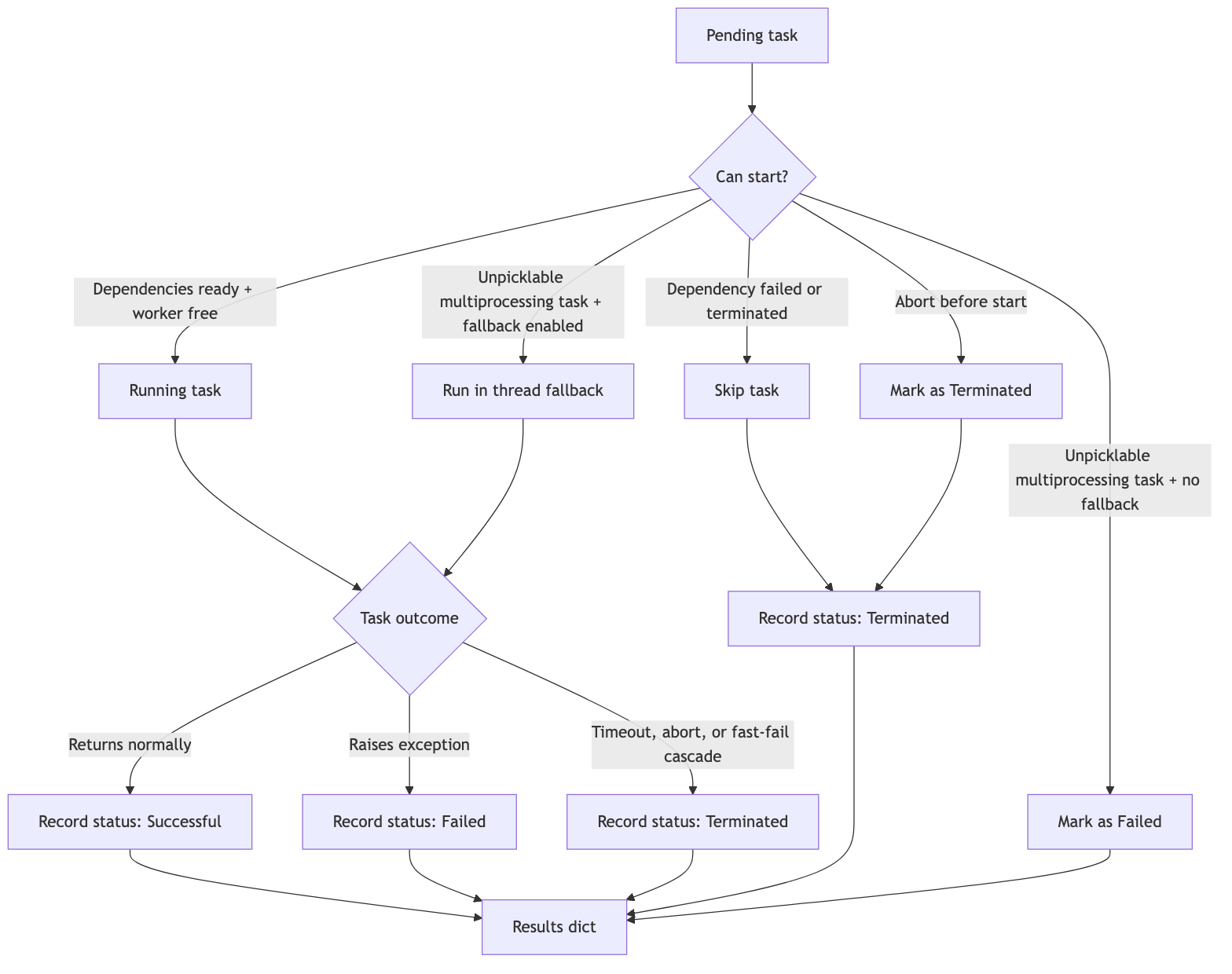
Task lifecycle
Every task starts in the pending queue and eventually records a terminal status. Successful tasks return normally, failed tasks capture an exception and traceback, and terminated tasks include timeouts, aborts, fast-fail cascades, and dependency skips.
✅ Example: All Tasks Pass
import concurra
import json
import time

def square(x):
    time.sleep(1)
    return x * x

def divide(x, y):
    return x / y

runner = concurra.TaskRunner(max_concurrency=4)

runner.add_task(square, 4, label="square_4")
runner.add_task(square, 5, label="square_5")
runner.add_task(divide, 10, 2, label="divide_10_2")

results = runner.run()
print(json.dumps(results, indent=4, default=str))
Console Output:
INFO:concurra.core:TaskRunner progress: [########.................] 1/3 [33.33%] in 0 min 0.0 sec
INFO:concurra.core:TaskRunner progress: [#################........] 2/3 [66.67%] in 0 min 1.04 sec
INFO:concurra.core:TaskRunner progress: [#########################] 3/3 [100.0%] in 0 min 1.04 sec
INFO:concurra.core:
+-------------+--------+------------+------------+
| label       | task   | status     | duration   |
|-------------+--------+------------+------------|
| square_4    | square | Successful | 1.01 sec   |
| square_5    | square | Successful | 1.01 sec   |
| divide_10_2 | divide | Successful | 0.0 sec    |
+-------------+--------+------------+------------+
Result for square_4:
{
    "task_name": "square",
    "start_time": "2026-04-12 00:46:54",
    "end_time": "2026-04-12 00:46:55",
    "duration": "1.01 sec",
    "duration_seconds": 1.01,
    "result": 16,
    "error": null,
    "trace": null,
    "status": "Successful",
    "has_failed": false,
    "output": 16,
    "execution_mode": "thread",
    "warning": null,
    "attempts": 1,
    "task_retries": 0,
    "retried": false,
    "retry_errors": []
}
❌ Example: Partial Failures
import concurra

def square(x):
    return x * x

def divide(x, y):
    return x / y

runner = concurra.TaskRunner(max_concurrency=4)

runner.add_task(square, 4, label="square_4")
runner.add_task(divide, 10, 2, label="divide_10_2")
runner.add_task(divide, 10, 0, label="divide_by_zero")  # This will fail

results = runner.run(verify=True)            # logs a failure report
print(results["divide_by_zero"]["status"])   # "Failed"
print(results["divide_by_zero"]["error"])    # "ZeroDivisionError: division by zero"
Result for divide_by_zero (abridged):
{
    "task_name": "divide",
    "result": null,
    "error": "ZeroDivisionError: division by zero",
    "trace": "Traceback (most recent call last): ...",
    "status": "Failed",
    "has_failed": true,
    "output": null,
    "execution_mode": "thread",
    "warning": null
}
To turn failures into a raised exception, pass
run(raise_exception=True).
🔁 Example: Task Retries
Use task_retries for transient failures such as flaky APIs, temporary files, or services that may need a second attempt.
import concurra

attempts = {"upload": 0}

def upload_report():
    attempts["upload"] += 1
    if attempts["upload"] < 3:
        raise ConnectionError("temporary upload failure")
    return "uploaded"

runner = concurra.TaskRunner(task_retries=2)
runner.add_task(upload_report, label="upload_report")

results = runner.run()

print(results["upload_report"]["status"])        # "Successful"
print(results["upload_report"]["attempts"])      # 3
print(results["upload_report"]["retried"])       # True
print(results["upload_report"]["retry_errors"])  # previous failed attempts
You can override retries for a single task:
runner.add_task(call_partner_api, label="partner_api", task_retries=4)
🧰 Example: External Commands
Use add_command for direct exec-form commands. This is the safest default and passes arguments exactly as provided.
import sys
import concurra

runner = concurra.TaskRunner(max_concurrency=2)

runner.add_command(
    [sys.executable, "-c", "print('generate report')"],
    label="generate_report",
)
runner.add_command(
    [sys.executable, "-c", "print('send report')"],
    label="send_report",
    depends_on=["generate_report"],
)

results = runner.run()

print(results["generate_report"]["execution_mode"])        # "subprocess"
print(results["generate_report"]["result"]["returncode"])  # 0
print(results["generate_report"]["result"]["stdout"])      # "generate report\n"
Use add_shell_command only when you need shell features such as pipes, redirects, globs, or command chaining.
import concurra

runner = concurra.TaskRunner()

runner.add_shell_command(
    "printf 'alpha\\nbeta\\n' | grep beta",
    label="filter_output",
)

results = runner.run()

print(results["filter_output"]["result"]["stdout"])  # "beta\n"
Command tasks can be mixed with normal Python tasks:
import sys
import concurra

def prepare_payload():
    return "payload ready"

runner = concurra.TaskRunner(max_concurrency=2)

runner.add_task(prepare_payload, label="prepare")
runner.add_command(
    [sys.executable, "-c", "print('external command ran')"],
    label="external_command",
    depends_on=["prepare"],
)

results = runner.run()

print(results["prepare"]["result"])                         # "payload ready"
print(results["external_command"]["execution_mode"])        # "subprocess"
print(results["external_command"]["result"]["stdout"])      # "external command ran\n"
⛔ Example: Fast-Fail
When fast_fail=True, the runner terminates all other tasks as soon as one fails (or times out).
import concurra
import time

def will_fail():
    raise RuntimeError("Oops!")

def will_succeed():
    time.sleep(2)
    return "Success"

runner = concurra.TaskRunner(fast_fail=True, max_concurrency=2)
runner.add_task(will_succeed, label="ok")
runner.add_task(will_fail, label="fail")
results = runner.run(verify=False)

print(results["fail"]["status"])  # "Failed"
print(results["ok"]["status"])    # "Terminated"
print(results["ok"]["error"])     # "RuntimeError: Execution terminated before completion"
Because
okruns in a thread, it is markedTerminatedimmediately; the underlying thread cannot be force-killed and finishes in the background. Useuse_multiprocessing=Truefor hard termination.
⏱️ Example: Per-task Timeout
timeout applies to each task individually. A task that runs longer is terminated and reported as Terminated.
import concurra
import time

def slow():
    time.sleep(15)
    return "Done"

runner = concurra.TaskRunner(timeout=4)
runner.add_task(slow, label="timeout_task")
results = runner.run(verify=False)

print(results["timeout_task"]["status"])  # "Terminated"
print(results["timeout_task"]["error"])   # "TimeoutError: Task exceeded timeout of 4 seconds"
🧩 Example: Multiprocessing (CPU-bound)
import concurra

def heavy(n):  # must be a top-level, picklable function
    total = 0
    for i in range(n):
        total += i * i
    return total

if __name__ == "__main__":          # required for spawn (macOS/Windows)
    runner = concurra.TaskRunner(max_concurrency=4, use_multiprocessing=True)
    runner.add_task(heavy, 10_000_000, label="job1")
    runner.add_task(heavy, 20_000_000, label="job2")

    results = runner.run()
    print(results["job1"]["execution_mode"])  # "process"
Remember: with
use_multiprocessing=True, functions must be top-level and arguments must be picklable, and the runner must be created/executed inside anif __name__ == "__main__":guard on platforms that use the spawn start method (macOS and Windows). Setfallback_to_thread_on_pickle_error=Trueto run unpicklable tasks in a thread instead of failing them (see the caveat in Multiprocessing requires picklable tasks).
🛑 Example: Abort Background Execution
import concurra
import time

def long_task():
    time.sleep(30)

runner = concurra.TaskRunner()
runner.add_task(long_task, label="job")
runner.execute_in_background()

time.sleep(1)
results = runner.abort()
print(results["job"]["status"])  # "Terminated"
🔗 Example: Dependent Tasks (Pipelines)
Concurra resolves depends_on relationships as a DAG, running independent tasks in parallel and dependent tasks only after their prerequisites finish.
ℹ️ Ordering only — not data piping.
depends_oncontrols when a task runs, not what it receives. Concurra does not automatically feed a dependency's return value into a dependent task; you pass each task's arguments explicitly (as shown below). If a downstream task needs an upstream result, read it from the returned results dict after the run, or have the upstream task persist it somewhere the downstream task can fetch.
import time
import concurra

def receive_order(order_id):
    time.sleep(1)
    return f"received {order_id}"

def validate_payment(order_id):
    time.sleep(1)
    return f"payment validated for {order_id}"

def check_inventory(order_id):
    time.sleep(1)
    return f"inventory reserved for {order_id}"

def pack_order(order_id):
    return f"packed {order_id}"

def ship_order(order_id):
    return f"shipped {order_id}"

def send_confirmation(order_id):
    return f"confirmation sent for {order_id}"

runner = concurra.TaskRunner(max_concurrency=3)
order_id = "ORD-1001"

# Receive the order first, then run payment and inventory checks in parallel.
runner.add_task(receive_order, order_id, label="receive_order")
runner.add_task(validate_payment, order_id, label="validate_payment",
                depends_on=["receive_order"])
runner.add_task(check_inventory, order_id, label="check_inventory",
                depends_on=["receive_order"])

# Fulfillment waits for both checks before packing, shipping, and notifying.
runner.add_task(pack_order, order_id, label="pack_order",
                depends_on=["validate_payment", "check_inventory"])
runner.add_task(ship_order, order_id, label="ship_order",
                depends_on=["pack_order"])
runner.add_task(send_confirmation, order_id, label="send_confirmation",
                depends_on=["ship_order"])

results = runner.run()

for label, info in results.items():
    print(f"{label}: {info['status']} → {info['result']}")
⚙️ Dependency Diagram

✅ How It Works
receive_orderstarts first.validate_paymentandcheck_inventoryrun in parallel after the order is received.pack_orderwaits for both payment and inventory checks to finish successfully.ship_orderandsend_confirmationrun only after fulfillment reaches their prerequisite steps.- If payment, inventory, or another dependency fails or is terminated, its dependents are automatically skipped and recorded as
Terminatedwith an explanatory error ("Skipped: dependency [...] failed or was terminated").
🔐 License
MIT License.
Release history Release notifications | RSS feed


Download files
Download the file for your platform. If you're not sure which to choose, learn more about installing packages.
Source Distribution
Built Distribution
Filter files by name, interpreter, ABI, and platform.
If you're not sure about the file name format, learn more about wheel file names.
Copy a direct link to the current filters
File details
Details for the file concurra-1.1.9.tar.gz.
File metadata
- Download URL: concurra-1.1.9.tar.gz
- Upload date:
- Size: 44.1 kB
- Tags: Source
- Uploaded using Trusted Publishing? No
- Uploaded via: twine/6.1.0 CPython/3.11.5
File hashes
| Algorithm | Hash digest | |
|---|---|---|
| SHA256 |
024a72c7a996981f339c7f2eb6974271ed1a0a446b9652d09f49d6c498c64014
|
|
| MD5 |
853841b11352d4eb3baf3c1790ca467c
|
|
| BLAKE2b-256 |
5d6c9360417360c49a07eb872aa027cc686328ca6bf5e697f778a67424b795de
|
File details
Details for the file concurra-1.1.9-py3-none-any.whl.
File metadata
- Download URL: concurra-1.1.9-py3-none-any.whl
- Upload date:
- Size: 23.2 kB
- Tags: Python 3
- Uploaded using Trusted Publishing? No
- Uploaded via: twine/6.1.0 CPython/3.11.5
File hashes
| Algorithm | Hash digest | |
|---|---|---|
| SHA256 |
4b8a206db419ae48572a8243adac9bce7f3a7f9ae5d4c27484d01ddaca1edca8
|
|
| MD5 |
b0cc0813f9113dfac58cb9d890c231d7
|
|
| BLAKE2b-256 |
cb79ce594137b2fa3f4e3d90d1b740c47b9f6f0027d9b6e129c1746b5542f52d
|






