
Condensr
Summarize books chapter by chapter using AI.
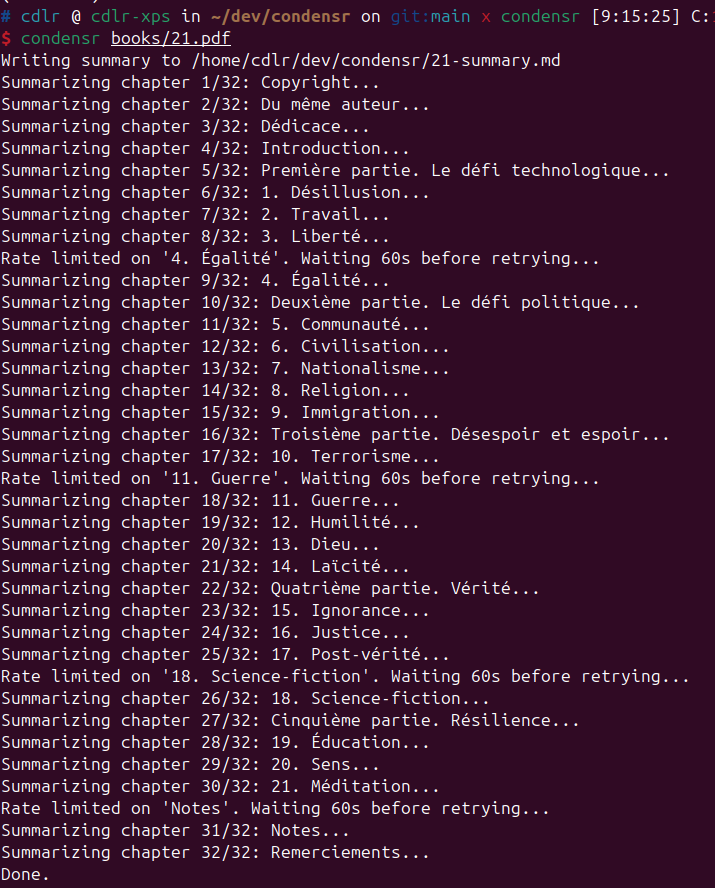
Condensr takes a PDF book as input and produces a structured Markdown summary. It detects chapters automatically and summarizes each one individually (max ~500 words per chapter) using Mistral AI.
Installation
pip install condensr
Quick Start
Python API
import condensr

# Preview detected chapters (no API calls)
chapters = condensr.get_chapters("book.pdf")
print(chapters)
# ["Introduction", "Chapter 1: Origins", "Chapter 2: Growth"]

# Summarize chapter by chapter
for title, summary in condensr.summarize("book.pdf"):
    print(f"## {title}\n{summary}\n")
CLI
condensr book.pdf
# Writes book-summary.md with progress output
API Reference
condensr.get_chapters(pdf_path, *, toc_level=1)
Detect and return chapter titles from a PDF. Uses heuristic detection only (no API calls). Returns an empty list if no chapters are found.
Parameters:
pdf_path(str) — Path to the PDF file.toc_level(int) — Maximum TOC depth to include. Default:1(main chapters only). Use2to include sub-sections.
Returns: list[str] — Chapter titles.
condensr.summarize(pdf_path, *, model, api_key, on_chapter, toc_level=1)
Summarize a PDF book chapter by chapter. Returns a generator yielding (title, summary_markdown) tuples.
If no chapters are detected, summarizes the entire book as one unit.
Parameters:
pdf_path(str) — Path to the PDF file.model(str) — Mistral model name. Default:"mistral-small-latest".api_key(str | None) — Mistral API key. Falls back toMISTRAL_API_KEYenv var.on_chapter(callable | None) — Optionalcallback(title, summary)fired before each yield.toc_level(int) — Maximum TOC depth to include. Default:1. Use2to include sub-sections.
Yields: tuple[str, str] — (chapter_title, summary_markdown).
Callback Example
def on_chapter(title, summary):
    save_to_db(title, summary)

for title, summary in condensr.summarize("book.pdf", on_chapter=on_chapter):
    display(title, summary)
CLI Reference
Usage: condensr [OPTIONS] PDF_PATH

  Summarize a PDF book chapter by chapter.

Options:
  -o, --output PATH    Output file path. Default: <book>-summary.md
  -m, --model TEXT     Mistral model name.
  -t, --toc-level INT  Chapter detection depth: 1 for main chapters only,
                       2 to include sub-sections. [default: 1]
  --help               Show this message and exit.
Configuration
Set your Mistral API key as an environment variable:
export MISTRAL_API_KEY="your-api-key"
Or pass it programmatically:
for title, summary in condensr.summarize("book.pdf", api_key="your-api-key"):
    ...
Privacy Notice
Condensr sends the text content of your PDF to Mistral AI's API servers for summarization. Do not use Condensr with confidential or sensitive documents unless you are comfortable with this data being transmitted to a third-party service. Review Mistral's privacy policy for details on how your data is handled.
License
AGPL-3.0-or-later
Release Process
This project uses Commitizen for automated versioning and twine for local PyPI publishing.
How to release a new version
- Ensure all your changes are committed on the
mainbranch. - Run the bump command to update
CHANGELOG.mdand create a new Git tag:cz bump - Build and upload the package:
rm -rf dist/ build/
python -m build
twine upload dist/*
- Push the changes and new tag to GitLab:
git push origin main --tags
Troubleshooting
If cz bump fails with "No tag found to do an incremental changelog", the CHANGELOG.md file is out of sync with the Git tags. Regenerate it with:
cz changelog
Then commit the updated changelog before running cz bump again.
For detailed instructions, see docs/RELEASE_PROCESS.md.
1 maintainer

Metadata
1 maintainer
Release files for condensr 0.4.0
For a detailed explanation of source distributions (sdists) and built distributions (wheels), please see the package formats documentation.
Source distribution (sdist)
| File | Size | Uploaded | |
|---|---|---|---|
| condensr-0.4.0.tar.gz | 237.6 kB | Details |
Built distribution (wheel)
| File | Interpreter | ABI | Platform | Reset |
|---|---|---|---|---|
| condensr-0.4.0-py3-none-any.whl | Python 3 | none | any | Details |
Total release size: 260.2 kB
Release files / condensr-0.4.0.tar.gz
| Download URL | condensr-0.4.0.tar.gz |
|---|---|
| Size | 237.6 kB |
| Tags | Source |
|
SHA-256 checksum How to use checksums |
8ad0ac7f8c743a60f3a08d52256e7085f2155fb5fb88e593197cb6ade06cb3fa
|
|
BLAKE2b-256 checksum How to use checksums |
add74b4be14bfce67c463358cc5dd12e70e2f0bbe6a5d31b21490a948ef29b86
|
| Upload date | |
|
Uploaded using Trusted Publishing? What is trusted publishing? |
No |
| Uploaded via |
twine/6.2.0 CPython/3.12.3
|
Release files / condensr-0.4.0-py3-none-any.whl
| Download URL | condensr-0.4.0-py3-none-any.whl |
|---|---|
| Size | 22.6 kB |
| Tags | Python 3 |
|
SHA-256 checksum How to use checksums |
19367ec403454c84710dcb2abd7947b22dc1897ee1cdcbb9f01afab9d48a5a1d
|
|
BLAKE2b-256 checksum How to use checksums |
5a18c394ac6302635b9a2428dc92d20f4eab3a1f75add91c901a58a37f2b3d72
|
| Upload date | |
|
Uploaded using Trusted Publishing? What is trusted publishing? |
No |
| Uploaded via |
twine/6.2.0 CPython/3.12.3
|














