

Conect2Ai - TAC python package
Conect2Py-Package is the name given for the Conect2ai Python software package. The package contains the implementation of TAC, an algorithm for data compression using TAC (Tiny Anomaly Compression). The TAC algorithm is based on the concept the data eccentricity and does not require previously established mathematical models or any assumptions about the underlying data distribution. Additionally, it uses recursive equations, which enables an efficient computation with low computational cost, using little memory and processing power.

Dependencies
Pandas, Numpy, Matplotlib, Seaborn, Scikit-learn, Ipython
Installation
You can download our package from the PyPi repository using the following command:
pip install conect2py
If you want to install it locally you download the Wheel distribution from Build Distribution.
First navigate to the folder where you downloaded the file and run the following command:
pip install conect2py-0.1.1-py3-none-any.whl
Usage Example
This usage example can be run on a Colab Notebook here

To begin you can import conect2py using
# FULL PACKAGE
import conect2py
Or try each of our implemented functionalities
# MODEL FUNCTIONS
from conect2py.models import TAC
from conect2py.models import AutoTAC

# RUN FUNCTIONS
from conect2py.run.single import print_run_details, run_single_online, run_single_offline
from conect2py.run.multiple import run_multiple_instances, get_optimal_params, display_multirun_optimal_values, run_optimal_combination

# UTILS FUNCTIONS
from conect2py.utils.format_save import create_param_combinations, create_compressor_list, create_eval_df
from conect2py.utils.metrics import get_compression_report, print_compression_report, calc_statistics
from conect2py.utils.plots import plot_curve_comparison, plot_dist_comparison, plot_multirun_metric_results
Running Multiple tests with TAC
- Setting up the initial variables
model_name = 'TAC_Compression'

params = {
    'window_size': np.arange(2, 30, 1),
    'm': np.round(np.arange(0.1, 2.1, 0.1), 2),
}

param_combination = create_param_combinations(params)
compressor_list = create_compressor_list(param_combination)
- Once you created the list of compressors you can run
result_df = run_multiple_instances(compressor_list=compressor_list,
                                param_list=param_combination,
                                series_to_compress=dataframe['sensor_data'].dropna(),
                                cf_score_beta=2
                                )
- This function returns a pandas Dataframe containing the results of all compression methods. You can expect something like:
| param | reduction_rate | reduction_factor | mse | rmse | nrmse | mae | psnr | ncc | cf_score | |
|---|---|---|---|---|---|---|---|---|---|---|
| 0 | (2, 0.1) | 0.4507 | 1.8204 | 0.0648 | 0.2545 | 0.0609 | 0.0127 | 39.9824 | 0.9982 | 0.8031 |
| 1 | (2, 0.2) | 0.4507 | 1.8204 | 0.0648 | 0.2545 | 0.0609 | 0.0127 | 39.9823 | 0.9982 | 0.8031 |
| 2 | (2, 0.3) | 0.4507 | 1.8204 | 0.0648 | 0.2545 | 0.0609 | 0.0127 | 39.9823 | 0.9982 | 0.8031 |
| 3 | (2, 0.4) | 0.4508 | 1.8209 | 0.0648 | 0.2545 | 0.0609 | 0.0127 | 39.9824 | 0.9982 | 0.8032 |
| 4 | (2, 0.5) | 0.4511 | 1.8217 | 0.0648 | 0.2545 | 0.0609 | 0.0128 | 39.9823 | 0.9982 | 0.8033 |
- You can also check the optimal combination by running the following code:
display_multirun_optimal_values(result_df=result_df)
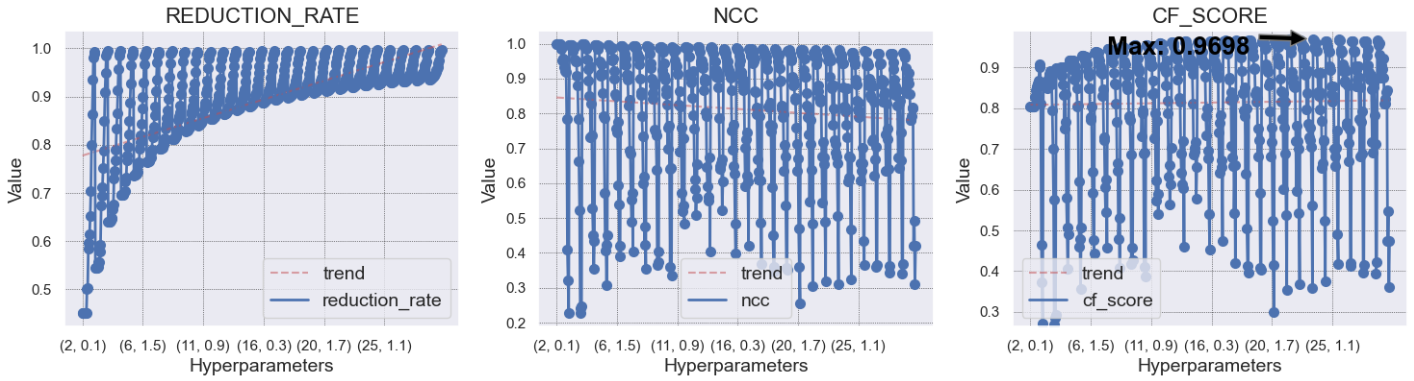
Parameter combinations for MAX CF_SCORE
              param    reduction_rate  reduction_factor     mse      rmse    nrmse  \
      440  (24, 0.1)          0.9224           12.8919    0.6085  0.7801  0.1867

             mae    psnr     ncc    cf_score
      440  0.1294  30.254  0.9825    0.9698
Parameter combinations for NEAR MAX CF_SCORE
        param  reduction_rate    reduction_factor     mse    rmse   nrmse  \
 521  (28, 0.2)          0.9336           15.0531  1.1504  1.0726  0.2567
 364  (20, 0.5)          0.9118           11.3396  0.9458  0.9725  0.2328
 262  (15, 0.3)          0.8810            8.4029  0.6337  0.7960  0.1905
 363  (20, 0.4)          0.9102           11.1352  0.9084  0.9531  0.2281
 543  (29, 0.4)          0.9372           15.9222  1.1474  1.0712  0.2564

       mae     psnr     ncc     cf_score
 521  0.1810  27.4883  0.9666    0.9598
 364  0.1431  28.3388  0.9726    0.9598
 262  0.0907  30.0780  0.9817    0.9598
 363  0.1323  28.5140  0.9737    0.9603
 543  0.1925  27.4996  0.9667    0.9607
Visualize multirun results with a plot
- By default this plot returns a visualization for the metrics
reduction_rate,nccandcf_score.
plot_multirun_metric_results(result_df=result_df)
- The result should look like this;
Running a single complession with the optimal parameter found
- You don't need to run the visualization and the
display_multirun_optimal_valuesin order to get the optimal compressor created, by running the following code it's possible to get the best result:
optimal_param_list = get_optimal_params(result_df=result_df)
print("Best compressor param combination: ", optimal_param_list)
- With the list of optimal parameter (There is a possibility that multiple compressors are considered the best) run the function below to get get the compression result.
points_to_keep, optimal_results_details = run_optimal_combination(optimal_list=optimal_param_list,
                                                          serie_to_compress=dataframe['sensor_data'].dropna(),
                                                          model='TAC'
                                                          )
- If you want to see the result details use:
print_run_details(optimal_results_details)
POINTS:
- total checked: 30889
- total kept: 1199
- percentage discaded: 96.12 %
POINT EVALUATION TIMES (ms):
- mean: 0.003636738161744472
- std: 0.15511020000857362
- median: 0.0
- max: 13.513565063476562
- min: 0.0
- total: 112.335205078125
RUN TIME (ms):
- total: 124.2864
Evaluating the Results
- Now, to finish the process of the compression, you should follow the next steps:
1. Step - Create the evaluation dataframe:
  evaluation_df = create_eval_df(original=dataframe['sensor_data'].dropna(), flag=points_to_keep)
  evaluation_df.info()
2. Step - Evaluate the performance:
report = get_compression_report(
    original=evaluation_df['original'],
    compressed=evaluation_df['compressed'],
    decompressed=evaluation_df['decompressed'],
    cf_score_beta=2
)

print_compression_report(
    report,
    model_name=model_name,
    cf_score_beta=2,
    model_params=optimal_param_list
)
After that you expect to see something like the following informations:
RUN INFO
- Model: TAC_Compression
- Optimal Params: [(24, 0.1)]
- CF-Score Beta: 2
RESULTS
SAMPLES NUMBER reduction
- Original length: 30889 samples
- Reduced length: 1199 samples
- Samples reduced by a factor of 25.76 times
- Sample reduction rate: 96.12%
FILE SIZE compression
- Original size: 385549 Bytes
- Compressed size: 14974 Bytes
- file compressed by a factor of 25.75 times
- file compression rate: 96.12%
METRICS
- MSE: 0.622
- RMSE: 0.7886
- NRMSE: 0.1888
- MAE: 0.1384
- PSNR: 30.1591
- NCC: 0.9821
- CF-Score: 0.9778
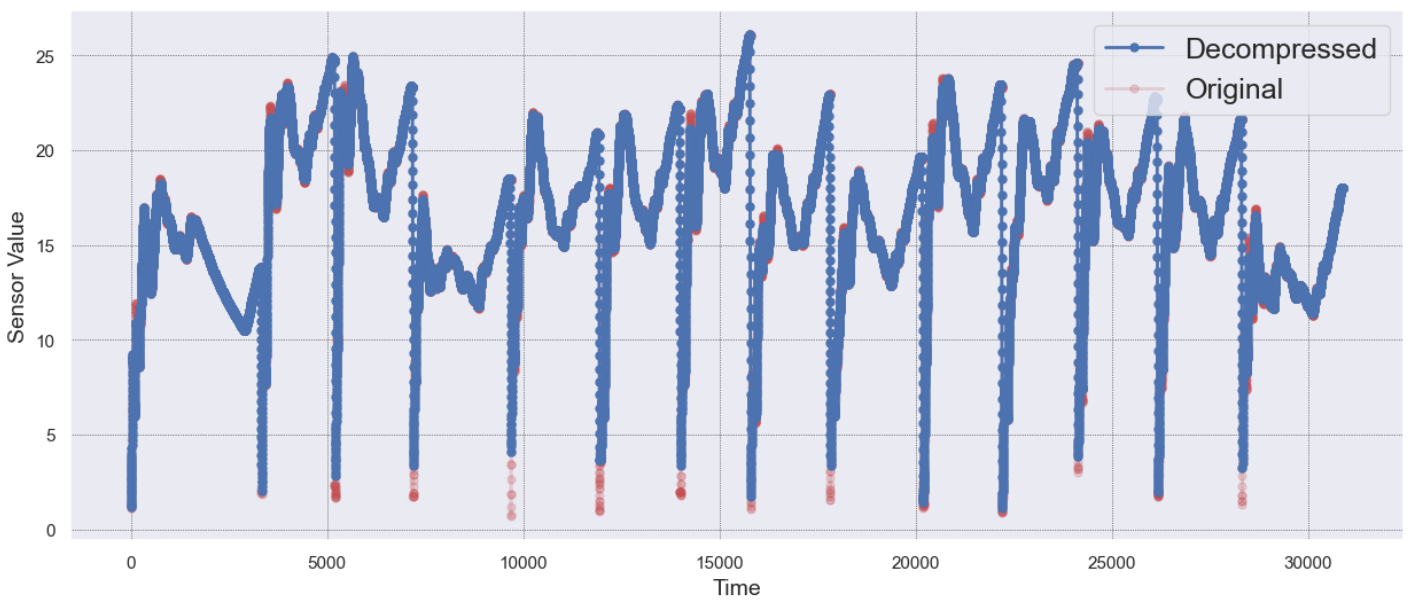
3. Step - Create the model visualizations:
# plot the curves comparison (original vs decompressed)
plot_curve_comparison(
    evaluation_df.original,
    evaluation_df.decompressed,
    show=True
)
And finally here is a example of the result:
Other Models
Please check the informations for more information about the other models been implemented in this package.
Literature reference
-
Signoretti, G.; Silva, M.; Andrade, P.; Silva, I.; Sisinni, E.; Ferrari, P. "An Evolving TinyML Compression Algorithm for IoT Environments Based on Data Eccentricity". Sensors 2021, 21, 4153. https://doi.org/10.3390/s21124153
-
Medeiros, T.; Amaral, M.; Targino, M; Silva, M.; Silva, I.; Sisinni, E.; Ferrari, P.; "TinyML Custom AI Algorithms for Low-Power IoT Data Compression: A Bridge Monitoring Case Study" - 2023 IEEE International Workshop on Metrology for Industry 4.0 & IoT (MetroInd4.0&IoT), 2023. 10.1109/MetroInd4.0IoT57462.2023.10180152
License
This package is licensed under the MIT License - © 2023 Conect2ai.
1 maintainer

Metadata
1 maintainer
Release files for conect2py 0.1.4
For a detailed explanation of source distributions (sdists) and built distributions (wheels), please see the package formats documentation.
Source distribution (sdist)
| File | Size | Uploaded | Provenance | |
|---|---|---|---|---|
| conect2py-0.1.4.tar.gz | 27.0 kB | Without provenance | Details |
Built distribution (wheel)
| File | Interpreter | ABI | Platform | Reset |
|---|---|---|---|---|
| conect2py-0.1.4-py3-none-any.whl | Python 3 | none | any | Details |
Total release size: 54.7 kB
Release files / conect2py-0.1.4.tar.gz
| Download URL | conect2py-0.1.4.tar.gz |
|---|---|
| Size | 27.0 kB |
| Tags | Source |
|
SHA-256 checksum How to use checksums |
4259583e48dc980718b6394d7704203a5a1c8c548e75d747a1c9e7ad2b68fa2a
|
|
BLAKE2b-256 checksum How to use checksums |
22845e34aacaa84010859b72b17c972fcb8d5baad792653c4b276206c61139ab
|
| Upload date | |
|
Uploaded using Trusted Publishing? What is trusted publishing? |
No |
| Uploaded via |
twine/4.0.2 CPython/3.11.0
|
Release files / conect2py-0.1.4-py3-none-any.whl
| Download URL | conect2py-0.1.4-py3-none-any.whl |
|---|---|
| Size | 27.7 kB |
| Tags | Python 3 |
|
SHA-256 checksum How to use checksums |
19a4481e71d2a1a1b2484e307d9ac1729128de789972d7dd4e773edab61b1b59
|
|
BLAKE2b-256 checksum How to use checksums |
c9d7741acd8ccfaf6804ef44ce21c1b36d95b7a22d203b8994e04b9557e779e3
|
| Upload date | |
|
Uploaded using Trusted Publishing? What is trusted publishing? |
No |
| Uploaded via |
twine/4.0.2 CPython/3.11.0
|
Security for conect2py 0.1.4
Provenance
Provenance describes where a file came from. On PyPI, provenance is shared via attestations, which provide a verifiable record of the build or publishing details. View details, limitations and caveats.
No provenance found
None of the files in this release were uploaded with provenance metadata.
A note on package security
PyPI is a repository for distributing packages, not a service for auditing them. While third-party security researchers and our staff do their best to detect and remove malicious packages, PyPI cannot guarantee the quality, security or suitability of any given package.
To learn more about protecting yourself from malicious actors, visit our package security documentation.














