
PDF Confectionary 🧁
Work in the NLP domain and find that your end users/clients don't like using
.txtfiles with your excellent results? Look no further!
PDF Confectionary is a tool for quickly creating templated PDFs from text files using FPDF2. Essentially, point it at a directory of text files, and generate some sweet PDFs.
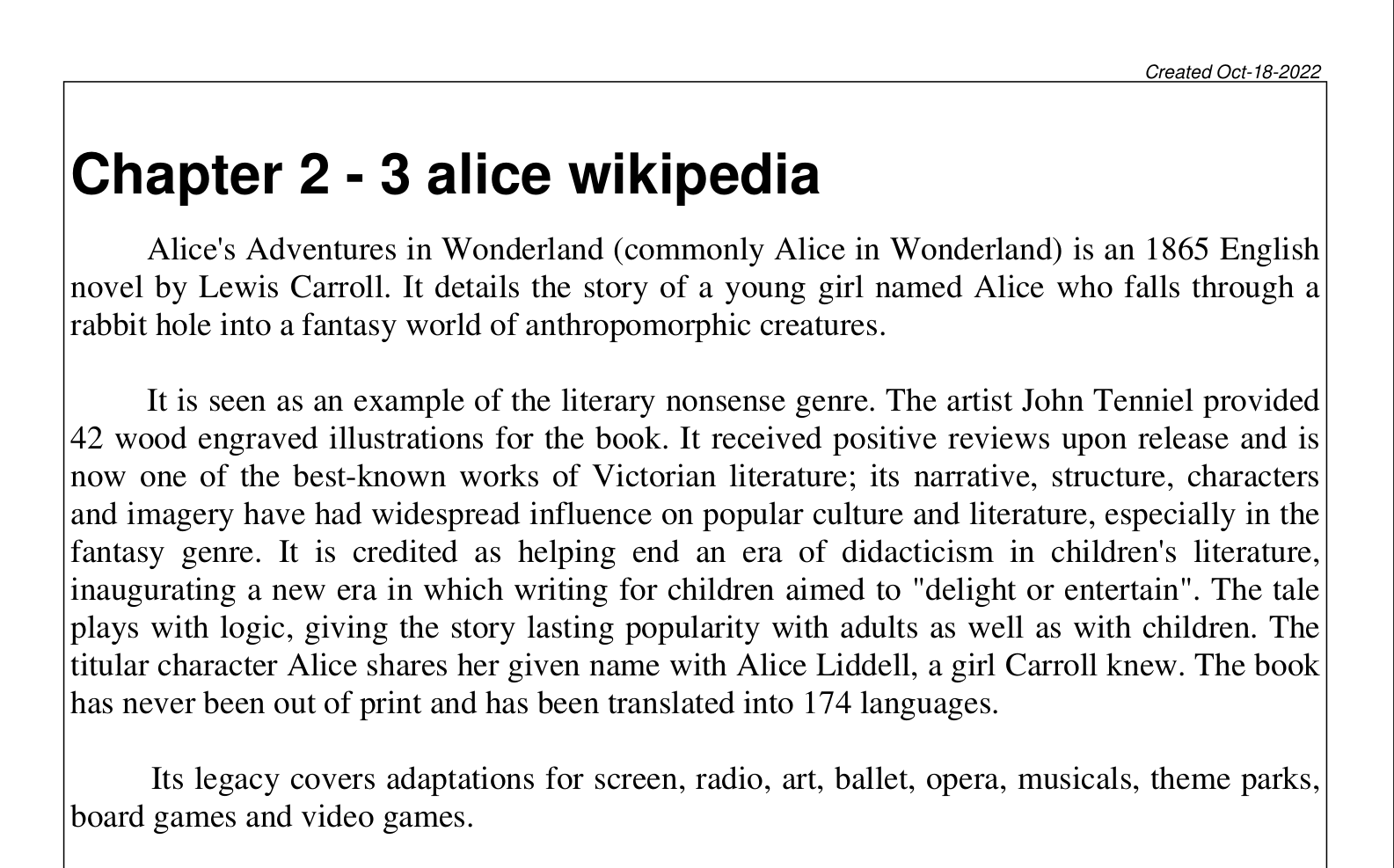
Quickly convert text files into readable, paragraph-segmented PDFs that are easy to navigate.
Table of Contents
About
The focus of this repo is to provide a simple, easy-to-use, and extensible PDF creation tool. Relevant features in PDF Confectionary include:
- Automatic paragraph separation via the
textsplitmodule - Fast navigation through generated PDFs via links between TOC to chapters & footer links back to TOC.
- Keyword extraction for each text file
This module was inspired by the need to create clean output documents for reading & review speech transcription from the vid2cleantxt project. PDF Confectionary was initially designed as a command-line tool but provides a Python API for more advanced use cases.
Installation
Requirements
Primary modules used by confectionary are: FPDF2, textsplit, gensim, and clean-text.
All dependencies are listed in the requirements.txt file.
Package Installation
The package can be installed using pip:
pip install confectionary
To install as a python package without pip, run:
git clone <https://github.com/pszemraj/confectionary.git>
cd confectionary
pip install -e .
Usage
There are two ways to use PDF Confectionary:
-
command line, via
python confectionary/text2pdf.py -i <input_dir> -o <output_dir> -
Python API via functions in the
confectionary.text2pdfmodule. Thedir_to_pdffunction is the equivalent of the command line tool application.
Both create one pdf from all txt files in the input directory, saved to output_dir. Add the -r switch (or recurse=True in function) to load files recursively.
Command Line Usage
Call python confectionary/text2pdf.py -i /path/to/input/dir -o /path/to/output/dir to create a pdf from all txt files in the input directory and save it to the output directory:
    python confectionary/text2pdf.py -i /path/to/input/dir -o /path/to/output/dir \
    -kw "my keywords to label this document."
The below example shows the output of the command line tool and uses the -m switch to specify a specific word2vec model.
$ python confectionary/text2pdf.py -i "example/text-files" -o "example/outputs" -kw "my keywords to label this document" \
    -m "glove-wiki-gigaword-200"
Output:
Since the GPL-licensed package `unidecode` is not installed, using Pythons `unicodedata` package which yields worse results.
3 files found matching extension .txt

# entries is 3, < title thresh 39
will use one page for TOC

Building Chapters in PDF file:   0%|                                                                                    | 0/3 [00:00<?, ?it/s]
No local model file - downloading glove-wiki-gigaword-200 from gensim-data API
[==================================================] 100.0% 252.1/252.1MB downloaded

Loaded word2vec model glove-wiki-gigaword-200
Building Chapters in PDF file: 100%|████████████████████████████████████████████████████████████████████████████| 3/3 [01:23<00:00, 27.77s/it]
100%|█████████████████████████████████████████████████████████████████████████████████████████████████████████| 3/3 [00:00<00:00, 3484.61it/s]

PDF file written to example/outputs/text-to-PDF/my keywords to label this document_txt2pdf_Oct-18-2022_standard.pdf
Find out more about the command line tool by running python confectionary/text2pdf.py -h.
Basic Usage within Python
Three basic functions are available in confectionary.text2pdf: dir_to_pdf, file_to_pdf, and str_to_pdf:
dir_to_pdftakes a directory path and creates a pdf from all txt files in the directory.file_to_pdftakes a file path and creates a pdf from the file.str_to_pdftakes a string and creates a pdf from the string.
Details on the function arguments can be found in the relevant function docstrings (or call help()). To replicate the above command line usage, use the following code:
from confectionary.text2pdf import dir_to_pdf

report_path = dir_to_pdf(
    input_dir="/path/to/input/dir",
    output_dir="/path/to/output/dir",
    keywords="my keywords to label this document",
)

print(f"Report saved to {report_path}")
Check out the dir_to_pdf docstring for more options:
import inspect
from confectionary.text2pdf import dir_to_pdf

inspect.getdoc(dir_to_pdf)
Note: word2vec model loading
Splitting input text into paragraphs is enabled by default and uses a word2vec model. If it doesn't exist, it will be downloaded via gensim's API and saved to the ./models directory.
- the quality of the paragraph splitting and runtime of the script both depend on the size and complexity of the word2vec model. If you want to use a different model, you can pass the path to the model to the
dir_to_pdffunction via theword2vec_modelargument.- the default model is
glove-wiki-gigaword-100and is a 100-dimensional model and has a download size of ~130 MB.
- the default model is
- additional models that are downloadable are listed here. This info is also available by passing the
--api-infoflag to the command line tool or calling theconfectionary.utils.print_api_info()function. - Using paragraph splitting is not required and can be disabled by setting the
do_paragraph_splittingparameter toFalseor, in command line mode, by adding the--no-splitswitch.
TODO list
- convert the
text2pdf.pyscript to a module/function - publish to PyPI
- add alternate, smaller, word2vec models for splitting paragraphs
- improve TOC calculation beyond a simple title threshold
- Add a basic notebook demo
License
Apache License 2.0
Contributing
- Given the open-ended nature of documentation creation, there are a lot of features that are not yet implemented. Please feel free to contribute!
- Developers can contribute to this project by submitting pull requests in this repo - see details in the contributing guide.
1 maintainer

Metadata
1 maintainer
Release files for confectionary 0.3
For a detailed explanation of source distributions (sdists) and built distributions (wheels), please see the package formats documentation.
Source distribution (sdist)
| File | Size | Uploaded | Provenance | Actions |
|---|---|---|---|---|
| confectionary-0.3.tar.gz | 25.3 kB | Without provenance | Details for confectionary-0.3.tar.gz |
Built distribution (wheel)
| File | Interpreter | ABI | Platform | Actions Reset |
|---|---|---|---|---|
| confectionary-0.3-py3-none-any.whl | Python 3 | none | any | Details for confectionary-0.3-py3-none-any.whl |
Total release size: 56.9 kB
Release files / confectionary-0.3.tar.gz
| Download URL | confectionary-0.3.tar.gz |
|---|---|
| Size | 25.3 kB |
| Tags | Source |
|
SHA-256 checksum How to use checksums |
ca0e2793debfac2b0db07a4d45da80f84afe3c56a66e53f7e101f9b0696bb6a0
|
|
BLAKE2b-256 checksum How to use checksums |
b3d8b1a8a0344e825e9732baf3c2bb8cbf7f20aea022422f795b1a8cc2996f46
|
| Upload date | |
|
Uploaded using Trusted Publishing? What is trusted publishing? |
No |
| Uploaded via |
twine/4.0.1 CPython/3.9.15
|
Release files / confectionary-0.3-py3-none-any.whl
| Download URL | confectionary-0.3-py3-none-any.whl |
|---|---|
| Size | 31.6 kB |
| Tags | Python 3 |
|
SHA-256 checksum How to use checksums |
c6b4d02984c9ed9d4a2b3904fc0fb409a5e25c3e6425692841bc83b9fe4f9cc1
|
|
BLAKE2b-256 checksum How to use checksums |
9bbc2e766776d70d22896c8f7aadf3d4cd42f5b59a6d98a3c07a0bd7f0a9058c
|
| Upload date | |
|
Uploaded using Trusted Publishing? What is trusted publishing? |
No |
| Uploaded via |
twine/4.0.1 CPython/3.9.15
|
Security for confectionary 0.3
Provenance
Provenance describes where a file came from. On PyPI, provenance is shared via attestations, which provide a verifiable record of the build or publishing details. View details, limitations and caveats.
No provenance found
None of the files in this release were uploaded with provenance metadata.
A note on package security
PyPI is a repository for distributing packages, not a service for auditing them. While third-party security researchers and our staff do their best to detect and remove malicious packages, PyPI cannot guarantee the quality, security or suitability of any given package.
To learn more about protecting yourself from malicious actors, visit our package security documentation.














