
A multi-objective counterfactual explanation method for deep learning based multivariate time series.

Project description







Counterfactual Explanations for Multivariate Time Series
CONFETTI is a multi-objective method for generating counterfactual explanations for multivariate time series. It identifies the most influential subsequences, constructs a minimal perturbation, and optimizes it under multiple objectives to produce sparse, realistic, and confidence-increasing counterfactuals
CONFETTI is model-agnostic and works with any deep learning classifier, differentiable or not.
✨ Highlights
- Multi-objective optimization using NSGA-III
- Works for any Keras/Scikit-learn multivariate time series classifier
- Optional use of class activation maps for feature-weighted perturbations
- Generates multiple diverse counterfactuals per instance
- Parallelized counterfactual generation
- Built-in utilities for:
- loading datasets
- computing CAM weights
- visualizing counterfactual explanations
🚀 Installation
PyPI Installation
pip install confetti-ts
Development Installation
git clone https://github.com/serval-uni-lu/confetti.git
cd confetti

uv venv
source .venv/bin/activate
uv pip install -e .
Requirements:
- Python 3.12+
- NumPy, pandas
- Keras 3.x
- TensorFlow
- Pymoo
- tslearn
All dependencies are handled automatically via pyproject.toml.
⚡ Quick Example
Below is a minimal end-to-end example based on the demo_confetti.ipynb notebook.
It loads a trained model, prepares a dataset, and generates counterfactuals for a single instance.
from confetti import CONFETTI
from confetti.attribution import cam
from confetti.utils import load_multivariate_ts_from_csv
from confetti.visualizations import plot_counterfactual
import keras

# Load model
model_path = "examples/models/toy_fcn.keras"
model = keras.models.load_model(model_path)

# Load dataset in (n_samples, time_steps, n_features) format
X_train, y_train = load_multivariate_ts_from_csv("examples/data/toy_train.csv")
X_test, y_test   = load_multivariate_ts_from_csv("examples/data/toy_test.csv")

# Select instance to explain
instance = X_test[0:1]

# Generate CAM weights for training data (optional)
training_weights = cam(model, X_train)

# Initialize explainer
explainer = CONFETTI(model_path=model_path)

# Generate counterfactuals
results = explainer.generate_counterfactuals(
    instances_to_explain=instance,
    reference_data=X_train,
    reference_weights=training_weights,      # or None if not available
)

# Visualize the best counterfactual
plot_counterfactual(
    original=results[0].original_instance,
    counterfactual=results[0].best,
    cam_weights=results[0].feature_importance,
    cam_mode="heatmap",
    title="Counterfactual Explanation"
)
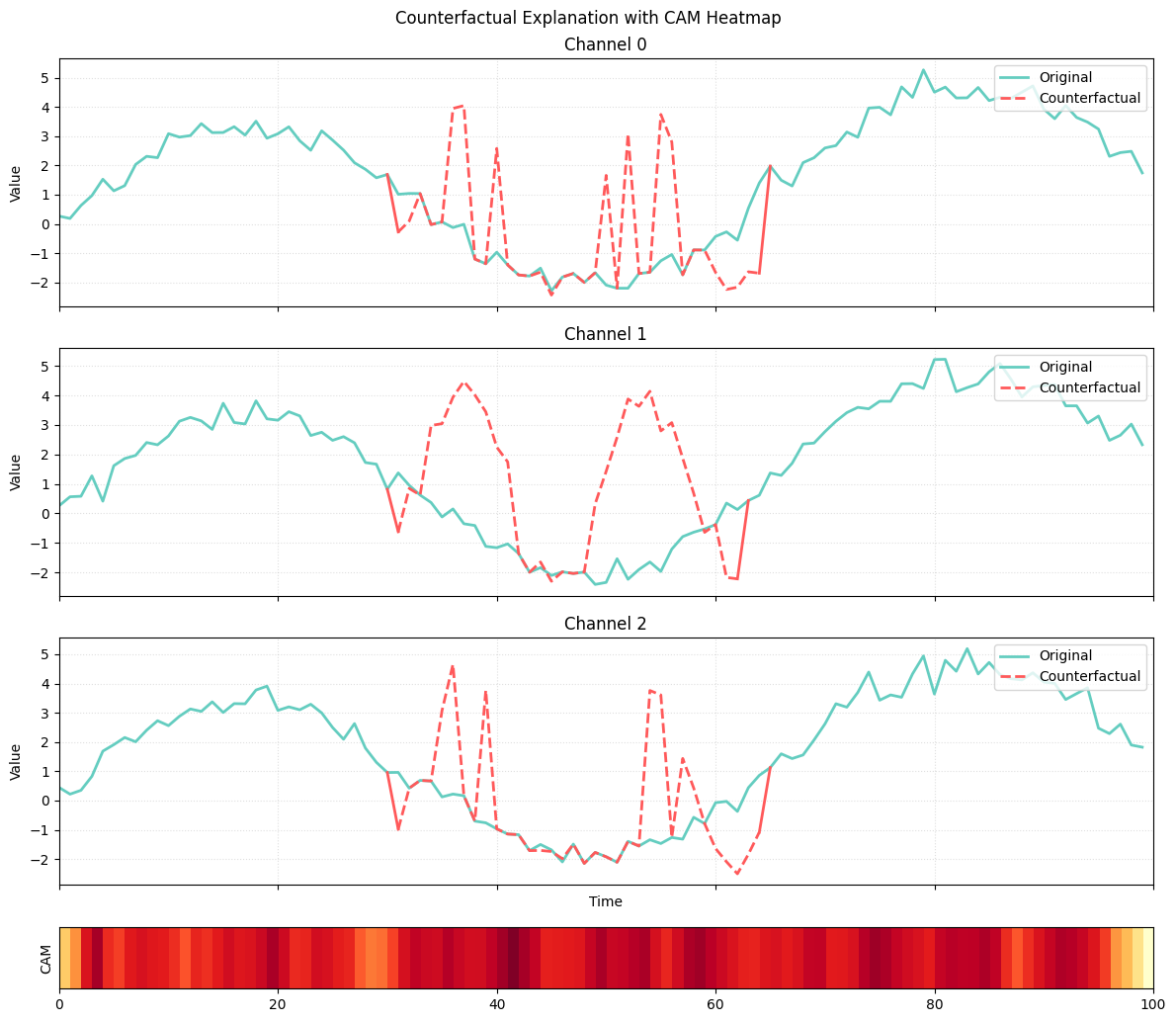
In the visualization:
- green curves represent the original instance
- red curves represent the counterfactual subsequence
- the heatmap corresponds to CAM scores of the nearest unlike neighbor
The alignment between CAM activation and the altered subsequence shows how CONFETTI uses attribution to target meaningful areas of the time series.
📚Documentation
The full documentation, including usage guides, API reference, and examples, is available at:
👉 https://confetti-ts.readthedocs.io/en/latest/
📄License
CONFETTI is released under the MIT License.
📝 Citing CONFETTI
A formal citation entry will appear here once the paper is officially published.
To replicate the experiments described in the paper, use the paper branch of this
repository. It contains the experiment scripts, model configurations, and dataset handling
used in the publication.
Release history Release notifications | RSS feed


Download files
Download the file for your platform. If you're not sure which to choose, learn more about installing packages.
Source Distribution
Built Distribution
Filter files by name, interpreter, ABI, and platform.
If you're not sure about the file name format, learn more about wheel file names.
Copy a direct link to the current filters
File details
Details for the file confetti_ts-0.1.1.tar.gz.
File metadata
- Download URL: confetti_ts-0.1.1.tar.gz
- Upload date:
- Size: 28.6 kB
- Tags: Source
- Uploaded using Trusted Publishing? No
- Uploaded via: uv/0.9.3
File hashes
| Algorithm | Hash digest | |
|---|---|---|
| SHA256 |
6569365dab5958687d623c725a4f1af2d3b17309bb09a95c5b40f38c2adee34b
|
|
| MD5 |
4aa3f2d9319c325adbf478e48c3e663f
|
|
| BLAKE2b-256 |
7546a5c0309a71d7514166d3176eeae8ecc23752ad8b119793b0e354585380b9
|
File details
Details for the file confetti_ts-0.1.1-py3-none-any.whl.
File metadata
- Download URL: confetti_ts-0.1.1-py3-none-any.whl
- Upload date:
- Size: 30.6 kB
- Tags: Python 3
- Uploaded using Trusted Publishing? No
- Uploaded via: uv/0.9.3
File hashes
| Algorithm | Hash digest | |
|---|---|---|
| SHA256 |
6cef20141f47793e3cbcee34b91fac74b5180e117ca86aea97f3b48e8d484884
|
|
| MD5 |
da6ebd5419582e389b91c316fe24d0c0
|
|
| BLAKE2b-256 |
a7045f2639e5945e07f3facdeaecd0f2e66f61b891579d4fa71ed6204d254660
|






