
config-map
A searchable terminal map of your configuration files.
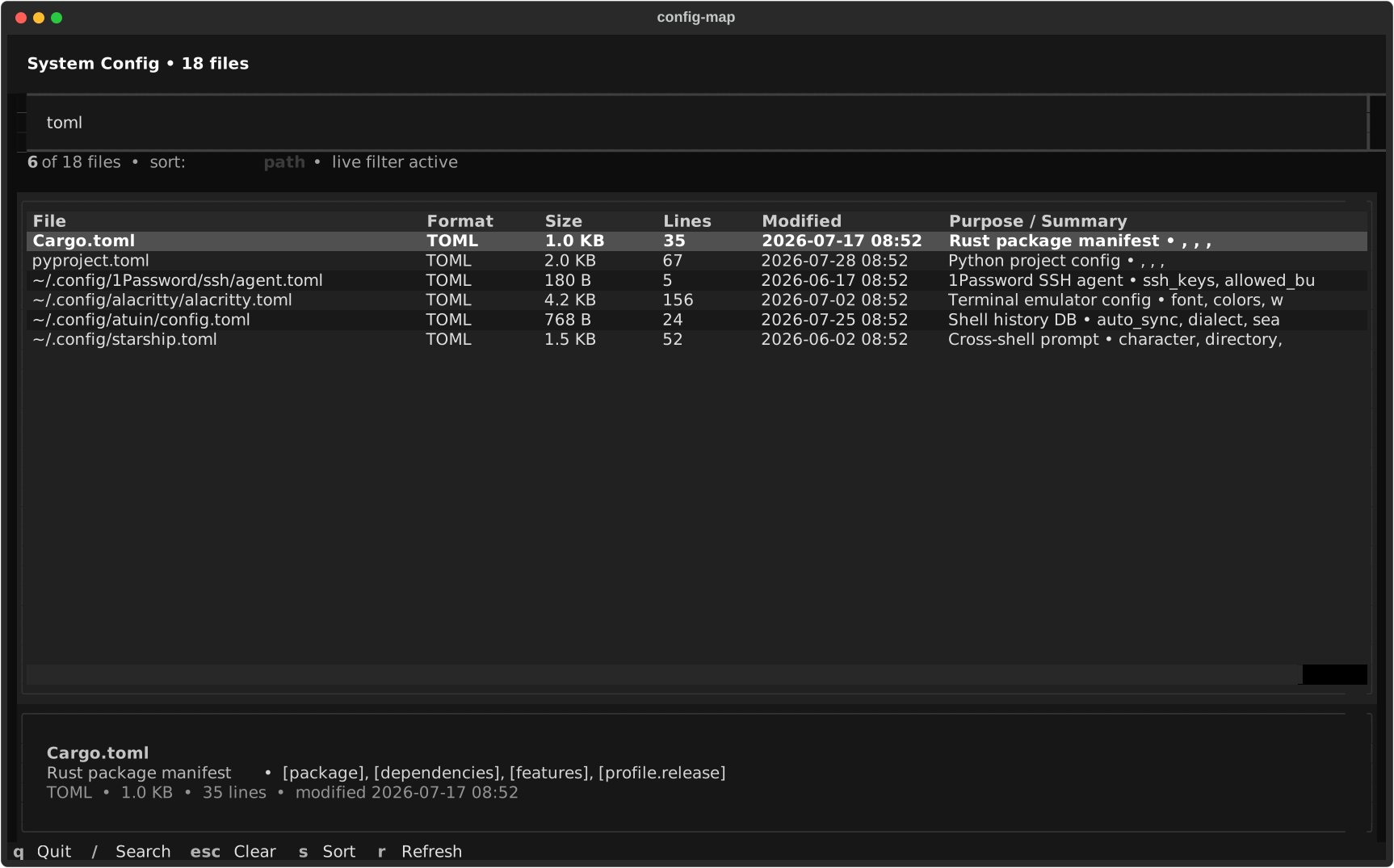
Scans ~/.config/ recursively and your top-level dotfiles, then lets you browse each
file with path, size, last-modified, format, line count, and a type-specific
summary — extracted keys for JSON/YAML/TOML, alias/export counts for shell
configs, variable counts for .env, and more.
Runs in ~3 seconds. No configuration needed. Read-only.
Quick start
pip install config-map
config-map
That's it. In a terminal, you get an interactive dashboard with live search, keyboard and mouse navigation, sorting, file details, and rescanning. When the output is piped or redirected, config-map automatically renders its original static report instead.
Interactive controls
| Key | Action |
|---|---|
/ |
Focus live search |
Esc |
Clear search and return to the file table |
↑ / ↓ or j / k |
Move through files |
s |
Cycle path, size, and modified-date sorting |
r |
Rescan configuration files in the background |
q |
Quit |
Search matches paths, formats, purposes, and extracted summaries. Multiple
words narrow the results further, so toml terminal finds TOML files whose
metadata also mentions a terminal.
What you see
Each file is displayed in a table row with:
| Column | What it shows |
|---|---|
| File | Path (relative to ~) |
| Format | JSON / YAML / TOML / ENV / SHELL / PLIST / INI, etc. |
| Size | Human-readable (B / KB / MB) |
| Lines | Line count (skips files >5 MB) |
| Modified | Last modified date and time |
| Purpose / Summary | What the file is for + extracted structure |
Type-specific summaries
The script recognizes 60+ config file types and extracts meaningful summaries:
- JSON → top-level keys (e.g.,
name, version, main, scripts, dependencies) - YAML → top-level keys
- TOML → top-level sections/keys (e.g.,
[tool.poetry], [build-system]) - .env → variable count (e.g.,
12 variables) - Shell configs → alias/export/function counts (e.g.,
9 aliases, 21 exports) - .gitconfig → section list (e.g.,
user, core, alias, push, pull) - SSH config → Host entries
- Plists → top-level keys
- INI/CFG → section headers
A header panel shows aggregate stats: total file count, total size, format breakdown, and number of directories scanned.
Usage
config-map [OPTIONS]

Options:
  --demo            Render with synthetic data (for screenshots, no filesystem access)
  --full            Scan everything (default)
  --config          Only scan ~/.config/
  --dotfiles        Only scan top-level dotfiles (~/.zshrc, ~/.gitconfig, etc.)
  --search TEXT     Filter by path/name substring (case-insensitive)
  --min-size SIZE   Only show files >= this size (e.g., 1k, 100k, 1m)
  --interactive     Force the interactive TUI
  --no-interactive  Render the static report, even in a terminal
  --no-color        Disable colored output
  --version         Show version
  --help            Show help message
Examples
# Find all Hermes-related config files
config-map --search herme

# See only substantial config files (>= 10KB)
config-map --min-size 10k

# Focus on just your shell and git configs
config-map --dotfiles --search zsh
config-map --dotfiles --search git

# Audit just ~/.config/
config-map --config

# Keep the classic report for a screenshot or saved text file
config-map --no-interactive
How it works
- Discovery — Walks
~/.config/recursively and all top-level dotfiles in~/. Skips known noise dirs (.cache,node_modules, GPU caches, etc.) and binary file extensions. - Analysis — For each file, detects format and runs the appropriate extractor. Large files (>5 MB) are stat'd but never read — keeps it fast.
- Display — Opens a searchable Textual data table in a terminal, or groups files into color-coded Rich tables when using static output.
Config directories that are mostly caches (.hermes, .vscode, .lmstudio,
.gemini, .claude, .cursor, etc.) are scanned shallowly — only
top-level files, no recursion. This avoids walking gigabytes of models and
caches.
Performance
On a typical macOS system with ~30 config directories:
- Scan time: ~3 seconds
- Memory: Minimal (files are processed one at a time)
- Disk: Read-only. Never writes anything.
Requirements
Works on macOS and Linux with Python 3.9+.
Use cases
- Audit your dotfiles: See what's accumulated across years of tool installs
- Find stale configs: Sort by modified date to spot configs from uninstalled tools
- Discover forgotten settings: That
.envfrom a project you abandoned two years ago - Document your system: Screenshot the output for a system readme
- Clean up: Identify which config directories are eating disk space
Project links
| Source | github.com/toshon-jennings/config-map |
| PyPI | pypi.org/project/config-map |
| Issues | GitHub Issues |
| Changelog | CHANGELOG.md |
| Contributing | CONTRIBUTING.md |
Comparison
| Tool | What it does | How config-map differs |
|---|---|---|
ls -la ~/.* |
Lists files | config-map adds format detection, summaries, size, line counts |
find ~/.* -type f |
Finds files | config-map groups, classifies, and extracts structure |
du -sh ~/.* |
Shows disk usage | config-map shows content, not just size |
mackup |
Backs up configs | config-map audits; doesn't modify anything |
FAQ
Does config-map modify any files?
No. It's read-only. It never writes, deletes, or moves anything.
Will it pick up secrets from my .env files?
It counts variables in .env files but never displays their values. Sensitive
content stays on disk.
Why does it skip some directories recursively?
Directories known to contain large caches or downloaded models (.hermes,
.vscode, .lmstudio, etc.) are scanned at the top level only. This keeps
scan time in seconds rather than minutes. Add your own large dotdirs to
SHALLOW_DOTDIRS in the source if needed.
Can I run it on a remote server?
Yes. It reads ~ (the current user's home) so it works anywhere you have a
home directory and Python 3.9+. It's particularly useful for auditing Linux
server configs.
License
MIT © 2026 Toshon Jennings
1 maintainer

Download files
Download the file for your platform. If you're not sure which to choose, learn more about installing packages.
Source Distribution
Built Distribution
Filter files by name, interpreter, ABI, and platform.
If you're not sure about the file name format, learn more about wheel file names.
Copy a direct link to the current filters
File details
Details for the file config_map-1.1.0.tar.gz.
File metadata
- Download URL: config_map-1.1.0.tar.gz
- Upload date:
- Size: 21.6 kB
- Tags: Source
- Uploaded using Trusted Publishing? No
- Uploaded via:
twine/7.0.0 CPython/3.14.5
File hashes
| Algorithm | Hash digest | |
|---|---|---|
| SHA256 |
a85a5b4b29565746bf7c4087f48f84b5bd2f2b4b261dc71212f0c8b0b98502d4
|
|
| MD5 |
166d972271570e359f16d6cb39257889
|
|
| BLAKE2b-256 |
5d0e1d40b806be9fd4bb75597c2a47ebf3c4297e159d492563c5fc5488132d31
|
File details
Details for the file config_map-1.1.0-py3-none-any.whl.
File metadata
- Download URL: config_map-1.1.0-py3-none-any.whl
- Upload date:
- Size: 18.6 kB
- Tags: Python 3
- Uploaded using Trusted Publishing? No
- Uploaded via:
twine/7.0.0 CPython/3.14.5
File hashes
| Algorithm | Hash digest | |
|---|---|---|
| SHA256 |
0bd82c4a759638d95be38971e2a277243f86aae8e75cb288ba8f5eb33cb0b9ac
|
|
| MD5 |
5a16a126e2eb0eff0418009d91dbc308
|
|
| BLAKE2b-256 |
87c252ba41f1cb188df0c24d601c4f9285cc0ea4ff5ef309843c49b8a0e620fa
|







