
Configly Python Library
The Python library for Configly: the modern config/static data key/value store.


Table of Contents
What is Configly?
Configly is the place software developers put their static / config data—like copy, styling, and minor configuration values. They can then update that data directly from https://www.config.ly without having to wait for a deploy process / app store review. Their app or webapp receives the data near instantly. Non-technical folks themselves can publish changes freeing developers to focus on hard software problems and not copy tweaks.
On the backend, Configly provides a read-optimized static-data key/value store built with the aim of being low-latency, and high-availability. The client libraries are made to be dead-simple, lean, and efficient (via enhancements like caching). There is a fancy web UI called the Configulator for setting and updating the configs as well as seeing things like change history. Configly is built for modern software development.
There are a host of other benefits to using Configly ( such as ensuring you do not have data duplicated across clients, reducing load on your primary DB, and better tolerance for traffic spikes), read more about the benefits at Configly.
Core Features
- API to fetch Strings, JSON Blobs (arrays and objects), Booleans, and Numbers from the Configly backend
- Web interface for modifying these values without having to deploy code (we call our beloved web interface the Configulator).
- High availability, high-throughput, low-latency backend.
- Smart caching on the client libraries to minimize server requests.
- Client libraries available in an expanding amount of languages.
Concepts/ Data Model
- A Configly account contains a set of Configs.
- A Config is a key-value pair along with associated metadata (like TTL).
- The keys are strings.
- The values are one of the following types:
Types
| Type | notes | Example(s) |
|---|---|---|
| string | "I <3 Configly!" | |
| number | Can be integers or decimal; be aware some clients require you to specify which when fetching | 31337, 1.618 |
| boolean | only true or false | true, false |
| jsonBlob | A JSON5 (more relaxed JSON) array or object. | ["one", 5, true], {"text": "Buy now!", color: "#0F0"} |
More jsonBlob examples
You can make arbitrarily complex JSON structures -- as long as the top level is an object or array. This is incredibly powerful as you can send a host of data with a single config:
A more complex array for a store inventory. Note that because we're using JSON5, quotes are optional for single words.
[
  "Simple T-shirt",
  "Basic hoodie",
  {
    item: "Complex T-shirt",
    sizes: ['S', 'M', 'L'],
    price_us_cents: [1099, 1499, 1599],
  }
]
And a more complex object showing how you can internationalize and set style:
{
  "welcome_message": {
    copy: {
      'en': 'Welcome!',
      'es': "¡Bienvenidos!",
    }, style: {
      color: '#0F0',
      fontWeight: '700',
    }
  },
  "buy_button" : {
    copy: {
      'en': 'Buy',
      'es': "Comprar",
    }, style: {
      backgroundColor: "#F00",
      border: "border-radius 10px",
    }
  }
}
Getting Started
In four easy steps!
1. Get your API Key
You'll need a Configly account. Registration is lightning quick—you can register via visiting https://www.config.ly/signup.
After signing up, you can grab your API Key from https://www.config.ly/register. You'll need your API Key to setup the API below.
2. Create your first Config
From https://www.config.ly/config, create a new Config via the "Add" button:
Consider creating a simple JSON Object or Array Config called greetings and give it the value of:
['hello', 'hola', '你好', 'नमस्ते']:
https://www.config.ly/config should look like this:
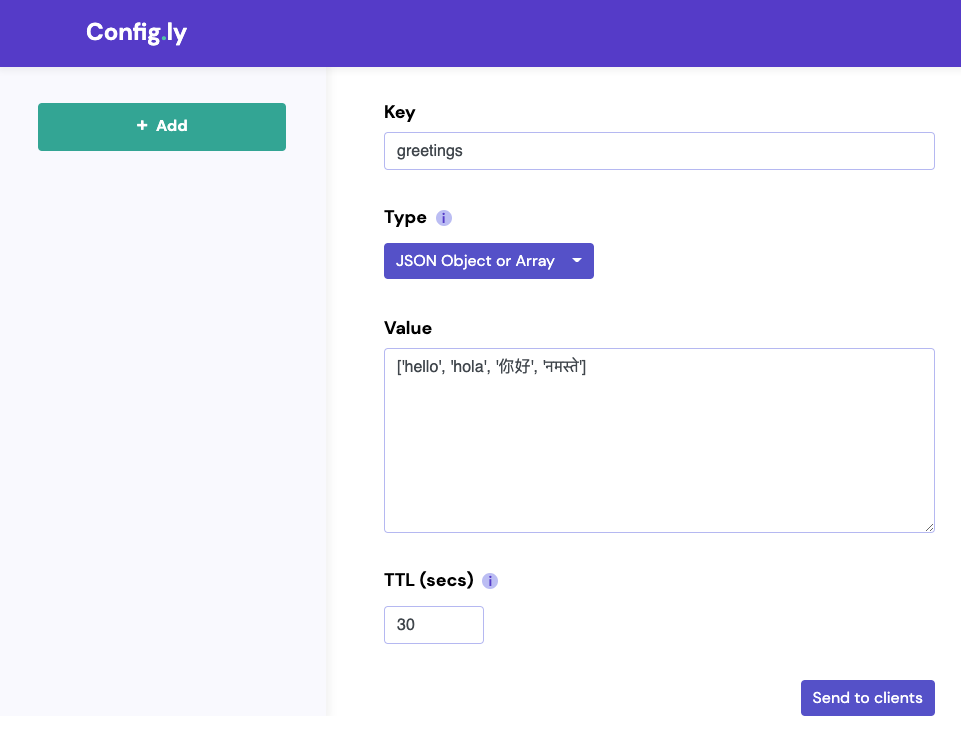
Be sure to save via clicking 'Send to Clients'. Now, we'll write client code to fetch this key.
3. Install the client library
If you're using Bundler (as is often the case with Rails), add the following line to your project's Gemfile:
gem 'configly-ruby', '~> 1.0.0'
Or, if you're using the Gem directly from your application, you can run:
gem install configly-ruby
You will need to set the CONFIGLY_API_KEY environment variable.
4. Fetch the Config
In a Rails controller, add the following code
def get
   begin
      key = Configly::Client.get(params[:key])
      render plain: key
   rescue Configly::KeyError
      render :status => 404
   end
end
Map the route, and then request it in your browser with the key params (e.g. http://localhost:3000/configly?key=test1234).
Try changing some values on https://www.config.ly/config to confirm that the client is getting the updates.
Congratulations you have Configly working end-to-end! Now, feel free to use Configly with all your projects!
Configuring this library to use websockets
Coming soon...
Usage
The golden rule of Configly library use is: do NOT assign the result of a
get()to a long-lived variable; in order to check for new values from the server, you must callget().
The package needs to be configured with your account's API key, which is available in the Configly Configulator
// This value is stored on the Config.ly servers.
store_catalog:
{
   has_sale: true,
   discount: 0.8,
   items: ['T Shirt', 'Hoodie', 'Ferrari'],
   price: [ 100, 250,  200000],
}
On the Python client:
# You can try this example out by setting the `CONFIGLY_API_KEY` environmental variable to our demo account: 'Dem0apiKEY'
begin
   catalog = Configly::Client.get("store_catalog")
   items = catalog['items']
   prices = catalog['prices']

   items.each_with_index do |item, index|
      Rails.logger.debug("#{item}: #{prices[index]} USD")
   end
rescue Configly::KeyError
   Rails.logger.error("Something went wrong")
end
Note: If the key doesn't exist, this will raise a Configly::KeyError
Feature Flags
Here is an example with feature flags.
// These values are stored on the Config.ly server

feature1_enabled: true
feature2_enabled: false
On the ruby client:
# Remember, you need to set the `CONFIGLY_API_KEY` environment variable.
# You can find your API Key on https://www.config.ly/config.

begin
  if Configly::Client.get('feature1_enabled')
    # Logic for feature 1
  end

  if Configly::Client.get('feature2_enabled')
    # Logic for feature 2
  end
rescue Configly::KeyError
   Rails.logger.error("Something went wrong")
end
License
This repository is published under the MIT license.
1 maintainer

Metadata
1 maintainer
Release files for configly-python-configly 0.0.2
For a detailed explanation of source distributions (sdists) and built distributions (wheels), please see the package formats documentation.
Source distribution (sdist)
| File | Size | Uploaded | Provenance | Actions |
|---|---|---|---|---|
| configly-python-configly-0.0.2.tar.gz | 5.9 kB | Without provenance | Details for configly-python-configly-0.0.2.tar.gz |
Built distribution (wheel)
| File | Interpreter | ABI | Platform | Actions Reset |
|---|---|---|---|---|
| configly_python_configly-0.0.2-py3-none-any.whl | Python 3 | none | any | Details for configly_python_configly-0.0.2-py3-none-any.whl |
Total release size: 12.1 kB
Release files / configly-python-configly-0.0.2.tar.gz
| Download URL | configly-python-configly-0.0.2.tar.gz |
|---|---|
| Size | 5.9 kB |
| Tags | Source |
|
SHA-256 checksum How to use checksums |
e69552b120a2e19660dbf7796d08af83310d6b1825e3b1fce3d2af8dbd9a1f76
|
|
BLAKE2b-256 checksum How to use checksums |
d735ab8246310f3834f68589cef72f89f22b521f14dc86b02acb66544ab871b2
|
| Upload date | |
|
Uploaded using Trusted Publishing? What is trusted publishing? |
No |
| Uploaded via |
twine/3.3.0 pkginfo/1.6.1 requests/2.25.1 setuptools/51.1.2 requests-toolbelt/0.9.1 tqdm/4.55.2 CPython/3.8.2
|
Release files / configly_python_configly-0.0.2-py3-none-any.whl
| Download URL | configly_python_configly-0.0.2-py3-none-any.whl |
|---|---|
| Size | 6.2 kB |
| Tags | Python 3 |
|
SHA-256 checksum How to use checksums |
739619904ca6cbb767fb3ff4f9085a523b04a20825ffac2ebf50ae151cc01f46
|
|
BLAKE2b-256 checksum How to use checksums |
cd103ac928463fdcd04ce9bb68e019ea9ce2f7c7416db5d44aab7b14c7ab73fd
|
| Upload date | |
|
Uploaded using Trusted Publishing? What is trusted publishing? |
No |
| Uploaded via |
twine/3.3.0 pkginfo/1.6.1 requests/2.25.1 setuptools/51.1.2 requests-toolbelt/0.9.1 tqdm/4.55.2 CPython/3.8.2
|
Security for configly-python-configly 0.0.2
Provenance
Provenance describes where a file came from. On PyPI, provenance is shared via attestations, which provide a verifiable record of the build or publishing details. View details, limitations and caveats.
No provenance found
None of the files in this release were uploaded with provenance metadata.
A note on package security
PyPI is a repository for distributing packages, not a service for auditing them. While third-party security researchers and our staff do their best to detect and remove malicious packages, PyPI cannot guarantee the quality, security or suitability of any given package.
To learn more about protecting yourself from malicious actors, visit our package security documentation.













