

confluence-cli
Confluence, readable and scriptable.
Read, search, browse, automate, and edit Confluence Cloud or Data Center—without leaving the terminal.





Install · Quick start · Read and explore · Proof Desk · Commands
confluence-cli makes Confluence directly useful from the shell. Read and browse without creating a local sync directory. Pipe stable JSON into scripts and agents. When content needs to change, work in Markdown and publish through an explicit plan-and-apply boundary.
| Job | Workflow | Result |
|---|---|---|
| Read and browse | space, search, page, blog, tui |
Scannable terminal output and a keyboard-first reader |
| Query and automate | JSON output, --fields, schema |
Stable, token-efficient data for scripts and agents |
| Edit and publish | pull → edit → plan → apply |
Reviewable Markdown changes with remote-drift protection |
Install
Choose the package manager that fits your environment. Every distribution installs the confluence executable.
With uv from PyPI:
uv tool install confluence-cli-rs
With Homebrew:
brew install rvben/tap/confluence-cli
With Cargo:
cargo install confluence-cli
With Nix (flakes):
nix run github:rvben/confluence-cli -- --help
nix profile install github:rvben/confluence-cli
The PyPI distribution is named confluence-cli-rs; the crate is named confluence-cli. Prebuilt macOS and Linux archives for Intel and ARM are available from GitHub Releases.
Quick start
Connect a profile and check access:
confluence init
confluence doctor --space SPACEKEY
For local-only diagnostics, use confluence auth status --offline or
confluence doctor --offline. The former doctor --skip-network spelling
remains available as a compatibility alias.
Then read, search, or browse immediately—no pull required:
confluence search 'release notes' --space DOCS
confluence page tree 'DOCS:Handbook'
confluence tui --space DOCS
The same commands become structured input when piped:
confluence search 'release notes' --space DOCS \
  | jq '.items[] | {title, web_url}'
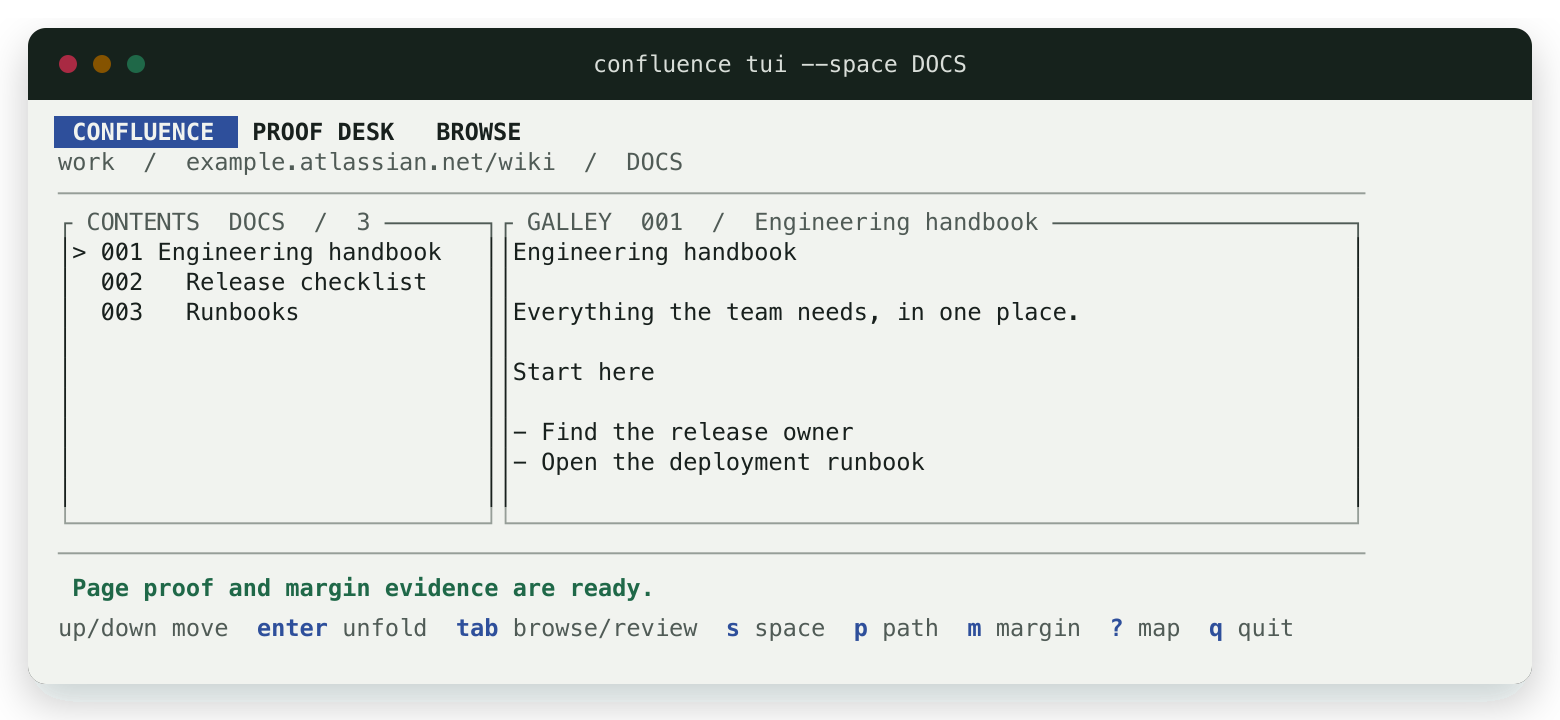
Proof Desk in its medium-width Browse layout, rendered from the deterministic test fixture. Open full resolution.
When you want to edit, pull a page tree to Markdown and inspect the local plan:
confluence pull tree 'SPACEKEY:Parent Page' ./docs/parent-page
$EDITOR ./docs/parent-page/parent-page--123/index.md
confluence plan ./docs/parent-page --diff
When the plan is correct, apply it:
confluence apply ./docs/parent-page
plan reads only the Markdown and sidecar state on disk. apply validates the complete local tree and checks every remote version before writing. If Confluence changed after the pull, the apply is refused unless you explicitly choose --force.
Before writing a hand-edited storage body, check it offline:
confluence template expand > body.xml
confluence validate --format storage --body-file body.xml
validate needs no credentials and makes no API requests. Writes also validate
bodies automatically, catching malformed XML, broken CDATA, and known macro
body mismatches before contacting Confluence. Markdown input, including embedded
storage blocks, goes through the same checks after conversion. See
storage-format guidance
for the validation limits and error-recovery workflow.
To inspect XML generated from Markdown, run
confluence convert --body-file page.md --output-file generated.xml. The saved
artifact remains available if validation fails. Ready-to-use code, expand, and
noformat templates are built into the CLI. Agents can use the bundled
Confluence skill; the
upgrade and editing workflow explains installation,
preserving the original body, and updating against its base version.
Read and explore
The direct commands cover everyday Confluence retrieval without requiring a sync directory:
confluence space list
confluence search 'on-call rotation' --space OPS
confluence page get 'OPS:Incident handbook' --show-body
confluence page tree 'OPS:Runbooks'
confluence blog list ENG
References accept a numeric content ID, a Confluence URL, or SPACE:Title. Search accepts plain text by default and full Confluence Query Language with --cql.
On a terminal, search results, lists, and page metadata are formatted for scanning. page get --show-body includes the canonical storage-format body for agents and transformations; Proof Desk turns that content into a readable page for humans.
When stdout is piped, data commands emit one JSON document:
confluence search 'release notes' --space DOCS \
  | jq '.items[] | {title, web_url}'
For an interactive reading experience, confluence tui opens Proof Desk on the first visible space. The --space option starts in a specific space, and o opens the selected page in Confluence.
Proof Desk TUI
Proof Desk is a keyboard-first, read-only workspace for reading and browsing Confluence. Add a local path when you also want to review a sync plan:
confluence tui
confluence tui --space DOCS
confluence tui --space DOCS --path ./docs/handbook
Browse mode combines the page hierarchy, a readable Markdown proof, and an outer margin for metadata, labels, attachments, comments, and content properties. Review mode presents the local plan and unified body diffs in the same layout.
The TUI never applies changes and does not contact Confluence to detect drift. confluence apply remains the separate, remote-aware write boundary. Passing --delete-remote only includes attachment deletions in the local review plan.
| Key | Action |
|---|---|
Arrow keys or j / k |
Move through content |
Enter |
Unfold the selected proof |
Tab |
Switch between Browse and Review |
1–4 |
Change the margin evidence |
s |
Choose a space |
p |
Choose a local sync directory |
o |
Open the selected page in Confluence |
? |
Show the complete keyboard map |
Wide terminals show all three regions. Compact terminals reveal complete proofs and margins on demand. Proof Desk requires interactive stdin and stdout and honors --no-color.
Edit and publish with Markdown
Pull
Export one page, a page tree, or an entire space:
confluence pull page 'DOCS:Getting Started' ./docs/getting-started
confluence pull tree 'DOCS:Handbook' ./docs/handbook
confluence pull space DOCS ./docs
Pulls are staged beside the destination and installed as one snapshot. A pull refuses to replace local Markdown changes or unmanaged files. Use --force only when the remote snapshot should replace the entire destination.
Filtered pull space --since ... exports require a new or empty destination because a partial result cannot safely replace a complete snapshot. Attachment names are confined to their page's attachments/ directory.
A page is written only when its Markdown converts back to valid storage. When some pages of a pull do not, the rest are still written, and the pull exits 2 and names each page it left out. For every such page, .confluence-pull-failures/<slug>--<content-id>/ in the destination holds remote.xml (the storage Confluence returned), generated.md (the Markdown made from it), and, when that Markdown converts at all, generated.xml (the storage it converts to). .confluence-pull-failures/manifest.json records those files, and a later pull replaces the directory only while it holds exactly what the manifest records; move or delete anything you add or change there, or pass --force. A link from a page that is written to a page that was left out stays the remote link. Pages below a page that was left out keep their place and their remote parent.
Markdown does not carry every detail of storage: a wrapping <div>, for example, has no Markdown form. pull compares the storage each page converts back to with the storage Confluence returned, and reports how many pages differ. plan names those pages, because the first update applied to one also rewrites that markup.
A mention of a user is pulled as a link that shows the user's name, such as [@Jane Doe](confluence-user://user?account-id=...&name=Jane+Doe). pull looks up each mentioned user once. A user Confluence does not disclose keeps the identifier as link text, and so do all mentions when the lookup itself fails, which pull warns about and does not fail on. The target records the name, so a mention left as pulled is written back as a plain mention, and one whose text you change gets that text as its link text.
Edit
Each page has a predictable local layout:
<slug>--<content-id>/
├── index.md
├── .confluence.json
└── attachments/
The Markdown frontmatter contains editable metadata such as title, type, labels, status, and properties. Move a page directory beneath its desired local parent to reparent it; the parent frontmatter field is informational.
The sidecar records remote IDs, versions, hashes, and attachment mappings. It is the baseline that makes offline planning and drift detection possible.
Plan
confluence plan ./docs/handbook --diff
plan validates the complete tree and compares it with the state captured by pull. It never contacts Confluence and never writes remotely. A page whose pulled Markdown does not carry its remote markup exactly is listed even when it is unchanged, and an update of such a page says that it also rewrites that markup.
For an interactive review, open the same directory in the Proof Desk:
confluence tui --space DOCS --path ./docs/handbook
Apply
confluence apply ./docs/handbook
Before its first mutation, apply validates every local document and preflights every remote version. Versioned updates continue to reject drift that occurs during the apply. If an API failure leaves a partial remote mutation, the CLI reports the completed actions in structured error details so automation can reconcile safely.
Remote attachment deletions are opt-in with --delete-remote. Conditional overwrites require an explicit --force or --replace where supported.
Authentication
confluence init starts the guided login flow. It links to the appropriate token
page, discovers scoped-token details, verifies access, and stores credentials in
the operating-system keychain. New profiles start read-only unless you explicitly
enable commands that change Confluence. Cloud and Data Center profiles share the
same workflow.
Scripts and headless machines can use explicit profiles or environment-only credentials. See the authentication guide for Cloud, Data Center, CI, keychain, environment, and private certificate authority examples.
Command surface
Reading, browsing, direct updates, and Markdown publishing are all first-class:
| Area | Commands |
|---|---|
| Accounts | auth login|status|logout|migrate, profile add|list|use|remove |
| Discovery | space list|get, search, page list|get|tree, blog list|get |
| Content | page move|create|update|delete, blog create|update|delete |
| Page data | attachment, label, comment, and property command groups |
| Markdown | pull page|tree|space, plan, tui, apply |
| Body authoring | validate, convert, template code|expand|noformat (offline) |
| Tooling | config show|path, doctor, completions, schema |
On a terminal, --output auto produces readable text. When piped, data
commands produce one JSON document. Agents can request one token-efficient,
versioned command contract without loading the complete CLI surface:
confluence schema --command 'page get'
See the CLI reference for output modes, exit codes, shell completions, Markdown fidelity, and the complete command map.
Status and compatibility
The project is an early release, live-verified against Confluence Cloud and Data Center.
| Area | Cloud | Data Center | Evidence |
|---|---|---|---|
| Reading, search, and content CRUD | Verified | Verified | Live end-to-end lifecycle |
| Attachments, labels, properties, comments | Verified | Verified | Live end-to-end lifecycle |
pull → plan → apply |
Verified | Verified | Drift refusal and no-op checks |
| Proof Desk | Shared APIs | Shared APIs | Deterministic responsive render tests |
The deterministic simulator runs on every pull request. Protected live checks exercise real provider lifecycles. The testing guide explains the confidence model and automation.
Known limits
- Unknown provider-specific macros can behave differently between Cloud and Data Center; unsupported storage is preserved instead of silently flattened.
applyrefuses remote-version drift unless--forceis explicit.
Documentation
- Authentication and profiles
- CLI, output, schema, and Markdown reference
- Testing and live-provider confidence
- Release and recovery runbook
Development and releases
make test           # deterministic unit, contract, and simulator tests
make release-check  # formatting, clippy, tests, smoke checks, and packaging
Live-provider tests and the local Data Center stack are documented in the testing guide.
License
1 maintainer

Metadata
1 maintainer
Release files for confluence-cli-rs 0.1.41
For a detailed explanation of source distributions (sdists) and built distributions (wheels), please see the package formats documentation.
Source distribution (sdist)
| File | Size | Uploaded | Provenance | Actions |
|---|---|---|---|---|
| confluence_cli_rs-0.1.41.tar.gz | 495.7 kB | Without provenance | Details for confluence_cli_rs-0.1.41.tar.gz |
Built distributions (wheels)
| File | Actions Reset | |||
|---|---|---|---|---|
| confluence_cli_rs-0.1.41-py3-none-manylinux_2_17_x86_64.manylinux2014_x86_64.whl | Python 3 | none | Linux glibc 2.17+ x86-64 | Details for confluence_cli_rs-0.1.41-py3-none-manylinux_2_17_x86_64.manylinux2014_x86_64.whl |
| confluence_cli_rs-0.1.41-py3-none-manylinux_2_17_aarch64.manylinux2014_aarch64.whl | Python 3 | none | Linux glibc 2.17+ ARM64 | Details for confluence_cli_rs-0.1.41-py3-none-manylinux_2_17_aarch64.manylinux2014_aarch64.whl |
| confluence_cli_rs-0.1.41-py3-none-macosx_11_0_arm64.whl | Python 3 | none | macOS 11.0+ ARM64 | Details for confluence_cli_rs-0.1.41-py3-none-macosx_11_0_arm64.whl |
| confluence_cli_rs-0.1.41-py3-none-macosx_10_12_x86_64.whl | Python 3 | none | macOS 10.12+ x86-64 | Details for confluence_cli_rs-0.1.41-py3-none-macosx_10_12_x86_64.whl |
Total release size: 25.3 MB
Release files / confluence_cli_rs-0.1.41.tar.gz
| Download URL | confluence_cli_rs-0.1.41.tar.gz |
|---|---|
| Size | 495.7 kB |
| Tags | Source |
|
SHA-256 checksum How to use checksums |
21c750e3117838c5d4029caca48a5d398878f31eca4e23c0aafbd7b244ed88f3
|
|
BLAKE2b-256 checksum How to use checksums |
26d82e3e5165fd13de3655cf4a7835714ab68019b11bb9f9cd735130e729ffdd
|
| Upload date | |
|
Uploaded using Trusted Publishing? What is trusted publishing? |
Yes |
| Uploaded via |
uv/0.13.9 {"installer":{"name":"uv","version":"0.13.9","subcommand":["publish"]},"python":null,"implementation":{"name":null,"version":null},"distro":{"name":"Ubuntu","version":"26.04","id":"resolute","libc":null},"system":{"name":null,"release":null},"cpu":null,"openssl_version":null,"setuptools_version":null,"rustc_version":null,"ci":true}
|
Release files / confluence_cli_rs-0.1.41-py3-none-manylinux_2_17_x86_64.manylinux2014_x86_64.whl
| Download URL | confluence_cli_rs-0.1.41-py3-none-manylinux_2_17_x86_64.manylinux2014_x86_64.whl |
|---|---|
| Size | 7.1 MB |
| Tags | Linux glibc 2.17+ x86-64 Python 3 |
|
SHA-256 checksum How to use checksums |
68eda73236a6e830365462a7f251f8920a049ebdc40b24c89751a4f6999f2758
|
|
BLAKE2b-256 checksum How to use checksums |
3d8e308b9b4e21c664d76255d94dc594122e38be69869212bdaef562612be0af
|
| Upload date | |
|
Uploaded using Trusted Publishing? What is trusted publishing? |
Yes |
| Uploaded via |
uv/0.13.9 {"installer":{"name":"uv","version":"0.13.9","subcommand":["publish"]},"python":null,"implementation":{"name":null,"version":null},"distro":{"name":"Ubuntu","version":"26.04","id":"resolute","libc":null},"system":{"name":null,"release":null},"cpu":null,"openssl_version":null,"setuptools_version":null,"rustc_version":null,"ci":true}
|
Release files / confluence_cli_rs-0.1.41-py3-none-manylinux_2_17_aarch64.manylinux2014_aarch64.whl
| Download URL | confluence_cli_rs-0.1.41-py3-none-manylinux_2_17_aarch64.manylinux2014_aarch64.whl |
|---|---|
| Size | 6.7 MB |
| Tags | Linux glibc 2.17+ ARM64 Python 3 |
|
SHA-256 checksum How to use checksums |
46b1cafa8ba50aa78bfa9e2248f10b505a2d7a678b2dabd50beea47ffa4a86e4
|
|
BLAKE2b-256 checksum How to use checksums |
f6dbe57d9cbb65ded1503aac7855437f425a5fbe25b3e11aa7ffe51dccec3134
|
| Upload date | |
|
Uploaded using Trusted Publishing? What is trusted publishing? |
Yes |
| Uploaded via |
uv/0.13.9 {"installer":{"name":"uv","version":"0.13.9","subcommand":["publish"]},"python":null,"implementation":{"name":null,"version":null},"distro":{"name":"Ubuntu","version":"26.04","id":"resolute","libc":null},"system":{"name":null,"release":null},"cpu":null,"openssl_version":null,"setuptools_version":null,"rustc_version":null,"ci":true}
|
Release files / confluence_cli_rs-0.1.41-py3-none-macosx_11_0_arm64.whl
| Download URL | confluence_cli_rs-0.1.41-py3-none-macosx_11_0_arm64.whl |
|---|---|
| Size | 5.4 MB |
| Tags | Python 3 macOS 11.0+ ARM64 |
|
SHA-256 checksum How to use checksums |
490611148d4b8bd6bbe6f67d265b18ab42078ff9071c6e00b85f19a9f91f6234
|
|
BLAKE2b-256 checksum How to use checksums |
235a173d75386dace8455b486203f699ffef28fc67d3fde64939eb1342c13042
|
| Upload date | |
|
Uploaded using Trusted Publishing? What is trusted publishing? |
Yes |
| Uploaded via |
uv/0.13.9 {"installer":{"name":"uv","version":"0.13.9","subcommand":["publish"]},"python":null,"implementation":{"name":null,"version":null},"distro":{"name":"Ubuntu","version":"26.04","id":"resolute","libc":null},"system":{"name":null,"release":null},"cpu":null,"openssl_version":null,"setuptools_version":null,"rustc_version":null,"ci":true}
|
Release files / confluence_cli_rs-0.1.41-py3-none-macosx_10_12_x86_64.whl
| Download URL | confluence_cli_rs-0.1.41-py3-none-macosx_10_12_x86_64.whl |
|---|---|
| Size | 5.6 MB |
| Tags | Python 3 macOS 10.12+ x86-64 |
|
SHA-256 checksum How to use checksums |
14ceac80cdd9cae79d052cbf35216a462e819e25aca5c6bd96d7f3eed195fa15
|
|
BLAKE2b-256 checksum How to use checksums |
ed8d3c47341d21ef5991e6c62f08d9bce0b201837eadd75954757480dd0dd1c5
|
| Upload date | |
|
Uploaded using Trusted Publishing? What is trusted publishing? |
Yes |
| Uploaded via |
uv/0.13.9 {"installer":{"name":"uv","version":"0.13.9","subcommand":["publish"]},"python":null,"implementation":{"name":null,"version":null},"distro":{"name":"Ubuntu","version":"26.04","id":"resolute","libc":null},"system":{"name":null,"release":null},"cpu":null,"openssl_version":null,"setuptools_version":null,"rustc_version":null,"ci":true}
|
Security for confluence-cli-rs 0.1.41
Provenance
Provenance describes where a file came from. On PyPI, provenance is shared via attestations, which provide a verifiable record of the build or publishing details. View details, limitations and caveats.
No provenance found
None of the files in this release were uploaded with provenance metadata.
A note on package security
PyPI is a repository for distributing packages, not a service for auditing them. While third-party security researchers and our staff do their best to detect and remove malicious packages, PyPI cannot guarantee the quality, security or suitability of any given package.
To learn more about protecting yourself from malicious actors, visit our package security documentation.














