
Confradar
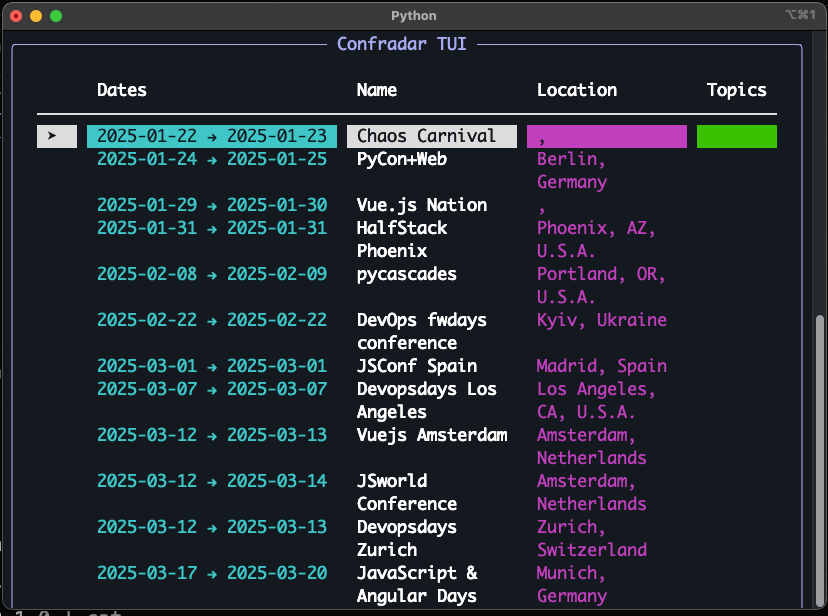
A colorful CLI to explore upcoming tech conferences. Built with Typer and Rich.
Screenshot
Install
- Recommended (no venv hassle):
pipx install confradar
# upgrade later
pipx upgrade confradar
- Alternative (user site):
python3 -m pip install --user confradar
# ensure ~/.local/bin (Linux) or ~/Library/Python/*/bin (macOS) is on PATH
Install from GitHub (no venv needed)
- pipx from a Git tag (recommended):
pipx install "confradar @ git+https://github.com/amrrs/confradar.git@v0.1.0"
# upgrade later (rebuilds from Git):
pipx upgrade confradar
- pipx from main (latest):
pipx install "confradar @ git+https://github.com/amrrs/confradar.git@main"
- pip (user site) from Git:
python3 -m pip install --user "confradar @ git+https://github.com/amrrs/confradar.git@v0.1.0"
# ensure ~/.local/bin (Linux) or ~/Library/Python/*/bin (macOS) is on PATH
- Local clone with pipx:
git clone https://github.com/amrrs/confradar.git
cd confradar
pipx install .
If confradar is not found after pip --user install
Add your user scripts directory to PATH (macOS example for Python 3.9):
echo 'export PATH="$HOME/Library/Python/3.9/bin:$PATH"' >> ~/.zshrc
source ~/.zshrc
Portable (any OS/Python version):
USER_BASE="$(python3 -m site --user-base)"
echo 'export PATH="'"$USER_BASE"'/bin:$PATH"' >> ~/.zshrc
source ~/.zshrc
Using pipx avoids PATH issues:
pipx ensurepath
Quickstart
# From the project root
python -m venv .venv && source .venv/bin/activate
pip install -U pip
pip install -e .
confradar --help
confradar interactive
Usage
confradar list— list conferences- Options:
--topic,--country,--after YYYY-MM-DD,--before YYYY-MM-DD
- Options:
confradar show "name"— show details for matching conferencesconfradar interactive— full-screen TUI with keyboard navigationconfradar add NAME --start-date YYYY-MM-DD --end-date YYYY-MM-DD --city CITY --country COUNTRY --url URL --topics "a,b,c"— add a local conference (persisted)confradar star NAME/confradar unstar NAME— manage favoritesconfradar sources list|add <URL-or-path>|remove <index>— manage refreshable data sources (JSON URL or local JSON file)confradar refresh— fetch from configured sources and update cache
First run convenience:
confradar refreshseeds sources with the built-in dataset if none configured, so you always get a result.
Data & Persistence
Ships with a small sample dataset in confradar/data/conferences.json. User-added conferences and starred items are saved under your OS data dir (via platformdirs), e.g. ~/Library/Application Support/confradar/ on macOS.
TUI keys
- Up/Down (or k/j): move one row
- PageUp / PageDown / Space: page
- Home / End: jump to start/end
- Enter / o: open link in browser
- *: star/unstar
- t: set topic filter
- c: set country filter
- r: refresh sources
- x: clear filters
- q: quit
License
MIT
1 maintainer

Release files for confradar 0.1.0
For a detailed explanation of source distributions (sdists) and built distributions (wheels), please see the package formats documentation.
Source distribution (sdist)
| File | Size | Uploaded | |
|---|---|---|---|
| confradar-0.1.0.tar.gz | 3.7 kB | Details |
Built distribution (wheel)
| File | Interpreter | ABI | Platform | Reset |
|---|---|---|---|---|
| confradar-0.1.0-py3-none-any.whl | Python 3 | none | any | Details |
Total release size: 8.3 kB
Release files / confradar-0.1.0.tar.gz
| Download URL | confradar-0.1.0.tar.gz |
|---|---|
| Size | 3.7 kB |
| Tags | Source |
|
SHA-256 checksum How to use checksums |
85d4ae21d0b70a20e0b414cdd4a47c6630dee4600c45c88db74edd7edb4d91a0
|
|
BLAKE2b-256 checksum How to use checksums |
b4cb15bde5d9b882bf10f6d860828813a78daad2db5c0036b421a14e5df0c9d5
|
| Upload date | |
|
Uploaded using Trusted Publishing? What is trusted publishing? |
Yes |
| Uploaded via |
twine/6.1.0 CPython/3.12.9
|
Provenance
Provenance describes where a file came from. On PyPI, provenance is shared via attestations, which provide a verifiable record of the build or publishing details. View details, limitations and caveats.


PyPI Publish Attestation
PyPI verified that this artifact, at this checksum, originated from the publisher listed below.
Signed by GitHub Actions, verified by PyPI on Aug 9, 2025.
Transparency logRelease files / confradar-0.1.0-py3-none-any.whl
| Download URL | confradar-0.1.0-py3-none-any.whl |
|---|---|
| Size | 4.6 kB |
| Tags | Python 3 |
|
SHA-256 checksum How to use checksums |
9db9c04ce07935c1af7ea1bdf65c0c914b1310233e566dc29702da72d7a8c0a9
|
|
BLAKE2b-256 checksum How to use checksums |
5682393b477932c89d505ecf5a7b902c58645528c3770f0c7789bb0e1e66c4c5
|
| Upload date | |
|
Uploaded using Trusted Publishing? What is trusted publishing? |
Yes |
| Uploaded via |
twine/6.1.0 CPython/3.12.9
|
Provenance
Provenance describes where a file came from. On PyPI, provenance is shared via attestations, which provide a verifiable record of the build or publishing details. View details, limitations and caveats.
PyPI Publish Attestation
PyPI verified that this artifact, at this checksum, originated from the publisher listed below.
Signed by GitHub Actions, verified by PyPI on Aug 9, 2025.
Transparency log












