
Connected Phone Forensics
Find every phone that was connected to a computer, and show exactly where each fact came from.
USB · Bluetooth · Wi-Fi hotspots · Phone Link · iPhone pairing and backups · Messages · AirDrop · KDE Connect
from Windows, macOS and Linux disk images and triage collections.








Why
Seized phones are increasingly unreadable: since iOS 18.1 a locked iPhone reboots into Before-First-Unlock after 72 hours without use, and full-file-system extractions depend on exploits that come and go. The suspect's computer is usually easier to examine, and phones leave a trail on every computer they touch: pairing records, backups, USB and Bluetooth history, hotspot connections, companion apps, synced messages and calls.
Connected Phone Forensics finds that trail and answers three questions:
- Which phones touched this computer? Each phone is identified by its UDID, serial, IMEI, Bluetooth or Wi-Fi MAC, or USB serial, and every identifier is traced to the record that holds it.
- When, and over which connection? USB, Bluetooth, hotspot, pairing, backup, Phone Link, Continuity, companion apps, with first and last seen for each.
- What phone data is on the computer? Messages, calls, contacts and notifications, each tagged with the phone it came from.
Highlights
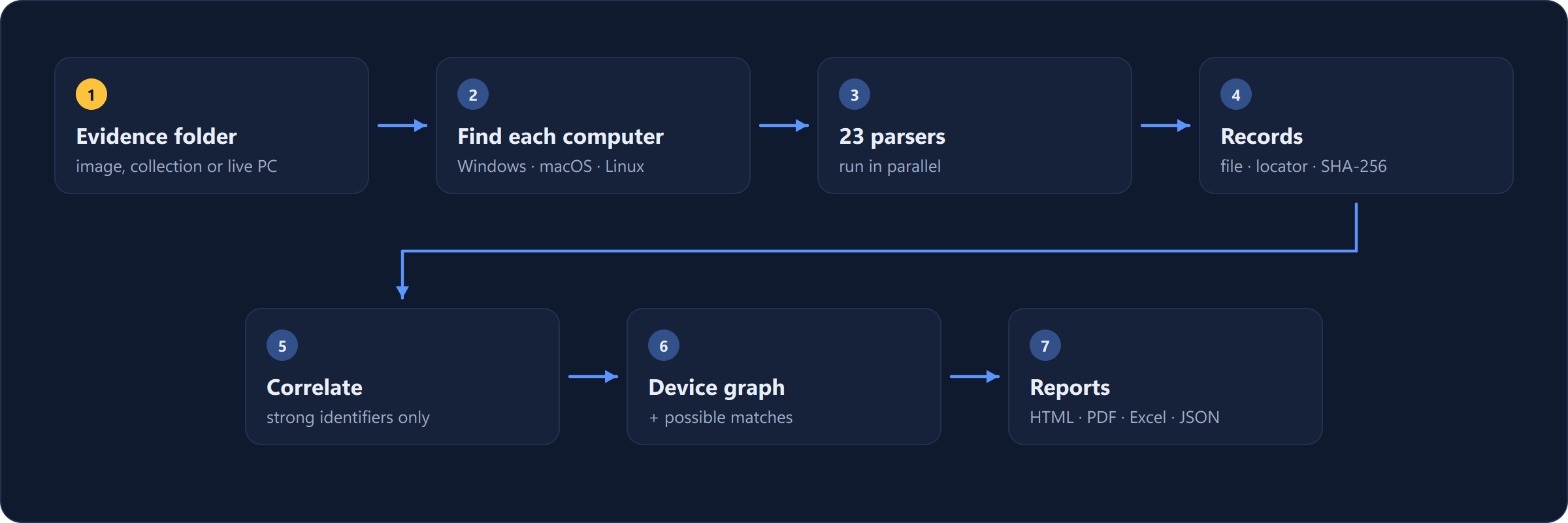
- 23 parsers for Windows, macOS and Linux, run in parallel. Point it at a mounted image or a KAPE, Velociraptor or UAC collection and every computer inside is found automatically.
- One device per phone, defensibly. Records merge only through strong identifiers named together in one record, and each merge shows the record that caused it. Shared names, numbers and neighbouring MAC addresses are shown as possible matches and never merged silently.
- Provenance for every fact: source file, SHA-256 and a locator precise enough to find the
record by hand (
SYSTEM:\ControlSet001\Enum\USB\...\0066,table=message rowid=42). - Read-only and verifiable. Databases and hives are read from copies, every evidence file read is hashed into a manifest, and nothing is skipped silently: unknown formats are reported.
- Desktop app and command line. A fast native app for examination, and a CLI for scripting and pipelines. Both write the same report, Timesketch timeline and JSON.
Screenshots
 |
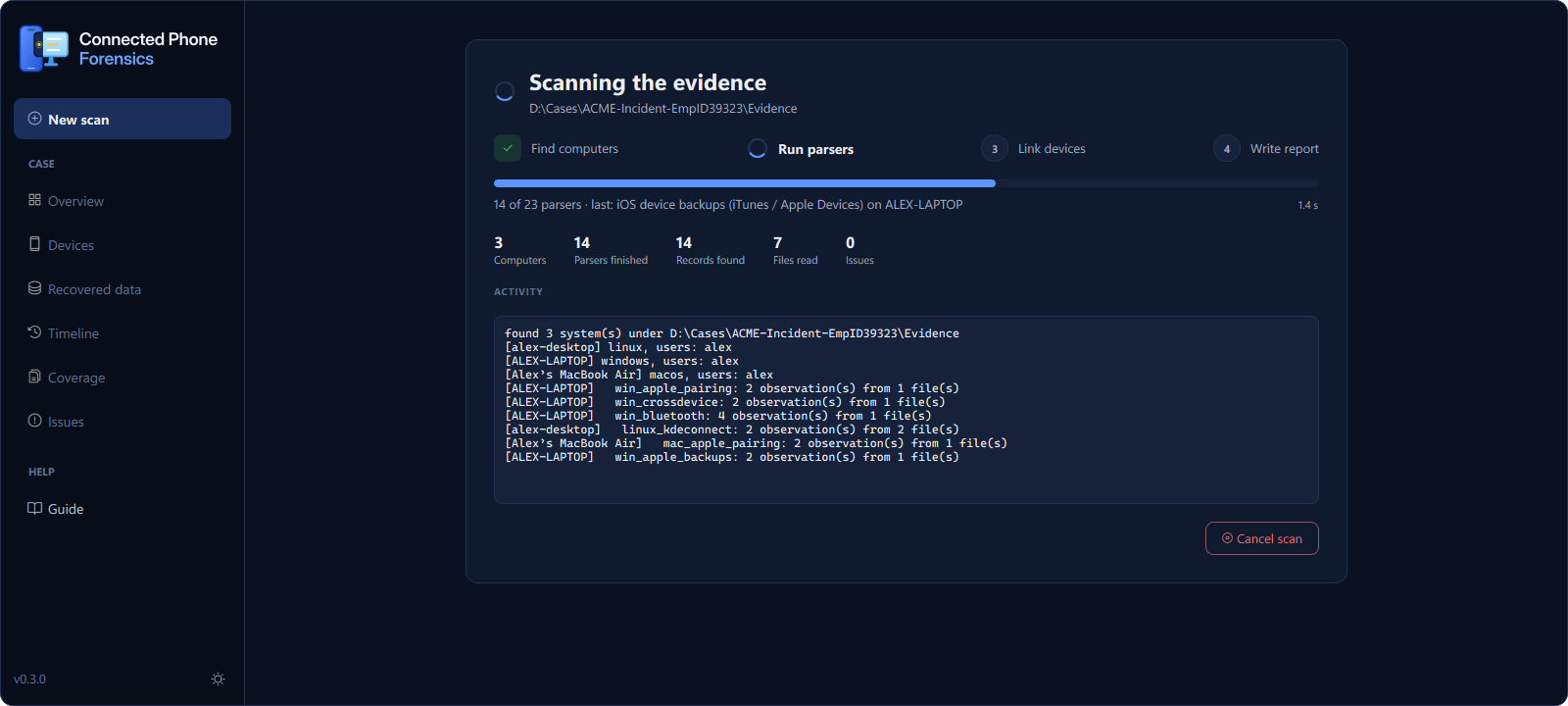 |
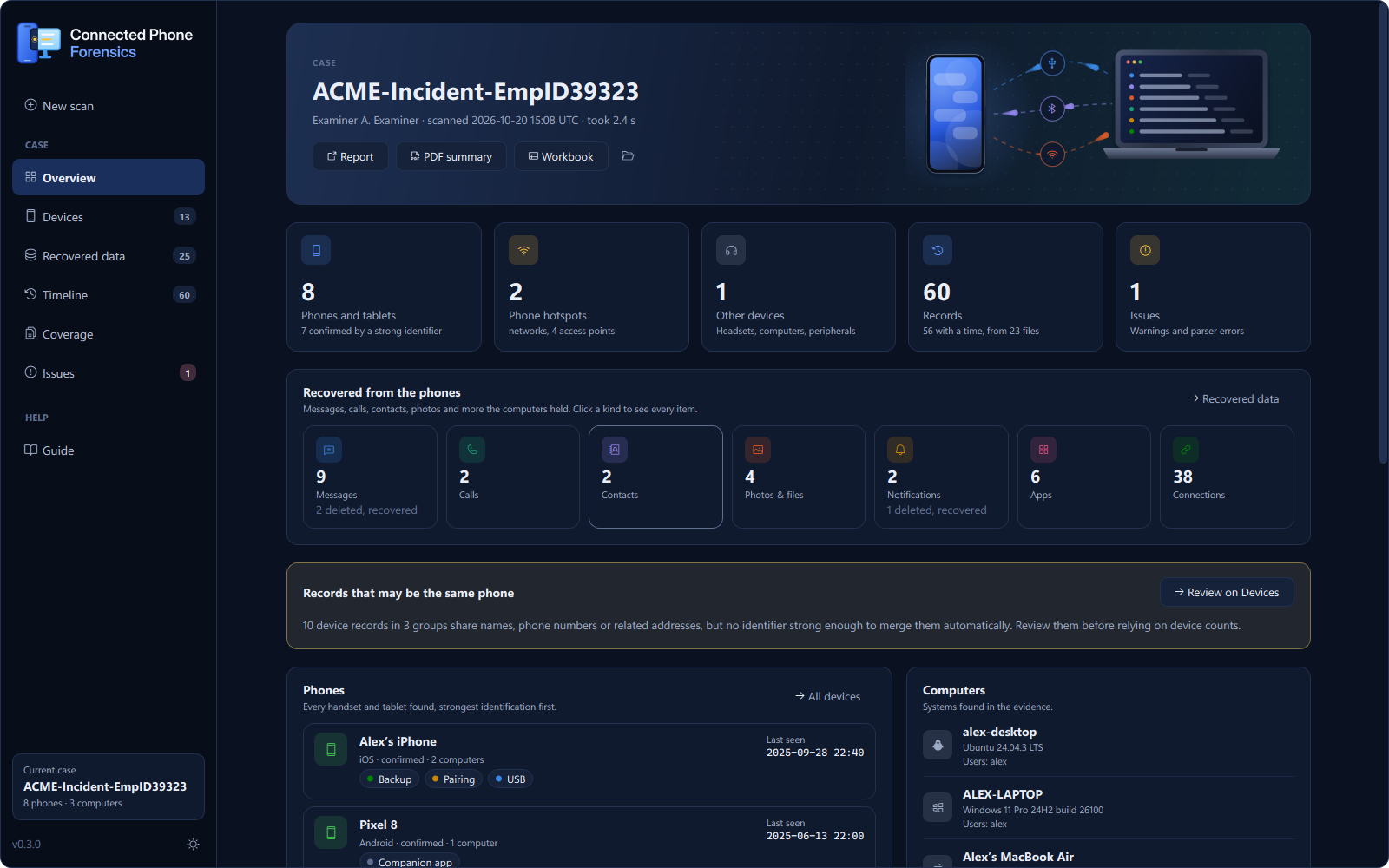
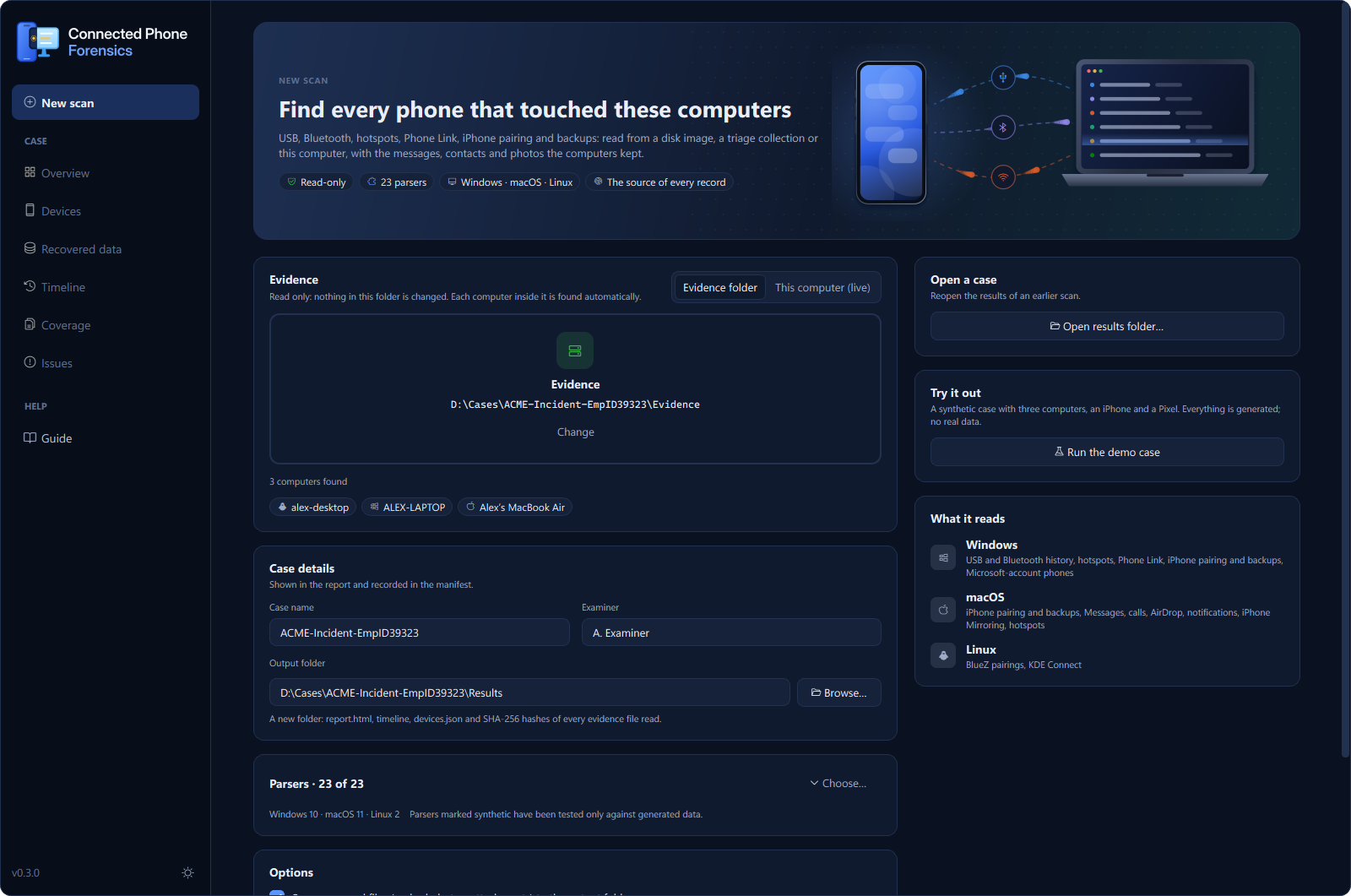
| New scan: drop the evidence; the computers inside are listed before you start | Live progress: parsers run in parallel and can be cancelled |
 |
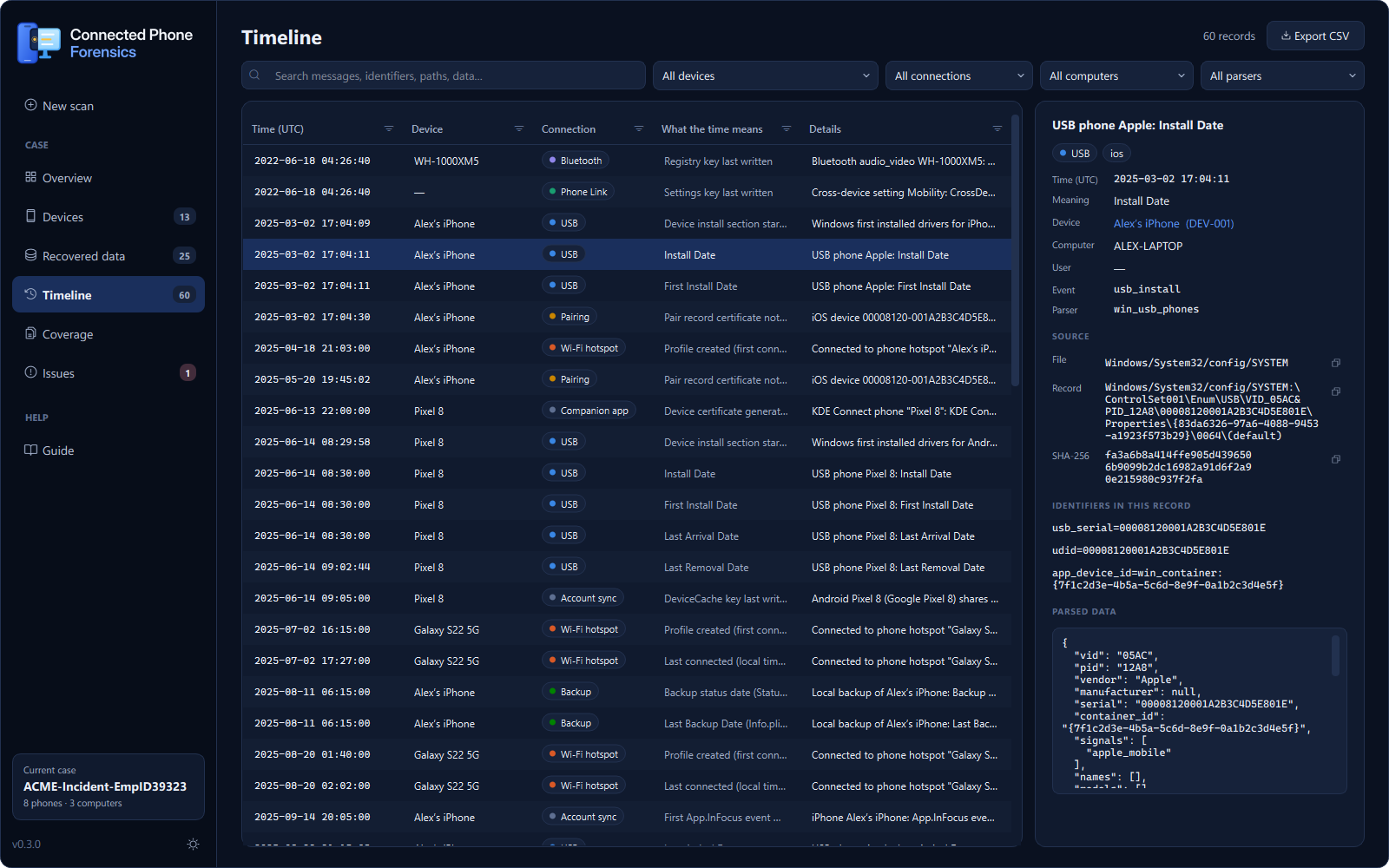 |
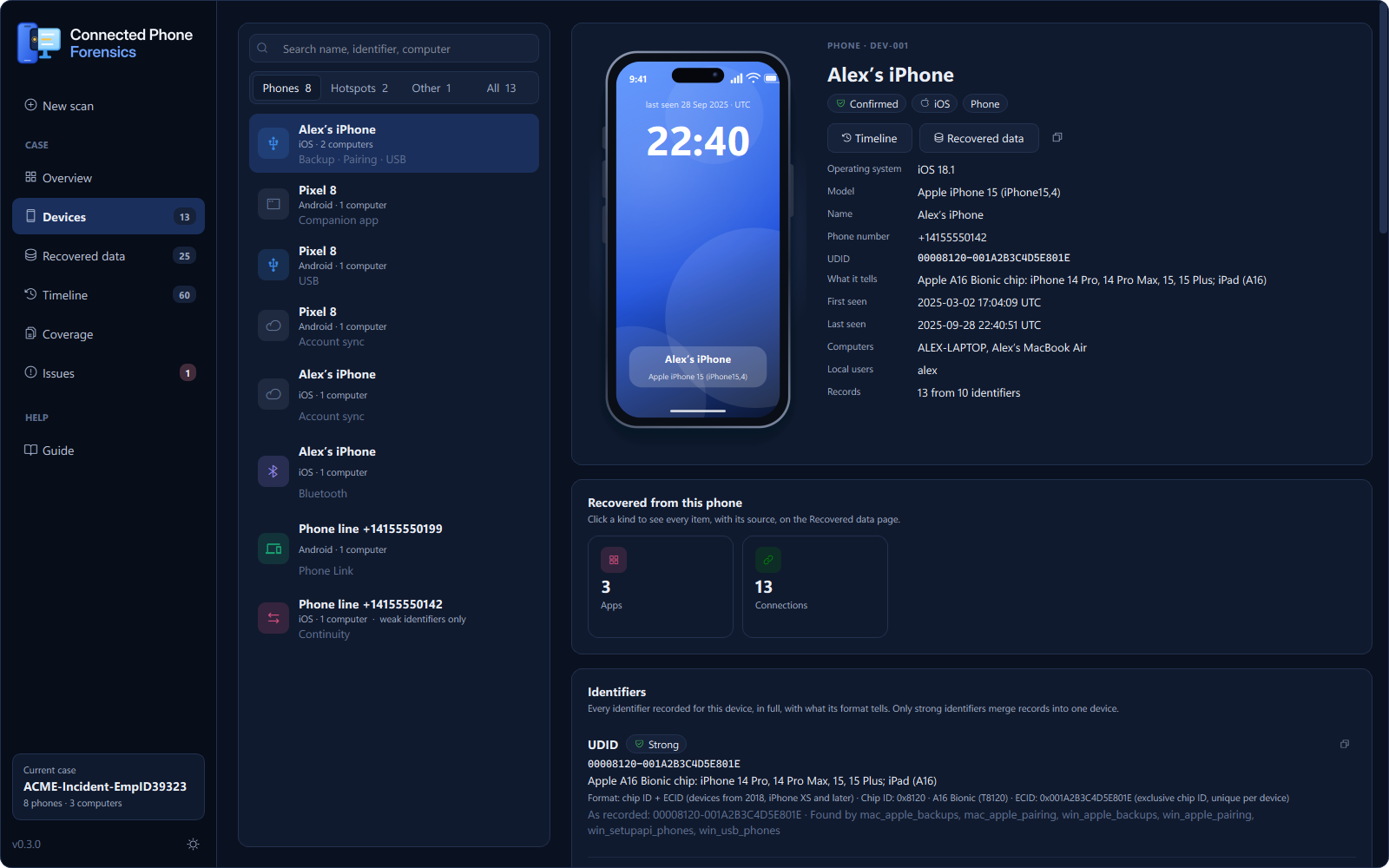
| Devices: identifiers, connections, why records were linked | Timeline: every record with its file, locator and SHA-256 |
 |
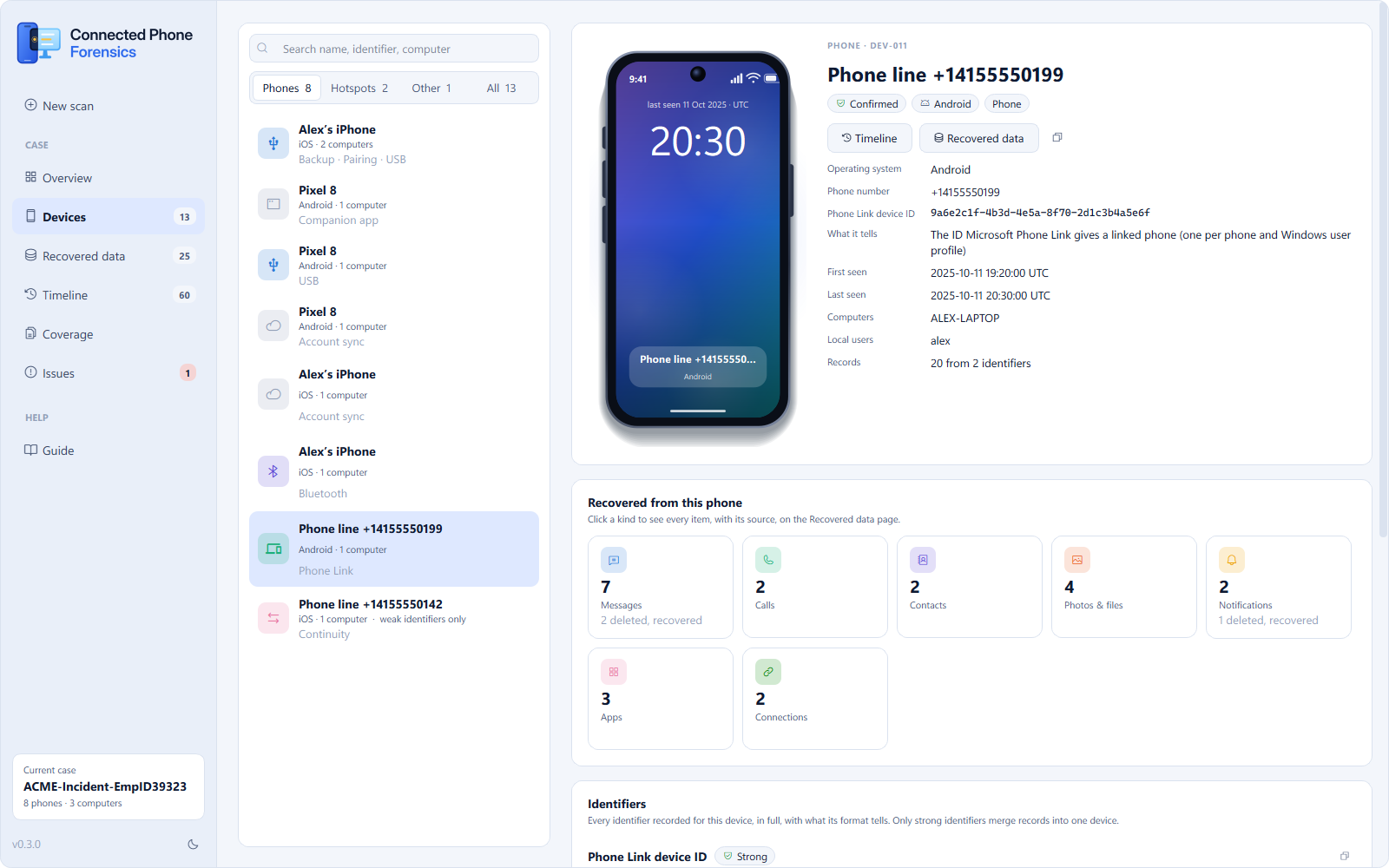 |
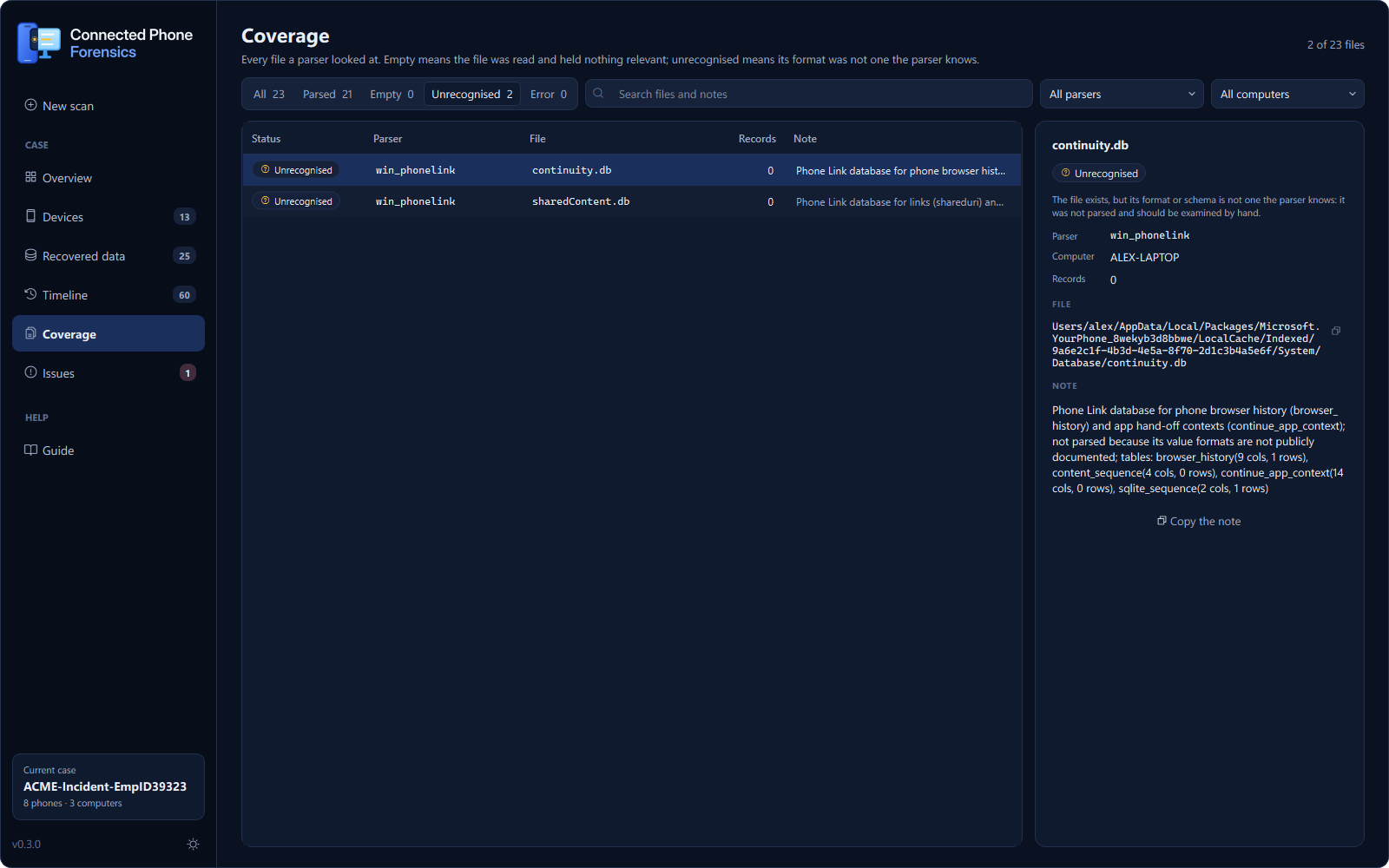
| Coverage: every file a parser read, and what came of it | Light theme |
Screenshots show the built-in demo case: entirely synthetic data.
Quick start
Windows: download and run
- Download
ConnectedPhoneForensics-<version>-windows-x64.exefrom the latest release. Nothing to install. - Run it. The executable is not code-signed yet, so SmartScreen may say Windows protected your
PC: choose More info → Run anyway. Check the download against
SHA256SUMS.txtfirst:certutil -hashfile ConnectedPhoneForensics-0.1.0-windows-x64.exe SHA256
- Click Run the demo case to see it work on synthetic data, or drop your evidence folder on New scan.
The same release has cpf-<version>-windows-x64.exe, the command-line tool.
Install with pip (Windows, macOS, Linux)
pip install connected-phone-forensics
Then run cpf-gui for the desktop app or cpf --help for the command line. Needs Python 3.10 or
newer.
Try it without evidence
cpf demo ./demo
builds a synthetic case (a Windows laptop, a MacBook and a Linux desktop that one iPhone and one
Pixel touched), scans it and writes the report to ./demo/report. Every byte is generated.
Usage
Desktop app
| Page | What it shows |
|---|---|
| New scan | Evidence picker (drop a folder), the computers found in it, case reference, examiner, output folder, parser selection |
| Overview | Phones, computers, records by connection type, and records that may be the same phone |
| Devices | Every device: identifiers and their strength, connections with first and last seen, why its records were linked, possible matches |
| Timeline | All records, searchable and filterable by device, connection, computer and parser; provenance of the selected record; CSV export of what is shown |
| Coverage | Every evidence file read, with status parsed, empty, unrecognised or error |
| Issues | Parser warnings and errors, with the full message |
Open results folder reopens any earlier scan. Keyboard: Ctrl+N new scan, Ctrl+O open results, Ctrl+F search, Ctrl+1…6 switch pages.
Command line
cpf scan /mnt/evidence -o case42 --case 42 --examiner "A. Examiner"
| Command | Purpose |
|---|---|
cpf scan INPUT -o OUT |
Scan a mounted image, extracted drive or triage collection. Options: --case, --examiner, --plugins, --workers N, --workdir, --no-export, --no-html, --assume-same |
cpf demo OUT |
Build and scan the synthetic demo case |
cpf plugins |
List the parsers and how far each has been validated |
cpf targets --format kape|velociraptor|list |
Collection targets for exactly the files the parsers read |
cpf validate truth.json OUT |
Score a scan against a ground-truth file |
cpf docs -o artifacts.md |
Artifact reference generated from the parsers |
What it finds
| Parser | Computer | Evidence of | Validation |
|---|---|---|---|
win_usb_phones |
Windows | Phones over USB (MTP/PTP/ADB/RNDIS, iPhone), install/arrival/removal times, serial/UDID, model | public sample |
win_setupapi_phones |
Windows | First driver install per phone, later driver installs (setupapi.dev.log) | synthetic |
win_bluetooth |
Windows | Bluetooth pairings (BTHPORT): name, class of device, last seen/connected, link keys; phone services offered to the PC (Hands-Free, MAP, PBAP, Apple Notification Center) | synthetic |
win_phone_hotspots |
Windows | Phone hotspots joined (NetworkList + DHCP; iPhone 172.20.10.0/28) | public sample |
win_phonelink |
Windows | Microsoft Phone Link caches: SMS/MMS/RCS messages and RCS file transfers, calls, contacts, notifications, photos, wallpaper, app list, the phone's own number; the phone's name, model and OS from DeviceMetadataStorage.json; deleted and edited rows recovered from the WAL | synthetic |
win_wpn_phonelink |
Windows | Phone Link toasts in the Windows notification database, including recovered expired toasts | public sample |
win_crossdevice |
Windows | Phones known to the Microsoft account (TaskFlow DeviceCache), cross-device settings | synthetic |
win_apple_pairing / mac_apple_pairing |
Windows / macOS | iPhone trust (lockdown) records: UDID, Wi-Fi MAC, escrow keybag, pairing time | synthetic |
win_apple_backups / mac_apple_backups |
Windows / macOS | iPhone backups: identity, phone number, IMEI, apps, dates, encryption | synthetic |
mac_biome_sync |
macOS | iPhones syncing with the Mac through Biome: OS build, last sync, data streams received | synthetic |
mac_messages |
macOS | SMS relayed from the iPhone (Text Message Forwarding) and iMessage; the iPhone's number | synthetic |
mac_callhistory |
macOS | Calls synced from the iPhone, with the originating device name | synthetic |
mac_airdrop |
macOS | Files received by AirDrop, with the sender's name | synthetic |
mac_phone_hotspots |
macOS | Phone hotspots joined (known networks, Personal Hotspot flag, DHCP leases) | synthetic |
mac_notifications |
macOS | Notifications forwarded from the iPhone (inferred: the app is not installed on the Mac) | synthetic |
mac_knowledgec_peers |
macOS | knowledgeC sync peers (older macOS) | synthetic |
mac_iphone_mirroring |
macOS | iPhone Mirroring pairing, the iPhone's app inventory | synthetic |
linux_bluetooth |
Linux | BlueZ pairings and discovered devices | synthetic |
*_kdeconnect |
Linux / Windows / macOS | KDE Connect paired phones; when the app on the phone created its identity, and whether that was the Android or the iOS app | synthetic |
Validation levels are printed in every report. synthetic: tested against fixtures built from
public documentation. public_sample: also tested against real public data (the DFIR Artifact
Museum). ground_truth: tested against data created on real devices with recorded actions. See
docs/VALIDATION.md; ground-truth datasets are the most valuable contribution
the project can receive.
How it works
More in docs/ARCHITECTURE.md.
How evidence is treated
- Read-only. SQLite databases are copied together with their
-waland-shmfiles and the copy is opened, so the original is never modified and committed WAL records are not lost. Dirty registry hives are recovered from their transaction logs on a copy, following the REGF specification: only entries that continue the hive's sequence and pass their hash checks are applied, and logs next to a clean hive are left alone. - Hashed. Every evidence file read is SHA-256 hashed; hashes, tool version and command line go
into
manifest.json. - Nothing skipped silently. Every file a parser opened is in the coverage table. A file whose
format is not recognised is reported as
unrecognised, not dropped, and a folder that cannot be read (for example the locked registry folder on a live system) is reported as an error. - Honest time. All times are UTC. Local-time artifacts are converted with the time zone recorded in the same image. Filesystem times are labelled as such and do not set a phone's first or last seen.
- Long paths. On Windows, evidence deeper than 260 characters (common for Phone Link) is read with extended-length paths, so it is never mistaken for missing.
Outputs
| File | Contents |
|---|---|
report.html |
Self-contained report (works offline): phones, identifiers, connections, timeline, coverage |
timeline.jsonl / timeline.csv |
Timestamped records; imports directly into Timesketch |
observations.jsonl |
Every record, timed or not |
devices.json |
The device graph, with merge reasons and possible matches |
coverage.csv |
Every evidence file read and its parse status |
manifest.json |
Run metadata, evidence hashes, warnings |
Possible matches and examiner conclusions
Weak clues (the same device name, a phone number, MAC addresses that differ by one, a hotspot BSSID derived from the phone's address) never merge records automatically. They are listed per pair of devices with the number of independent signals. When an examiner has verified that two identifiers belong to one phone, the conclusion can be recorded, and it is labelled as an examiner assertion in the report and manifest:
cpf scan /mnt/evidence -o out --assume-same udid=00008120001A2B3C4D5E801E,bt_mac=a4:c3:37:5e:10:2b
Collecting only what it needs
cpf targets --format kape > CPF.tkape
cpf targets --format velociraptor > CPF.yaml
cpf targets --format list
The targets are generated from the parsers' own path declarations, so a collection always matches what the installed version can parse.
Project status
Early release (0.1). The tool runs end to end on Windows, macOS and Linux, and every parser has automated tests, but only three parsers have been checked against real public data and none yet against ground-truth data from real phones. A code review in October 2026 found issues that are not all fixed yet. Its one critical finding, recovery of deleted SQLite rows (Phone Link, Windows notifications) reporting rows from another table as recovered messages or notifications, was fixed in 0.1.2: a row is now attributed to a table only when its page belonged to that table in the database state it was read from. The open issues are listed in the changelog.
Treat results as leads and verify them against the source records the report points to, which is good practice with any forensic tool.
Roadmap
- Fix the open review findings
- Ground-truth validation with real iPhone and Android devices
- Code-signed Windows builds
- Recording examiner conclusions (same phone / not the same phone) from the desktop app
Building from source
git clone https://github.com/sujayadkesar/connected-phone-forensics
cd connected-phone-forensics
python -m venv .venv && . .venv/bin/activate      # Windows: .venv\Scripts\activate
pip install -e ".[dev]"
python -m pytest                                  # GUI tests run headless
python -m ruff check connected_phone_forensics tests
Windows executables: pip install -e ".[build]", then python packaging/build.py and
python packaging/smoke_test.py dist. Releases are built the same way by
GitHub Actions when a version tag is pushed.
Contributing
Parsers are small, self-registering modules. CONTRIBUTING.md describes the plugin API and the evidence-handling rules every parser follows. Bug reports, artifact requests and ground-truth datasets are welcome in the issue tracker. Please report security problems privately, as described in SECURITY.md.
Citing
If you use Connected Phone Forensics in research or casework documentation, please cite it; GitHub shows a citation from CITATION.cff under Cite this repository.
License
MIT. Provided as is, without warranty: validate results before relying on them in legal proceedings.
1 maintainer

Metadata
1 maintainer
Release files for connected-phone-forensics 0.1.3
For a detailed explanation of source distributions (sdists) and built distributions (wheels), please see the package formats documentation.
Source distribution (sdist)
| File | Size | Uploaded | Provenance | |
|---|---|---|---|---|
| connected_phone_forensics-0.1.3.tar.gz | 210.8 kB | With provenance | Details |
Built distribution (wheel)
| File | Interpreter | ABI | Platform | Reset |
|---|---|---|---|---|
| connected_phone_forensics-0.1.3-py3-none-any.whl | Python 3 | none | any | Details |
Total release size: 418.0 kB
Release files / connected_phone_forensics-0.1.3.tar.gz
| Download URL | connected_phone_forensics-0.1.3.tar.gz |
|---|---|
| Size | 210.8 kB |
| Tags | Source |
|
SHA-256 checksum How to use checksums |
a4211d65175aab91206146bc9a59aa66c76a0781c0d0f91b4529df3ba0a1daa8
|
|
BLAKE2b-256 checksum How to use checksums |
a297e70b4b752dde2fd83359fb9bbdfdca91dd8e19087c002ef45ec2aa52fd30
|
| Upload date | |
|
Uploaded using Trusted Publishing? What is trusted publishing? |
Yes |
| Uploaded via |
twine/7.0.0 CPython/3.13.14
|
Provenance
Provenance describes where a file came from. On PyPI, provenance is shared via attestations, which provide a verifiable record of the build or publishing details. View details, limitations and caveats.


PyPI Publish Attestation
PyPI verified that this artifact, at this checksum, originated from the publisher listed below.
Signed by GitHub Actions, verified by PyPI on Oct 18, 2026.
Transparency logRelease files / connected_phone_forensics-0.1.3-py3-none-any.whl
| Download URL | connected_phone_forensics-0.1.3-py3-none-any.whl |
|---|---|
| Size | 207.2 kB |
| Tags | Python 3 |
|
SHA-256 checksum How to use checksums |
e4c90a8c53e78ac55a0d8b5ea5de7bfcb10553c23b38feac49bb5970635b9686
|
|
BLAKE2b-256 checksum How to use checksums |
cc545fc289419ecf41bc8e193cc05766d5f6761aaf7fc59a4b76115c2224eeb9
|
| Upload date | |
|
Uploaded using Trusted Publishing? What is trusted publishing? |
Yes |
| Uploaded via |
twine/7.0.0 CPython/3.13.14
|
Provenance
Provenance describes where a file came from. On PyPI, provenance is shared via attestations, which provide a verifiable record of the build or publishing details. View details, limitations and caveats.
PyPI Publish Attestation
PyPI verified that this artifact, at this checksum, originated from the publisher listed below.
Signed by GitHub Actions, verified by PyPI on Oct 18, 2026.
Transparency logSecurity for connected-phone-forensics 0.1.3
Provenance
Provenance describes where a file came from. On PyPI, provenance is shared via attestations, which provide a verifiable record of the build or publishing details. View details, limitations and caveats.
Full provenance
All 2 files in this release have been uploaded with provenance metadata.
Attestation for connected_phone_forensics-0.1.3.tar.gz
PyPI Publish Attestation
PyPI verified that this artifact, at this checksum, originated from the publisher listed below.
Signed by GitHub Actions, verified by PyPI on Oct 18, 2026.
Transparency logA note on package security
PyPI is a repository for distributing packages, not a service for auditing them. While third-party security researchers and our staff do their best to detect and remove malicious packages, PyPI cannot guarantee the quality, security or suitability of any given package.














