






ConnectomeKG -- Connectomes as Knowledge Graphs
ConnectomeKG turns an electron-microscopy connectome into a queryable knowledge graph: every neuron a node, every edge a counted synapse, with the cell types, neuropils and community labels layered on top.
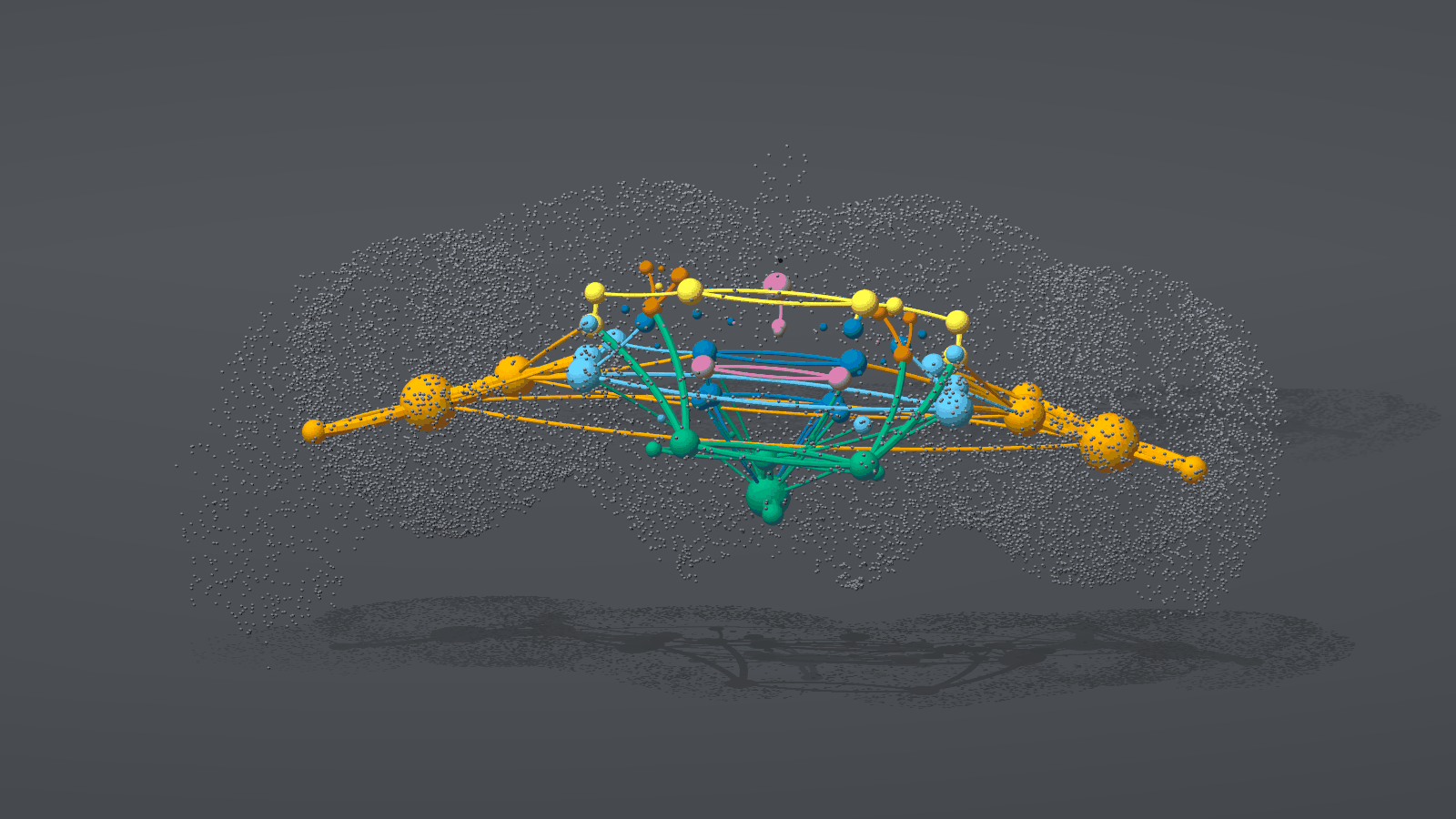
The whole fly brain, and where its signal goes. Each sphere is one of the 79 neuropils, sized by its synapse count and colored by brain region, and each tube is one of the 100 strongest flows between them. The gray dots are the cell bodies of all 139,255 neurons. Reading the images explains every mark, and connkg quilt --view flow --floor --cloud --still draws it.
Render of the FlyWire FAFB v783 connectome (Dorkenwald et al. 2024; Schlegel et al. 2024), CC BY-NC-SA 4.0. The image is an adaptation shared under the same license, not under the software's Elastic License 2.0.
Author: Eric G. Suchanek, PhD -- Flux-Frontiers, Liberty TWP, OH
Status: pre-alpha (0.8.1). Three real connectomes build and answer queries, and the 2-D and 3-D views work. The neuPrint reader (hemibrain) and the leaky integrate-and-fire (LIF) what-if simulation are not done yet.
Install
ConnectomeKG needs Python 3.12 or 3.13.
pip install connectome-kg
Add an extra for the parts you want:
| extra | adds |
|---|---|
semantic |
The embedding model for connkg query. Without it, pass --no-index to connkg build |
viz |
The 2-D partner charts of connkg viz |
viz3d |
The 3-D views: connkg quilt, connkg viz3d, and --render on path and cone |
For example, pip install "connectome-kg[semantic,viz3d]". To work on the code, clone the repository and run poetry install --with dev --extras semantic, then prefix each command with poetry run.
Quickstart
The quickstart needs no download. connkg fixture writes a 1,000-neuron synthetic connectome shaped like FAFB v783, with three circuits planted in it: feeding (GRN_sugar and GRN_bitter to MN9), escape (LC4 and LPLC2 to DNp01) and grooming (JO-CE to aDN1).
Build a synthetic connectome
-
Write the synthetic connectome:
connkg fixture --out /tmp/synth1k
wrote synthetic Codex release to /tmp/synth1k
-
Build the graph. The build takes about a second.
connkg --root /tmp/kg --dataset synthetic1k build --data-dir /tmp/synth1k --no-index
...
nodes       : 1373  {'cell_type': 154, ..., 'neuron': 1000, 'neuropil': 33, ...}
edges       : 20242  {..., 'SYNAPSES_TO': 12145, 'TYPE_SYNAPSES_TO': 2198, ...}
Ask questions
With one graph under /tmp/kg, the commands find it without --dataset.
What is the strongest route from sugar-sensing neurons to the proboscis motor neuron?
connkg --root /tmp/kg path --from GRN_sugar --to MN9
strength 0.04189, net sign +1
  GRN_sugar/R/720575940473189481
  -> SEZ_IN1/L/720575940473189248  (39 syn, 14.8% of input, sign +1)
  -> MN9/R/720575940473189669  (76 syn, 28.4% of input, sign +1)
Each hop reports its synapse count, its share of the receiving neuron's input, and its transmitter sign.
Does the bitter pathway excite or inhibit the same motor neuron?
connkg --root /tmp/kg path --from GRN_bitter --to MN9
strength 0.02383, net sign -1
  GRN_bitter/R/720575940473189487
  -> SEZ_INb/L/720575940473189251  (29 syn, 21.8% of input, sign +1)
  -> MN9/L/720575940473189668  (33 syn, 10.9% of input, sign -1)
The last hop is inhibitory, so the route has a net sign of -1.
What feeds MN9 through strong connections?
connkg --root /tmp/kg cone MN9 --direction up --min-syn 20
hop 0: 2 neurons
  MN9/L/720575940473189668
  MN9/R/720575940473189669
hop 1: 5 neurons
  AN007/R/720575940473189650
  SEZ_IN1/L/720575940473189248
  SEZ_IN1/L/720575940473189250
  SEZ_IN1/R/720575940473189249
  SEZ_INb/L/720575940473189251
How much of MN9's input does GRN_sugar account for, over every route?
connkg --root /tmp/kg influence --from GRN_sugar --to MN9 --hops 2 --limit 3
influence of GRN_sugar (6 neurons), signed, as a share of the receiving neuron's input

onto MN9 (2 neurons), averaged:
  hop 1: +0.0000
  hop 2: +0.4811
  total: +0.4811
...
The sugar neurons reach MN9 only through a relay, and they account for about 48% of its input two hops out.
What does the whole graph look like?
connkg --root /tmp/kg analyze > report.md
report.md lists node and edge counts, hub neurons, the strongest type-to-type links and neuropil coverage.
Real connectomes
Three releases from the Codex portal build the same way, each into its own graph:
| dataset id | what it is | neurons | license |
|---|---|---|---|
fafb783 |
FlyWire FAFB v783, adult female brain | 139,255 | CC BY-NC-SA 4.0 |
banc888 |
BANC v888, adult female brain and ventral nerve cord | 158,262 | CC BY 4.0 |
mcns1 |
FlyEM Male CNS v1.0, adult male brain and ventral nerve cord | 166,700 | CC BY 4.0 |
The Codex portal needs a Google sign-in, so you download the files yourself. Get the data lists the files each release needs and how to check them.
To build a release, name it with --dataset. --root and --dataset are global options, so they go before the command:
connkg verify --data-dir fafb_v783
connkg --root . --dataset fafb783 build --data-dir fafb_v783
connkg --root . --dataset banc888 build --data-dir banc_v888
The FAFB v783 build takes about three minutes and 7.2 GB of memory, and writes a 2.3 GB graph. connkg datasets lists the graphs built under a root. When a root holds more than one, every command needs --dataset:
connkg --root . --dataset banc888 cone DNp01 --min-syn 5
Examples
The examples below use the FAFB v783 graph. connkg specs lists every way to name neurons, and connkg <command> --help lists every option.
Ask wiring questions
Find the strongest signed path from the looming detectors to the giant fiber:
connkg --root . --dataset fafb783 path --from LPLC2 --to DNp01
List everything one hop upstream of the giant fiber, keeping connections of 10 synapses or more:
connkg --root . --dataset fafb783 cone DNp01 --direction up --min-syn 10
Rank the cell types that LC4 drives most, over three hops:
connkg --root . --dataset fafb783 influence --from LC4
Open LC4 and DNp01 as FlyWire meshes in the browser, with no login:
connkg --root . --dataset fafb783 link LC4 DNp01
Draw 3-D views
These commands need the viz3d extra. Fetch the neuropil surfaces once first:
connkg --root . --dataset fafb783 meshes
Render the escape circuit inside the brain as a single 4K image:
connkg --root . --dataset fafb783 quilt LPLC2 DNp01 --tubes --cloud --still
Open a query's answer in the interactive viewer, colored hop by hop:
connkg --root . --dataset fafb783 viz3d "path:LPLC2>DNp01"
Open the signal flow through BANC's brain and nerve cord. The viewer's Dataset box switches to any other connectome built under the root, and its View box switches between the circuit and flow views:
connkg --root . --dataset banc888 viz3d --view flow
Leave out --still to render a Looking Glass quilt instead. The circuit view draws each neuron's traced skeleton, which comes from a separate 31 GB download; connkg skeletons caches it once. Rendering the connectome in 3-D covers both views, the viewer and the skeleton cache.
Use the Python API
ConnectomeKG takes the same specs as the CLI. This example opens the quickstart graph:
from connectomekg import ConnectomeKG

with ConnectomeKG("/tmp/kg/connectomes/synthetic1k") as kg:
    path = kg.strongest_path("GRN_sugar", "MN9")
    print(path.strength, path.net_sign)
    for partner in kg.type_partners("DNp01", direction="up", limit=3):
        print(partner)
0.04189280868385347 1
{'cell_type': 'LC4', 'syn_count': 239, 'n_pairs': 16, 'nt_type': 'ACH'}
{'cell_type': 'LPLC2', 'syn_count': 221, 'n_pairs': 20, 'nt_type': 'ACH'}
{'cell_type': 'SN001', 'syn_count': 53, 'n_pairs': 4, 'nt_type': 'ACH'}
kg.cone, kg.influence and kg.neurons_of work the same way.
Serve the graph to an AI agent
connkg-mcp serves the graph over the Model Context Protocol (MCP), so an agent such as Claude Code can call strongest_path, cone, influence and the other queries as tools. Add an entry to your project's .mcp.json:
{
  "mcpServers": {
    "connkg": {
      "command": "connkg-mcp",
      "args": ["--root", "/path/to/connectome_kg", "--dataset", "fafb783"]
    }
  }
}
The command reference lists every tool and its argument limits.
The graph also federates with the rest of the KGRAG fleet: pip install "kg-rag[connectome]".
Documentation
The full documentation is at flux-frontiers.github.io/connectome_kg.
| page | covers |
|---|---|
| Get the data | The Codex files for each release, checksums, reproducible snapshots and the build footprint |
| Asking the graph a question | The spec and answer grammar, path weighting, path, cone, influence, query and link |
| What is in the graph | Node and edge kinds, transmitter signs and the one-graph-per-connectome layout |
| Command reference | Every connkg command and connkg-mcp, with options and an example each |
| Rendering the connectome in 3-D | connkg quilt and connkg viz3d, how each view is drawn, and Looking Glass quilts |
| CHANGELOG.md | Release history |
Data and licensing
Each connectome keeps its own license, and a graph built from it is a derived work under the same license:
- FlyWire FAFB v783 is CC BY-NC-SA 4.0: free for non-commercial use only. Keep FAFB graphs out of anything commercial.
- BANC v888 and FlyEM Male CNS v1.0 are CC BY 4.0, which allows commercial use with attribution.
Keep the downloads and the built graphs (connectomes/*/.connectomekg/*.sqlite) out of the repository. .gitignore already excludes them.
The Codex portal tracks the live FlyWire database, so its FAFB files drift from the October 2024 published release. For a reproducible build, use the static snapshots listed in Get the data and record which one you used.
If you use the data, cite the data papers.
FlyWire FAFB v783:
- Dorkenwald, S. et al. (2024). Neuronal wiring diagram of an adult brain. Nature 634, 124-138.
- Schlegel, P. et al. (2024). Whole-brain annotation and multi-connectome cell typing of Drosophila. Nature 634, 139-152.
- Eckstein, N. et al. (2024). Neurotransmitter classification from electron microscopy images at synaptic sites in Drosophila melanogaster. Cell 187, 2574-2594.
BANC v888:
- Bates, A. S. et al. (2026). Nature. doi:10.1038/s41586-026-10735-w
- The BANC data deposit: doi:10.7910/DVN/7WTH1N
FlyEM Male CNS v1.0:
- The Male CNS connectome paper, bioRxiv: doi:10.1101/2025.10.09.680999
Citation
If you use ConnectomeKG in research or a project, please cite it. Each GitHub release is archived on Zenodo, and the DOI 10.5281/zenodo.22817369 always resolves to the newest version.
APA
Suchanek, E. G. (2026). ConnectomeKG: Connectomes as Knowledge Graphs (Version 0.8.1) [Software]. Flux-Frontiers. https://doi.org/10.5281/zenodo.22817369
BibTeX
@software{suchanek_connectome_kg,
  author    = {Suchanek, Eric G.},
  title     = {{ConnectomeKG}: Connectomes as Knowledge Graphs},
  version   = {0.8.1},
  year      = {2026},
  publisher = {Flux-Frontiers},
  doi       = {10.5281/zenodo.22817369},
  url       = {https://github.com/Flux-Frontiers/connectome_kg},
}
License
Elastic License 2.0: free for non-commercial and internal use; commercial redistribution or hosting requires a license from Flux-Frontiers. The license covers the software only. The connectome data keeps its own license, described in Data and licensing.
Support
- Issues: GitHub Issues
- Sister projects: ConnectomeKG is part of the KGRAG family of knowledge graphs, with PyCodeKG (Python code), DocKG (documents), MetaboKG (metabolic pathways), GenealogyKG (family history), DiaryKG (journals) and AgentKG (conversational memory).
- Built on: kgmodule-utils, SQLite, sqlite-vec, pandas, SciPy and Click.
1 maintainer

Metadata
1 maintainer
Release files for connectome-kg 0.8.1
For a detailed explanation of source distributions (sdists) and built distributions (wheels), please see the package formats documentation.
Source distribution (sdist)
| File | Size | Uploaded | |
|---|---|---|---|
| connectome_kg-0.8.1.tar.gz | 153.6 kB | Details |
Built distribution (wheel)
| File | Interpreter | ABI | Platform | Reset |
|---|---|---|---|---|
| connectome_kg-0.8.1-py3-none-any.whl | Python 3 | none | any | Details |
Total release size: 323.1 kB
Release files / connectome_kg-0.8.1.tar.gz
| Download URL | connectome_kg-0.8.1.tar.gz |
|---|---|
| Size | 153.6 kB |
| Tags | Source |
|
SHA-256 checksum How to use checksums |
807147dfd77315b1cb223e4df08ca5d58d985dd33f2d27da539a9c1a30140183
|
|
BLAKE2b-256 checksum How to use checksums |
ea250b7d89db1b32b7f58a3a7f56e10d723156b74378bef34f0fafc6c6987014
|
| Upload date | |
|
Uploaded using Trusted Publishing? What is trusted publishing? |
Yes |
| Uploaded via |
twine/7.0.0 CPython/3.13.14
|
Provenance
Provenance describes where a file came from. On PyPI, provenance is shared via attestations, which provide a verifiable record of the build or publishing details. View details, limitations and caveats.


PyPI Publish Attestation
PyPI verified that this artifact, at this checksum, originated from the publisher listed below.
Signed by GitHub Actions, verified by PyPI on Sep 29, 2026.
Transparency logRelease files / connectome_kg-0.8.1-py3-none-any.whl
| Download URL | connectome_kg-0.8.1-py3-none-any.whl |
|---|---|
| Size | 169.5 kB |
| Tags | Python 3 |
|
SHA-256 checksum How to use checksums |
12697616675f46d27534f33704a0e5a66d028d48f2ca64e6450c4a2b260a2207
|
|
BLAKE2b-256 checksum How to use checksums |
6e068841fec64446c42c1a3266ca16fbecda40f4ea14fcddcedb60440f7c04bc
|
| Upload date | |
|
Uploaded using Trusted Publishing? What is trusted publishing? |
Yes |
| Uploaded via |
twine/7.0.0 CPython/3.13.14
|
Provenance
Provenance describes where a file came from. On PyPI, provenance is shared via attestations, which provide a verifiable record of the build or publishing details. View details, limitations and caveats.
PyPI Publish Attestation
PyPI verified that this artifact, at this checksum, originated from the publisher listed below.
Signed by GitHub Actions, verified by PyPI on Sep 29, 2026.
Transparency log













